
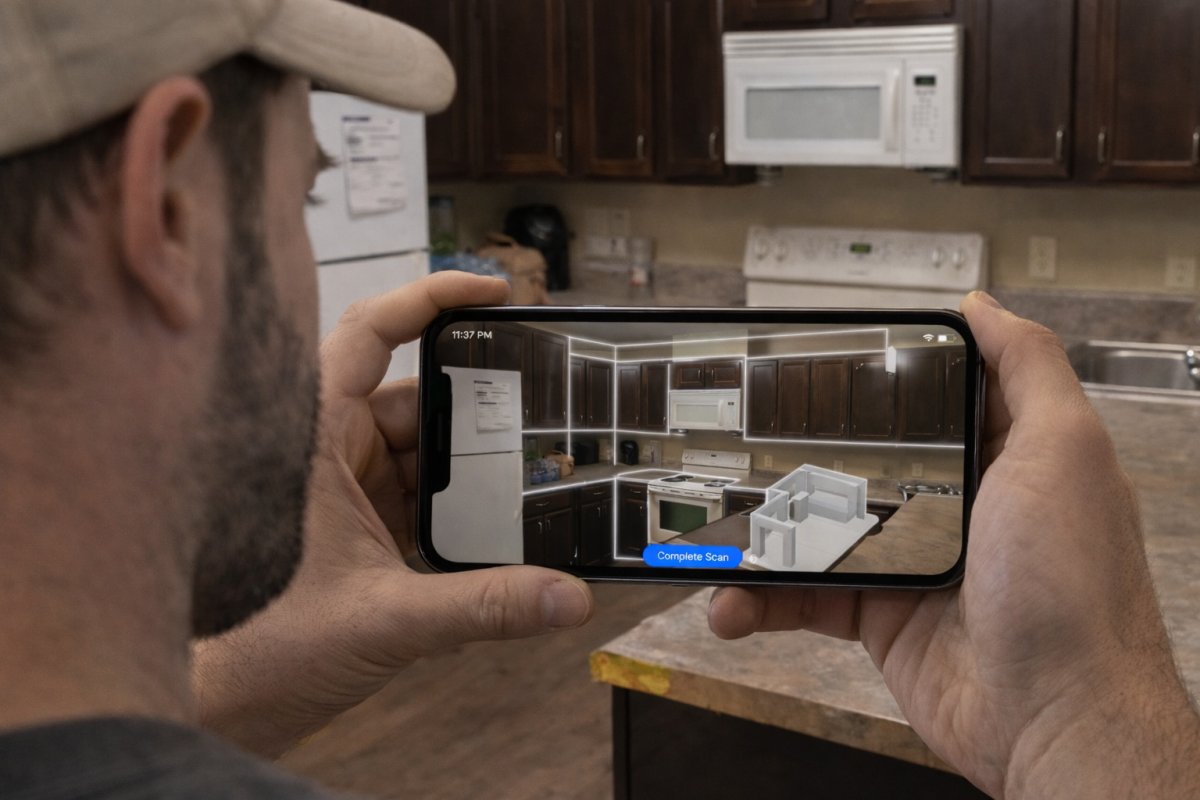
56% of interior designers now use iPhone LiDAR scanners to create instant 3D room models, while many contractors are still stuck with a tape measure and a prayer. You know the drill. One missed measurement on a cabinet run leads to a three week delay and a direct hit to your profit. It's frustrating to finish a long day on-site only to head home for three more hours of drafting on a laptop.
You deserve a faster, more reliable way to work. Mastering LiDAR room mapping allows you to generate precise kitchen layouts on-site, eliminate ordering errors, and win more bids. ArchKit Design turns your phone into a professional measurement tool that creates a 3D floor plan in minutes. No laptop required. In this article, you'll learn how to capture accurate as-builts and use AR visualizations to close deals before you even leave the driveway. Scan. Design. Show. It's time to leave the manual errors in the past.
Key Takeaways
- Learn the "steady-walk" scanning technique to capture a complete 3D point cloud of any kitchen in under two minutes.
- Replace error-prone manual measurements with LiDAR room mapping to automatically document window heights, soffits, and electrical outlets.
- Convert raw scan data into precise 2D floor plans with auto-snapping walls while still standing in the client's kitchen.
- Win more bids by using AR visualizations to walk clients through their new 3D layout instantly.
- Eliminate the "laptop burden" by integrating on-site scans directly with U.S. standard cabinet catalogs in ArchKit.
What is LiDAR Room Mapping for Kitchen Contractors?
Manual measuring remains the industry's most persistent bottleneck. You walk into a job site with a clipboard, spend forty minutes sketching, and still leave wondering if you accounted for the slight curve in the drywall. LiDAR room mapping shifts this process from a manual "best guess" to a digital certainty. By utilizing laser pulses to build a high-resolution 3D point cloud, you capture every surface, corner, and obstacle in a room simultaneously. It is the most reliable way to document as-built conditions in complex, non-square kitchen spaces where traditional tools often fail.
Understanding What is LiDAR helps clarify why this technology is essential for the 2026 job site. LiDAR stands for Light Detection and Ranging, a technology that bounces light off surfaces to calculate distances with extreme precision. While this used to require expensive, heavy equipment, modern mobile devices like the iPhone Pro and iPad Pro have made this tech accessible on-site. You aren't just taking measurements; you're creating a digital twin of the remodeling environment that follows you from the initial walk-through to the final cabinet install.
LiDAR vs. Traditional Laser Distance Meters
A standard laser meter is essentially a digital tape measure. It provides a single point-to-point distance that you still have to manually translate into a sketch or drawing. LiDAR is fundamentally different because it captures the entire environment at once. It sees the window casings, the floor-to-ceiling height, and the plumbing stubs in one sweep. This eliminates the need to manually connect individual numbers, acting instead as a comprehensive generator for your project's digital foundation.
Why Accuracy Matters in Kitchen Remodeling
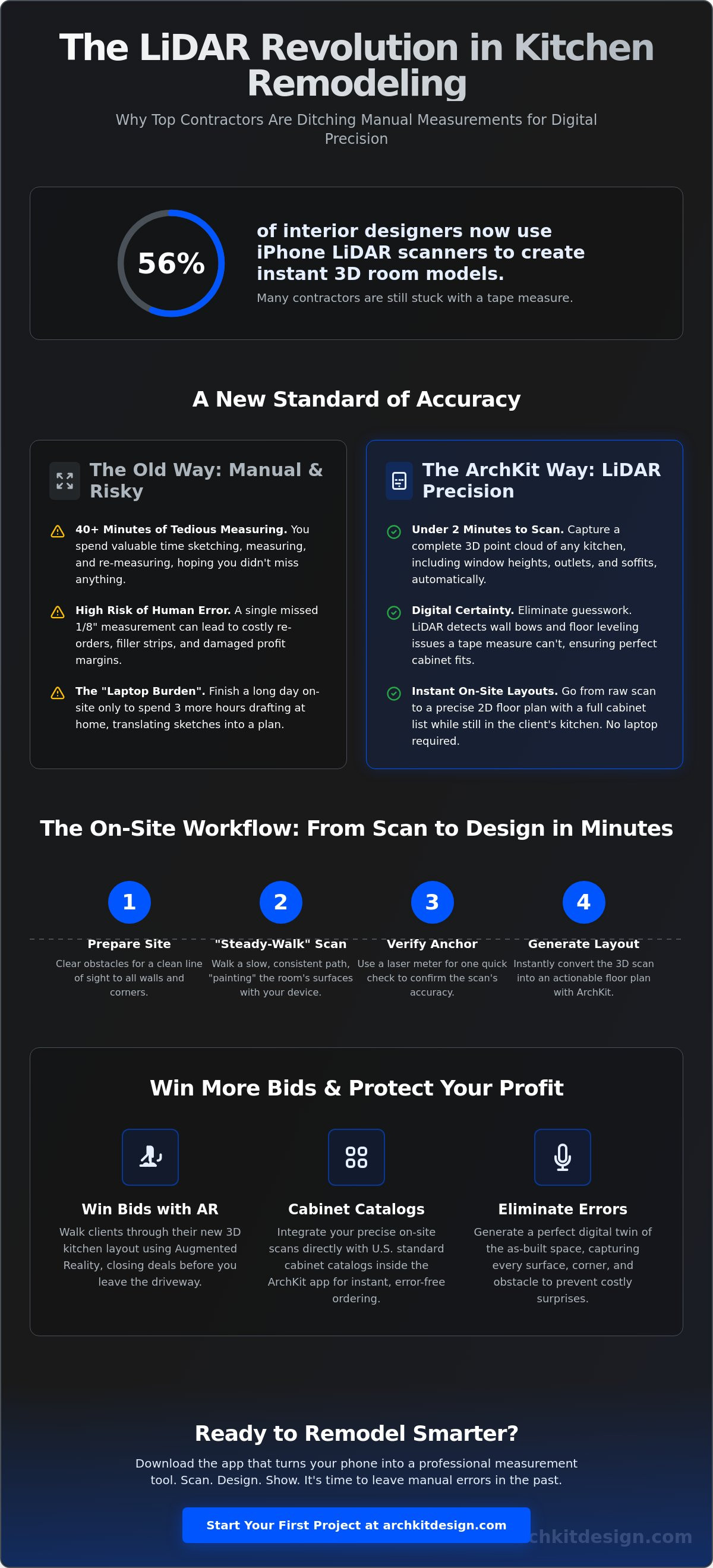
In the kitchen trade, precision isn't a luxury; it's a requirement. Standard U.S. cabinets often require 1/8-inch precision to avoid unsightly filler strips or expensive reorders that eat your profit. LiDAR room mapping detects wall bowing and floor leveling issues that a tape measure simply cannot catch. By capturing every dimension in a single 60-second scan, you reduce return visits and ensure your cabinet list is correct before the first box is ordered. Using ArchKit Design allows you to turn that raw accuracy into a functional layout immediately, protecting your reputation and your bottom line.
The 4-Step Workflow for Accurate On-Site LiDAR Scanning
Generating a high-quality digital twin requires more than just pointing your phone at a wall. To get the most out of LiDAR room mapping, you need a disciplined approach that accounts for the unique obstacles found in a kitchen. Many professionals are ditching the tape because they want a repeatable system that eliminates the "going back home" drafting phase. This four-step workflow ensures your scan is clean, verified, and ready for a cabinet list before you leave the job site.
Preparing the Job Site for a Clean Scan
Success starts with a clear line of sight. Remove stacks of old tile, trash bags, or cabinet doors leaning against the baseboards; if the scanner can't see the floor-to-wall transition, the geometry will be off. Open the sink base and any pantry doors to map interior plumbing or gas lines. While LiDAR technology works well in low light, your device's AR overlay needs enough visibility to track your movement accurately. Turn on the overhead lights or set up a work lamp to ensure the software stays locked onto the room's geometry. A clean site prevents "ghost" geometry from appearing in your final model.
The Scan: Technique and Movement
Avoid jerky movements. Use the "steady-walk" technique by holding your device at chest height and walking a slow, consistent path around the perimeter. Turn your whole body rather than just your wrist to keep the sensor stable. Focus on "painting" the corners and ceiling lines first to define the room's volume. Watch the device screen to track the mesh as it populates in real-time. If you see a gap in the digital mesh, simply pan back over that area until the surface is fully captured. This real-time feedback is what makes mobile scanning so much faster than traditional methods.
Never skip the verification step. Once the scan is complete, check the digital mesh against a single physical "anchor" measurement using a laser meter. If your 12-foot wall run matches the digital model, you can trust the rest of the room's data. This 30-second check is your insurance policy against ordering errors. Finally, export the raw point cloud into a functional 2D or 3D layout. Using LiDAR room mapping within ArchKit Design makes this transition happen instantly on-site. You can move from a raw scan to a full cabinet list in one session, allowing you to show the client their new kitchen before the first demo hammer swings. Ready to streamline your projects? Get early access and start scanning today.
LiDAR vs. Manual Measurement: Why Pros are Ditching the Tape
Measuring a standard 12x12 kitchen used to take forty minutes and a lot of luck. Now, LiDAR room mapping handles the same space in under two minutes. It's not just about speed; it's about total room awareness. Traditional tape measures miss the "invisible" details like wall leans or slightly off-center outlets. A digital scan captures everything simultaneously. This shift in workflow is supported by an academic paper on LiDAR in architecture, which highlights how laser scanning provides superior accuracy and efficiency over manual techniques. You aren't just measuring; you're documenting the entire environment in high definition.
Completeness is your best defense against project delays. A LiDAR scan captures window heights, soffits, and every electrical box automatically. You don't need a ladder to measure a vaulted kitchen ceiling anymore. Point the phone. Scan. Done. This builds immediate professional authority with your clients. When you show a homeowner a 3D model before you even leave the room, you win the bid. You aren't just another contractor with a clipboard. You're a specialist using modern tools to guarantee a perfect fit.
Reducing Ordering Errors and Material Waste
The most expensive mistakes don't happen on the job site. They happen at your desk. Manual errors usually creep in during the transcription phase when you try to read your own chicken-scratch sketches back at the office. A digital scan provides a permanent record that you can re-measure virtually at any time. If you realize you forgot to check the distance between the range and the island, you don't have to drive back to the site. LiDAR room mapping prevents those "forgotten measurements" that kill your schedule and force a second trip to the house. You have the data you need, exactly when you need it.
The ROI of Digital Measurement Tools
Efficiency equals profit. Switching to digital workflows typically saves you two to four hours of drafting time per project. That's time you can spend closing more deals or managing active crews. Faster estimates lead to higher closing rates because you provide answers while the client is still in the "buying" mindset. Check the ArchKit Pricing to see how a small SaaS investment stacks up against the cost of your labor. The math is simple. If you save one return trip or prevent one cabinet misorder, the tool pays for itself for the entire year. Stop wasting time with a tape and start winning more projects.
Turning Point Clouds into Actionable Kitchen Layouts
A raw point cloud is just a collection of millions of data points. While it looks impressive, you can't order a pantry cabinet or a double-oven housing from a fuzzy digital cloud. The real magic of LiDAR room mapping happens when you convert that data into a clean, actionable floor plan. Modern software takes the "noise" of a job site and interprets it into solid geometry. It snaps walls to 90-degree angles and identifies the exact footprint you have to work with. This transition is the core of the "Scan. Design. Show." workflow that is quickly becoming the industry standard for high-performance contractors.
In a kitchen, "close enough" isn't an option. You need to identify plumbing and electrical zones within the digital layout before you commit to a cabinet list. By mapping the room digitally, you can mark the exact center point of the sink drain or the dedicated 220v outlet for the range. You're building a digital foundation that accounts for the physical realities of the house—a level of precision also required by Elite L.A. Patios when designing premium aluminum outdoor structures. This prevents the nightmare of a cabinet arriving only to find it blocks a critical junction box or a vent pipe.
If your kitchen remodel uncovers issues with venting or chimney stacks, especially when working on older homes, it's vital to ensure everything is up to code. For those in the Kansas City area, you can find out more about professional safety inspections from Best Chimney Services.
Automating the 2D-to-3D Transition
Smart apps interpret LiDAR mesh data to create solid wall geometry instantly. You don't have to draw lines manually. Instead, the software recognizes the planes captured during your scan. You can adjust wall thickness to account for 1/2-inch drywall or a thick marble backsplash. This level of detail ensures your 2D floor plan is perfectly accurate. Once the walls are set, the layout is ready for appliance and fixture placement. You aren't just guessing where the fridge goes; you're placing it into a mathematically perfect model of the existing room.
Client Communication via AR Walkthroughs
Visualizing a new kitchen is hard for homeowners, especially when they're standing in a room full of dust and exposed studs. You can solve this by overlaying new designs onto the current messy job site using Augmented Reality. Use the free kitchen design app to demonstrate concepts on-site. When a client can see the new island and the U.S. standard cabinet heights in their actual space, they feel confident. This reduces revision cycles significantly. You get client buy-in before you ever leave the house, which means you can move straight to the ordering phase without the usual back-and-forth emails. It's about closing the deal with speed and authority.
Stop wasting your evenings on a laptop trying to recreate what you saw on-site. Start designing in the moment and win more bids. Get early access to ArchKit and transform your workflow today.
ArchKit: The One-App Solution for LiDAR Kitchen Mapping
Most LiDAR tools are built for virtual tours or real estate listings. They look pretty, but they don't help you install crown molding or fit a corner lazy susan. ArchKit is different. It's built for the job site. It's the only solution that combines professional LiDAR room mapping with the specific needs of a kitchen contractor. You don't need a laptop in your truck anymore. You go from a raw scan to a full cabinet list in one session. This is designed for the "Tech-Savvy Foreman" who values speed and can't afford a single measurement error.
The "ArchKit way" replaces the "going back home" fatigue with instant results. You aren't just capturing a room; you're building a project. By integrating the scan directly with a catalog of U.S. standard cabinet sizes, you eliminate the gap between measuring and ordering. It's a no-nonsense approach that values your time. You scan the room, place the cabinets, and show the client the final result before the dust even settles.
Seamless Cabinet Placement and Estimation
Precision is the difference between a profitable job and a week of unpaid revisions. ArchKit: The Ultimate Kitchen Design App for Contractors is the primary tool that bridges the gap between a digital scan and a physical order. It auto-populates your scan with real-world cabinet dimensions. You aren't just looking at walls; you're placing actual U.S. standard cabinets into the 3D space. This allows you to generate accurate project estimates based on the digital layout while you're still on-site. You'll know exactly how many base cabinets, uppers, and fillers you need before you ever start the truck.
Getting Started with Mobile LiDAR
Mobile LiDAR is the new industry standard for as-built documentation. To get these results, you need an iPad Pro or iPhone Pro. These devices carry the specialized sensors required to map a room with the accuracy your trade demands. If you're ready to modernize your workflow and win more bids, you can get early access to the ArchKit professional suite today. It's a simple transition that yields massive returns in time saved and errors avoided.
- Hardware: Use an iOS device with a built-in LiDAR scanner (iPhone 12 Pro or newer, iPad Pro 2020 or newer).
- Software: Open ArchKit and select the kitchen workflow.
- Practice: Start with a simple room scan at home to master the "steady-walk" movement before a high-stakes client meeting.
- Execution: Scan. Design. Show. Close the deal on-site.
Mastering this technology isn't just about convenience. It's about being the most professional person in the room. When you provide an instant 3D layout and a precise cabinet list, you aren't just a contractor. You're a partner the client can trust to get the job done right the first time.
Modernize Your On-Site Workflow Today
The days of the clipboard and the late-night laptop sessions are finally over. You've seen how LiDAR room mapping turns a grueling measurement process into a two-minute victory on the job site. By capturing every wall bow, ceiling height, and outlet location instantly, you protect your profit margins from the costly ordering errors that plague manual workflows. You aren't just saving time; you're building a professional reputation for precision and speed that manual competitors simply can't match.
ArchKit is built for the physical reality of the dusty job site, not a comfortable office desk. With a massive U.S. Standard Cabinet Catalog integrated directly into the mobile interface, you can finalize layouts and estimates before you even leave the client's driveway. No laptop required. It's time to replace the "going back home" fatigue with the empowerment of a closed deal. Take control of your remodeling projects and wow your clients with instant AR visualizations that prove your expertise. Start your first on-site LiDAR scan with ArchKit today and experience the future of kitchen remodeling. You have the skills. Now, use the tech to scale your business.
Frequently Asked Questions
Is LiDAR room mapping accurate enough for ordering custom kitchen cabinets?
Yes, it is accurate enough for layouts and sales, but always verify critical runs. Mobile LiDAR generally provides accuracy within 15 to 20mm. For U.S. standard cabinets that require 1/8-inch precision, use the scan to generate your layout and then check your longest wall with a laser meter. This hybrid workflow ensures you never order a cabinet that doesn't fit the physical space.
Which iPhone and iPad models support LiDAR room scanning?
You need an iOS Pro device to access built-in LiDAR sensors. This includes the iPhone 12 Pro and newer Pro or Pro Max models, along with the iPad Pro 11-inch (2nd Gen or newer) and iPad Pro 12.9-inch (4th Gen or newer). While standard iPhones can run basic AR apps, only the Pro series hardware provides the laser-based depth sensing required for professional kitchen mapping.
Do I need an internet connection to perform a LiDAR scan on-site?
No, the raw scan happens locally on your device's hardware. You can capture a full 3D point cloud in a basement or a remote job site without a Wi-Fi or cellular signal. You'll only need a connection later if you want to sync your project to the cloud or export your final cabinet list. This makes it a reliable tool for any job site environment.
How does LiDAR room mapping handle reflective surfaces like mirrors or stainless steel?
Mirrors and stainless steel can confuse the laser pulses. The sensor might record depth incorrectly or create "ghost" geometry. Simply cover a small section of the reflective surface with painter's tape or a post-it note. This gives the scanner a solid surface to hit. It's a quick on-site fix that ensures your digital twin remains accurate even in high-end, modern kitchens.
Can I export LiDAR scans from ArchKit into other CAD software?
Yes, ArchKit allows you to export your 2D and 3D layouts into industry-standard formats. You can move your on-site work into platforms like AutoCAD or SketchUp if you need to perform advanced architectural drafting. This ensures your initial LiDAR room mapping data serves as the foundation for the entire project lifecycle, from the first sales call to the final permit drawings.
How long does it take to learn how to use LiDAR for room mapping?
Most contractors master the basic "steady-walk" technique in less than thirty minutes. The software handles the heavy lifting of converting points into walls and cabinets. Start by scanning your own kitchen or office to get a feel for the movement. Once you understand how to "paint" the corners and ceilings, you'll be ready for a high-stakes client meeting without any stress.
What happens if the kitchen is full of old cabinets during the scan?
You can still map the room, but you must focus on the visible floor-to-wall transitions and ceiling lines. Open cabinet doors to let the laser reach the back walls and plumbing stubs. While a gutted room provides the cleanest data, modern LiDAR room mapping software is smart enough to identify wall planes even when they're partially obstructed by existing cabinetry and appliances.
Is LiDAR room mapping better than photogrammetry for contractors?
LiDAR is the clear winner for on-site speed and reliability. Photogrammetry requires perfect lighting and hundreds of overlapping photos to build a model. LiDAR works in dim basements and provides a live mesh as you walk. You get instant measurements without waiting for cloud processing. For a busy contractor, the ability to "Scan. Design. Show." in one visit is the ultimate competitive advantage.


