
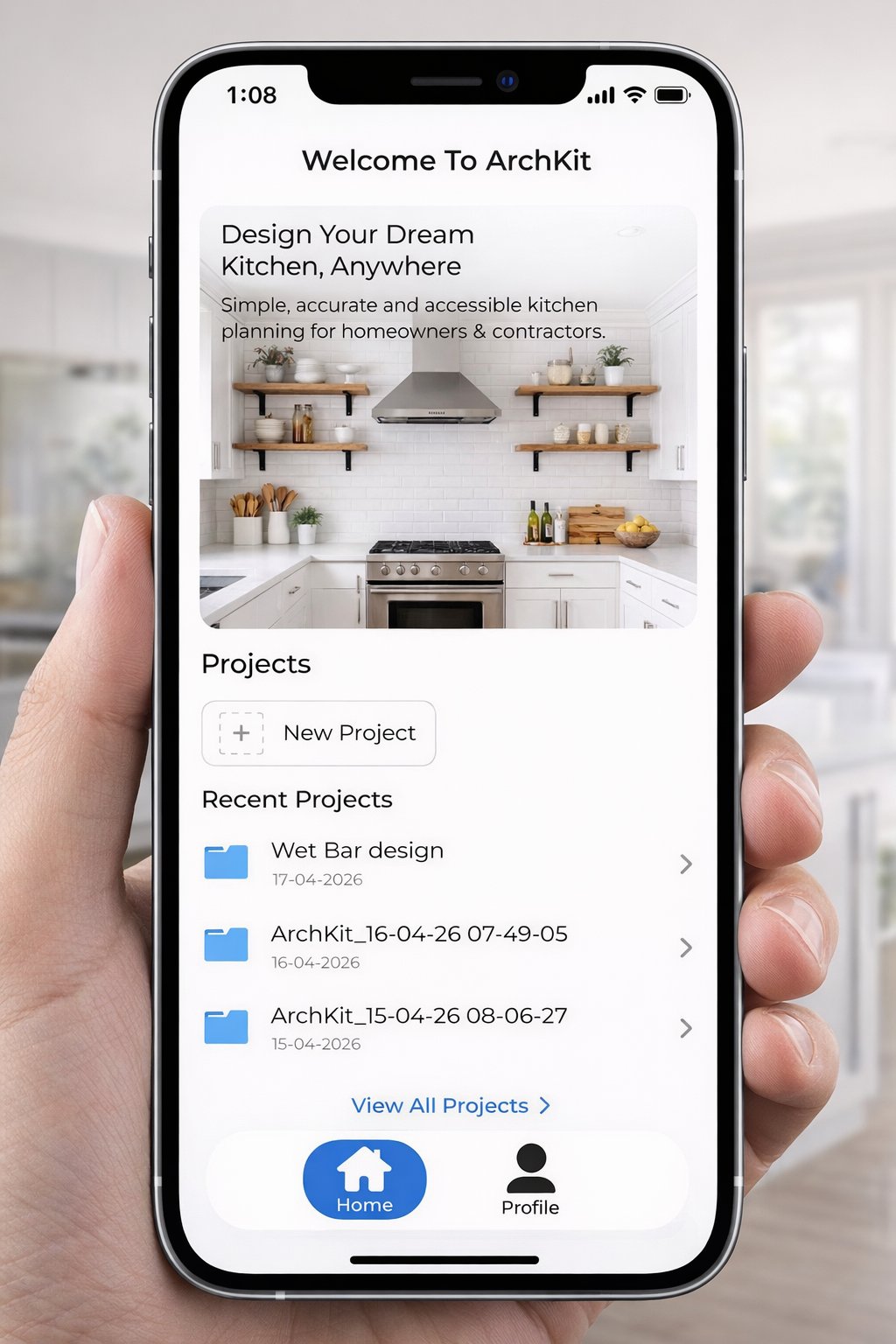
The laptop is officially the most inefficient tool in your truck. If you're still spending your evenings at a desk drafting layouts after a long day on the job site, you're losing billable hours and slowing down your sales cycle. You know the frustration of manual measurement errors that lead to costly cabinet reorders and the long approval delays when clients can't visualize your vision. It's a bottleneck that keeps you from scaling your business.
This guide shows you how to master mobile CAD for kitchen design to generate professional 2D and 3D layouts in under 10 minutes while standing in the client's kitchen. You'll learn how to leverage LiDAR sensors, standard in iPhone 12 Pro and newer models, to capture as-built conditions with surgical precision. We'll walk through the exact steps to scan, design, and show your work using tools like ArchKit Design. By the end of this article, you'll have a blueprint for getting client sign-off during the first meeting. You'll eliminate measurement mistakes and win more bids without ever opening a laptop on-site.
Key Takeaways
- Stop hauling your laptop to every job site. Adopting mobile CAD for kitchen design moves your drafting workflow to your tablet for instant, on-site results.
- Replace manual tape measures with LiDAR scanning to map room dimensions in under 60 seconds with professional accuracy.
- Use AR visualization to place virtual cabinets in a client's real kitchen, helping them make faster decisions while reducing revision cycles.
- Generate accurate 2D and 3D cabinet layouts on-site with ArchKit to get client sign-off before you leave the first meeting.
- Prevent costly ordering errors by capturing digital as-built conditions, ensuring your cabinet list is accurate the moment you finish the scan.
The Shift to Mobile CAD: Why Laptops are Leaving the Job Site
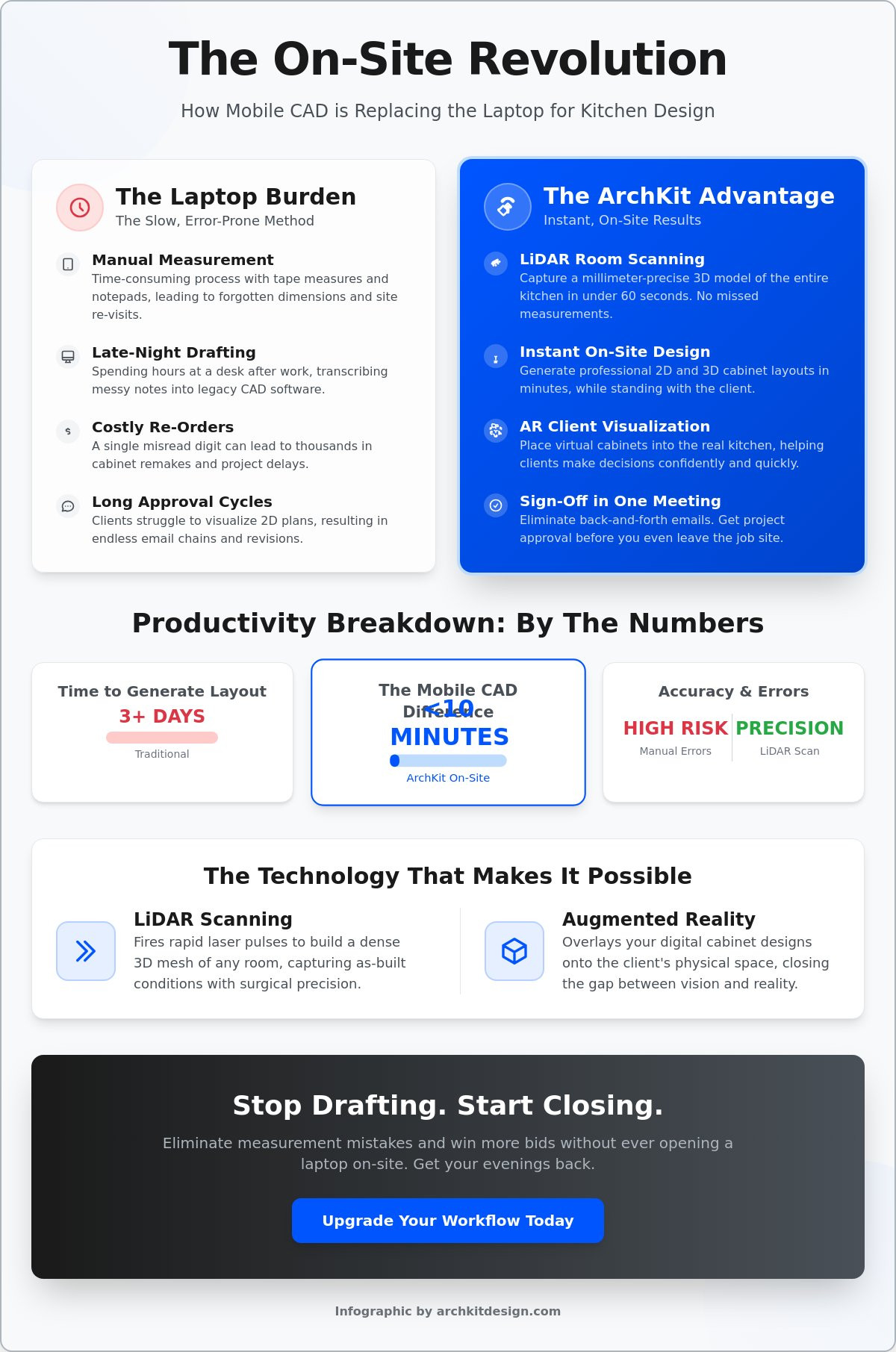
The traditional workflow is broken. For decades, Computer-aided design (CAD) meant sitting at a desk for hours after the sun went down. You'd measure a kitchen with a tape, scribble numbers on a greasy notepad, and hope your handwriting was legible by 8:00 PM. This "laptop burden" creates a massive lag in your sales cycle. While you're at home drafting, your competitor might already be sending a quote. By 2026, homeowners expect instant results. They don't want to hear "I'll email you the plans next week." They want to see the vision while you're standing in their home.
Mobile CAD for kitchen design is the intersection of LiDAR accuracy and portable design. It's professional software built for the device in your pocket. It turns your iPad or iPhone into a high-powered workstation that functions in the middle of a dusty job site. This isn't a browser-based DIY tool that crashes without Wi-Fi. It's a rugged, on-site solution designed for the reality of construction. It moves the brain of your business from the office to the palm of your hand.
Breaking the 'Office Nights' Cycle
Traditional drafting is a time thief. When you use mobile CAD for kitchen design, you finish the work before you start your truck. You eliminate the manual transcription phase where most ordering errors happen. A single misread digit on a paper sketch can cost thousands in cabinet remakes. Mobile workflows replace that risk with digital certainty. You scan the room, place the cabinets, and generate a list instantly. This shift reduces the design cycle from three days of back-and-forth emails to 15 minutes of on-site collaboration. You get your evenings back, and your clients get their project started sooner.
On-Site Reality vs. Office Theory
Kitchens are rarely square. Pipes, vents, and uneven walls don't show up in a "perfect" office model. Designing on-site allows you to solve these problems in real-time. If a client wants to move the island six inches to the left, you do it instantly on your screen. You show them the result in 3D while standing in the space. You don't have to guess if a cabinet will clear a plumbing stack; you can see it on the screen immediately.
Many contractors are ditching legacy 2020 design software because it tethers them to a desk. Tools like ArchKit allow for a "Scan. Design. Show." workflow that keeps you on the move. You handle site conditions as they exist, not as you remember them. This immediate feedback loop builds trust. It proves you're a modern professional who values the client's time and their budget.
- Eliminate "Laptop Fatigue": No more late nights at the kitchen table.
- Reduce Revisions: Get client feedback while the ideas are fresh.
- Win More Bids: Close the deal before the first meeting ends.
LiDAR and AR: The Tech Behind Professional Mobile CAD
Professional contractors don't rely on best guesses or shaky hand-sketches. The shift to mobile CAD for kitchen design is powered by two specific technologies: LiDAR and Augmented Reality (AR). These aren't just buzzwords for tech enthusiasts. They're practical tools that solve the most common job site headaches. If you're carrying a Pro-model iPhone or iPad, you already have the hardware required to replace your digital tape measure and your drafting table.
LiDAR Room Mapping Explained
LiDAR stands for Light Detection and Ranging. It works by firing rapid laser pulses to measure the exact distance to every surface in a room. While a manual tape measure only gives you a point-to-point number, LiDAR creates a dense 3D mesh of the entire space. It captures the subtle tilt of a wall or the exact placement of a window casing with millimeter precision. It doesn't just record dimensions; it builds a digital twin of the kitchen in seconds.
This technology handles complex room shapes, such as bay windows or angled soffits, that usually take 20 minutes to measure by hand. With a mobile CAD workflow, you scan the room in under 60 seconds. This eliminates the "forgotten measurement" that forces a second trip back to the site. You aren't just taking a picture. You're capturing a geometrically accurate foundation for your entire cabinet layout.
Visualizing with AR Design
Once the room is mapped, AR allows you to overlay digital cabinets onto the physical world. This is where you close the deal. Most homeowners struggle to visualize how a new layout will actually feel. They can't translate a 2D blueprint into a 3D experience. AR solves this by removing the imagination gap. You can walk a client through their new kitchen before a single cabinet is demolished.
They can see if the island leaves enough clearance for the fridge door. They can experience the workflow of the kitchen in real-time. Research from the Federal Highway Administration suggests that Augmented reality enhances accuracy and efficiency by providing a clearer understanding of complex spatial relationships. In a kitchen remodel, this means fewer revisions and faster sign-offs. If you want to see this technology in action on your next project, you can join our early access list to start streamlining your workflow.
The Accuracy Threshold
Is it accurate enough for cabinet orders? In 2026, the answer is a resounding yes. Modern LiDAR sensors provide the foundational accuracy required for U.S. standard cabinet layouts. When paired with professional software like ArchKit, the digital mesh serves as a fail-safe. It highlights discrepancies between the as-built conditions and the proposed design instantly. You catch the plumbing vent or the uneven floor before the cabinets are built, not during the install. This tech turns a standard smartphone into a professional-grade survey tool.
- Laser Precision: LiDAR captures millions of data points for a perfect 3D mesh.
- Zero Imagination Gap: AR lets clients "walk" through their design on-site.
- Digital Twin: Create a perfect replica of the job site to reference later.
Mobile CAD vs. Legacy Software: A Contractor’s Productivity Breakdown
The legacy workflow is a three-headed monster. First, you measure. Second, you go back to the office to draft. Third, you schedule a second meeting to present. This fragmented process is where leads go to die. Modern mobile CAD for kitchen design collapses these three steps into a single on-site event. You aren't just drawing; you're selling. By eliminating the week-long gap between the first visit and the design reveal, you keep the client’s excitement high. You close the deal while the kitchen is still fresh in their minds. No laptop required. No office nights wasted.
The Speed Advantage
Think about your billable time. A typical manual measurement and desktop drafting session takes roughly four to six hours of labor per project. With a kitchen design app for iPhone, that time drops to 15 or 20 minutes. You're saving nearly 90% of your pre-contract labor. The "Scan. Design. Show." workflow isn't just a marketing slogan; it's a productivity standard for 2026. It allows a single contractor to handle three times the lead volume without adding staff. You stop being a draftsman and start being a closer. You win the project before the competition even opens their laptop.
Accuracy and Accountability
Handwritten notes are a liability. A "3" that looks like an "8" on a greasy notepad leads to a $2,000 cabinet ordering mistake. Digital workflows remove human error from the equation. When you use mobile CAD for kitchen design, the software generates a precise cabinet list based on the digital twin of the room. It uses U.S. standard cabinet sizes to ensure what you design on your iPad actually fits the physical inventory in the shop. You design with reality, not theory.
This digital record also protects your profit margins. Scope creep is a notorious profit killer in remodeling. By integrating AR into modern construction workflows, you create a visual contract of exactly what was agreed upon during the initial walkthrough. If the client wants to change the layout later, you have a timestamped 3D model of the original site conditions. It provides a level of accountability that paper sketches simply can't match. Your files live in the cloud. They're accessible in the field, in the truck, and at the shop. No lost folders. No missing dimensions. Just a streamlined, professional process that builds trust and wins more bids.
- One-Step Workflow: Measure, draft, and present in a single visit.
- Cloud Accessibility: Sync project files instantly between the job site and the shop.
- Professional Edge: Impress clients with high-tech 3D visualizations that close deals faster.
Implementing a Mobile CAD Workflow: From Scan to Estimate in Minutes
Moving from a manual process to a digital one requires a clear plan of action. You don't need a degree in architecture to master mobile CAD for kitchen design; you just need a repeatable system. On a typical 2026 job site, this workflow takes you from a blank room to a signed contract in under 30 minutes. It turns the initial consultation into a high-velocity sales event. Follow these five steps to modernize your on-site presence and stop the "I'll get back to you" delay.
- Step 1: The Scan. Spend 60 seconds capturing the room with LiDAR to establish a perfect 3D foundation.
- Step 2: The Layout. Drop U.S. standard cabinets and appliances into the digital twin of the room.
- Step 3: The Reality Check. Adjust the design for fixed constraints like plumbing stacks and electrical panels.
- Step 4: The Math. Generate an instant cabinet list and project estimate based on the active design.
- Step 5: The Approval. Walk the client through the AR model and get a digital sign-off before leaving.
Mastering the On-Site Scan
Success starts with a clean data set. Before you begin the scan, open the curtains and turn on all overhead lights. LiDAR performs best in well-lit environments where surfaces are clearly defined. Clear small appliances like toasters or coffee makers off the counters to ensure the sensor captures the actual wall and backsplash dimensions. To handle corners and hidden obstructions during a scan, maintain a steady movement path and ensure the LiDAR sensor has a clear line of sight to the wall-floor intersection whenever possible. Scan the entire perimeter, including door swings and window casings, to create a complete site picture. This digital record serves as your single source of truth, eliminating the need for a second trip to verify a missed measurement.
Instant Layout and Estimation
Once the room is scanned, the design phase begins. Use pre-loaded catalogs to place cabinets with a few taps. Because you're using mobile CAD for kitchen design, the software automatically snaps components to the walls of your 3D mesh. This ensures a perfect fit. You can instantly swap a 30-inch base cabinet for a 36-inch unit to show the client how it impacts the remaining run. As you design, the app builds your cabinet list in the background. This list is ready for immediate supplier quotes, allowing you to provide a realistic estimate while you're still in the kitchen. To start closing deals faster and reclaim your evenings, get early access to ArchKit’s on-site tools today. This professional workflow proves to the homeowner that you're the most efficient and accurate contractor for the job.
- Scan: Capture everything in 60 seconds.
- Design: Place U.S. standard cabinets instantly.
- Show: Get client approval on the spot.
Winning the Contract: The Future of Kitchen Design Presentations
The days of winning high-end contracts with a pencil sketch and a promise are over. Today’s homeowners, particularly Gen X and Baby Boomers who represent 67% of the remodel market, demand a higher level of professional clarity. They don’t want to guess where the island ends or how the pantry flow feels. If you rely on 2D blueprints, you’re leaving your closing rate to chance. Adopting mobile CAD for kitchen design allows you to present a finished vision before you even leave the driveway. This transparency eliminates the buyer's remorse that often stalls projects before they begin.
The Power of Instant Visualization
AR walkthroughs are the ultimate anxiety-killers for your clients. When a homeowner can stand in their actual kitchen and see virtual 3D cabinets overlaid on their walls, the imagination gap disappears. They can test different layouts or move a double-oven cabinet in real-time. This instant feedback loop turns a three-week revision process into a ten-minute conversation. You aren't just presenting a design; you're providing an experience. This level of technical expertise on-site establishes you as an authority. It proves you have the tools to handle their investment with surgical precision.
Professionalism and Branding
Your tools are your brand. Walking onto a job site without a laptop and still producing a professional 3D layout signals that your firm is a leader in the local market. High-tech presentations lead to higher project values because clients perceive more value in your process. It also drives better referrals. When a client tells their neighbor about their remodel, they won't just talk about the cabinets; they'll show off the AR model you built on your phone. To start building this competitive edge, you can check out ArchKit's free kitchen design app to test the workflow yourself.
The ArchKit Way is about modernizing the trade to win more clients with less effort. It's about replacing the fatigue of office nights with the satisfaction of a signed contract on-site. By using mobile CAD for kitchen design, you ensure your business is fast, accurate, and ready for the 2026 market standards. You stop chasing leads and start managing a professional, tech-forward pipeline. Win the project. Save your time. Modernize your workflow today.
- Close Faster: Use 3D visuals to get instant sign-off.
- Build Trust: Show clients exactly what they are buying.
- Command Margins: Tech-forward firms win higher-value projects.
Modernize Your Job Site and Win More Contracts
The transition to mobile CAD for kitchen design is about more than just new tech. It's about reclaiming your time and building a more profitable, professional business. You've seen how LiDAR scanning replaces the slow, error-prone tape measure with millimeter-accurate digital twins. You know how AR walkthroughs remove the imagination gap, helping clients commit to high-end remodels on the spot. This professional workflow allows you to scan, design, and show results in under 30 minutes. You stop wasting your evenings drafting on a laptop and start closing deals before you even leave the driveway.
The tools are ready. ArchKit is built specifically for contractors, featuring integrated U.S. standard cabinet catalogs and LiDAR accuracy for professional-grade measurements. It's a rugged, on-site solution that works as hard as you do. Stop hauling a laptop to every consultation. Start using a workflow that impresses your clients and protects your margins. Ready to ditch the laptop? Get early access to the ArchKit mobile CAD platform today.
Your business deserves a process that matches your craftsmanship. Take the first step toward a more efficient, tech-forward future today. You've got this.
Frequently Asked Questions
Is mobile CAD accurate enough for ordering custom kitchen cabinets?
Yes, modern LiDAR sensors provide millimeter precision that meets the requirements for custom cabinet orders. While traditional tape measurements are prone to human error, mobile CAD for kitchen design captures the exact geometry of the room. You catch out-of-plumb walls and uneven floors before the manufacturing phase. This digital accuracy reduces cabinet remakes by 15% on average according to industry workflow studies. It ensures your shop drawings match the physical reality of the site.
Do I need an iPad Pro to use LiDAR-based mobile CAD for kitchen design?
You don't need an iPad Pro as long as you have an iPhone 12 Pro or a newer Pro model. Apple integrated LiDAR sensors into their Pro lineup starting in October 2020. These devices have the hardware needed to build a dense 3D mesh of any space. While the larger screen of an iPad Pro makes designing easier on-site, the pocket-sized iPhone Pro is a fully capable workstation for rapid room mapping and layout planning.
Can I export my mobile CAD designs to other professional software?
Yes, professional mobile CAD tools allow you to export your files in standard formats like DWG, DXF, or OBJ. This ensures your on-site work integrates perfectly with desktop software like AutoCAD or SketchUp. You can capture the as-built conditions in 60 seconds and then send the data to your shop or architect for final technical drawings. This cross-platform compatibility keeps your entire project team synced without the need for manual data entry.
How long does it take to learn a mobile CAD workflow on a job site?
Most contractors master the basic "Scan. Design. Show." workflow in under 30 minutes. The interface is built for speed on a job site, not for complex office drafting. You can learn to map a room and place mobile CAD for kitchen design components during a single lunch break. Because the software uses intuitive touch controls and pre-loaded U.S. standard cabinet catalogs, the learning curve is significantly shorter than legacy desktop CAD programs.
What happens if the kitchen I'm scanning is currently full of old cabinets?
LiDAR sensors can map the room even when old cabinets are still installed. You simply scan the visible wall surfaces, ceiling lines, and floor perimeters to establish the room’s footprint. For the highest accuracy, clear the countertops of small appliances and clutter. The software uses these data points to calculate the true dimensions of the space, allowing you to plan the new layout without waiting for demolition to finish.
Does mobile CAD work for small kitchen layouts and tight spaces?
Mobile CAD is exceptionally effective for small kitchens where manual measuring is physically difficult. In a tight 8x10 galley kitchen, a LiDAR scan captures every corner and utility location in seconds without you needing to crawl under sinks or reach over appliances. The 3D visualization helps clients see how to maximize storage in limited footprints, making it easier to sell high-density cabinet solutions like pull-out organizers and floor-to-ceiling pantries.
Can I generate a full cabinet list directly from a mobile design?
Yes, the software generates a detailed cabinet list automatically as you place items in the 3D layout. This list includes widths, heights, and depths based on U.S. standard sizes. You can export this list as a CSV or PDF to get immediate quotes from your suppliers. This feature eliminates the 2-hour task of manually counting and measuring cabinets from a paper sketch, ensuring your estimate is accurate and your margins are protected.
Is there a monthly fee for professional mobile CAD for contractors?
Most professional tools, including ArchKit, operate on a SaaS subscription model. This ensures you always have access to the latest LiDAR updates, cloud storage for your project files, and updated cabinet catalogs. While pricing varies across the industry, the cost is typically offset by saving 5 or more hours of drafting time per project. You trade a small monthly fee for the ability to close deals on-site and eliminate costly ordering mistakes.


