
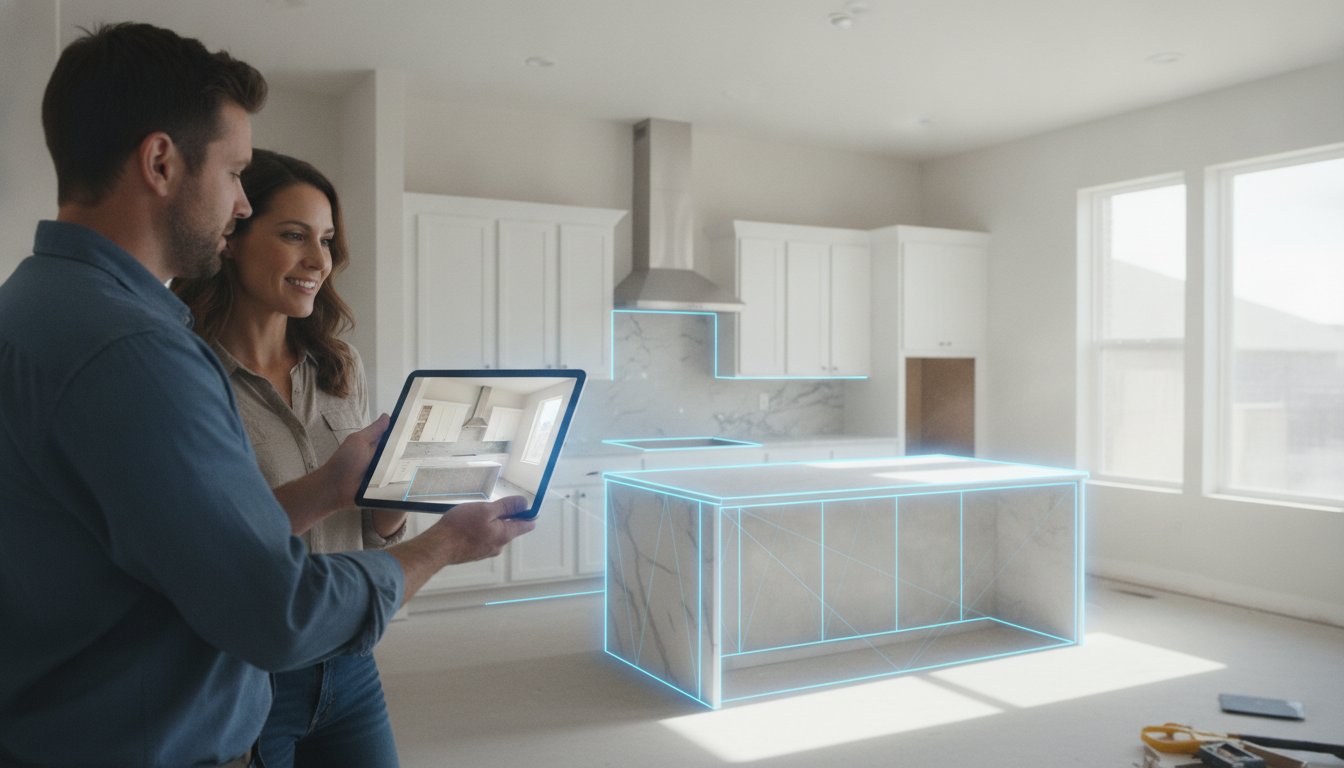
Driving back to the office to tweak a CAD file is costing you thousands in lost momentum and billable hours. You know the drill. You measure a kitchen, head back to your desk, and wait days for a client to finally "see" the vision. By then, the excitement has cooled and the revision requests start piling up. Finding the right app to get client sign-off on kitchen layouts isn't just about convenience. It's about closing the deal before you leave the driveway.
Stop losing time to the "I can't visualize it" excuse. This guide shows you how to eliminate revision fatigue and secure instant project approvals using professional on-site design apps. We'll explore how LiDAR scanning, AR visualization, and mobile workflows from ArchKit Design turn a three-week design phase into a single on-site visit. Learn to generate a signed PDF while standing in the client's kitchen. It's time to ditch the stationary office equipment and start winning more contracts with speed and accuracy.
Key Takeaways
- Stop the office bottleneck. Shift your design workflow to the field and reclaim hours spent on manual CAD updates.
- Secure instant approvals. Use a dedicated app to get client sign-off on kitchen layouts to lock in budgets before you leave.
- Master LiDAR speed. Generate millimetre-accurate floor plans in minutes with rapid scanning technology.
- Erase client doubt. Use AR visualization to overlay new designs onto the current space and kill the "I can't visualize it" excuse.
- Standardize your sales. Empower every project manager to deliver high-quality 3D layouts on-site with ArchKit.
Stop the Revision Trap: Why Your Current Sign-Off Process Fails
Every time you pack up your laser measure and tell a client, "I'll get back to you with a draft by Friday," you're bleeding money. That gap between the initial consultation and the first layout is a danger zone. It's where momentum dies and second-guessing begins. By the time you've driven back to the office to input data, the client has already seen three different "dream kitchens" on social media that contradict your plan. Using an app to get client sign-off on kitchen layouts while you're still in the room isn't just a convenience. It's a survival strategy for the modern contractor.
The "On-Site Yes" is psychologically powerful. When you're standing in their current, cramped kitchen, the desire for a solution is at its peak. If you can show them a 3D vision of their new space right then, you lock in that emotional commitment. Wait forty-eight hours, and that excitement turns into budget anxiety. Physical friction points like measurement discrepancies or manual sketch errors only make it worse. One wrong number on a yellow notepad can lead to a cabinet misfit that costs thousands to fix. Digital tools eliminate these manual hand-off errors before they reach the shop floor.
The Office Bottleneck vs. Field Efficiency
Traditional Computer-aided design (CAD) software was built for desks and high-end workstations. It wasn't built for dusty jobsites or quick client meetings. Manually re-entering measurements from a notepad into a desktop program is a massive time leak. You risk transposing numbers or misinterpreting your own scribbled site photos. In 2026, clients don't just prefer digital responses; they demand them. They want to see the wall move in real-time, not in three days. Tools like a free kitchen design app from ArchKit Design allow you to bridge that gap instantly. You capture the data once. You show the result immediately. You stop the administrative fatigue before it starts.
The Hidden Cost of Miscommunication
Vague descriptions lead to expensive tear-outs. When a client says "more counter space," they might mean a deeper island, while you're thinking of an extended run of perimeter cabinets. These verbal misunderstandings are the root of most project friction. 3D visualization removes the guesswork. It creates a shared reality where everyone sees exactly where the sink lands and how the fridge clears the pantry door. A timestamped digital sign-off provides a clear paper trail for both parties. It protects your profit margins and your reputation. Using ArchKit Design as your primary app to get client sign-off on kitchen layouts ensures that the approval you get in the home is the one that sticks through the final inspection.
Essential Features for a Professional Kitchen Approval App
A generic sketching tool won't build a business. To eliminate revision fatigue, you need a high-performance app to get client sign-off on kitchen layouts that bridges the gap between a rough idea and a contract. Modern clients expect precision. They want to see exactly how their new cabinets fit around that awkward bulkhead or off-center window. If your software can't handle real-world jobsite variables, you're just drawing pictures, not closing deals.
Accuracy Through LiDAR Technology
Ditch the digital tape measure. While a laser distance tool is better than a manual tape, it still requires manual input and leaves room for human error. LiDAR technology transforms your mobile device into a millimetre-accurate scanning engine. It captures the entire room volume in seconds. This isn't just about walls. It's about identifying plumbing stacks, electrical outlets, and HVAC vents that dictate your layout. Recent research on technology adoption in construction shows that professionals who leverage these on-site scanning tools significantly reduce measurement-related rework. Accurate data ensures your cabinet orders are right the first time, protecting your margins from expensive misfit errors.
Professional Cabinetry and Estimating Tools
Most design apps fail because they use generic blocks that don't reflect real-world inventory. A professional layout requires integrated U.S. standard cabinet catalogs. If you can't drop a standard 36-inch sink base or a 15-inch spice pull-out into the 3D view, your estimate is a guess. Real-time visualization allows you to walk a client through their kitchen using Augmented Reality (AR), showing them the new layout overlaid on their existing space. This immersive experience kills uncertainty. When the client can see the flow of the workspace, the "Yes" comes faster.
Efficiency doesn't stop at the drawing. Your app should sync your layout directly with your pricing. Automated material lists prevent under-bidding by accounting for every filler strip and crown molding piece. By integrating your specific labor and material costs, you can provide an accurate quote before you put your boots back on. If you want to stay ahead of the curve and modernize your workflow, you can get early access to these advanced on-site tools through ArchKit Design. This level of professional transparency builds trust and secures signatures on the spot.
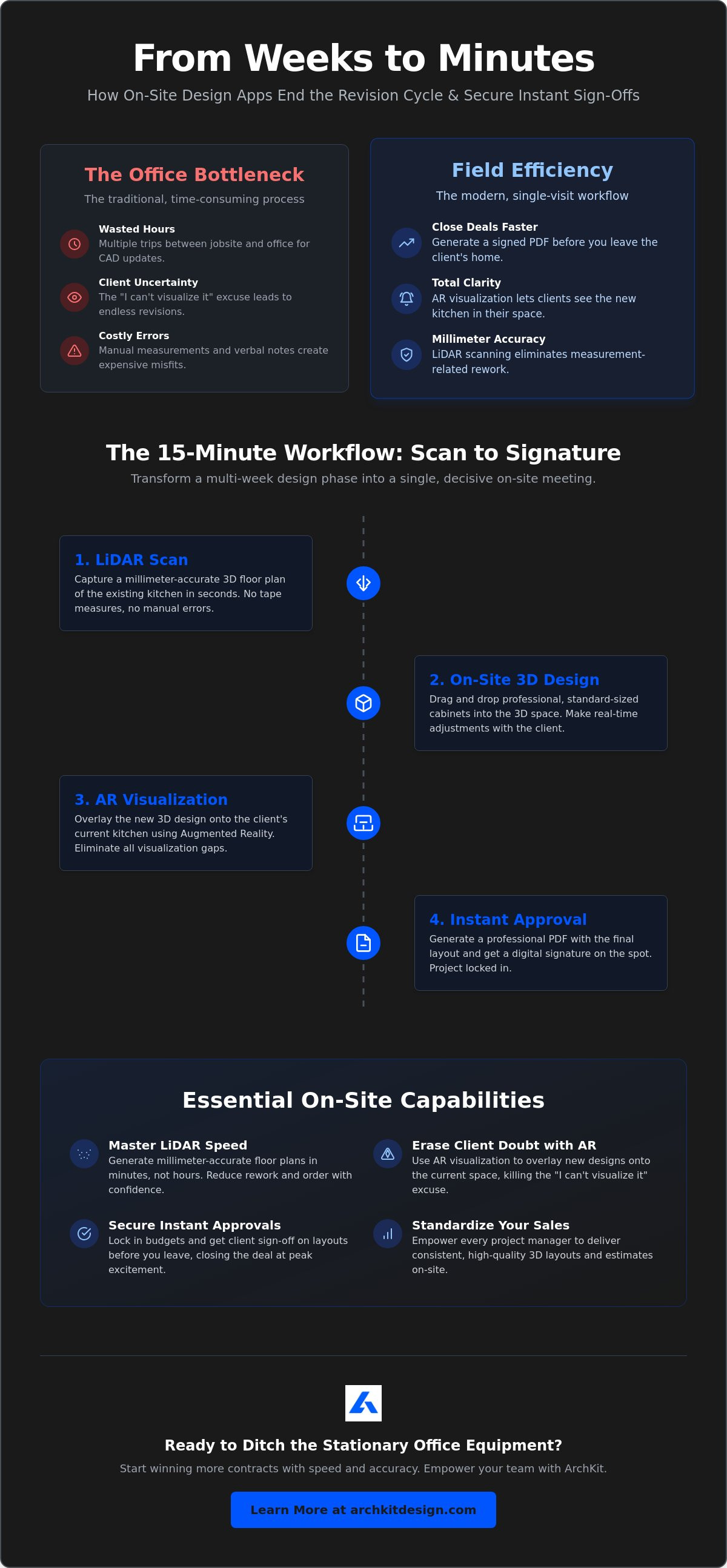
The 15-Minute Workflow: From LiDAR Scan to Client Signature
Speed wins. In the kitchen renovation business, the professional who provides the quickest path to visualization usually takes the deposit. A high-performance app to get client sign-off on kitchen layouts turns a multi-day administrative headache into a 15-minute on-site victory. You don't need a drafting table or a stationary workstation. You need a mobile device and a structured process that moves as fast as your sales pitch.
- Step 1: Rapid LiDAR Scanning. Clear the counters. Move the clutter. Scan the footprint to capture every wall, window, and outlet with millimetre precision.
- Step 2: Real-Time Layout. Drop standard cabinets into the digital footprint. Swap an L-shape for a galley layout in seconds.
- Step 3: AR Immersion. Activate Augmented Reality. Let the client "walk through" their new kitchen while standing in the old one.
- Step 4: Immediate Adjustments. If they want the island six inches to the left, move it now. Don't wait until you're back at the office.
- Step 5: Digital Signature. Generate a PDF and capture their signature on the screen. Sync it to the cloud instantly.
This workflow solves the technical glitches and "unusable" account systems that plague legacy software. It keeps the focus on the project, not the tool. By the time you're walking back to your truck, the project is approved, the data is synced, and the next phase is already in motion.
Scanning and Layout Basics
A clean scan starts with a clear site. Ask the homeowner to clear the countertops before you arrive. This ensures the LiDAR sensor captures the actual wall surface, not a pile of mail. Once the room is mapped, focus on the flow. Use the free kitchen design app from ArchKit to practice your scanning technique before your next high-stakes meeting. Switching between layout shapes like Islands or U-shapes takes just a few taps. It allows you to present multiple options without ever touching a pencil or a mouse.
The Closing Conversation
The AR walkthrough is your strongest sales tool. It builds confidence by removing the abstraction of 2D blueprints. When a client sees their new cabinetry overlaid on their current mess, the project feels real. This immediate feedback loop is a core part of developing an effective, efficient interior design project workflow. It moves the "Approval" stage from a distant future date to the present moment. Capture that signature while their excitement is high. Using a professional app to get client sign-off on kitchen layouts ensures you leave the house with a commitment, not just a promise to "think about it."
Using AR Visualization to Eliminate Client Uncertainty
The phrase "I just can't picture it" is the graveyard of profitable contracts. Even with a detailed 2D floor plan, most homeowners struggle to translate flat lines into a physical room. They worry the island will feel too big or the walkways too narrow. This spatial anxiety leads to "I need to think about it," which usually means another week of delays. An app to get client sign-off on kitchen layouts that features Augmented Reality (AR) solves this by projecting the new design directly into their existing space. It replaces imagination with evidence.
AR visualization allows you to overlay new cabinet configurations onto the current mess of a demo-ready kitchen. You aren't just showing them a picture; you're letting them experience the flow of the work triangle. They can physically walk from the virtual range to the virtual sink. This immediate sense of scale and proportion kills the uncertainty that stalls large projects. When a client can see the exact clearance between a new island and the refrigerator, their confidence in your expertise skyrockets.
Solving the Spatial Awareness Problem
Understanding clearances is the most difficult part of design for a non-professional. AR makes these dimensions tangible. You can show a client exactly how much room they'll have to pass behind a seated guest at the island. It also helps visualize upper cabinet accessibility. If a client is shorter or taller than average, you can adjust the virtual mounting heights in real-time to find their perfect fit. For those looking to master these presentations, checking out a 3D kitchen visualizer for professionals provides deeper insight into boosting on-site rendering efficiency. These tools ensure that the "spatial feel" of the room is settled before the first cabinet is even ordered.
Building Trust Through Transparency
Transparency is your best tool for reducing future complaints. Using AR to confirm appliance placements prevents the "I thought the fridge was going over there" conversation during the middle of the install. You can show the "bones" of the design, including where plumbing and electrical lines will run relative to the new cabinetry. This level of detail reduces the fear of the unknown that often prevents clients from committing to high-ticket renovations. By using a professional app to get client sign-off on kitchen layouts, you create a digital record of exactly what was promised and seen. It protects your business while making the client feel like a partner in the process.
Ready to stop the second-guessing and start closing more deals on the first visit? You can get early access to ArchKit’s AR tools and transform your next client consultation into an immersive, high-conversion experience.
Scaling Your Business with ArchKit’s On-Site Tools
Scaling a contracting business requires more than just harder work. It requires a repeatable, professional system that doesn't depend on the owner being at every jobsite. If your sales process relies on manual sketches and office-based CAD revisions, you've created a bottleneck that limits your growth. Adopting a professional app to get client sign-off on kitchen layouts allows you to delegate the design and approval phase to your project managers without sacrificing accuracy or quality. You move from being a solo operator to managing a high-velocity design and build engine.
Standardizing the Professional Workflow
Consistency is the hallmark of a growing firm. You need every lead to receive the same high-quality visual presentation, regardless of which team member is on-site. Modern LiDAR tools allow you to train new hires to perform accurate room scans in under an hour. This rapid onboarding means you can expand your sales force without a massive training overhead. For firms looking to equip multiple teams, reviewing ArchKit pricing reveals how team-based licensing can provide a high ROI compared to traditional desktop software seats. You don't just buy a tool; you buy a standardized sales engine that works the same way every time.
Moving the design process to the field also reduces your dependency on high-end CAD designers for standard kitchen layouts. While complex custom builds might still need a deep dive, a vast majority of your kitchen projects can be designed and approved on-site. Using the kitchen design app for iPhone, your field team can generate layouts, select standard cabinetry, and secure a signature before the first consultation ends. This shift drastically reduces project lead times. It increases your annual project capacity by cutting out weeks of administrative lag.
Future-Proofing Your Contracting Firm
The industry is moving away from stationary office equipment. In 2026, AR and LiDAR are no longer "cool features" for tech-savvy contractors; they are the new industry standards. Clients now expect a digital-first experience. If you can provide a personalized, immersive design on their kitchen floor while a big-box retailer asks them to wait two weeks for a rendering, you win the contract every time. It’s about being faster, more accurate, and more professional than the competition.
Measuring the ROI of instant approvals is simple. Calculate the hours your team currently spends on back-and-forth revisions and office-based drafting. Multiply that by your billable rate. Most firms find that an app to get client sign-off on kitchen layouts pays for itself within the first two project approvals. To start modernizing your workflow and protecting your margins, you can get early access to ArchKit’s professional on-site features today.
Modernize Your Jobsite Sales Process
The days of office-bound drafting and endless revision cycles are over. By shifting your workflow to the field, you reclaim your time and protect your profit margins. You've seen how LiDAR-powered accuracy and a standard U.S. cabinet catalog turn complex measurements into ready-to-sign layouts in minutes. This transition isn't just about new tech; it's about building a more efficient and scalable business.
Ready to transform your sales results? View ArchKit Pricing and Start Closing More Deals.
Your next project is waiting for a faster approval. It's time to go get it.
Frequently Asked Questions
What is the best app for getting a client to sign off on a kitchen layout?
ArchKit is the top choice for contractors because it combines LiDAR scanning with a professional app to get client sign-off on kitchen layouts. It focuses on the high stakes accuracy required for cabinet installs rather than just general room sketching. The workflow is built specifically for on-site professionals who need to close deals quickly.
Do I need an internet connection to get a client signature on-site?
You don't need an active internet connection to perform a LiDAR scan or create a layout. However, you'll need a connection to sync the project to the cloud or email the final PDF to your client. The core design and signature capture features work locally on your device to ensure reliability on remote jobsites.
Can I export a PDF of the kitchen layout to my client immediately?
Yes, you can generate and export a PDF on-site immediately with the Regular or Pro plans. This allows you to hand the device to the client for a digital signature and then send them the signed document before you leave the driveway. It eliminates the need for follow up emails and administrative delays.
How accurate are LiDAR scans for kitchen cabinet measurements?
LiDAR scans provide millimetre accurate data for your room footprint. This technology captures the exact volume of the space, including wall deviations and plumbing points, which is far more reliable than manual tape measurements. It ensures that your cabinet orders fit perfectly without the risk of human error in data entry.
Does ArchKit support standard U.S. cabinet sizes for estimating?
ArchKit includes integrated U.S. standard cabinet catalogs to ensure your layouts are realistic and ready for production. Using standard sizes prevents errors during the estimating phase and ensures the final design fits the physical space. This feature makes it easy to provide accurate quotes while you are still standing in the client's kitchen.
Can I use these apps on both iPhone and iPad?
The app is fully compatible with both iPhone and iPad running iOS 16 or later. It also works on Mac computers with an Apple M1 chip or later. Using an iPad on-site often provides a better visualization experience for the client during the AR walkthrough due to the larger screen size.
How do I handle revisions after a client has already signed off?
If a client requests changes after a signature, you can create a new project file or version within the app to maintain a clear paper trail. This digital record helps manage scope creep and ensures everyone is aligned on the latest project cost and layout changes. It protects your business from disputes over verbal agreements.
Is there a free version of kitchen design apps for contractors?
There is a free version of ArchKit that includes LiDAR scanning and basic layout tools for one project. It is an excellent way to test the app to get client sign-off on kitchen layouts before upgrading to plans that include PDF exports and estimate creators. This allows you to master the scanning process before using it in a live sales meeting.


