
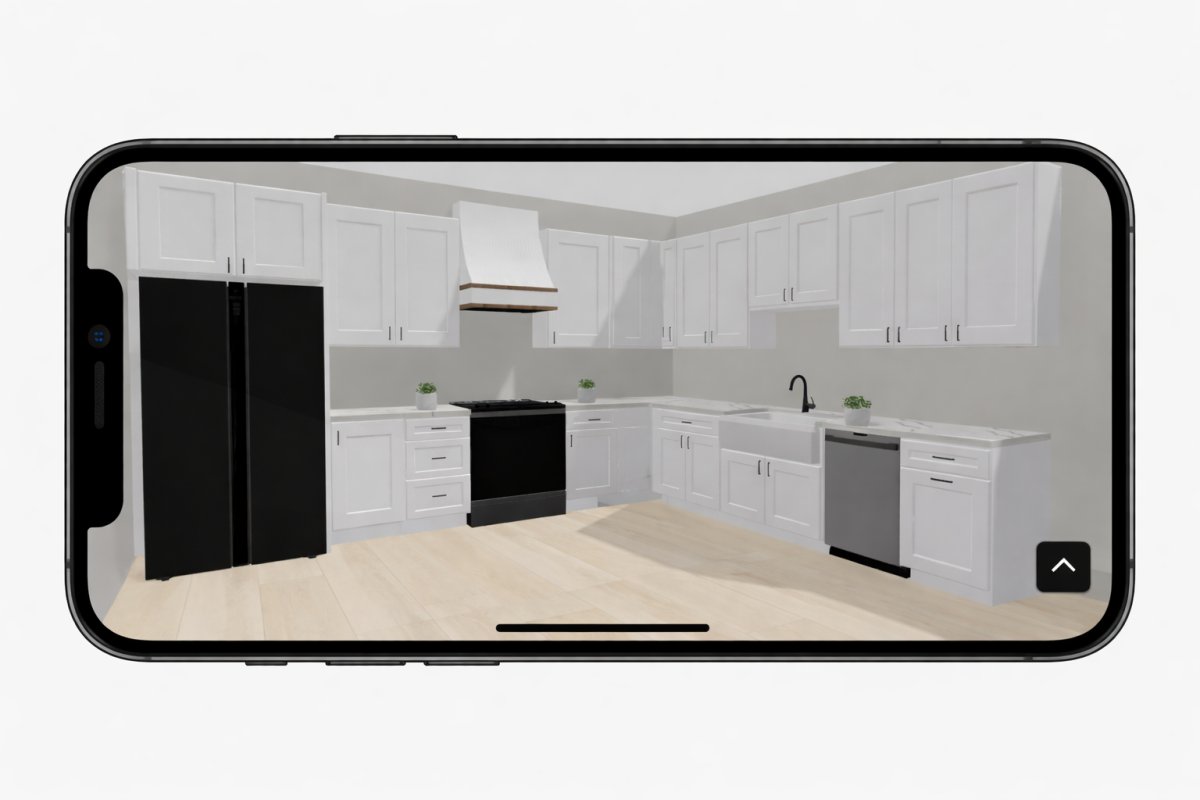
A single quarter-inch measurement error in a 70-square-foot kitchen doesn't just delay a project; it kills your profit margin. You've been there. You spend hours fighting with a tape measure in a cramped corner, only to have the client second-guess the cabinet placement three weeks later. Relying on a manual small kitchen layout planner often leads to "analysis paralysis" and expensive rework. It's time to stop the administrative fatigue and start closing deals on-site.
We agree that tight footprints require surgical precision, not guesswork. This guide will show you how to master high-efficiency design using modern on-site planning workflows and AR technology. You'll learn to eliminate measurement doubt and secure client buy-in before you even leave the driveway. We'll explore how tools like ArchKit leverage LiDAR scanning and 3D visualization to turn a complex remodel into a streamlined, high-velocity process. Get ready to produce accurate estimates and maximize storage without the typical design delays.
Key Takeaways
- Eliminate measurement errors in tight corners by shifting from manual tapes to high-precision LiDAR scanning workflows.
- Accelerate your project starts by using a mobile small kitchen layout planner to create 3D designs directly on the job site.
- Maximize utility in limited square footage by integrating vertical storage and modern work triangle principles for high-efficiency footprints.
- Secure client buy-in instantly by using AR technology to visualize cabinet fit and walking room in real-time.
What is a Small Kitchen Layout Planner for Professionals?
A professional small kitchen layout planner isn't a web-based toy for homeowners. It's a field-ready tool built for the reality of tight tolerances and immovable plumbing. While generic tools focus on "inspiration," a pro-grade solution focuses on execution. It bridges the gap between a rough field sketch and a final cabinet order. It allows you to visualize 3D spatial constraints while standing in the actual room. This eliminates the "will it fit?" anxiety that plagues small-footprint projects. You stop guessing and start building.
This technology integrates real-world measurements with standardized cabinetry catalogs for accurate bidding. It's essential for modern remodelers who need to reduce office-bound design hours. Instead of spending your evening at a desktop CAD station, you finalize the layout before you leave the driveway. The goal is simple: maximize every square inch of utility without sacrificing speed or accuracy. You get immediate results that impress the client and protect your bottom line.
The Difference Between DIY and Professional Planners
Browser-based planners fail because they assume walls are perfectly plumb and corners are square. They don't. In a 70-square-foot kitchen, missing a measurement by a fraction of an inch means a $2,000 cabinet doesn't fit. Professional tools prioritize technical accuracy over generic aesthetics. They respect the kitchen work triangle principle even when space is at a premium. You move from a measurement to a high-fidelity 3D model in minutes. This cuts out the back-and-forth office time that eats your margins. You provide a level of technical detail that a homeowner's tablet app simply can't match.
Why Mobile-First Planning is the New Industry Standard
The era of paper sketches and manual tapes is ending. Modern remodelers use LiDAR-enabled mobile apps to capture "as-built" conditions instantly. This isn't just about speed; it's about accuracy and client confidence. Using a free kitchen design app like ArchKit allows you to show a client an AR walkthrough during the very first meeting. They see the cabinets in their space. They feel the walking room. You get the signature faster because you've removed the guesswork. This mobile-first approach replaces administrative fatigue with immediate results. It positions you as the authority who uses modern tech to solve old problems. Capture the room. Drop in the cabinets. Close the deal. It's that fast.
Core Design Principles for Small Kitchen Layouts
Designing a high-efficiency kitchen in a tight footprint isn't about compromise; it's about density. You aren't just fitting cabinets. You are orchestrating a workflow where every inch must perform. A professional small kitchen layout planner helps you visualize these constraints before you order a single box. Efficiency starts with the physics of movement and the reality of standard hardware dimensions. If you ignore the technical specs of the room, you'll end up with a beautiful space that's impossible to use.
Success relies on four specific pillars: the work triangle, vertical volume, clearance zones, and lighting. Neglect one, and the kitchen feels cramped regardless of the finish quality. Prioritize the path between the sink, stove, and refrigerator. Ensure enough "swing room" for appliance doors and drawers. Use the full wall height for storage to keep counters clear. Finally, deploy a layered lighting strategy to push back the walls visually. This approach turns a claustrophobic corner into a functional workspace that looks and feels larger.
Optimizing the Work Triangle in Tight Footprints
In a small kitchen, the work triangle must be tight but not suffocating. For galley layouts, keep the prep and cook zones on opposite sides to prevent a single-user bottleneck. In L-shaped or U-shaped spaces, watch the corners. Placing a sink too close to a corner cabinet creates a "dead zone" where two doors can't open simultaneously. For one-wall layouts, the triangle becomes a linear sequence. Follow the natural flow: Refrigerator to prep, then sink to stove. This prevents unnecessary backtracking in a confined hall. Efficiency is the priority here.
Standard U.S. Cabinetry Sizes for Small Spaces
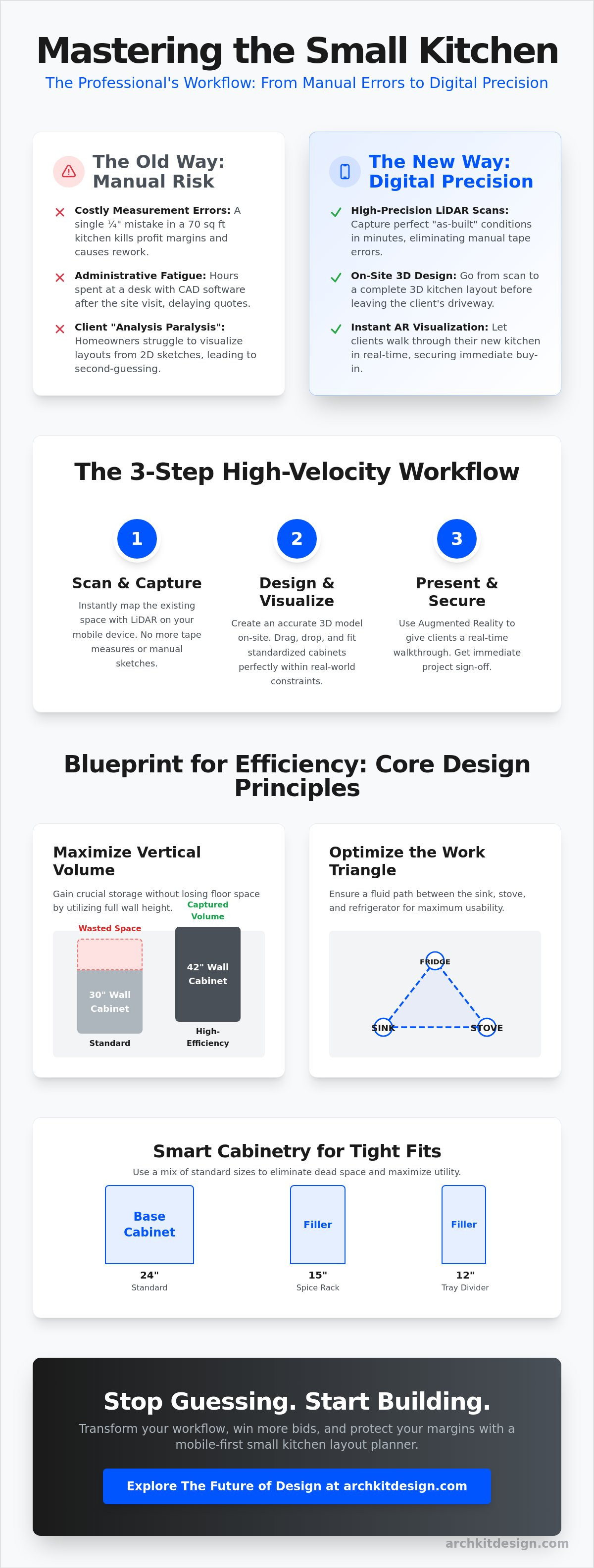
Precision is your best defense against wasted space. Standard 24-inch base cabinets are the anchor of most designs. However, 12-inch and 15-inch "filler" cabinets are essential for eliminating dead space in tight corners. These narrow units are perfect for pull-out spice racks or tray dividers. Don't settle for standard 30-inch wall cabinets. In small footprints, use 42-inch cabinets that reach the ceiling. This captures vertical volume that would otherwise be wasted. You gain storage without losing an inch of floor space. To see how these standards fit your specific job site, you can get early access to modern planning tools that visualize these dimensions in AR.
Digital vs. Manual: Choosing the Best Planning Methodology
Choosing a planning methodology determines your project's profitability. Traditional manual sketches are fast in the moment but risky in the long run. In a cramped kitchen, a single missed measurement leads to a cabinet that won't fit. Desktop CAD software offers high precision but chains you to an office chair. You lose 48 hours just getting a basic layout back to the client. Modern professionals are moving toward a mobile-first approach. A mobile small kitchen layout planner using AR and LiDAR provides on-site accuracy without the office-bound delay. It is the hybrid solution that balances speed with surgical precision. Stop trading your evenings for design hours.
Subscription costs are a recurring operational expense, but time is your most limited resource. Saving four hours of design time per project pays for the software in a single job. You reduce rework. You eliminate the cost of mis-ordered cabinets. High-velocity workflows aren't just about cool tech; they are about protecting your margins. Moving the design phase to the job site allows you to secure client commitment before the first meeting ends. This competitive edge is what separates high-volume remodelers from those struggling with administrative fatigue.
The Pitfalls of Traditional Measurement
A 1-inch error is a catastrophe in a 70-square-foot kitchen. If you misread your own handwriting on a paper sketch, the entire cabinet order is compromised. This forces a cycle of back-and-forth verification. You measure, go to the office, find a discrepancy, and drive back to the site. This "office delay" kills your momentum. Clients want answers now. If they have to wait two days for a layout, they'll call the contractor who gave them one in twenty minutes. Digital verification removes this friction entirely.
Leveraging LiDAR for Instant Accuracy
LiDAR mapping creates a perfect digital twin of the space. It doesn't just capture walls; it identifies plumbing lines, gas stubs, and electrical outlets automatically. You eliminate manual data entry. Contractor-focused tools like ArchKit convert these scans into 2D and 3D layouts while you're still in the room. This ensures that your "as-built" model is flawless. You aren't just drawing lines; you are capturing reality. This speed allows you to move from scanning to estimating in a single site visit. Capture the data once. Get it right the first time. Move to the next lead.
Step-by-Step: How to Plan a Small Kitchen Layout On-Site
Planning a high-performance kitchen begins with the "as-built" reality. You don't start with a generic mood board; you start with a precise scan. A mobile small kitchen layout planner allows you to build a digital twin of the space while you're still standing in it. This process removes the friction of returning to the office for manual data entry. Follow this linear sequence to move from a cluttered room to a finalized design in under twenty minutes. It's about speed, accuracy, and immediate results. Stop guessing. Start building.
- Scan the room using LiDAR to capture every wall and corner precisely.
- Tag fixed obstacles like plumbing stacks, gas lines, and load-bearing columns.
- Drop in your anchor appliances: the refrigerator, range, and sink.
- Build out the cabinetry using standard U.S. dimensions to ensure a perfect fit.
- Launch a 3D AR walkthrough to confirm the layout with the client in real-time.
Scanning and Mapping the Footprint
Start with a clean LiDAR scan. Move through the space slowly to ensure the sensor captures depth in every corner. Don't worry about existing clutter; modern software filters out the noise to find the actual wall surfaces. Pay close attention to ceiling heights and soffit dimensions. These are the vertical boundaries that define your cabinet height limits. Linking your scan to a professional kitchen design app ensures that your digital model matches the physical site with 1/8-inch accuracy. You eliminate the "guessing" of whether a 42-inch wall cabinet will clear the ceiling. Capture the data once. Get it right the first time.
Refining the Cabinet Layout
Once the footprint is locked, prioritize accessibility over simple storage. In small kitchens, drawer bases outperform standard doors every time. They provide full access to deep storage without the need to crawl on the floor. Solve the "blind corner" dilemma by using specialized inserts or rotating carousels that maximize every cubic inch. Using ArchKit's standard catalog allows you to snap cabinets into place instantly. This speeds up the placement process and ensures that your layout is based on actual, orderable hardware. You see the fit. The client sees the value. You catch door-swing conflicts on-site, not during the install. Ready to modernize your workflow and win more bids? Get early access to start designing on-site today.
Winning More Bids with AR Kitchen Visualization
Anxiety is the biggest barrier to closing a small kitchen remodel. Clients fear their new space will feel like a closet. They worry that a new island or deeper cabinets will choke the room. Augmented Reality (AR) is the antidote to this hesitation. A mobile small kitchen layout planner with AR capabilities allows you to prove the design works while you're still in the room. You aren't just showing a 2D sketch; you are providing a physical experience. When a client can literally walk through their future kitchen, the fear of "feeling cramped" disappears.
Visualizing the layout on-site also drastically reduces change orders. Most disputes happen because a client didn't understand the spatial reality of a 24-inch clearance zone. By finalizing the layout during the first meeting, you set clear expectations. They see the door swings. They test the walking paths. You integrate estimates directly from your layout planner tool to provide a quote before you even leave the driveway. This speed and transparency make you the obvious choice over contractors still using graph paper and office-bound CAD software.
The Psychology of On-Site Design
On-site design builds immediate trust. It shows the client that you value their time and prioritize accuracy. In small kitchens, clients are often afraid to make bold choices like dark cabinetry or unique hardware. AR allows them to commit to these designs by seeing them in their actual light and space. You move from being a salesperson to a collaborative partner. Providing a firm quote based on a digital twin of their room allows you to close the sale in the moment. You remove the "let me think about it" phase that kills so many leads.
Streamlining Your Project Workflow
Your digital layout is more than a sales tool; it's your project's technical foundation. Once the client approves the AR walkthrough, you export the layout directly to your cabinet manufacturer. This eliminates manual data entry and the risk of transcription errors. You also create a digital record of the approved "as-built" conditions. This protects you from measurement liability and ensures that every trade partner sees exactly what needs to happen. Modernizing your workflow isn't just about the technology. It's about protecting your margins and scaling your business. Check out ArchKit's pricing plans to start your digital transition and leave the administrative fatigue behind. Capture the room. Design the space. Win the contract. It's that simple.
Modernize Your Workflow and Reclaim Your Evenings
Mastering a small kitchen footprint doesn't require more time; it requires better tools. You've seen how legacy manual methods create measurement doubt and office-dependent delays. Transitioning to a mobile-first approach allows you to solve technical spatial problems while you're still standing in the room. By combining density-focused design principles with LiDAR precision, you ensure every cabinet fits the first time. This isn't just a minor upgrade. It is a fundamental shift in how you secure project approvals and protect your profit margins.
A professional small kitchen layout planner isn't just about drawing lines. It is about securing client trust through instant AR visualization and accurate on-site estimates. You eliminate the administrative fatigue of back-and-forth revisions. Instead, you provide immediate results that close deals faster. You move from the first meeting to a signed contract without the typical design-phase friction.
Stop losing margins to manual errors and office rework. Start planning faster on-site with ArchKit's AR toolkit. Gain access to LiDAR-accurate measurements, a comprehensive U.S. standard cabinet catalog, and instant 3D visualization. It's time to build smarter and scale your business with confidence.
Frequently Asked Questions
What is the best layout for a very small kitchen?
Galley layouts are the most efficient choice for narrow footprints because they maximize the work triangle in a compact hall. This design places all essential appliances within a few steps of each other. If you're working with extreme space constraints, a one-wall layout is the fallback option. It keeps the floor plan open while consolidating plumbing and electrical lines.
How do I plan a kitchen layout in a small space with standard cabinets?
Anchor your design with 24-inch base units and use 12 or 15-inch fillers to eliminate dead corners. A professional small kitchen layout planner helps you snap these standard sizes into place without the risk of manual measurement errors. Prioritize vertical volume by using 42-inch wall cabinets that reach the ceiling. This captures storage space that usually goes to waste.
Can I use an iPad to plan a kitchen layout on-site?
Yes, an iPad Pro with LiDAR is the ideal tool for professional field measurements and layout generation. Modern apps like ArchKit turn your tablet into a mobile design studio that captures "as-built" conditions in minutes. You can drop in cabinets and appliances while standing in the room. This eliminates the need to return to the office for data entry.
How much clearance do I need between cabinets in a small kitchen?
Maintain a minimum of 36 inches of walkway space, though 42 to 48 inches is the industry preference for comfort. In tight remodels, you must verify door swings for every appliance and cabinet to prevent collisions. Use your digital planner to test these clearances in 3D. It's better to find a pinch point on a screen than during the final installation.
What are common mistakes to avoid when planning a small kitchen?
Neglecting task lighting and ignoring door swing radii are the most frequent errors in tight spaces. Many contractors also skip the work triangle principle, which leads to a cramped and frustrating workflow for the client. Don't forget to account for "filler" strips at the ends of cabinet runs. Without them, drawers often hit door casings or adjacent hardware.
Do I need LiDAR to create an accurate kitchen floor plan?
You don't strictly need LiDAR, but manual tape measurements in tight corners invite human error that kills profit margins. LiDAR provides 1/8-inch accuracy and captures plumbing stubs or electrical outlets automatically. It builds a digital twin of the room in seconds. This speed allows you to move from scanning to estimating without the administrative fatigue of traditional sketching.
How does AR help with small kitchen design approvals?
AR removes the client's fear of a "cramped" feeling by letting them walk through the virtual space in real-time. They see the walking room and cabinet fit before you order any materials. This immediate visualization builds trust and leads to faster signatures. It also reduces the likelihood of expensive change orders once the project moves into the construction phase.
How can I maximize storage in a small 10x10 kitchen layout?
Use 42-inch wall cabinets to reach the ceiling and replace standard base doors with deep drawer units for better access. A small kitchen layout planner can help you identify "dead zones" where smart corner inserts or pull-out spice racks can add cubic feet of storage. Every inch must perform a function. Focus on density to turn a 10x10 footprint into a high-utility hub.


