
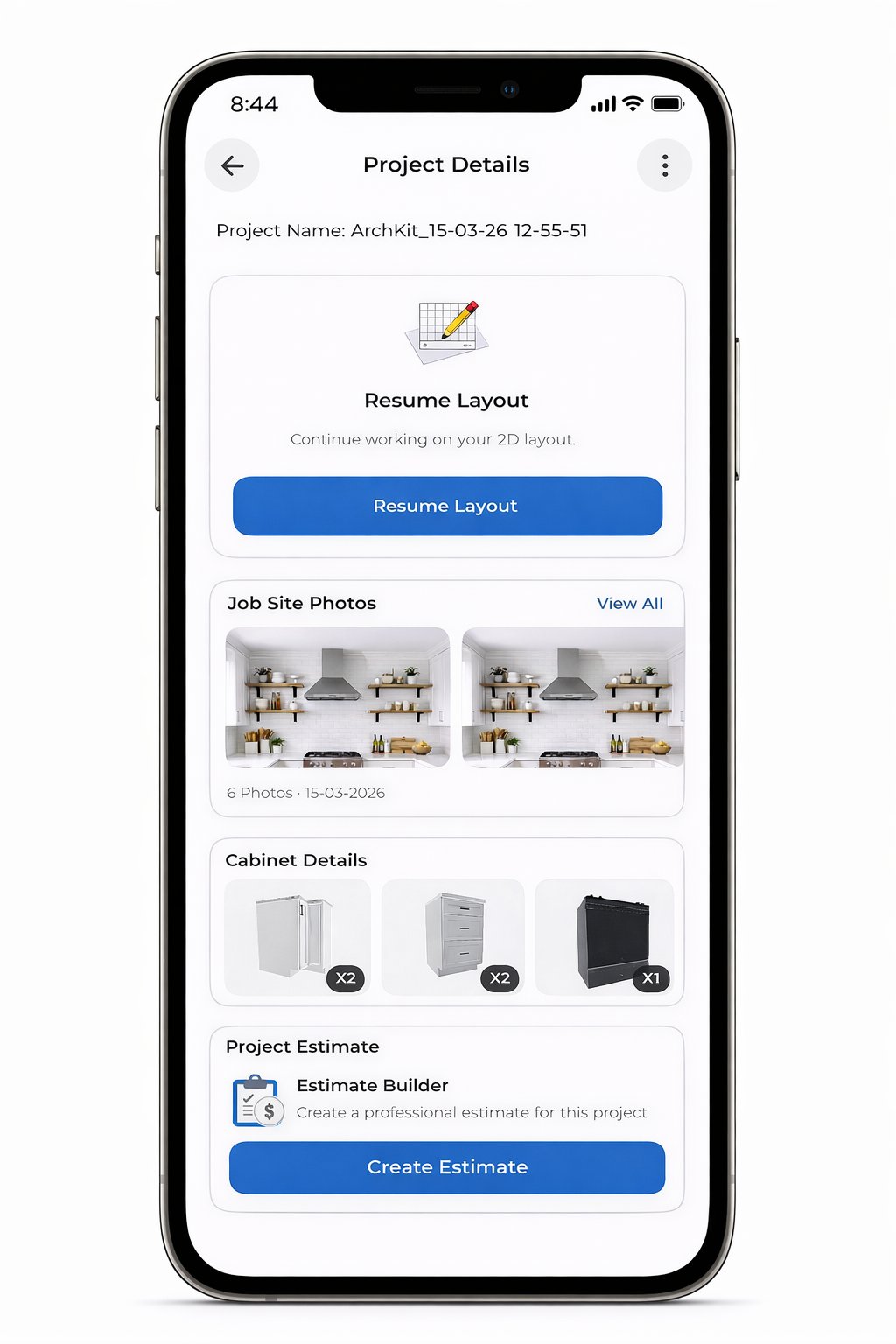
Your most expensive tool isn't a high-end table saw. It is the pencil and paper you still use for site notes. Manual drafting is a profit killer. You measure the walls, sketch the cabinet layout, and then spend your night fighting with desktop software for creating a kitchen scope of work. One missed decimal point leads to a cabinet misorder that eats your margin. It is a slow, outdated process that keeps you stuck in the office while your competitors are closing their next deal.
We know the fatigue of administrative rework and the frustration of waiting days for a client to sign off on a project. This article shows you how to stop wasting hours on manual drafting. You will learn how mobile-first software generates accurate kitchen scopes on-site, using tools like ArchKit Design to turn LiDAR scans into immediate 3D visuals. We will compare the top platforms for 2026. Discover how to reduce revision cycles, master the shift toward natural wood cabinetry, and impress clients with professional results before you even leave the jobsite.
Key Takeaways
- Stop losing money on cabinet misorders by replacing manual tape measurements with millisecond-accurate LiDAR scanning.
- Learn how modern software for creating a kitchen scope of work eliminates the 48-hour office bottleneck by generating professional drafts on-site.
- Compare the high costs of legacy desktop CAD hardware against the portability and speed of mobile-first design workflows.
- Master a five-step workflow to capture footprints, place utility connections, and finalize cabinet layouts before leaving the kitchen.
- Reduce revision cycles and impress clients instantly by leveraging 3D visuals to confirm design choices in real time.
Why Traditional Kitchen Scope of Work Methods Fail Modern Contractors
The tape measure is lying to you. Even with a steady hand, manual measurements are prone to "close enough" approximations that haunt you during installation. Relying on a pencil and a scrap of lumber for your site notes is a liability, not a workflow. In 2026, the gap between a successful project and a financial disaster is often measured in fractions of an inch. When you rely on outdated processes, you aren't just measuring walls; you are inviting human error into your profit margins. A professional Statement of Work requires more than a handwritten list of tasks. It demands precision data that bridges the gap between the initial walkthrough and the final cabinet install.
The real bottleneck isn't the physical work. It's the administrative fatigue of moving data from a notepad to a spreadsheet back at the office. This "office-dependent" model kills your momentum. While you spend 48 hours drafting a proposal on a desktop, your lead is already talking to a competitor who provided a visual plan before leaving their driveway. Modern software for creating a kitchen scope of work eliminates this delay. It moves the drafting process to the jobsite, where the information is fresh and the client is ready to sign.
The Hidden Cost of Measurement Errors
Precision is everything in a kitchen. A 1/4 inch mistake in your base cabinet run can ruin an entire layout, leading to expensive re-orders and weeks of project delays. Manual errors don't just cost time; they eat your margins through "hidden" labor costs. You pay for the installer to wait, the designer to fix the drawing, and the freight for replacement parts. Using professional software for creating a kitchen scope of work ensures that every wall, window, and utility connection is captured with LiDAR accuracy. You stop guessing and start documenting. This level of detail protects your business from the "he said, she said" disputes that arise when a scope isn't clearly defined from day one.
The Speed Advantage: Closing Deals on the First Visit
The first contractor to provide a clear, visual SOW usually wins the contract. Clients in 2026 have zero patience for "I'll get back to you next week." They want to see their kitchen now. By using a mobile-first tool like ArchKit Design, you move from a vague estimate to a concrete plan in minutes. You can place cabinets, adjust layouts, and show the client exactly what they are paying for while you are still standing in their kitchen. This immediate validation reduces the back-and-forth communication that stalls projects. It builds trust, demonstrates authority, and secures the deposit before you even start your truck.
Essential Features of Professional Kitchen SOW Software
Professional software for creating a kitchen scope of work is a data engine, not just a drawing tool. While DIY planners focus on the "dreaming" phase, a contractor needs a tool that handles the messy reality of a physical jobsite. You don't have time to fiddle with abstract shapes or generic blocks. You need a system that captures every wall, utility line, and obstacle in seconds. An Effective Construction Scope of Work requires a level of detail that generic apps simply can't provide. When you select your tech stack, prioritize field-ready features that bridge the gap between site measurement and material ordering.
The right software should generate 2D floor plans and 3D visualizations simultaneously. You shouldn't have to draw twice. Every time you place a cabinet in 2D, the 3D model should update instantly. This allows you to walk the client through their new space while you're still standing in their old one. It's about validation. If they can see the layout on your tablet, they are far more likely to approve the project on the spot.
LiDAR Scanning: The New Standard for Site Surveys
LiDAR scanning is the baseline for 2026 kitchen contracting, turning physical rooms into millisecond-accurate digital models. This technology creates a perfect digital twin of the kitchen by bouncing laser pulses off every surface. You no longer need a second person to hold the end of a tape measure or a laser disto. Just pan your phone around the room. The software captures the exact dimensions of walls, windows, and soffits. It even identifies the center points of plumbing and electrical outlets. This level of precision eliminates "measurement drift" and ensures your cabinet layout fits the first time. If you want to see this precision in action, you can secure early access to the ArchKit Design mobile workflow tool today.
Automated Cabinet Lists and Estimating
Accuracy in your SOW means accuracy in your bill of materials. Professional software for creating a kitchen scope of work should include pre-loaded catalogs of U.S. standard cabinet sizes. When you drag a 36-inch base cabinet into the plan, the software should log it automatically. This creates an instant list of components for your supplier. Linking the visual layout directly to your pricing model prevents estimating gaps. You aren't just showing a picture; you are building a live manifest of every hinge, drawer box, and filler strip required for the job. This automation removes the administrative fatigue of manual data entry and keeps your profit margins protected from forgotten line items.
Finally, ensure your tool is cloud-based. Your field measurements should be accessible to your office team or sub-contractors the moment you hit save. This connectivity ensures that everyone is working off the most recent version of the project, reducing the risk of using outdated measurements for cabinet production.
Comparing SOW Software: Mobile-First vs. Legacy Desktop CAD
The office is where project momentum goes to die. Traditional desktop CAD programs like Chief Architect or SketchUp are powerful, but they are tethered to a desk. Bringing a $3,000 "CAD-ready" laptop into a dusty kitchen walkthrough is impractical. These legacy systems rely on complex command lines and steep learning curves that don't fit the fast-paced reality of a contractor's day. When you use stationary software for creating a kitchen scope of work, you create a massive "office bottleneck." You measure on Monday, but the client doesn't see a proposal until Wednesday. In that 48-hour gap, your lead grows cold.
Mobile-first tools like ArchKit Design flip this script. They prioritize a tap-and-drag interface designed for the field. You don't need a drafting degree to move a pantry cabinet or adjust a kitchen island. Your iPhone or iPad Pro becomes the only hardware you need. This shift from stationary to mobile is about more than convenience. Industry leaders recognize that we must Advance The Skilled Trades Through Technology to stay profitable. By moving the design process to the jobsite, you eliminate the "re-drawing" phase entirely.
The Power of On-Site AR Visualization
Static PDF printouts can't compete with the "wow factor" of Augmented Reality (AR). Using AR visualization, you can show homeowners their new cabinetry in their actual space before the first demo hammer swings. This is the ultimate tool for resolving layout objections. If a client is worried that a new peninsula will make the kitchen feel cramped, you can place it digitally and let them walk around it. This immediate visual proof builds deep trust. It reduces project anxiety and helps you secure a signature on the Statement of Work before you even leave the driveway.
Workflow Efficiency: Office Time vs. Field Time
Modern contractors are reclaiming their evenings by moving administrative tasks to the field. Using a mobile kitchen design app for iPhone allows you to generate a professional scope of work while the measurements are fresh in your mind. This workflow saves an average of three to five hours of office work per project. You stop being a data entry clerk and start being a builder again. Because the ArchKit Design software for creating a kitchen scope of work links your visual plan directly to your bill of materials, you eliminate the risk of forgetting a filler strip or a toe kick during the transition from site notes to a formal estimate. The result is a faster sales cycle and a more protected profit margin.
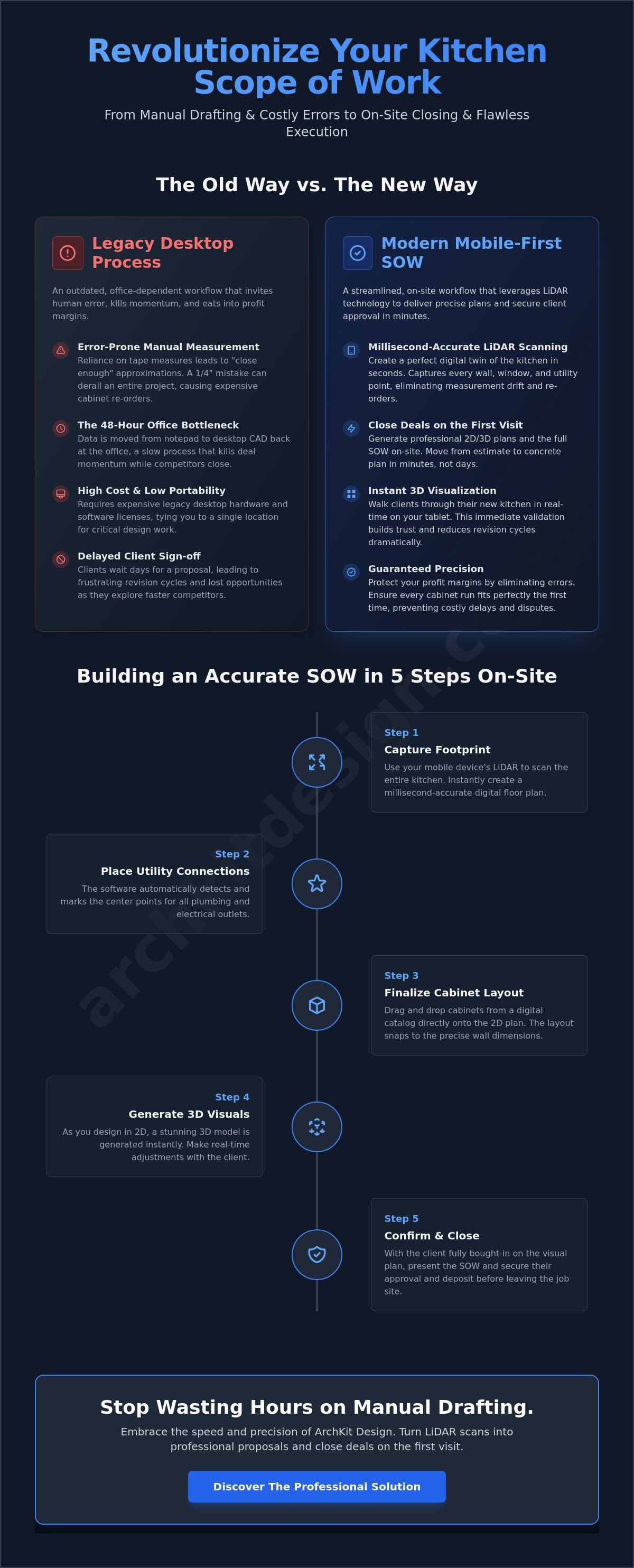
Building an Accurate Kitchen Remodel Scope in 5 Steps
Stop guessing. Start scanning. The process of building a professional scope of work should happen while you are on-site, not days later at a desk. Using modern software for creating a kitchen scope of work turns a chaotic walkthrough into a structured data capture session. It ensures that every detail, from the height of the backsplash to the swing of the pantry door, is documented correctly. Follow this five-step workflow to streamline your site visits and eliminate the drafting bottleneck.
- Step 1: Rapid LiDAR Scanning. Use your mobile device to scan the entire footprint. ArchKit Design captures the room geometry in seconds, creating a millisecond-accurate digital twin of the existing space.
- Step 2: Place Openings and Utilities. Drop in windows, doors, and walkways. Mark the exact center points for the sink plumbing, gas lines, and electrical outlets to ensure the new layout respects existing infrastructure.
- Step 3: Layout Cabinets. Drag and drop units from a professional catalog of U.S. standard sizes. This ensures your design is buildable and your material list is accurate from the start.
- Step 4: Generate 3D Visuals. Toggle to the 3D view and walk the client through the space. Use this moment to confirm cabinet heights and island clearances before you leave the site.
- Step 5: Export the SOW. Hit export to generate a finalized Statement of Work and a detailed bill of materials. You now have a professional document ready for a signature.
Capturing the Digital Blueprint
Kitchens are rarely empty when you arrive for a survey. To get the best results with LiDAR, clear small appliances from the countertops if possible. If the room is cluttered, focus your scan on the ceiling lines and floor-to-wall junctions; the software can often "see" through furniture to find the true wall location. Don't forget the vertical details. Ensure you log ceiling heights and soffit depths accurately, as these are the most common areas for cabinet install errors. Marking plumbing and electrical "as-is" locations during this phase prevents layout conflicts during the rough-in stage.
Finalizing the Deliverable
A professional kitchen SOW must be more than a drawing. It needs to include specific material callouts, project exclusions, and a clear sequence of work. Review the automated cabinet list generated by your software for creating a kitchen scope of work to account for custom modifications or specialized hardware. This list acts as your ordering manifest, so precision here saves weeks of lead-time delays later. If you are ready to modernize your workflow, check the pricing for professional design tools to find a plan that fits your business volume. Building a digital-first business isn't just about speed; it's about protecting your margins through absolute accuracy.
Ready to stop wasting hours on manual drafting? Get early access to ArchKit Design and start generating professional kitchen scopes directly on-site.
ArchKit Design: The Professional Solution for On-Site SOW Generation
ArchKit Design addresses the office bottleneck by moving every critical task to the palm of your hand. This isn't generic design software; it's a high-velocity software for creating a kitchen scope of work built for the reality of dusty rooms and busy schedules. By merging LiDAR precision with an intuitive mobile interface, it eliminates the need for stationary hardware or second-person assistance. You capture the data, build the layout, and finalize the scope before you even put your keys in the ignition.
The goal is simple: remove the friction between the initial measurement and the final contract. ArchKit Design allows you to bypass the traditional "re-drawing" phase entirely. Because the app creates 2D and 3D layouts simultaneously, your field notes become your final deliverable. This is the modern standard for professional contractors who value accuracy over approximations.
Designed for the Field, Not the Office
Most CAD tools are too slow for a live walkthrough. ArchKit Design features a no-nonsense interface that works as fast as you do. You don't have to navigate deep menus or complex command lines to get results. Accessing standard U.S. cabinet sizes on the fly allows you to build a manifest that your supplier actually understands. This speed translates directly into a higher win rate. When you provide a professional on-site presentation, you aren't just selling a kitchen. You are selling the confidence that you are the most organized and technologically advanced contractor for the job.
Accuracy is your best insurance policy. By leveraging AR technology, ArchKit Design reduces measurement errors to near zero. You can visually confirm that a 36-inch sink base fits exactly where the plumbing is located. This real-time validation prevents the hidden costs of re-orders and labor delays. It turns your iPhone into a powerful workflow tool that serves both your crew and your clients.
Join the Future of Kitchen Remodeling
The industry is shifting. Top remodelers are ditching tape measures for LiDAR because they value their time and their profit margins. The competitive advantage of immediate project approvals cannot be overstated. If you are still spending your nights drafting scopes from scratch, you are falling behind. Modernizing your business starts with choosing the right software for creating a kitchen scope of work. It is time to replace administrative fatigue with the satisfaction of immediate, on-site results.
This transition to digital precision allows contractors to focus on quality craftsmanship and specialized partnerships, such as working with Cabinet refinishing Denver to provide clients with premium, sustainable cabinetry updates.
Don't let another lead grow cold while you're stuck at your desk. Get early access to ArchKit Design now and transform your site visits into closing opportunities.
Own Your Workflow and the Jobsite
The tape measure is a relic. Your competitive edge now depends on speed and precision. Legacy desktop CAD creates an office bottleneck that stalls projects and drains your evenings. By switching to mobile-first software for creating a kitchen scope of work, you eliminate the re-drafting phase. You reclaim your time. You close more deals.
ArchKit Design transforms your iPhone into a project-closing machine. By unifying site surveys and layout planning into a single mobile workflow, you bypass the errors that typically occur during manual data transfer. This precision ensures that your installation phase remains profitable and your lead-to-contract cycle stays tight. You stop being a data entry clerk and start being the most professional contractor in your market.
Stop the administrative fatigue. Start winning more bids with immediate, professional results. Get Early Access to ArchKit Design and Streamline Your SOW Workflow. It is time to lead the trade into the digital age and secure your margins.
Frequently Asked Questions
What is the best software for creating a kitchen scope of work?
ArchKit is the premier software for creating a kitchen scope of work on-site. It replaces cumbersome desktop CAD with a high-velocity mobile workflow. You scan, design, and document in one visit. It bridges the gap between site measurement and client signature by providing immediate results. This tool is built specifically for contractors who need to move faster and eliminate the office-dependent drafting bottleneck that kills leads.
Can I create a kitchen layout on my iPhone or iPad?
Absolutely. ArchKit transforms your iPhone or iPad into a professional design workstation. You place cabinets, move walls, and adjust layouts directly in the field. There is no need for stationary office equipment or expensive CAD laptops. Your mobile device handles the 2D floor plans and 3D visuals simultaneously. It allows you to finalize the project footprint while you're still standing in the kitchen, saving hours of office time.
How accurate is LiDAR scanning for kitchen measurements?
LiDAR delivers millisecond-accurate results with sub-inch precision. It creates a perfect digital twin of the kitchen footprint by bouncing laser pulses off every surface. You eliminate "close enough" measurements and tape measure drift. This technology captures wall lengths, ceiling heights, and utility locations with professional authority. It ensures your cabinet layout fits the first time, protecting your margins from the high cost of measurement errors and cabinet misorders.
Do I need CAD experience to use kitchen SOW software?
No drafting degree required. ArchKit utilizes a tap-and-drag interface designed for field professionals. It replaces complex command lines with intuitive touch controls. You focus on the kitchen layout while the software for creating a kitchen scope of work handles the technical drafting. It's built for speed, not steep learning curves. This approach allows any contractor to generate a professional scope without spending weeks learning traditional architectural software.
Can I export a cabinet list from my design app?
Yes. ArchKit generates an automated bill of materials as you design. It tracks every base cabinet, wall unit, and filler strip using U.S. standard sizing. You export a finalized manifest directly to your supplier to ensure order accuracy. This automation removes administrative fatigue and protects your profit margins from forgotten line items. It turns your visual layout into a functional manifest, linking your scope of work directly to your procurement process.
How does AR help in the kitchen design approval process?
AR provides immediate visual validation for the homeowner. It projects the new cabinetry into the client's actual space. You resolve layout objections before the first demo hammer swings. This "see it to believe it" experience builds deep trust and secures project approvals on the spot. It reduces project anxiety by showing exactly how the new island or peninsula will function within the room, making the sales process faster and more transparent.
Is there a free kitchen design app for contractors?
Yes. You can start with the free kitchen design app from ArchKit. It allows you to test the LiDAR scanning and layout features on a real jobsite before committing. It is the perfect entry point for modernizing your traditional trade without initial overhead. You can scan rooms, place cabinets, and see the value of a mobile workflow firsthand. It is a no-nonsense tool built for the physical reality of the work.
What hardware do I need for LiDAR kitchen scanning?
You need an iPhone Pro or iPad Pro (model 12 or newer). These devices feature the integrated LiDAR sensor required for millisecond-accurate scanning. You don't need expensive standalone scanners or specialized hardware. Your existing mobile device becomes your most powerful site survey tool. Just open the app, pan the room, and watch the digital twin appear. It is a simple, effective solution that replaces bulky equipment with the tech already in your pocket.


