
Spending three hours at a desk after ten hours on a dusty job site isn't a business strategy; it's a recipe for burnout. You know the drill. You manually measure a kitchen, head home, and then spend half your night fighting with a desktop program to get a 3D model ready. One wrong measurement leads to a cabinet ordering disaster. It's slow, it's exhausting, and it's costing you contracts. Finding the best kitchen design software for small business in 2026 means moving beyond the office and into the palm of your hand.
We understand the pressure to impress high-end clients while maintaining total accuracy. This guide promises to show you how to eliminate measurement errors, ditch the "laptop burden," and close bids before you even leave the driveway. We will compare the top pro tools, including mobile-first solutions like ArchKit Design and industry staples, to help you generate accurate 3D models and professional presentations directly on-site. Scan. Design. Show. It's time to win more jobs with less office time.
Key Takeaways
- Stop fighting manual CAD. Pros are ditching legacy desktop platforms for mobile-first, AR-driven design solutions.
- Master the on-site scan. LiDAR technology eliminates measurement errors and ensures layouts are accurate to the inch.
- Find the best kitchen design software for small business. Compare high-end showroom tools with flexible, on-site apps like ArchKit.
- Speed up your sales cycle. Instant visualization helps you close bids and get client signatures before you leave the job site.
- Build with confidence. Ensure every design is order-ready by using tools focused on U.S. standard cabinet catalogs.
The Shift in Kitchen Design Software for Small Business
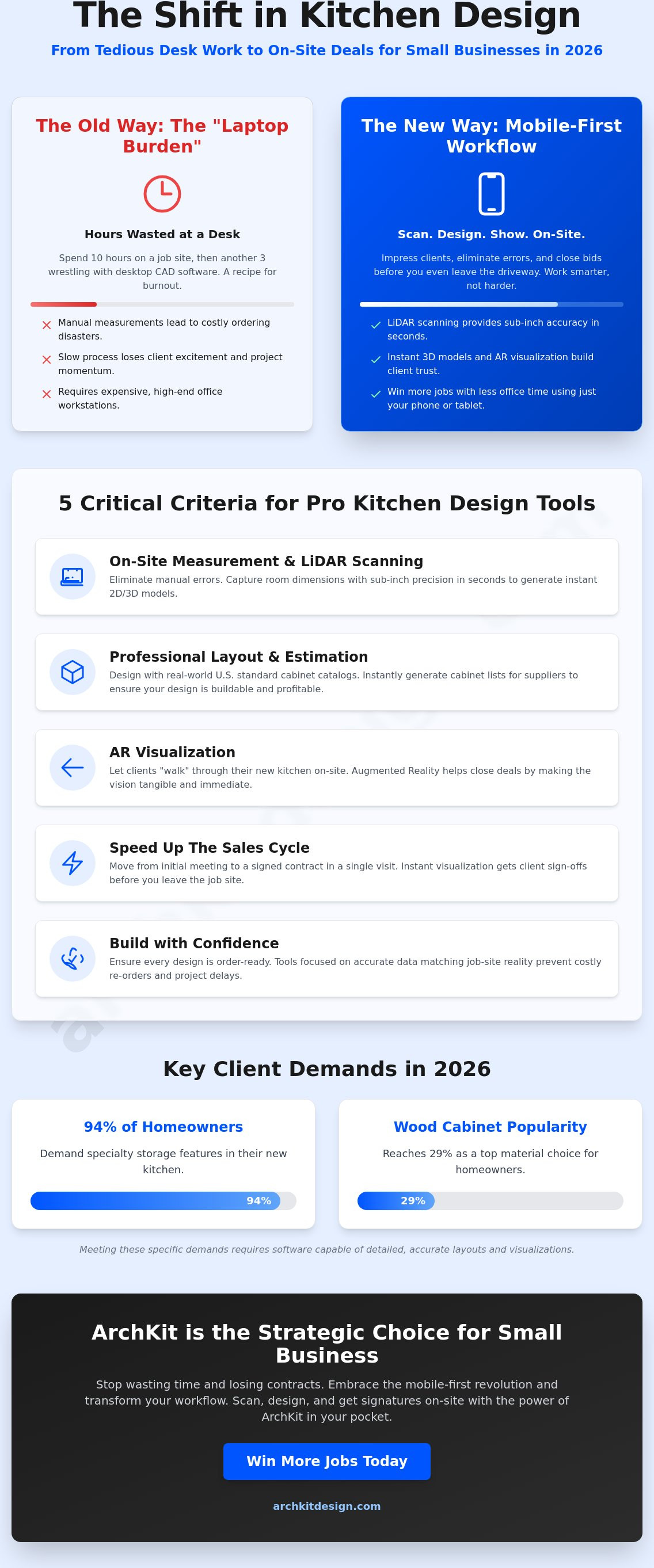
The kitchen design industry is moving fast. Small business owners are ditching the desk and taking their workflow to the job site. For years, professionals relied on heavy Computer-aided architectural design (CAAD) programs that required a high-end office workstation. That old way of working creates a massive bottleneck. In 2026, the best kitchen design software for small business isn't an office program; it's a mobile-first tool that lives on your phone.
Modern contractors need speed. They need to visualize ideas while standing in the client's actual kitchen. Mobile AR and LiDAR technology have turned the "laptop burden" into a thing of the past. Instead of taking manual notes and hoping they're right when you get home, you can now scan, design, and show results in minutes. This shift empowers you to act as a tech-savvy foreman who closes deals before even leaving the driveway.
Desktop vs. Mobile: The Battle for the Job Site
Office-bound software is a weight on your business. When you have to go back to the office to generate a 3D model, you lose momentum. The client's excitement fades, and you're left chasing them for a follow-up meeting. Mobile-first design changes the rhythm. You can place cabinets, swap finishes, and adjust layouts in real-time. This immediate feedback loop builds trust and speeds up the contract process.
Hardware has finally caught up to the trade. An iPad Pro or an iPhone 15 Pro now packs more than enough power to handle complex 3D rendering. You don't need a bulky laptop or a dedicated CAD specialist. With a free kitchen design app, you can start a project on your phone and finish the layout while the client is still talking about their vision. ArchKit Design is built for this specific speed. It's about being efficient, professional, and fast.
Why Accuracy is the New Competitive Edge
Manual measurement errors are the silent profit killers of kitchen remodeling. One missed inch on a cabinet wall can lead to thousands of dollars in reordering fees and weeks of project delays. Digital tools remove the guesswork. By using an on-site kitchen design app, you ensure that every cabinet list you generate is based on the actual physical reality of the room. ArchKit Design ensures that your digital data matches the job site reality. In 2026, LiDAR technology allows kitchen professionals to capture room dimensions with sub-inch precision in seconds without ever touching a tape measure.
5 Critical Criteria for Professional Kitchen Design Tools
Generic design tools like SketchUp or Figma have their place, but they aren't built for the grit of a job site. When you're standing in a client's home, you don't need a general-purpose drawing tool. You need software that understands the nuances of cabinetry and construction. The best kitchen design software for small business must meet specific criteria to be worth your investment. It has to be fast, accurate, and mobile. If a tool requires you to spend hours at a desk after the work day is done, it's not a solution; it's a liability.
On-Site Measurement and Scanning
Tape measures fail. Notebooks get lost. In 2026, LiDAR scanning is the baseline for any serious remodeler. This technology captures room dimensions with sub-inch precision in seconds. You scan the room, and the software generates a 2D floor plan and a 3D model instantly. This reduces the need for multiple site visits and eliminates those moments where you realize you forgot to measure a window height or an outlet location. By using an on-site tool like ArchKit Design, you capture the physical reality of the space in one pass.
Professional Layout and Estimation
A beautiful design is useless if you can't build it. Professional tools must include U.S. standard cabinet catalogs. This ensures your layout fits real-world products. The benefits of CAD in interior design are clear; it streamlines the transition from concept to construction. Your software should generate an instant cabinet list for your suppliers. With wood cabinets reaching 29% popularity in 2026, and 94% of homeowners demanding specialty storage features, your estimates must be detailed and accurate. Digital precision reduces material waste and keeps your margins healthy.
AR Visualization and Adoption
Augmented Reality (AR) lets your clients "walk" through their new kitchen before a single demo hammer swings. Show them the multi-functional island or the layered lighting plan in their actual space. This level of visualization closes deals faster because it removes the client's fear of the unknown. Finally, follow the 15-minute rule. If you can't learn the basics of the app in 15 minutes, it's too complex for a busy contractor. You shouldn't need a degree in architecture to place a base cabinet. If you want to see how these mobile workflows can transform your business, sign up for early access to see the latest in on-site design tech.
Comparing the Top Small Business Solutions for 2026
Choosing the best kitchen design software for small business depends on where you do your work. High-volume showrooms often lean on legacy giants like Design Flex (formerly 2020 Design) or ProKitchen. These platforms offer incredible depth with manufacturer-specific catalogs and high-end rendering. However, they're built for desktop workstations. For a small team of 1-5 people, the complexity and cost can be overkill. You're paying for features you'll never use while still being tethered to a desk. The learning curve alone can take weeks of billable time away from your projects.
General 3D tools like SketchUp Pro offer a middle ground. Priced at $399 per year, it's a flexible option for custom objects. The downside? It's not built for kitchens. You'll spend hours building cabinet libraries or hunting for plugins to make it functional for a remodel. Then there are scanning apps like MagicPlan. They're excellent for rapid floor plans, but they lack the cabinet-specific depth required to generate a buildable list. They tell you the room size, but they don't help you sell a kitchen.
The "No Laptop" Workflow: ArchKit vs. The Rest
ArchKit represents the new wave of mobile innovators. While legacy tools force you to "go back to the office," ArchKit moves the entire design phase to the job site. You scan the room, place U.S. standard cabinets, and show the client a 3D model in one visit. This eliminates the days of lag time between the first meeting and the presentation. For a deeper look at this workflow, check out ArchKit: The Ultimate Kitchen Design App for Contractors. It's the difference between chasing a lead and signing a contract on the spot. Scan. Design. Show. It's that simple.
Pricing and ROI for Small Business Owners
The industry has shifted from one-time licenses to SaaS subscription models. Design Flex and ProKitchen can cost thousands of dollars annually when you factor in support and success plans. SketchUp is more affordable but requires a massive time investment to master. When calculating ROI, don't just look at the software cost. Calculate the value of your time. If a tool saves you five hours of office work per project, it pays for itself in a single job. Transparent models like ArchKit pricing allow small businesses to scale without hidden fees. Spend less on software licenses and more on growing your business.
Integrating Design Software into Your Daily Workflow
Adopting the best kitchen design software for small business isn't just about owning the tool; it's about changing how you work on the ground. Traditional workflows are broken. You measure with a tape, sketch on a pad, and then wait days to show the client a 3D rendering. By then, the lead has often gone cold. A modern, on-site workflow solves this by moving every step of the process into the initial consultation. You move from a passive estimator to an active designer in minutes.
To maximize efficiency, follow a structured on-site process:
- Step 1: The On-Site Scan. Move from tape to LiDAR. Walk the room and capture every wall, window, and outlet with sub-inch precision.
- Step 2: Instant Layout. Place U.S. standard cabinets in real-time. Adjust for plumbing and electrical constraints while you're still looking at them.
- Step 3: Client Visualization. Use AR to show the client their new kitchen. Let them see the multi-functional island or specialty storage features in their actual space.
- Step 4: Export and Estimate. Generate a buildable cabinet list. Send the PDF to your supplier for a quote before you leave the driveway.
Improving Client Communication with AR
Clients struggle to visualize 2D drawings. This indecision leads to endless revisions and project delays that eat into your margins. Using Mobile CAD for Kitchen Design allows you to bridge that gap. Follow the simple rhythm: Scan. Design. Show. When a homeowner sees their new kitchen through an AR lens in their own home, trust is built instantly. It removes the fear of the unknown and allows them to commit to the project with confidence.
Eliminating the Office Bottleneck
The goal is to finish the design phase before you pack up your tools. Instead of taking data back to an office, sync your on-site scan directly with your project management tools. This allows your team or suppliers to see what's needed in real-time, reducing the back-and-forth emails that stall projects. The "no laptop required" workflow ensures you leave the job site with a finished plan, turning your home back into a place for rest instead of a secondary office. If you're ready to stop the office-based design grind, sign up for early access to start designing on-site today.
Why ArchKit is the Strategic Choice for Small Business
ArchKit is more than a design tool. It is a strategic asset for the modern contractor. Most platforms are built for designers sitting in air-conditioned offices. ArchKit is built for the dusty job site. It understands that you don't have time for technical fluff. You need to scan a room, place cabinets, and get an accurate list for your supplier. This pragmatic focus makes it the best kitchen design software for small business owners who value their time above all else. It replaces the fatigue of office work with the satisfaction of instant results.
Accuracy is the foundation of profit. Ordering errors are expensive and stall your momentum. ArchKit focuses on U.S. standard cabinet sizes to ensure that what you design on-site is exactly what you order. There is no translation error between your digital model and the manufacturer catalog. By using the LiDAR sensors already in your iPhone or iPad, you capture the physical reality of the space with professional precision. You win more bids because you provide a superior client presentation that competitors using manual methods simply cannot match.
A Tool Built for Contractors, Not Just Designers
We stripped away the unnecessary complexity. You won't find features that require a week-long training course. Instead, you get a high-velocity workflow that delivers instant results. The "no laptop required" experience means you can handle everything from the initial scan to the final cabinet list while standing in the kitchen. For professionals just starting to digitize their workflow, the free kitchen design app provides the perfect entry point. It allows you to test the LiDAR scanning and basic layout tools without any upfront cost. It is a no-nonsense approach to remodeling technology.
Future-Proofing Your Business in 2026
The remodeling market is projected to grow this year. To capture that revenue, you need to be faster than the competition. While other contractors are still fumbling with tape measures and paper sketches, you are showing 3D visualizations in AR. This professional edge helps you win high-end clients who expect modern efficiency. Scaling your small business doesn't mean working more hours at night. It means increasing your on-site efficiency. Don't let outdated habits hold your growth back. Get early access to ArchKit and win more clients today.
Modernize Your Workflow and Win More Bids
The future of kitchen remodeling isn't found in a home office at midnight. It's happening right now on the job site. By choosing the best kitchen design software for small business, you reclaim your evenings and build deeper trust with your clients. You've seen how legacy desktop programs create bottlenecks and how mobile innovators are changing the game. Success in 2026 belongs to the contractors who can scan, design, and show results in a single visit.
Accuracy doesn't have to be a slow process. With LiDAR precision and a standard U.S. cabinet catalog at your fingertips, you eliminate the ordering errors that kill profit margins. No laptop is required to provide a professional presentation. You just need the right tool in your pocket. It's time to stop the back and forth and start closing contracts faster.
Start your on-site design journey with ArchKit and experience the freedom of a mobile-first workflow. Take control of your time, impress your clients, and grow your business with confidence.
Frequently Asked Questions
What is the easiest kitchen design software for a small contractor to learn?
Mobile-first apps like ArchKit are the easiest to learn because they replace complex CAD shortcuts with intuitive touch controls. You can master the basic "Scan. Design. Show." workflow in about 15 minutes. This is much faster than legacy desktop programs that require weeks of specialized training. It is built for the job site, not the classroom. Spend less time in tutorials and more time winning clients.
Do I need a LiDAR-enabled device like an iPad Pro for kitchen design software?
You need a LiDAR-equipped device like an iPhone Pro or iPad Pro to use the most advanced room scanning features. These sensors allow you to capture dimensions instantly without a tape measure. While some apps offer manual entry, the speed of LiDAR is what removes the office bottleneck. It is a smart hardware investment for a massive productivity gain on every project.
Is mobile kitchen design software accurate enough for cabinet ordering?
Modern LiDAR measurements are accurate enough for professional cabinet ordering when used correctly. The best kitchen design software for small business generates dimensions within sub-inch precision. This level of accuracy ensures your U.S. standard cabinet lists fit the physical space perfectly. It eliminates the human error often found in manual note-taking and messy hand-drawn sketches.
Can I use kitchen design software on-site without an internet connection?
Most professional mobile design tools allow you to perform the initial scan and layout offline. You can design in a basement or a new build with no cell service. Once you're back in range, the app syncs your project data to the cloud automatically. This ensures your workflow never stops just because the job site Wi-Fi is down or unavailable.
How much does professional kitchen design software for small businesses cost?
Professional software costs vary widely, ranging from around $10 a month for mobile apps to over $2,000 annually for high-end showroom platforms. Subscription models are now the industry standard for the best kitchen design software for small business. This shift allows you to pay for what you use without heavy upfront licensing fees. It makes pro-grade tools accessible for smaller remodeling teams.
What is the difference between AR and 3D rendering in kitchen design?
3D rendering is a digital image of a design; AR overlays that design onto the real room through your device screen. 3D shows the client what the kitchen could look like in a vacuum. AR shows them exactly how those cabinets will look in their actual house. This real-world context is what builds immediate trust and closes bids faster during the first visit.
How does LiDAR scanning improve the kitchen measurement process?
LiDAR scanning replaces the tape measure with laser precision to capture walls, windows, and floor heights in seconds. It creates a digital twin of the room instantly. This process is much faster and more reliable than manual methods. It ensures you never have to drive back to a job site because you forgot to measure a single outlet or window casing.
Can I export my designs from a mobile app to other CAD software?
Most modern design apps allow you to export your files as PDFs or standard CAD formats. This lets you share floor plans with architects or cabinet lists with your suppliers effortlessly. It bridges the gap between your on-site design and the final production phase. Your data stays mobile, flexible, and ready for every stage of the remodeling project.


