

Imagine standing in a client's windowless basement, ready to close a high-stakes deal, only to have your web-based software freeze. That spinning wheel of death isn't just an annoyance; it's a productivity killer that makes you look unprepared in front of a homeowner. You need a reliable kitchen design app with offline mode that keeps pace with your physical workflow on-site. We understand the frustration of losing design progress because of a dropped connection or a slow hotspot. This guide shows you why offline functionality is critical for professional results and zero downtime. We'll explore how to choose the right professional tools, like ArchKit Design, to maintain a seamless workflow in any environment. Learn how to transform your iPhone or iPad into a powerhouse that works anywhere the job takes you.
Key Takeaways
- Understand why cloud-dependent software fails on job sites and how local processing ensures you never lose a design in a cellular dead zone.
- Learn how a kitchen design app with offline mode eliminates presentation lag, allowing you to move through high-resolution 3D models without a Wi-Fi signal.
- Discover the speed of LiDAR scanning for capturing precise room measurements and obstacles instantly without relying on a manual tape measure.
- See how ArchKit Design uses a professional U.S. cabinet catalog to create accurate 2D and 3D layouts that you can visualize and approve before leaving the site.
The Critical Need for Offline Reliability on Modern Job Sites
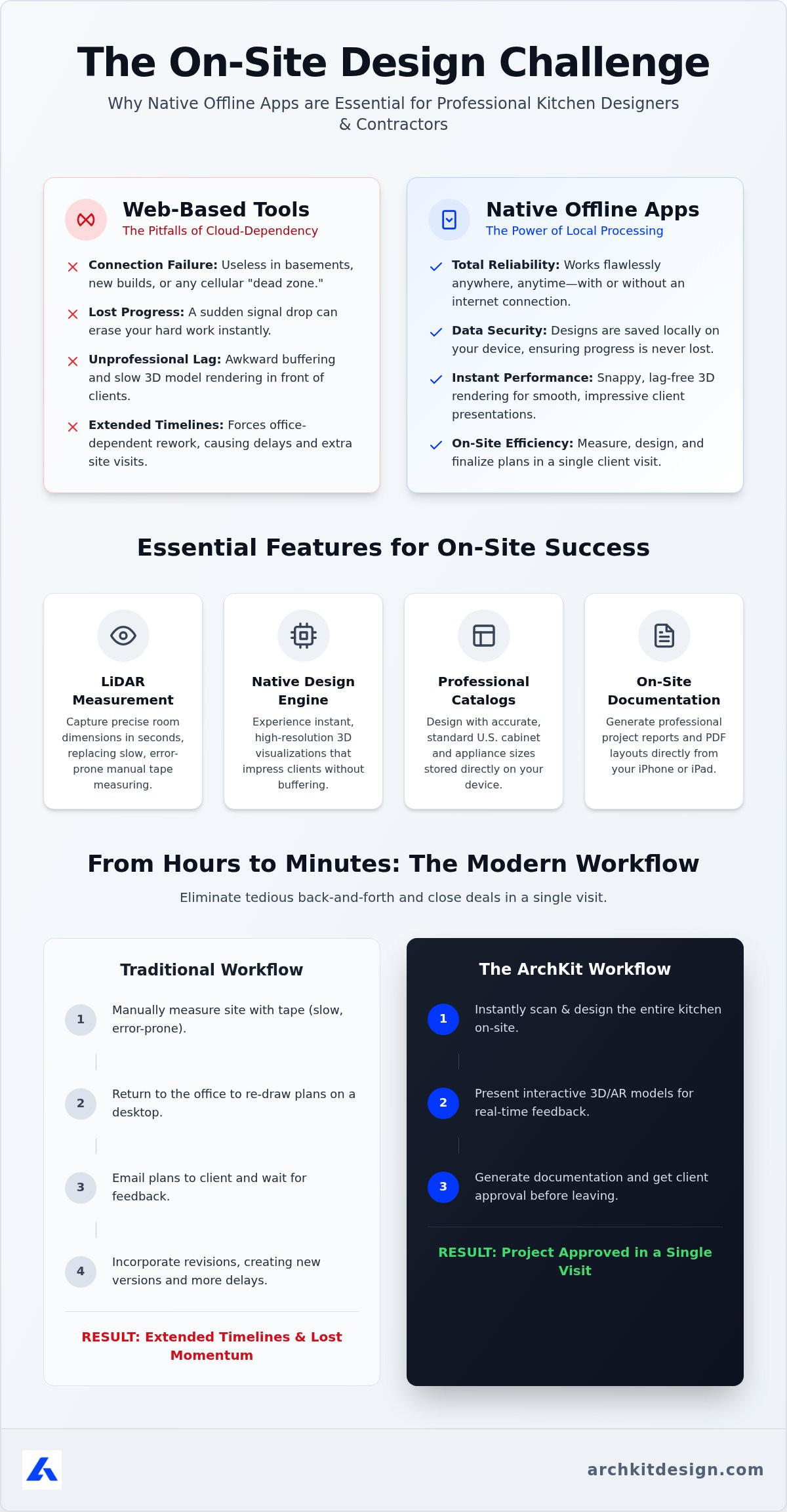
Web-based tools are a liability on a real job site. You're often working in windowless basements or remote new builds where Wi-Fi is nonexistent and cellular signals are blocked. Relying on a browser-based kitchen planner in these environments is a recipe for failure. When the connection drops, your progress vanishes. A kitchen design app with offline mode solves this by keeping your data on your device, not in a fragile cloud. It provides the rugged reliability needed for a high-performance kitchen measurement app.
Data lag during a client meeting kills your momentum. Waiting for a 3D model to buffer while a homeowner watches is unprofessional. It signals that your tools can't handle the pressure. The hidden costs of connectivity-dependent software include:
- Lost design progress during sudden signal drops.
- Inaccurate measurements caused by interface lag.
- Extended project timelines due to office-dependent re-work.
Modern Computer-aided design (CAD) technology now lives directly on your iPhone or iPad. ArchKit Design ensures you can finish layouts before you leave the site. Completing the design in one visit eliminates the tedious back-and-forth of traditional workflows.
Solving the Basement and New-Build Wi-Fi Crisis
Native local processing is the only way to handle complex 3D rendering in dead zones. Don't settle for "no download" tools that require a constant handshake with a remote server. These legacy methods are too slow for the field. Selecting a kitchen design app with offline mode ensures project continuity is never threatened by a weak signal. This functionality keeps your client's data secure and your presentation fluid. Maintain a sharp, authoritative image even when the grid fails. Efficiency wins the bid.
Essential Features to Look for in an Offline Kitchen Design App
Don't settle for sluggish web tools that fail when you need them most. A professional kitchen design app with offline mode uses native code to process data locally on your device. This architecture ensures high-resolution 3D visualizations load instantly, even without a stable data connection. Web-based planners often lag because they must download assets on the fly. Native apps are pre-loaded with the core design engine, delivering snappy performance that impresses clients in real-time.
Accuracy defines your reputation. Prioritize a tool with LiDAR kitchen measurement capabilities. This technology uses laser pulses to scan a room in seconds, generating a precise 3D mesh of the space. It replaces the slow, error-prone process of manual tape measuring. When your software integrates LiDAR directly into the design workflow, you move from scanning to a 3D layout in minutes. This speed allows you to secure approvals while still on the job site.
Native App Performance vs. Browser-Based Limitations
Local storage is the foundation of on-site efficiency. It provides immediate access to a comprehensive database of standard U.S. cabinetry and appliance sizes. You won't wait for a server to load cabinet specs while a client stands next to you. Background syncing is also a critical feature. Your app must save every layout change locally and push those updates to your account once you regain internet access. This ensures your contractor kitchen design software remains a reliable toolkit in any environment. If you're ready to modernize your field workflow, get started with a professional tool to measure and design with total confidence.
ArchKit: Precision On-Site Design Without an Internet Connection
ArchKit transforms your mobile device into a high-performance workstation. It isn't just another kitchen planner app; it's a complete field solution. By operating as a kitchen design app with offline mode, it ensures you can measure and layout a space in a single visit without hunting for a Wi-Fi password. This local processing power means zero lag when presenting complex 3D models to your clients.
Precision starts with the scan. Use ArchKit to generate accurate 2D and 3D layouts instantly using LiDAR technology. You're not just sketching ideas; you're designing with a full catalog of professional U.S. standard cabinet sizes. This allows you to verify clearances and layout constraints in real-time, preventing costly measurement errors before they ever reach the shop.
Documentation is the final step in the on-site workflow. Generate professional project reports and PDF layouts directly from your iPad. Eliminating the need to return to the office for basic administrative tasks gives you more time to focus on closing deals. This kitchen design app with offline mode keeps your business moving at the speed of the job site.
From LiDAR Scan to Client Approval in One Site Visit
Visualizing remodels in AR is a powerful tool for contractors and designers. It allows clients to see their new kitchen overlaid on their existing space, which builds immediate trust and reduces project approval time significantly. Learn how ArchKit streamlines on-site design and removes the friction of stationary office equipment. Download the app to modernize your workflow and win more bids.
Take Control of Your On-Site Workflow
Reliable on-site design isn't just a luxury; it's a competitive necessity for the modern contractor. You've seen how web-based tools fail in dead zones and why native processing is the only way to maintain professional momentum. By choosing a kitchen design app with offline mode, you eliminate the frustration of signal drops and the inefficiency of office-dependent re-work. ArchKit delivers professional LiDAR accuracy and a complete U.S. cabinet catalog directly to your device, optimized specifically for iPhone and iPad Pro. Stop letting connectivity issues dictate your project schedule. It's time to modernize your trade and impress your clients with instant, accurate 3D visualizations that work anywhere.
Start winning more bids with the speed and precision your business deserves.
Frequently Asked Questions
Can I use a kitchen design app without a Wi-Fi connection?
Yes, you can use a native app like ArchKit without any internet connection. Unlike web-based planners that require active Wi-Fi to load assets, a native kitchen design app with offline mode processes all data locally on your device. This architecture ensures you can scan rooms and create layouts in basements or remote job sites where signals are blocked.
Does ArchKit save my kitchen layout progress while I am offline?
ArchKit saves every layout change directly to your iPhone or iPad's local storage. You don't have to worry about losing progress when the connection drops. Once you return to a Wi-Fi zone, the app automatically syncs your project data to the cloud. This dual-storage approach provides a reliable fail-safe for busy professionals working in unpredictable field environments.
What is the benefit of a LiDAR kitchen measurement app for contractors?
A LiDAR kitchen measurement app allows you to capture precise room dimensions in seconds. It replaces the tedious process of manual tape measurements and reduces the risk of human error. For contractors, this means generating accurate 2D and 3D floor plans instantly. It speeds up the initial site visit and lets you provide immediate visualizations that win more bids.
Will an offline kitchen planner app include standard cabinet sizes?
Yes, a professional kitchen design app with offline mode like ArchKit comes pre-loaded with a comprehensive U.S. standard cabinet catalog. You can access these specifications instantly without waiting for a server to load. This local database allows you to snap real-world cabinet sizes into your 3D layout, ensuring your design is both accurate and ready for documentation while still on-site.


