

Your best kitchen installation plans shouldn't be drafted at a desk. They should be exported instantly while you're still standing on the job site. Most contractors lose hours trying to decipher hand-drawn sketches back at the office. This delay often leads to measurement errors and expensive cabinet re-orders. You shouldn't have to wait until you're behind a computer to figure out how to export kitchen plans for installers that actually work.
We know the high stakes of accuracy. It's frustrating when a misinterpreted sketch stalls your team. This article teaches you how to generate professional, error-free plans directly from the field. You'll learn to use ArchKit to create instant PDF exports and accurate cabinet schedules. We'll preview the mobile workflows that eliminate revisions and secure faster client approvals. It's time to replace administrative fatigue with the satisfaction of immediate, on-site results.
Key Takeaways
- Stop losing time on manual office drafting and start generating professional plans while you're still at the client's home.
- Discover the critical elements every export needs, from wall-to-wall dimensions to detailed cabinet schedules, to prevent installation errors.
- Learn how to export kitchen plans for installers using mobile LiDAR technology that captures 99% accurate room boundaries in minutes.
- Compare legacy CAD software with modern mobile workflows to see which method delivers faster project approvals and fewer revisions.
- Use ArchKit to streamline your on-site documentation and remove the administrative burden of back-office sketching.
The High Cost of Poor Communication: Why Accurate Installer Plans Matter
Inaccurate plans aren't just a nuisance. They're a profit killer. A single measurement error on a floor plan can lead to thousands of dollars in cabinet re-orders. When your installer arrives at the job site with a vague, hand-drawn sketch, you're inviting disaster. Misinterpreted chicken scratch causes delays that ripple through your entire project schedule. Learning how to export kitchen plans for installers with digital precision ensures that every stakeholder is looking at the same version of the truth. Clear, professional exports replace guesswork with data. They provide installers with the exact utility locations and wall dimensions needed to avoid costly on-site rework. Digital documentation builds a bridge between your vision and the physical build. It removes the ambiguity that leads to frustration.
The "Office Lag" Problem in Remodeling
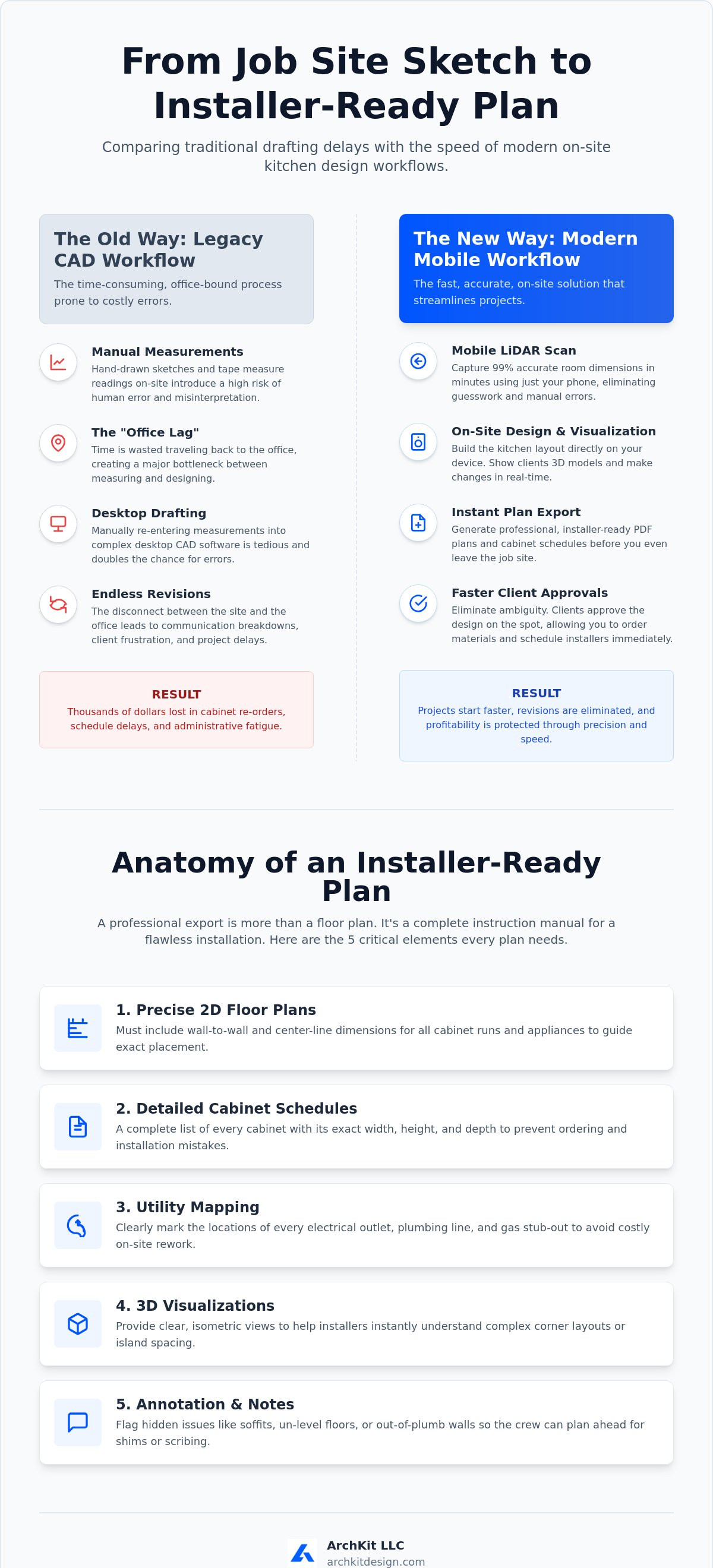
Traditional workflows are slow. You visit the site, take manual measurements, and then head back to the office to draft. This creates a massive bottleneck. Every hour you spend double-entering data into a desktop CAD program is an hour you aren't closing new bids. This "office lag" separates the measurement phase from the design phase, which significantly increases the risk of human error. It's a legacy approach that doesn't fit the fast-paced nature of modern remodeling. Using a mobile tool like ArchKit allows you to bypass this delay entirely. You scan, design, and export while the project is still fresh in your mind. Don't let your administrative tasks dictate your project's pace. Efficiency happens when you move from the tape measure to a digital export in one seamless motion.
Reducing Revisions with Professional Documentation
Clear communication starts with standard architectural drawings. Professional exports use standardized symbols for plumbing, gas, and electrical lines. This reduces the "I thought you meant..." conversations that lead to frustration and finger-pointing. When you provide a clean, digital PDF, you're setting a high standard for the entire build. These accurate exports act as a binding contract of work for your installation team. They know exactly where every filler and trim piece goes. ArchKit helps you maintain this level of professional polish without the need for stationary office equipment. It's about building trust with your clients and your crew through technical clarity. Better plans mean fewer phone calls from the field. You get the job done right the first time, protecting your margins and your reputation.
5 Critical Elements Your Kitchen Plan Export Needs for Installers
An installer-ready plan isn't just a floor plan. It's a comprehensive data set. To master how to export kitchen plans for installers, you must include five non-negotiable layers of information. Your export must function as an instruction manual, not a suggestion. Installers rely on technical accuracy to maintain speed. If your plan lacks center-line dimensions, you're forcing them to do math on-site. Math on-site leads to mistakes. Provide a high-velocity data package that includes every technical detail from the start.
- Precise 2D Floor Plans: Include wall-to-wall and center-line dimensions. Installers need to know exactly where a run of cabinets begins and ends relative to rough openings.
- Detailed Cabinet Schedules: List every unit's width, height, and depth. This prevents the nightmare of realizing a 33-inch cabinet was ordered for a 30-inch space.
- Utility Mapping: Mark every outlet, gas line, and plumbing stub-out. If a gas line is two inches off, your profit margin evaporates during the rework.
- 3D Visualizations: Complex corner layouts or island spacing can be hard to read in 2D. 3D exports clarify these spatial relationships instantly.
- Annotation Notes: Flag the "hidden" problems. Note soffits, un-level floors, or out-of-plumb walls so the crew can plan for shimming or scribing.
Standard U.S. Cabinet Sizes and Layouts
Professional installers expect standard increments. Using standard U.S. cabinet sizes in your digital layout prevents custom-order confusion. Map your base units first. Add wall and tall cabinets while maintaining vertical alignment. Always include fillers in your export. A one-inch filler can be the difference between a drawer that opens and one that hits a door casing. Digital tools like ArchKit make it easy to snap these standard sizes into place, ensuring your on-site design matches what the factory actually builds. Ditch the office-bound drafting and start delivering these critical elements directly from your phone. You can get early access to ArchKit and begin streamlining your field exports now.
Utility and Appliance Clearances
Rough-ins are the foundation of a successful kitchen. Export clearance zones for every appliance to ensure doors can fully open. Refrigerators need breathing room. Dishwashers need swing space. Mark the "Work Triangle" to validate functional flow before the first cabinet is set. Identify rough-in locations for plumbing sub-contractors to follow. Adhering to the United States National CAD Standard (NCS) ensures your layer naming and symbols are professional and recognizable. This level of detail reduces the back-and-forth phone calls that slow down a project. When your export is clear, your installers stay on track. Accuracy in the field leads to faster approvals and a more professional reputation.
Legacy CAD vs. Mobile LiDAR: Which Export Wins on the Job Site?
Desktop CAD belongs in an office, not on a dusty job site. It forces you to rely on manual measurements and paper sketches that often get lost or misread. This traditional workflow creates a massive disconnect. You spend your day on-site and your night behind a computer screen. Mobile LiDAR technology breaks this cycle. It captures every wall, window, and outlet with 99% accuracy in a fraction of the time. Understanding how to export kitchen plans for installers starts with choosing tools built for the field. You need immediate results. You need to eliminate the need for cumbersome laptops or fragile paper blueprints. Mobile-first design is the only way to keep your installers on track without the office-dependent bottleneck. It's about working smarter, not harder.
The Speed Advantage of Scan-to-Plan
Tape measures are slow and prone to error. A single 1/8-inch mistake can lead to a cabinet that won't fit. LiDAR room mapping eliminates this risk by using laser precision to define the space. Just walk the room. The app captures complex angles and ceiling obstructions automatically. It builds a 3D model while you move, giving you a digital twin of the kitchen instantly. This isn't just a gimmick; it's a productivity multiplier. You skip the tedious drafting phase and move straight to the layout. It's a logical sequence: scan, design, export. This workflow ensures that your data is clean and your installers have exactly what they need to succeed. No more return trips to verify a missed dimension.
Portability and Client Presentations
Contractors who wait to send plans lose projects. Speed builds trust. Use AR visualization to show your client the new layout in their actual space. ArchKit allows you to design on-site or in the app with a few taps. When the design is set, export the PDF and send it for signature before you pull out of the driveway. This level of service separates the pros from the amateurs. You aren't just a builder; you're a tech-forward professional providing a modern experience. Instant exports mean faster approvals and fewer project revisions. It's the ultimate competitive advantage for the modern remodeler. Secure the contract. Impress the client. Get to work.
How to Generate and Export Professional Kitchen Plans in 3 Steps
Forget the office-bound drafting table. You can now produce installer-ready documentation while standing in the middle of a gutted kitchen. Modern mobile technology has collapsed the distance between measurement and deployment. Learning how to export kitchen plans for installers is a straightforward three-step process when you move from manual sketches to a digital workflow. This method ensures that your installers receive a clean, data-rich package that they can actually use on the job site. It removes the friction of back-office processing and puts the power of professional design in your pocket.
- Step 1: Scan the Room. Use LiDAR technology to establish accurate room boundaries. Move your device around the space to capture every corner, wall, and opening.
- Step 2: Build the Layout. Place cabinets and appliances from a standardized professional catalog. Snap units into place and adjust for fillers to ensure a perfect fit.
- Step 3: Generate the Export. Select your output format. Export the technical 2D plan and 3D model as a PDF or a live sharing link for your crew.
Capturing the Core Measurements
Start your scan by focusing on the fixed elements. Capture windows, doors, and ceiling heights with precision. Don't just look at the walls; verify the model against key site landmarks like existing plumbing stacks or gas lines. This initial digital twin serves as the foundation for everything that follows. LiDAR captures the full spatial volume and hidden depth of a room that a manual tape measure misses by mapping thousands of points in 3D space. This depth data is critical for identifying out-of-plumb walls that will require shimming during installation. ArchKit handles this complex data automatically, giving you a 99% accurate base map in minutes. Verify your primary dimensions on-screen to confirm the scan is solid before you move to the design phase.
Finalizing the Export Package
An export is only useful if your installer can read it. Choose the right format for the task. A PDF is the industry standard for printed site plans, while a 3D sharing link allows the crew to rotate the model on their own tablets to see tight corners. Add custom annotations for the installation crew to flag specific site conditions. Mark the location of un-level floor spots or existing soffits that impact cabinet height. Ensure the final document includes the full cabinet schedule, including widths, heights, and depths. This comprehensive package eliminates the need for installers to guess your intentions. Ready to stop drafting and start exporting? You can get early access to ArchKit and transform your job site workflow today.
ArchKit: Streamlining On-Site Exports for Faster Project Approvals
ArchKit is built for the high-stakes environment of a physical job site. It doesn't require a desk, a mouse, or a quiet office. You get professional results in the middle of a teardown. When you master how to export kitchen plans for installers directly from your mobile device, you eliminate the biggest bottleneck in your business. Eliminate administrative fatigue with automated project documentation that happens while you walk the room. By the time you leave the site, the work is done. This immediate workflow empowers your installers with the most accurate data available. They don't have to guess. They don't have to call you. They just build. Modernizing your trade isn't optional anymore. It's how you stand out from competitors who are still stuck with legacy methods.
A Tool Built for the Field, Not the Office
ArchKit features a no-nonsense interface designed for rapid-fire use. It focuses on what matters: speed and accuracy. You get professional architectural results without the high price tag or steep learning curve of traditional CAD. Check ArchKit pricing for plans that scale with your business needs. Whether you're a solo remodeler or a large construction firm, the goal is the same. You need to reduce the time between the first meeting and the final export. ArchKit removes the technical barriers that slow you down. It's a partner in your productivity that works as hard as you do. Stop paying for bloated desktop software you only use half the time. Switch to a mobile-first solution built for the way you actually work.
Join the Modern Contractor Workflow
The future of kitchen remodeling is mobile and immediate. AR visualization is a game-changer for project approvals. It reduces client hesitation by letting them see the finished product in their actual home. More importantly, it reduces installer confusion. When an installer can view a 3D overlay of the cabinet layout on-site, the risk of misinterpretation vanishes. They see exactly where the crown molding meets the soffit and how the island aligns with the plumbing. Get started with free kitchen design app features to test the LiDAR scanner yourself. You'll see how easy it is to manage how to export kitchen plans for installers without ever opening a laptop. Join the modern contractor workflow and stop letting the office dictate your project's pace. Efficiency starts in the field. Scan, design, export.
Master Your On-Site Efficiency
Your installation team depends on the data you provide. Leaving the job site with nothing but a hand-drawn sketch is a recipe for rework and frustration. By adopting a mobile-first approach, you eliminate the "office lag" that stalls projects and eats your profit margins. You've seen how LiDAR accuracy and a standard U.S. cabinet catalog can transform a simple room scan into a technical blueprint in minutes. It's about delivering clarity when it matters most. Mastering how to export kitchen plans for installers ensures your crew has instant PDF and 3D exports to guide every cabinet set. This transition from legacy drafting to immediate field results is the ultimate competitive edge for modern remodelers. You'll spend less time behind a desk and more time closing high-value contracts. As you prepare your final quotes, you can explore Project-based tiling and stone installation fees to ensure every aspect of the build is covered. Empower your installers with the best data. Impress your clients with your speed. Take control of your documentation today.
Start exporting professional plans today with ArchKit and see the difference immediate accuracy makes on your next project. It's time to build smarter.
Frequently Asked Questions
What is the best file format to export for kitchen installers?
PDF is the most reliable format for installers because it preserves scale and formatting across any mobile device. It's the universal language of the job site. For crews using CNC machinery or desktop design software, exporting in DWG or DXF ensures technical compatibility. Provide both formats to cover all bases. This dual-format approach eliminates technical barriers and keeps the installation moving without delays.
Can I export a kitchen plan directly from my phone on the job site?
Yes, you can generate and send a professional export while standing in the kitchen. Mobile tools like ArchKit bypass the need for an office computer or stationary hardware. Just complete your layout and tap the export button to send a PDF via email or text. This immediate workflow removes the administrative bottleneck. It secures faster approvals from both clients and crews before you even leave the site.
Do I need to be a CAD expert to create professional kitchen drawings?
You don't need years of CAD experience to produce professional results. Modern software uses LiDAR scanning and pre-built cabinet catalogs to handle the complex geometry for you. The interface is designed for contractors, not software engineers. Focus on the layout while the app generates the technical drawings. It's a no-nonsense way to modernize your trade without the steep learning curve of legacy programs.
How accurate are LiDAR-based kitchen plans compared to manual measurements?
LiDAR technology provides 99% accuracy by mapping thousands of data points in seconds. It captures out-of-plumb walls and ceiling variances that human eyes often miss with a tape measure. This level of precision is critical for tight cabinet runs where every fraction of an inch counts. It provides a digital twin of the space that is far more reliable than traditional manual data entry.
Does the export include a full cabinet list for ordering?
Every professional export includes a comprehensive cabinet schedule. This list details the width, height, and depth of every unit in your layout. It acts as a clear checklist for your supplier and your installer. Having this data integrated into your plan prevents ordering errors and ensures the right boxes arrive at the right job site. It is essential for maintaining project momentum and reducing revisions.
How can I share 3D kitchen models with my installers remotely?
Share your 3D models via a secure cloud link or a mobile-ready file. This allows your installers to rotate and inspect the design on their own tablets from any location. They can zoom into complex corners or island configurations to understand the spatial relationships before they arrive. It's a powerful way to reduce on-site questions. It keeps everyone on the same page regardless of where they are.
What information should always be included in a kitchen installation plan?
Your plan must feature wall-to-wall dimensions, appliance clearances, and precise utility rough-ins. Don't forget to mark the center-lines for sinks and ranges. Learning how to export kitchen plans for installers with these details ensures the crew has a complete roadmap. Add notes about site conditions like soffits or floor variances. Technical clarity is the key to a fast, error-free build that protects your margins.
Can ArchKit export plans that follow U.S. standard cabinet sizes?
ArchKit is built with a professional catalog that follows standard U.S. cabinetry increments. This ensures your designs translate perfectly to real-world products. When you understand how to export kitchen plans for installers using these standards, you eliminate the risk of custom-order confusion. Your digital layout will match what the factory builds and what your installer expects to see on-site. It is built specifically for the reality of the field.

