
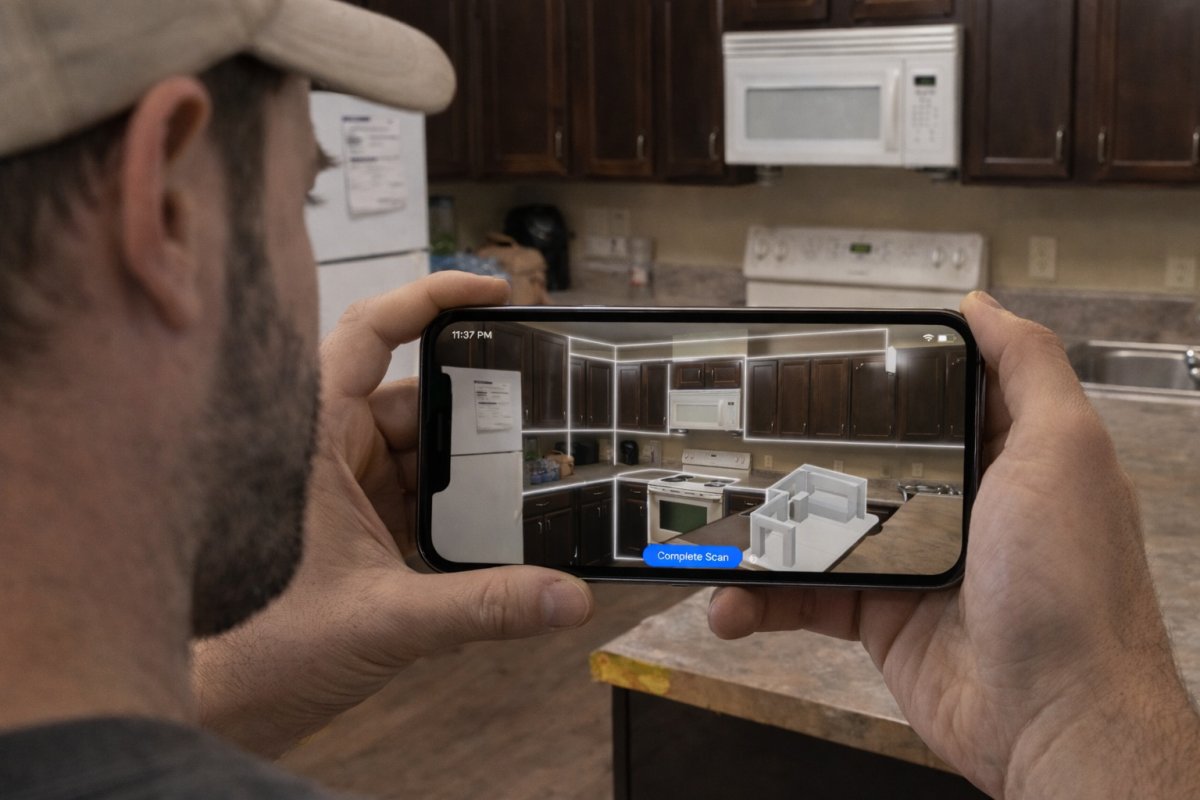
Did you know that AI-powered scanning and digital twin systems can cut your kitchen planning costs by as much as 75%? Adopting a professional LiDAR kitchen scanner app is no longer optional for contractors who want to stay competitive in 2026. You've likely spent years wrestling with manual tape measures, only to return to the office and realize a single missed dimension has ruined your cabinet layout. It's a frustrating, time-consuming cycle that eats into your margins and delays project approvals. You deserve a workflow that works as hard as you do on the job site.
This guide shows you how LiDAR technology eliminates these measurement errors and accelerates your entire on-site design process. We'll explore how modern technology transforms raw scans into instant, accurate 3D layouts. You'll learn how tools like ArchKit help you secure faster client approvals and reduce administrative fatigue. Stop drafting floor plans at midnight. Start closing more contracts before you even leave the driveway. It's time to replace your old-school tools with a high-performance digital workflow that guarantees precision, speed, and professional results.
Key Takeaways
- Eliminate the hidden costs of manual drafting by moving away from pencil-and-paper measurements and office-dependent bottlenecks.
- Understand how a LiDAR kitchen scanner app uses point clouds to generate high-precision 3D meshes of complex job sites in seconds.
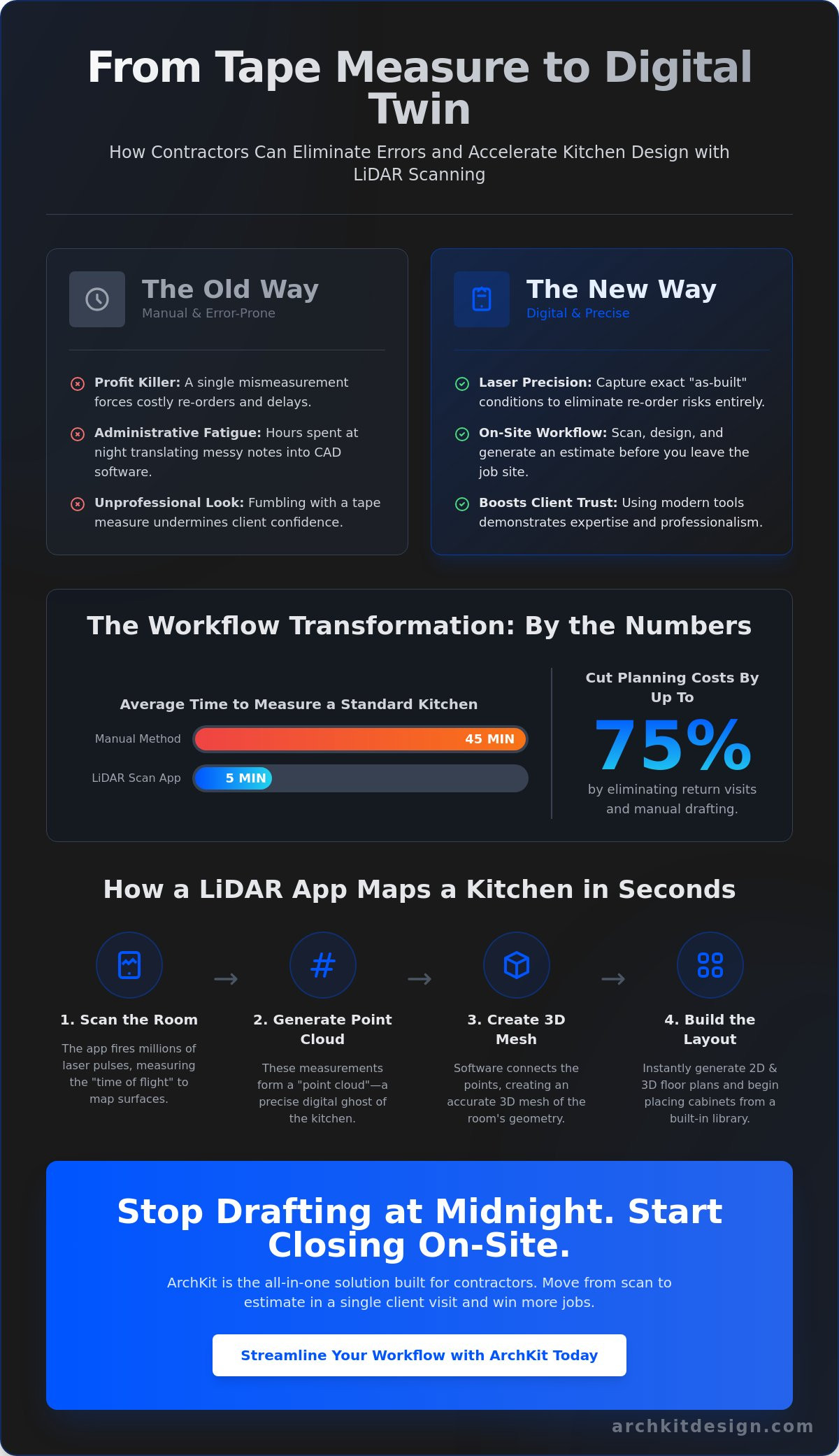
- Compare real-world benchmarks where digital scanning completes a standard kitchen layout in 5 minutes versus 45 minutes for traditional surveys.
- Identify the critical features needed for professional use, including US standard cabinet size integration and built-in object libraries.
- Streamline your "scan-to-estimate" workflow with ArchKit to finalize 2D and 3D layouts while you are still on-site with the client.
Stop Wasting Time: Why Manual Kitchen Measurements are Obsolete in 2026
Pencil and paper are profit killers. If you are still measuring kitchens by hand, you're choosing to work harder for less money. A single misread digit on a grease-stained notepad doesn't just cause a headache; it forces a total project restart. By the time you drive back to the office to draft a floor plan, your competitor has already sent a digital quote. In 2026, speed is the only way to protect your margins. Using a LiDAR kitchen scanner app turns a forty-minute measurement chore into a five-minute scan. It captures every corner, soffit, and plumbing line with laser precision. If you want to understand the physics behind this, you can read more about How LiDAR Technology Works to see how light pulses create these 3D environments. This isn't just about cool tech. It's about surviving a market where clients demand instant visual feedback before you leave their driveway.
The "one-man measurement" challenge is also a thing of the past. Measuring a large kitchen alone is nearly impossible with a traditional tape. You're hooking ends on corners, dodging furniture, and hoping the tape doesn't sag across long spans. LiDAR changes the math. It's a one-person operation. You stand in the center of the room, move your phone, and the app does the heavy lifting. No more asking the homeowner to hold the other end of the tape. You look professional, efficient, and in total control of the site.
The Administrative Fatigue of Traditional Workflows
Manual drafting creates a massive bottleneck. You spend all day in the field, then spend your evening translating chicken-scratch notes into CAD software. It's exhausting. It's also where most errors happen. Misplacing a field dimension or misinterpreting a sketch leads to delays that frustrate clients and stall your crew. Modern workflows move the "office work" to the job site. Tools like ArchKit Design allow you to generate a layout while you're still standing in the kitchen. You finish the work once. You don't repeat it at your desk at midnight.
Reducing Revisions and Material Waste
Precision is the difference between a profitable job and a loss. A 1/4-inch error in a corner can make a standard cabinet run impossible to install. Re-ordering custom cabinets takes weeks and costs thousands. A LiDAR kitchen scanner app eliminates this risk by capturing the exact "as-built" conditions of the room. This transparency builds massive trust with your clients. When they see you using professional-grade digital tools from ArchKit Design, they know their project is in expert hands. You eliminate the need for second site visits to double-check a measurement. You get it right the first time. You order with confidence. You install without surprises.
The Tech Behind the Scan: How LiDAR Maps Kitchens in Seconds
LiDAR isn't just a buzzword. It stands for Light Detection and Ranging. Think of it as a tiny, high-speed radar system inside your phone. The sensor shoots out millions of invisible laser pulses every second. These pulses bounce off cabinets, walls, and appliances, then return to the sensor. By measuring the "time of flight" for each pulse, the device calculates exact distances. This process creates high-resolution 3D mapping of the entire room. While older apps relied on your camera to "guess" distances based on visual contrast, a LiDAR kitchen scanner app physically measures the space. It is the difference between an estimate and a fact.
These millions of data points form what pros call a "point cloud." It looks like a digital ghost of the kitchen. Your software then connects these points to create a 3D mesh. This mesh represents the actual geometry of the room, including the weird angles of an old farmhouse or the slight bow in a long drywall run. Because LiDAR uses its own light source, it outperforms standard photogrammetry in every way. You can scan dark pantry corners or dim basements where a standard camera would lose its tracking. Scan the room. Capture the data. Move to the next lead. It's that simple. If you want to see this speed in action, you can get early access to the latest on-site design tools.
Point Clouds vs. Standard AR Measurements
Standard AR apps are toys for homeowners. They use "visual odometry," which fails on white walls or glossy cabinet faces because there isn't enough contrast for the camera to track. LiDAR doesn't care about color or light. It senses depth. This allows a LiDAR kitchen scanner app to capture ceiling heights, soffit depths, and window casings with professional-grade accuracy. You get a true 1:1 digital twin of the job site, not a distorted approximation. It handles reflective surfaces and complex layouts without dropping the signal.
Hardware Requirements for Pro-Grade Scanning
You need the right gear for the job. In 2026, the industry standard remains the iPhone Pro and iPad Pro models. These devices house the dedicated LiDAR sensor required for high-velocity data collection. Standard iPhone models lack this hardware and rely solely on camera-based AR, which isn't reliable for cabinet fitment. To run the latest 2026 software updates, ensure your device has at least an A14 Bionic chip or newer. This processing power is critical for turning massive point clouds into usable 3D layouts in real-time. Don't settle for hardware that forces you to wait for "processing" bars. Get the Pro gear and get the job done.
Accuracy Benchmarks: LiDAR Scanning vs. Traditional Field Surveys
Numbers don't lie. In a standard 10x10 kitchen field test, traditional manual measurements take an average of 45 minutes. You have to sketch the layout, hook the tape, read the dimensions, and write them down. A LiDAR kitchen scanner app completes this exact task in under 5 minutes. That is an 88% reduction in time spent on-site. Speed is useless without precision, but modern sensors deliver both. While manual measuring often suffers from tape sag or rounded numbers, digital scanning captures the "cabinetry standard" of accuracy within an eighth of an inch. You stop guessing and start knowing.
Accuracy is the foundation of your profit. When you rely on a digital twin, you aren't just getting wall-to-wall distances. You're getting the true geometry of the space. To see the science behind this precision, you can learn How LiDAR Technology Works through light-pulse distance calculations. This data ensures that every cabinet you order fits the first time. No more on-site modifications. No more wasted filler strips. You measure once, order once, and profit more. It is a cleaner, faster, and more professional way to run a job site.
LiDAR vs. Laser Tape Measures
Laser tape measures are a step up from metal tapes, but they still require manual data entry. Typing numbers into a phone or writing them on a pad is a major failure point. Fatigue leads to transposed digits. A 36-inch cabinet suddenly becomes 63 inches in your notes. A LiDAR kitchen scanner app removes the middleman. It captures the data directly into a 3D model. It also maps non-square rooms and irregular wall bows that a standard laser tape simply cannot detect. You get the whole picture, not just a few isolated lines.
The Impact on Estimating and Bidding
Speed wins contracts. If you can provide a project bid before you leave the driveway, you're ahead of 90% of the competition. Using a professional tool like ArchKit Design allows you to present a 3D visualization to the client immediately. This transparency builds trust. You don't need to add a 10% "uncertainty buffer" to your quotes because you know the measurements are perfect. Check out ArchKit Design pricing to find the right tier for your volume. You'll reduce your administrative load and close deals faster with on-site layouts that impress every time.
The long-term ROI is massive. If you handle 50 kitchen projects a year, saving 40 minutes per site visit reclaims over 33 hours of your time. That is nearly an entire work week spent on growth rather than measuring. Leave the paper in the truck. Stop the office-dependent bottlenecks. Modernize your workflow and let the technology handle the tedious details while you focus on the build.
Professional Checklist: Evaluating LiDAR Apps for Real-World Job Sites
Don't settle for a general-purpose floor plan app. A professional LiDAR kitchen scanner app must do more than just measure walls. It needs to understand the specific geometry of a kitchen. Most apps on the market are built for real estate agents, not contractors. They capture basic room shells but ignore the critical details like plumbing stubs, electrical outlets, and soffit transitions. You need a tool that allows you to drop professional-grade fixtures directly into the 3D mesh while you are still on-site. This immediate data entry ensures your estimate accounts for every detail from the start.
US standard cabinet sizes should be the foundation of the software. If an app doesn't support 3-inch increments or standard 24-inch base cabinet depths, it isn't a professional tool. It's a toy. You want to spend your time designing, not fighting with a digital tape measure to fix non-standard dimensions. Verify that the app works without Wi-Fi. Job sites are often "dead zones," and your workflow shouldn't stop just because the signal did. Local processing power is what separates a reliable field tool from a frustrating office-dependent bottleneck.
Kitchen-Specific Feature Requirements
Precision requires more than just lines on a screen. Your app should allow you to place appliances and plumbing fixtures within the scan to check for clearances and code compliance. An automated cabinet list is another essential feature. It turns your layout into a bill of materials instantly. This data should flow naturally into your cabinet layout software to eliminate double-entry. You scan the room. You place the cabinets. You generate the list. The process is linear, fast, and error-free.
Data Portability and Client Communication
Communication is the key to closing high-value contracts. Use AR kitchen layout tools to give your clients a virtual walkthrough before you pull a single permit. This visual proof builds confidence and reduces the likelihood of mid-project changes. Once the client is happy, you need to move that data. Ensure your LiDAR kitchen scanner app exports to industry-standard CAD and BIM formats. Whether you use Revit, SketchUp, or Chief Architect, your on-site data must be compatible. This portability ensures that your field measurements become the actual blueprint for the build.
Stop wasting time with fragmented workflows that require manual transcription. Transition to a system that handles the measurement, the layout, and the client presentation in one go. Ready to modernize your process? Get early access to ArchKit and start building your "scan-to-estimate" workflow today.
ArchKit Design: The All-in-One Solution for On-Site Kitchen Design
ArchKit Design isn't just another measurement tool. It is a high-performance engine built for the dirt and dust of a real job site. While hobbyist apps focus on "pretty" pictures, ArchKit Design focuses on the data you need to build. It leverages the precision of a LiDAR kitchen scanner app to generate instant 2D and 3D layouts. You don't just see walls; you see a workspace. You can place cabinets, adjust fillers, and check appliance clearances in real-time. This isn't about a digital sketch. It's about building a project-ready model while you're still talking to the client.
Accessing a standard US cabinet catalog is a game changer. You aren't guessing dimensions or forcing generic blocks to fit. You're using the actual specs of the products you'll install. This ensures your 3D model is a perfect reflection of the final build. The transition from scan to estimate is seamless. You capture the room, drop the layout, and generate a quote. It's a single, linear workflow that keeps you out of the office and on the job. No more stationary office equipment. No more administrative fatigue. Just immediate results.
Streamlining the Contractor Workflow
Efficiency defines your profit. As mentioned earlier, shifting to a digital twin system significantly slashes your planning costs. You finish the design on-site and move directly to the approval stage. Generating an accurate app to measure kitchen for cabinets report takes seconds, not hours. This data integrates directly with your professional project management. You keep your files organized, your team informed, and your clients impressed. It's a pragmatic approach to a traditionally slow trade.
Getting Started with Professional LiDAR Scanning
Modernize your business today. Choose between Monthly or Annual ArchKit Design plans to fit your specific project volume. If you want to stay ahead of the curve, you can get early access to the newest LiDAR features as they roll out. Success starts with consistent on-site habits. Train your crew to scan systematically. Focus on corners and ceiling transitions to ensure the point cloud is dense and accurate. Once they master the rhythm, your site visits will be faster and more accurate than ever before. Stop the manual struggle. Start using a LiDAR kitchen scanner app built by people who understand the stakes of a physical job site.
Take Control of Your Job Site Productivity
Manual measurements belong in the past. You've seen how digital twins eliminate costly errors and how point clouds guarantee cabinetry fitment. Adopting a high-performance LiDAR kitchen scanner app isn't just about the tech; it's about reclaiming your time and impressing your clients with immediate results. Stop the endless cycle of field notes and office drafting. Transition to a workflow that delivers precision without the administrative fatigue. You deserve a process that works as hard as you do.
ArchKit is built specifically for US standard cabinetry and delivers LiDAR-powered precision directly on your mobile device. You don't need an office PC to finalize a layout or generate an estimate. Everything happens right there on-site. Move from scan to approval in a single visit and leave the competition behind. It's time to build with confidence and scale your business with modern tools.
Start your professional kitchen scan today with ArchKit. Modernize your process and secure more contracts with the speed and accuracy your business deserves. You've got the skills; now get the tools to match.
Frequently Asked Questions
How accurate is a LiDAR kitchen scanner app compared to a tape measure?
A professional LiDAR kitchen scanner app delivers accuracy within 1/8 to 1/4 of an inch. While a manual tape measure is precise in theory, it often suffers from human error, tape sag, or rounded numbers. Digital scanning captures the true "as-built" geometry of a room. This ensures your cabinet layouts account for wall bows and non-square corners that a standard tape might miss.
Which devices support LiDAR kitchen scanning technology in 2026?
You need an iPhone Pro or iPad Pro model equipped with a dedicated LiDAR sensor to use these professional tools. Standard iPhone models lack the depth-sensing hardware required for cabinetry-grade precision. For the best performance with 2026 software updates, ensure your device has at least an A14 Bionic chip or newer. This processing power is critical for rendering complex 3D meshes in real-time on-site.
Can I export LiDAR scans from ArchKit to professional CAD software?
Yes, ArchKit allows you to export your on-site data into industry-standard CAD and BIM formats. You can move your project files directly into SketchUp, Revit, or Chief Architect for final detailing. This data portability eliminates the need to redraw floor plans from scratch back at the office. It creates a seamless bridge between your initial field survey and your final construction blueprints.
Does a LiDAR scanner app work in kitchens with dark or reflective cabinets?
LiDAR performs exceptionally well on dark surfaces because it uses its own laser light source rather than relying on ambient light. It doesn't need high visual contrast to measure depth accurately. However, extremely high-gloss or mirrored surfaces can occasionally deflect the laser pulses. Scanning from multiple angles usually solves this. It remains far more reliable than standard camera-based AR apps in dim or monochromatic spaces.
Do I need an internet connection to scan a kitchen on a job site?
No, you don't need a live Wi-Fi or cellular connection to perform the actual scan. The LiDAR kitchen scanner app processes the raw data locally on your device's hardware. This allows you to work in basements or remote locations where signals are weak. You only need a connection when you are ready to sync your project to the cloud or email a PDF report to a client.
How long does it take to learn how to use a LiDAR kitchen scanner?
Most contractors master the basic scanning motion in about 15 minutes. The process is as intuitive as taking a slow-motion video of the room. The software provides real-time visual feedback, showing you exactly which areas have been captured and which corners need more detail. You'll likely feel fully confident in the "scan-to-estimate" workflow after your first two or three site visits.
Is LiDAR scanning better than standard AR for kitchen remodelers?
LiDAR is vastly superior for professional remodeling because it physically measures distance rather than guessing based on camera pixels. Standard AR often fails on plain white walls or in low-light environments because it can't find "anchor points." LiDAR senses physical depth in any lighting condition. It provides the reliable, repeatable data that contractors need to order expensive custom cabinetry without fear of fitment issues.
Can I use a LiDAR app to generate a cabinet list for pricing?
Yes, ArchKit includes an automated cabinet list feature that turns your 3D layout into an itemized bill of materials. Once you place your cabinets within the scan, the app generates a list based on US standard sizes. This allows you to create accurate project estimates while you are still standing in the kitchen. It reduces your administrative load and helps you provide project bids much faster than traditional methods.


