
Design errors and omissions account for a staggering 56.5% of cost overruns on construction projects. For most remodelers, those numbers represent hours of unpaid administrative work and shrinking profit margins. You likely already know the frustration of "measurement drift," where a tiny manual error in the field turns into a cabinet that simply won't fit during installation. Learning how to prevent change orders in remodeling starts with closing the gap between your initial site survey and the final design.
It's time to stop relying on stationary office workflows. Ditch the manual sketches that leave clients guessing. This guide explores how to eliminate costly scope creep using modern on-site workflows and mobile LiDAR technology. We'll show you how tools like ArchKit allow for zero-error cabinet layouts and instant client approval through AR visualization. You'll learn to trade administrative fatigue for rapid, high-accuracy results that keep your projects on schedule and your profits intact.
Key Takeaways
- Stop "measurement drift" by replacing manual tape measures with high-accuracy LiDAR scanning for 100% precision.
- Use AR visualization to secure instant client approval on cabinet layouts before ordering a single part.
- Master how to prevent change orders in remodeling by creating a digital twin of the jobsite during your first walkthrough.
- Adopt a 5-step on-site workflow that eliminates design errors and moves estimating tasks from the office to the field.
- Slash administrative fatigue and project delays by integrating mobile-first design tools like ArchKit into your daily routine.
What Are Change Orders and Why Do They Kill Remodeling Profits?
A change order is more than just a paperwork hurdle; it is a legally binding amendment that modifies the original contract. To understand What is a Change Order?, you have to look at any work added or deleted from the initial scope. In the fast-moving world of remodeling, these shifts aren't just administrative. They're profit killers. On major construction projects, change orders typically account for 10-15% of the total contract value. When you're trying to figure out how to prevent change orders in remodeling, you have to start at the source: the jobsite.
Most errors aren't intentional. They're the result of "Measurement Drift." You pull a tape measure across a 15-foot wall, miss by a quarter-inch, and then carry that error into your design software. By the time the custom cabinets arrive, that quarter-inch has compounded into a layout that doesn't fit. Now, you’re facing restocking fees, labor rescheduling, and a project that’s stalled. Research shows that design errors and omissions contribute to 56.5% of cost overruns. These hidden costs eat your margins faster than material price hikes ever could.
The contrast between workflows is clear. Legacy methods rely on hand-drawn sketches and office-bound design sessions. They're slow, disconnected, and prone to human error. Modern workflows use tools like the ArchKit mobile kitchen design app to capture data instantly on-site. This shift from analog to digital isn't just about speed. It’s about protecting your bottom line from the physical reality of a site that doesn't match your blueprints.
The True Cost of Scope Creep
Minor client requests often feel harmless. A moved outlet here or a slightly different trim there might seem small, but these requests compound into major timeline shifts. Verbal agreements are a contractor's biggest liability because they leave room for interpretation and forgotten details. In the remodeling world, undocumented scope creep is a primary reason for shrinking margins. For small firms, a single unmanaged change order can be the difference between a profitable job and a total loss. Integrating a project management app like New Build Log into your workflow ensures that every site update is documented, helping you maintain the administrative control needed to protect your bottom line.
Identifying the 'Vision Gap' in Kitchen Design
Clients don't see what you see. They often struggle to translate 2D blueprints into a 3D reality. This "Vision Gap" leads to the dreaded mid-project realization: "I thought it would look different." When a client can't visualize the end result, they're more likely to request changes once the physical work begins. Visual alignment is your best preventative tool. By using technology to bridge this gap during the initial survey, you ensure everyone is looking at the same final product before the first hammer swings. This is a critical step in mastering how to prevent change orders in remodeling projects.
Eliminating Measurement Errors with LiDAR Technology
Stop fighting the tape measure. Manual measurements are the birthplace of costly revisions. LiDAR (Light Detection and Ranging) changes the game by using laser pulses to map every inch of a room in seconds. It creates a digital twin, a precise 3D replica of the kitchen that lives on your phone. This is the foundation of how to prevent change orders in remodeling. When your base data is perfect, your design is perfect. You aren't just measuring; you're capturing the physical reality of the site.
This digital scan becomes your single source of truth. Every trade professional, from the plumber to the cabinet installer, works off the same data. In tight kitchen layouts, tolerances are unforgiving. A three-millimeter error in a corner can prevent a full run of cabinets from fitting. LiDAR identifies out-of-plumb walls and uneven floors before you place an order. You see the problem on your screen, not on delivery day. Consider the impact on remodeling profits when you eliminate the need for a second or third site visit just to verify a single dimension. You scan once. You design once. You build once.
LiDAR vs. Manual Tape Measures
Manual measuring is slow. It invites transcription errors. You write down a 3, but later read it as an 8 back at the office. LiDAR eliminates this human risk. A single scan captures every wall, window, and outlet with millimeter precision. You can scan a complex room in minutes, a task that would take hours with a tape and a notepad. In high-end cabinetry, where every fraction of an inch counts, this speed and precision are non-negotiable. It replaces administrative fatigue with immediate, actionable data.
Creating Precise 2D and 3D Layouts On-Site
The old way meant taking notes, driving to the office, and spending hours in CAD software. With ArchKit's LiDAR kitchen measurement tool, you generate workable layouts immediately. You turn a physical room into a digital 2D or 3D plan while you're still standing in the client's home. It removes office-dependent delays. You walk in with a phone and walk out with a verified as-built plan. This immediate feedback loop is essential for anyone serious about how to prevent change orders in remodeling. Don't wait for the office to catch up; get early access to these on-site tools today and start scanning your way to better accuracy.
Bridging the Vision Gap: Using AR to Align Client Expectations
Clients don't speak blueprints; they speak experience. Most homeowners struggle to translate a flat 2D drawing into a functional kitchen. This disconnect creates the "Vision Gap." It's the moment where a client approves a plan but requests major changes once the physical work begins. Augmented Reality (AR) acts as the ultimate "try-before-you-buy" tool for remodeling. It bridges the gap between your technical design and their emotional expectation. By overlaying digital models onto the existing room, you give the client a tangible sense of the final product before a single cabinet is ordered.
Mastering how to prevent change orders in remodeling requires more than just perfect measurements. It requires absolute alignment on the design intent. Following best practices to minimize and mitigate change orders means validating the project in the actual physical environment. When a client walks through their virtual kitchen, seeing standard U.S. cabinet sizes in their actual space, the psychological impact is profound. It removes the guesswork. It settles the "I changed my mind" factor because they've already lived with the layout virtually. You aren't just selling a kitchen; you're selling certainty.
The Power of On-Site 3D Visualization
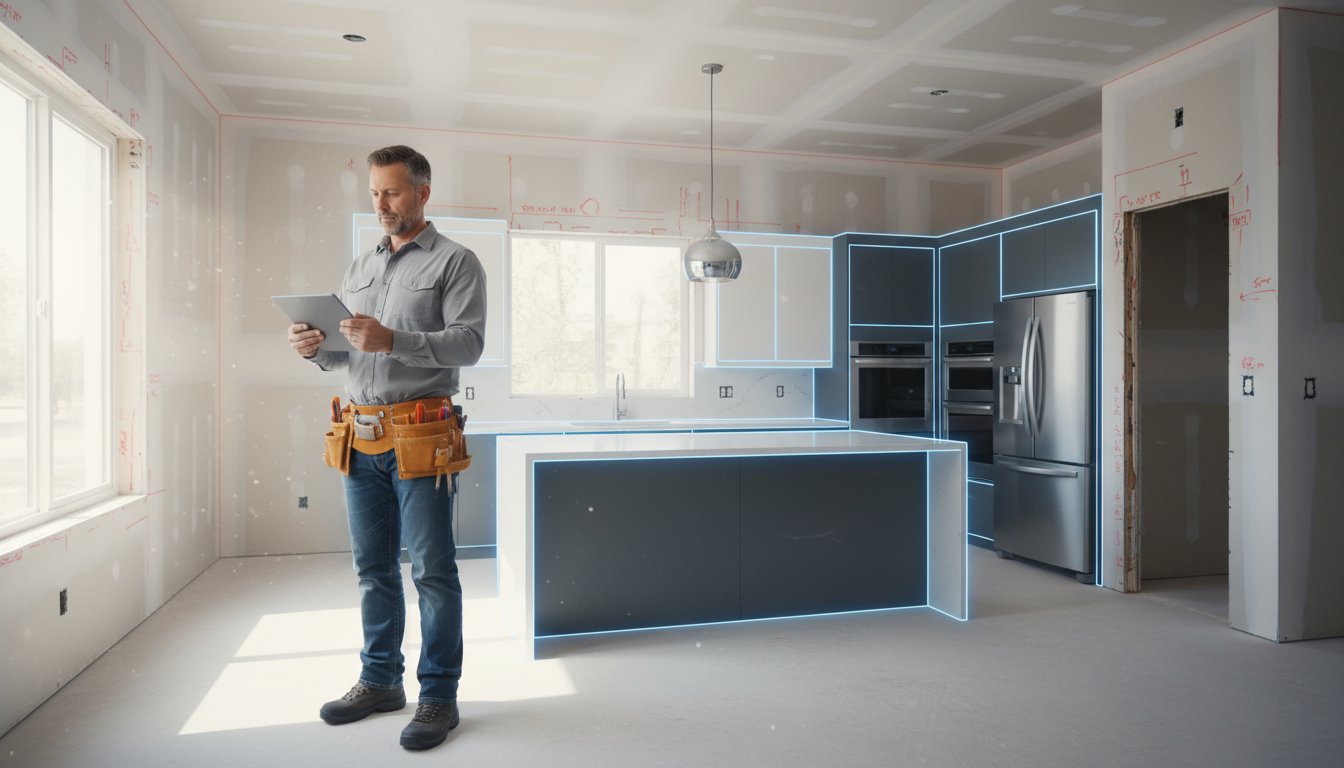
Imagine standing in a gutted kitchen with an iPad. You show the client the full 3D model, perfectly aligned with the existing walls. This immediate visualization builds a level of trust that no paper sketch can match. It accelerates the approval process and eliminates the need for back-and-forth emails. You can test this workflow yourself with a free kitchen design app designed for field professionals. It's about moving the design process from the office to the jobsite where the work actually happens. Show the design. Get the signature. Start the build.
Addressing Cabinetry and Layout Objections Early
AR allows you to solve traffic flow problems before they become physical obstacles. You can show exactly how a new kitchen island impacts floor traffic or how upper cabinet heights feel in relation to the ceiling. Visual proof is your strongest defense. When a client sees the layout in their own home, they can't claim they didn't know how it would look. This proactive approach is the most effective way to secure firm approvals and keep your project on schedule.
- Verify clearances for appliance doors and drawers.
- Check sightlines from adjacent living areas.
- Confirm cabinet reach and accessibility for the homeowner.
A 5-Step Workflow to Change-Order-Proof Your Projects
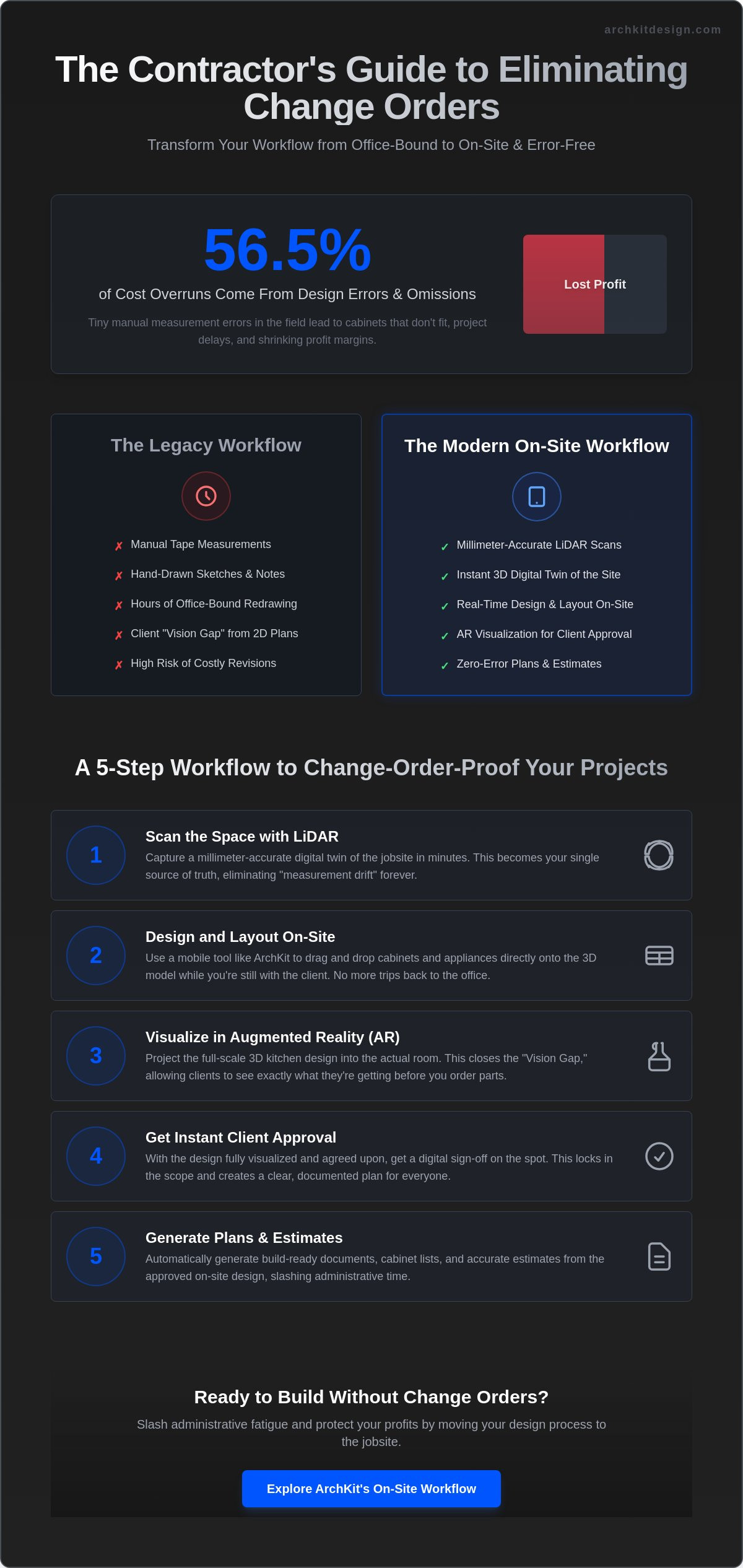
Speed is everything on the jobsite. You need a system that kills errors before they reach the production phase. This 5-step process shows you how to prevent change orders in remodeling by moving the design and approval stages from the office to the field. When you align the data and the client’s vision immediately, you eliminate the friction that leads to costly delays.
- Step 1: Conduct a LiDAR-powered site survey. Capture every wall, outlet, and plumbing line with millimeter precision.
- Step 2: Generate a 3D layout. Use standard U.S. cabinet catalogs to build the design while standing in the room.
- Step 3: Perform an AR walkthrough. Let the client walk through their virtual kitchen for final design sign-off.
- Step 4: Export material lists. Generate accurate estimates and cabinet orders directly from your layout.
- Step 5: Attach the digital model to the contract. Use the 3D file to define the exact scope of work.
This workflow turns the initial site visit into a high-value production meeting. You aren't just taking notes; you're building the project's digital foundation. By the time you leave the house, the "Vision Gap" is closed. The client knows exactly what they're getting, and you know exactly what to order.
Standardizing Your Cabinet Layout Planning
Using industry-standard sizes is non-negotiable for profitability. Custom-order errors often happen when contractors guess at clearances or use non-standard dimensions. ArchKit's cabinetry layout tool automates this by snapping standard units into your scanned space. It ensures you aren't promising a layout that physically cannot exist. Protect your business by including a "no-verbal-changes" clause in your agreement. Always reference the digital model as the final authority for the build. This is a critical step in how to prevent change orders in remodeling.
Documenting the 'As-Built' vs. Proposed Design
Clear documentation is your insurance policy. If a client claims the scope changed mid-project, you need the data to prove otherwise. Using mobile CAD for kitchen design keeps these records accessible on your phone at all times. You can compare the original "as-built" site scan with the proposed design in real-time. Update the model during the site visit to reflect any on-the-spot adjustments. This level of transparency removes ambiguity and keeps everyone on the same page. Ready to modernize your jobsite? Get early access to the tools that make this workflow possible.
ArchKit: The Contractor's Toolkit for Error-Free Remodeling
ArchKit isn't another office-bound CAD program. It's a no-nonsense mobile platform built for the dust and noise of the jobsite. By combining LiDAR scanning, AR visualization, and standard cabinet catalogs into one app, it solves the core problem of how to prevent change orders in remodeling. It moves the critical work of measurement and design to the first meeting. You stop guessing. You start building. This isn't about hype; it's about utility. You replace administrative fatigue with the satisfaction of immediate, high-accuracy results. The brand acts as your reliable partner, providing the tools needed to impress clients in the moment and secure contracts faster.
Presenting a 3D vision while standing in a client's kitchen gives you an immediate competitive edge. Homeowners often struggle to trust a contractor who only brings a pencil and paper. ArchKit allows you to show them the future of their home in real-time. This reduces revisions, protects your margins, and keeps your projects moving. You aren't just a builder; you're a tech-forward professional who values the client's time and your own accuracy. The result is a streamlined workflow that eliminates the "vision gap" and keeps your profit where it belongs: in your pocket.
From LiDAR Scan to 3D Estimate in Minutes
Ditch the manual drafting and the long drives back to the office. ArchKit turns a LiDAR scan into a precise 2D and 3D layout instantly. You get as-built plans without the legacy delays of stationary equipment. The app handles the heavy lifting, generating layouts that respect standard industry dimensions. This speed doesn't sacrifice quality; it enhances it. You can review the ArchKit pricing options to find the professional subscription that fits your project volume. Whether you're handling one project or twenty, the ability to generate a 3D estimate on-site is a game-changer for your daily productivity.
Winning More Bids with Better Technology
Professionalism drives closing rates. When you provide immediate results, you eliminate the "I'll think about it" phase that kills so many deals. Homeowners value the certainty that comes with on-site visualization. It's the most effective way to understand how to prevent change orders in remodeling before the contract is even signed. By showing exactly what fits and where, you remove the ambiguity that leads to mid-project complaints. It's a simple formula: Scan. Design. Build. Stop the profit leaks and the measurement drift that eat your margins. Get early access today and start your next project with the confidence of total accuracy.
Secure Your Profits with On-Site Accuracy
Profitability in remodeling is built on the foundation of the initial site survey. You've seen how manual errors and client indecision lead to the cost overruns that kill margins. By adopting LiDAR-powered accuracy and instant AR visualization, you eliminate the "Vision Gap" that causes mid-project friction. It's about replacing stationary office work with immediate, field-ready results. This transition is the most effective way to master how to prevent change orders in remodeling projects.
Using a standard U.S. cabinet catalog directly on-site ensures your designs are buildable from day one. You don't have to wait for back-and-forth drafting or office-dependent revisions. You scan, design, and get approval in a single visit. This efficiency doesn't just save time; it builds the professional reputation that helps you win more bids and close more deals. Take the first step toward a more productive jobsite today.
Start your error-free workflow with ArchKit’s professional kitchen design app and stop the profit leaks caused by measurement drift. Your next project deserves the precision of modern technology. Build with confidence.
Frequently Asked Questions
What is the #1 cause of change orders in remodeling?
Design errors and omissions are the primary cause, contributing to 56.5% of cost overruns according to industry research. These issues usually start during the initial survey when manual measurements miss critical details like out-of-plumb walls. Small errors in the field grow into massive production costs. Adopting a digital-first survey is the most effective strategy for how to prevent change orders in remodeling.
How can LiDAR technology prevent measurement errors?
LiDAR uses laser pulses to map physical environments with millimeter accuracy. It captures every wall, window, and outlet instantly, creating a perfect digital twin of the kitchen. This technology eliminates the risk of human transcription errors common with tape measures. You get a verified as-built plan that serves as the single source of truth for every trade professional on the job.
Does using a kitchen design app actually save time on-site?
Yes, it slashes administrative fatigue by moving design tasks from the office to the field. Mobile LiDAR scanning can be 50% to 70% cheaper and significantly faster than traditional static scanning methods. You walk the site, scan the room, and generate a layout in minutes. This immediate feedback loop allows you to secure client approvals before you even leave the house.
How do I explain the cost of a change order to a client?
Focus on the logistical chain reaction. Explain that even "minor" changes trigger labor rescheduling, material restocking fees, and project delays. Use your 3D layout to show the physical conflict or scope shift. Most clients approve the added expense when they understand the impact on the project momentum. Visual proof turns a difficult conversation into a professional, data-driven update.
Can I use an iPad for professional kitchen measurements?
Absolutely. An iPad Pro or recent iPhone equipped with LiDAR is a professional-grade measurement tool. When you pair it with a dedicated contractor workflow app like ArchKit, your tablet becomes a mobile CAD station. This setup replaces traditional drafting tools and stationary office equipment. It's the most efficient way to handle high-accuracy kitchen measurements in a fast-paced field environment.
What should be included in a change order procedure?
Every procedure must include a written scope of work, a specific cost breakdown, and the updated project schedule. Never rely on verbal agreements; they're a contractor's biggest liability. Link the change order directly to your digital model for total clarity. This documentation protects your margins and ensures the homeowner understands the new project boundaries before any additional work begins.
How does AR help with client approvals?
AR bridges the "Vision Gap" by letting clients walk through their virtual kitchen while standing in the physical room. It eliminates the "I thought it would look different" excuse that leads to mid-project revisions. Seeing standard U.S. cabinet sizes in their actual space builds trust and secures faster sign-off. It is a powerful tool for visual alignment and how to prevent change orders in remodeling.


