
The tape measure is no longer your most valuable tool on a kitchen remodel. You know the frustration of a blueprint that looks great on paper but fails the test once you're standing in the room. Manual measurement errors don't just waste high-end materials; they stall your schedule and damage your reputation. Finding a dedicated kitchen island layout tool for contractors is the fastest way to stop guessing and start building with total confidence.
We're moving the design process from the office desk to the job site floor. In this guide, you'll learn how to leverage LiDAR scanning and AR visualization to eliminate errors before you ever pull a permit. We'll show you how to generate a 3D layout in minutes and confirm critical 42-inch clearances on-site. Using tools like ArchKit Design allows you to provide the visual proof that closes bids faster and keeps your projects moving. It's time to trade administrative fatigue for immediate, professional results.
Key Takeaways
- Map job site conditions with LiDAR scanning to eliminate the manual measurement errors that delay cabinet orders.
- Use a kitchen island layout tool for contractors to visualize 3D placements and confirm 42-inch clearances directly on the job site floor.
- Master spatial standards and appliance swing zones to prevent traffic bottlenecks in tight kitchen footprints.
- Replace slow, office-bound design cycles with mobile workflows that allow you to generate precise 2D and 3D layouts on an iPhone or iPad.
- Close bids faster by providing clients with immediate visual proof and accurate estimates using integrated cabinet catalogs in ArchKit.
The Spatial Challenge: Why Kitchen Island Layouts Fail
Kitchen islands are the high-stakes focal point of the modern home. They're also where most layout errors happen. A misplaced island doesn't just look off; it breaks the entire room's functionality. When you're managing tight tolerances, relying on a kitchen island layout tool for contractors is the only way to safeguard your schedule. Stop guessing where the cabinets should land. Start validating the space before the first box arrives on-site.
Most failures stem from ignoring core Kitchen Island Design Principles. You've seen the results: a beautiful island that blocks the path between the sink and the range. Traffic flow becomes a bottleneck. One person opens the fridge, and the kitchen effectively shuts down. These spatial bottlenecks lead to "clearance frustration," where appliance doors hit the island or seating areas block primary walkways. If you don't account for these swing zones during the planning phase, you're setting yourself up for a difficult conversation with the homeowner later.
Measurement errors are expensive. If your base cabinet dimensions are off by even half an inch, the stone countertop won't fit. You're forced to choose between a hack-job modification or eating the cost of a new cabinet with a multi-week lead time. Accuracy isn't a luxury. It's your profit margin. Using a kitchen island layout tool for contractors ensures your site survey matches the final installation perfectly.
The Problem with Manual Measurements
Traditional tape measures are prone to human error. Older homes rarely have square walls or level floors. You pull a measurement, write it on a scrap of lumber, and then try to remember if that was the "inside" or "outside" dimension once you're back at the office. This manual data entry creates a liability. Re-measuring on-site wastes billable hours. It delays the project start while you wait for a designer to digitize your sketches. Skip the office-dependent workflow. Measure, scan, and design in one shot.
Client Visualization Gaps
Homeowners can't read blueprints. They see a rectangle on a flat floor plan and say "yes," but they don't understand the physical reality. Once the island is set, they suddenly realize they can't walk past the dishwasher when it's open. These visualization gaps lead to expensive change orders. Using a mobile design tool like ArchKit Design allows you to walk them through the space in 3D. Show them the work aisles. Let them see the clearances. Close the bid with visual proof that they're getting a kitchen that actually works.
Modernizing the Workflow with a Kitchen Island Design App
Legacy desktop software belongs in the office, not on the job site. Traditional CAD programs are powerful, but they create a bottleneck between the initial site survey and the final estimate. You take measurements, drive back to your desk, and spend hours translating rough sketches into a digital format. This outdated cycle invites data entry errors and slows down client approvals. A modern kitchen island layout tool for contractors changes the game. It acts as a high-velocity bridge, allowing you to design, visualize, and estimate while you're still standing in the kitchen.
The goal is a "one-trip" survey. You need to capture every dimension, validate the layout, and secure a deposit in a single visit. Mobile CAD tools make this possible by moving the heavy lifting to your iPhone or iPad. Instead of waiting days for a draft, you provide immediate results. This speed doesn't just save time; it builds massive trust with homeowners who are used to contractors disappearing for weeks between meetings.
LiDAR vs. Digital Tape Measures
Tape measures have a fundamental flaw: they only measure what you tell them to. They miss the bowed wall in a 1920s bungalow or the floor that's out of level by half an inch. LiDAR mapping solves this by creating a precise 3D digital twin of the entire room. It captures thousands of data points in seconds, mapping every wall irregularity and plumbing stub-out with surgical precision. Scanning a room with a LiDAR-enabled device is significantly faster than pulling a physical tape. You get a complete, accurate model of the space without the risk of forgetting a critical dimension. This level of detail is non-negotiable when you're fitting a large island into a complex footprint.
The AR Advantage for Contractors
Visualization is your best sales tool. Research shows that over 52% of upgraded kitchen islands are now more than seven feet long. In a standard kitchen, that scale can feel overwhelming on paper. AR (Augmented Reality) allows you to place a virtual, full-scale island in the actual room. Walk around the model. Open the virtual dishwasher. Let the client feel the 42-inch clearance for themselves. This real-time validation eliminates the "it looked smaller on the plan" complaints that lead to expensive revisions. For a deeper dive into these professional features, read our guide on ArchKit: The Ultimate Kitchen Design App for Contractors.
Stop fighting with office-dependent workflows that eat your profit margins. You can get early access to our mobile workflow tools and start designing with total on-site accuracy today.
Essential Spacing Rules for Professional Island Layouts
Designing a kitchen island isn't just about aesthetics; it's about physics. You're managing a complex intersection of traffic, appliance mechanics, and ergonomics. If you miss a clearance by two inches, the entire workflow collapses. A professional kitchen island layout tool for contractors allows you to hard-code these rules into your digital model before you ever cut a piece of trim. Stop relying on eyeballing the space. Use data-driven standards to ensure every island you install is as functional as it is beautiful.
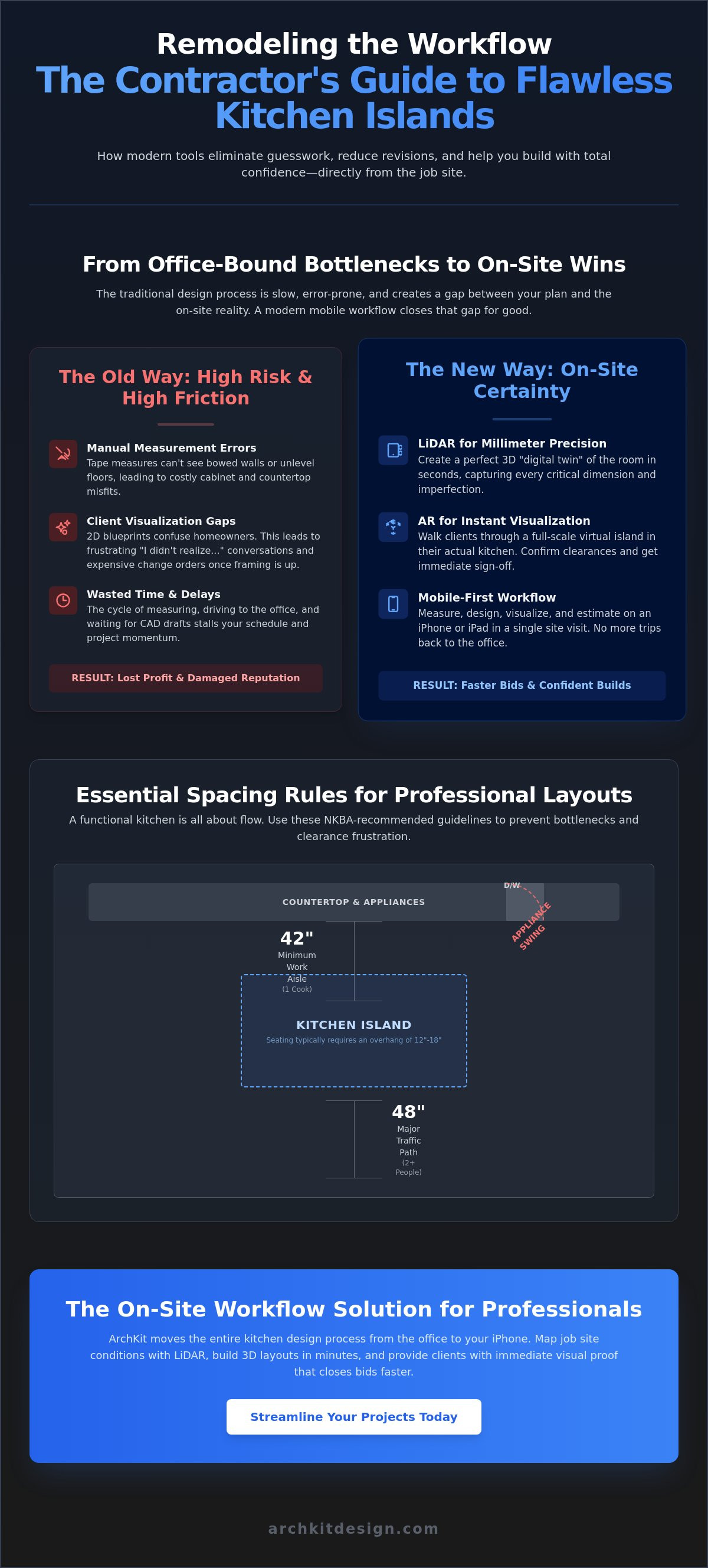
Nail the clearances. Avoid the callbacks. When you're standing on-site, use your mobile design app to verify these four critical zones:
- Appliance Swings: A standard dishwasher door drops roughly 26 inches. Ensure your aisle allows for a person to pass even when the door is fully extended.
- Landing Zones: Prep islands require at least 15 inches of clear counter space on either side of a sink or cooktop to meet professional standards.
- Seating Overhangs: For standard 36-inch high counters, provide a 15-inch overhang. Anything less feels cramped and forces guests to sit sideways.
- Work Triangle Integrity: Ensure the island doesn't force a detour between the primary work centers.
Aisle Clearance and Traffic Flow
Aisle width is the most common point of failure in island design. While building codes might allow for a 36-inch minimum, professional standards demand more. A 42-inch aisle is the sweet spot for a single-cook kitchen. It provides enough room to move without making the reach between the island and the perimeter counters feel like a marathon. If the household has multiple cooks, push that clearance to 48 inches. Use a kitchen layout dimensions checklist to verify every path during your site survey. Modern design apps like ArchKit Design allow you to lock these specific dimensions, ensuring the island doesn't drift during the design process.
Island Sizing for Utility
Balance island scale with the total square footage of the kitchen. An oversized island is a common mistake that turns a spacious room into a series of narrow corridors. You must factor in refrigerator drawer depths and oven door clearances. If the island includes a cooktop, you're also dealing with ventilation requirements and heat safety zones. Refer to Kitchen Layout Principles for broader context on how to integrate the island into the overall floor plan. Using a kitchen island layout tool for contractors helps you visualize these overhangs and clearances in 3D, showing the client exactly how much floor space remains for traffic when the stools are in use.
Using LiDAR and AR to Eliminate Island Measurement Errors
Accuracy isn't accidental. It's a process. Moving from a rough sketch to a precise digital twin requires a disciplined on-site workflow. By using a modern kitchen island layout tool for contractors, you replace guesswork with laser-verified data. Follow these four steps to ensure your next island fits perfectly on the first try.
- Step 1: Clear the job site. Move toolboxes, scrap lumber, and debris. LiDAR needs a clear line of sight to floor-wall intersections to establish a precise room envelope.
- Step 2: Map the site. Use your mobile device to scan every corner, window casing, and plumbing stub.
- Step 3: Insert the virtual island. Choose standard cabinet sizes from the digital catalog and drop the unit into your 3D model.
- Step 4: Walk the aisles. Switch to AR mode and physically move through the kitchen. Check the clearances you established in the previous section to ensure the flow feels natural.
This workflow eliminates the "office disconnect." You aren't just taking measurements to use later; you're validating the entire design while you're still on the job site floor. This immediate feedback loop is what separates high-velocity contractors from those stuck in legacy cycles.
Precision Mapping with LiDAR
LiDAR is a light-based measurement system that uses laser pulses to calculate distance with extreme accuracy. For contractors, this means capturing the exact "envelope" of a room in seconds. Scan door frames and corners to establish your baselines. ArchKit uses this 3D data to generate 2D floor plans automatically. You get a professional blueprint without touching a drafting table. This digital twin captures the wall bows and floor slopes that a standard tape measure ignores. It ensures that when you order a 96-inch island, you actually have 96 inches of usable space.
Real-Time Layout Adjustments
Client feedback usually happens too late. Homeowners often wait until the cabinets are bolted down to mention they wanted a larger seating overhang. AR visualization fixes this. Modify island dimensions on the fly while the client is standing right there. Check for plumbing and electrical stub-out alignment within the app to avoid costly relocation work. Getting client sign-off on the AR model creates a "locked" design that minimizes mid-project revisions. You save time. They get exactly what they saw in the virtual walkthrough.
Ready to modernize your site surveys? Get early access to our LiDAR measurement tools and start building with total confidence.
ArchKit: The On-Site Workflow Solution for Professional Contractors
ArchKit isn't just another design app; it's a mobile command center for the modern remodeler. While generic planners force you to use "placeholder" blocks, this kitchen island layout tool for contractors leverages a comprehensive catalog of standard U.S. cabinet sizes. This means your 3D model isn't just a pretty picture. It's a precise map of base cabinets, drawer units, and island components that translates directly to your material order. When you drop a B30 base cabinet into the layout, you know exactly how it fits against the plumbing and how much it affects your clearance.
Administrative fatigue is the silent killer of contractor profit margins. Every hour spent at a desktop computer after a long day on-site is an hour you aren't bidding new work or managing your crew. ArchKit moves that workload to the kitchen floor. You generate precise 2D and 3D layouts directly on your iPhone or iPad before you even leave the driveway. This "design where the work happens" approach ensures that nothing is lost in translation between the site survey and the final estimate.
Built for the Job Site
Traditional CAD sessions are stationary and slow. ArchKit is built for the high-velocity environment of a physical job site. You can export your completed layouts instantly, sharing professional PDFs or 3D views with subcontractors and cabinet suppliers. This transparency keeps everyone on the same page and reduces the risk of back-and-forth emails. If you're ready to see the difference, you can explore the free kitchen design app features to test the workflow on your next project.
Winning More Bids
In a competitive market, professionalism is your primary differentiator. Walking a client through a virtual AR model of their new kitchen creates an emotional connection that a flat blueprint can't match. You provide instant estimates based on accurate cabinet counts, giving the homeowner the confidence to sign the contract on the spot. By combining LiDAR accuracy with high-end visualization, you position your business as a tech-forward leader. You can check the ArchKit pricing to find the right plan for your crew and start closing more bids with less effort.
Master Your Next Island Installation
Success in kitchen remodeling is measured in inches. By adhering to professional spacing standards and utilizing a modern kitchen island layout tool for contractors, you eliminate the guesswork that leads to costly delays. You've seen how precise LiDAR scanning and a standard U.S. cabinet catalog can transform a rough site survey into a project-ready blueprint. These tools don't just save time; they protect your profit margins and build lasting client trust. Every clearance you verify on-site is a potential callback prevented.
Stop relying on manual sketches and office-bound software. Walk the job site with confidence. Use AR visualization to secure instant approvals and keep your projects moving at full speed. It's time to trade administrative fatigue for the precision of modern technology. Start your next kitchen project with ArchKit today and experience the satisfaction of a perfect fit on every floor. Your crew and your clients will notice the difference immediately. Build faster, design smarter, and secure more contracts with a workflow built for the field.
Frequently Asked Questions
What is the best kitchen island layout tool for professional contractors?
ArchKit is the premier choice for professionals who need a dedicated kitchen island layout tool for contractors. It prioritizes mobility and job site speed over office-bound complexity. By integrating LiDAR scanning directly into the design process, it allows you to move from a site survey to a 3D model in a single visit. It's the most efficient way to handle high-stakes island placements without returning to a desktop computer.
How much space should be between a kitchen island and a counter?
You should maintain a minimum of 42 inches for a standard work aisle. While 36 inches is technically the code minimum, it's often too tight for comfortable movement when appliance doors are open. If your project involves a multi-cook kitchen, push that clearance to 48 inches. This extra space prevents bottlenecks and ensures the kitchen remains functional during peak meal prep times.
Can I use an iPad Pro for kitchen island design on-site?
Absolutely, the iPad Pro is the preferred hardware for on-site kitchen design. Its integrated LiDAR sensor allows you to scan rooms with surgical precision. Using an iPad provides a larger canvas for adjusting 3D models and showing AR walkthroughs to clients. It effectively replaces your laptop, tape measure, and notepad, serving as a comprehensive mobile workstation for every site survey you conduct.
Is LiDAR accurate enough for kitchen cabinet measurements?
LiDAR is highly accurate for capturing room geometry and identifying out-of-square walls. It provides a precise digital twin that accounts for the imperfections traditional tape measures often miss. While you should verify final tight-tolerance dimensions for high-end stone countertops, LiDAR is the gold standard for layout planning. It ensures your cabinet boxes and island placements fit the actual room envelope perfectly.
How do I show a client a kitchen island layout before building it?
Leverage AR visualization to project a virtual, full-scale island into the client's actual kitchen. This allows them to physically walk around the unit and feel the aisle clearances. It's the most powerful way to bridge the visualization gap. Showing the layout in 3D directly on their floor secures instant approval and eliminates the complaints that often arise once the physical cabinets are installed.
What are the standard dimensions for a kitchen island with seating?
Standard islands with seating are typically 36 inches high with a 15-inch deep overhang for legroom. If you're installing a bar-height section at 42 inches, you can reduce the overhang to 12 inches. Ensure each seated guest has at least 24 inches of horizontal width. These dimensions guarantee comfort while maintaining enough floor space for traffic to flow around the stools when they're in use.
Do I need professional CAD training to use an AR kitchen design app?
You don't need any formal CAD training to master an AR kitchen design app. These tools are built specifically for contractors who value speed and simplicity. The software handles the complex geometry in the background while you focus on placement and clearances. Most professionals can learn the basic workflow in minutes, allowing them to start designing on-site immediately without a steep learning curve or administrative fatigue.
How does LiDAR scanning speed up the kitchen estimation process?
LiDAR scanning eliminates the tedious process of manual measuring and data entry. It captures every wall, window, and plumbing stub in seconds, automatically generating a 2D floor plan. This data links directly to a cabinet catalog, allowing the kitchen island layout tool for contractors to produce an instant material list. You can provide a professional estimate before you even leave the job site, significantly shortening your sales cycle.


