
Your office desk is the biggest bottleneck in your kitchen remodeling business. You've spent years mastering 2020 Design, but being chained to a workstation while your projects happen in the field is a recipe for lost time. If you're tired of slow rendering speeds and complex UI training, it's time to explore modern alternatives to 2020 design software. You need a solution that works at the speed of a job site, not a corporate office. High subscription costs and administrative fatigue shouldn't dictate your productivity.
Transitioning to a mobile-first workflow isn't just about convenience; it's about winning more contracts. We've vetted the top tools for 2026 that allow you to ditch the heavy hardware and stationary legacy systems. Tools like ArchKit leverage LiDAR scanning and AR visualization to help you build accurate cabinet lists and 3D layouts right in the client's home. This guide breaks down nine options to help you achieve faster project approvals, lower your software overhead, and regain your freedom from the desk. Stop drafting at midnight and start closing deals on-site.
Key Takeaways
- Eliminate administrative fatigue. Move your design workflow from a stationary office desk to the job site using agile, cloud-based tools.
- Compare professional alternatives to 2020 design software. Evaluate ProKitchen, Design Flex, and SketchUp to find the right balance of catalog depth and subscription cost.
- Speed up measurements. Replace manual tape measures with LiDAR scanning and AR visualization to provide instant client walkthroughs on-site.
- Solve your specific bottleneck. Choose a platform based on your need for deep manufacturer libraries versus rapid, mobile-first rendering speed.
- Leverage mobile tools like ArchKit. Map rooms instantly and generate accurate cabinet layouts directly from your device to secure faster project approvals.
Why Professionals Are Trading 2020 Design for Modern Alternatives in 2026
The days of being tethered to a high-end office workstation are ending. For decades, 2020 Design was the undisputed king of the industry, but the landscape in 2026 has shifted toward mobility and speed. Professionals are actively seeking alternatives to 2020 design software to escape the bottlenecks of legacy desktop systems. You shouldn't have to choose between a powerful design and a portable workflow. The modern kitchen pro needs to move fast, stay accurate, and impress clients on the spot. Legacy hardware and slow rendering speeds are no longer acceptable in a competitive market.
Breaking the 'Office Day' Cycle
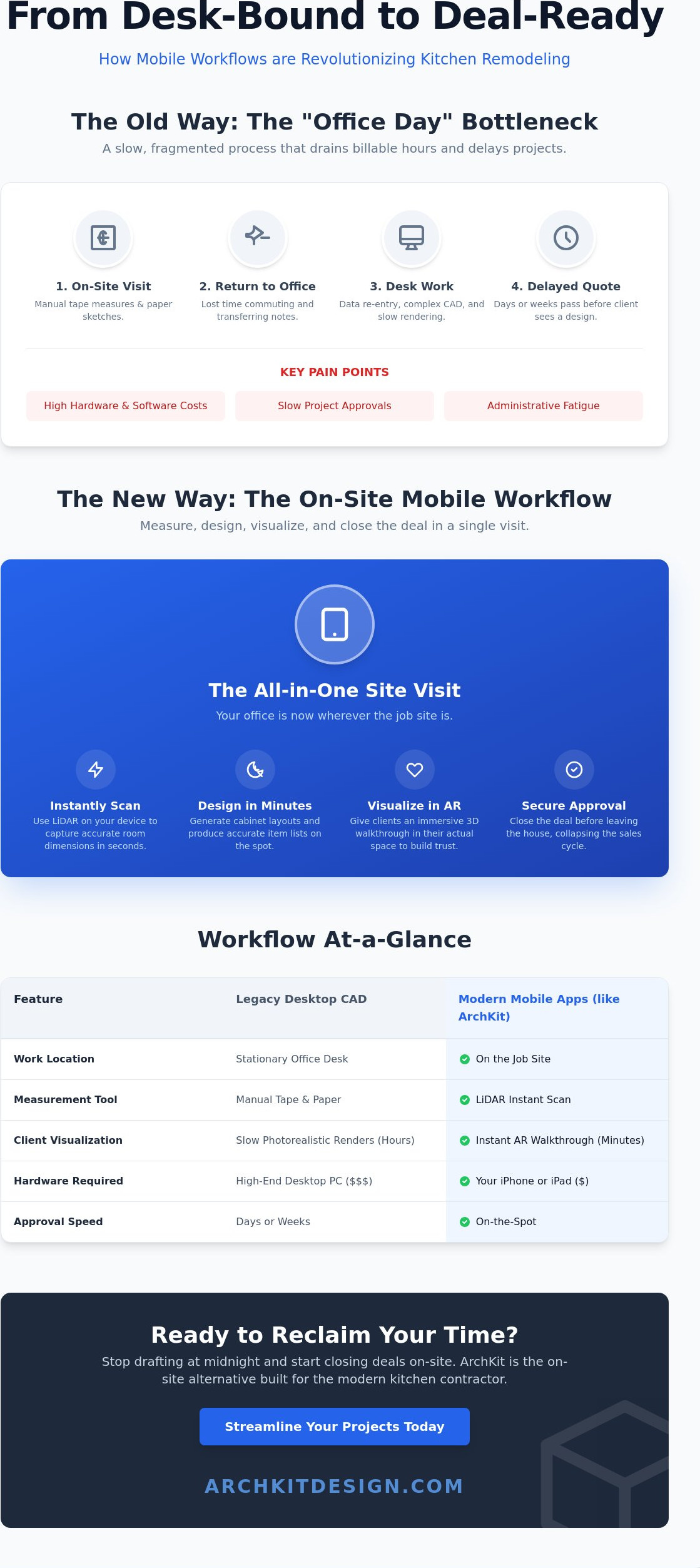
Traditional kitchen design follows a slow, rigid pattern. You visit the site, pull a manual tape measure, and record dimensions on a paper grid. The real work doesn't start until you get back to your desk. This "office day" is a massive drain on your billable hours. It's unpaid administrative time that delays your quotes and stalls your sales cycle. Modern field tools change this dynamic completely by allowing you to work where the project actually lives.
By using a kitchen design app for iPhone, you can design and estimate during your first visit. You don't need to sketch by hand and then perform double-entry data into a PC later. Instead, you capture the room, place the cabinets, and show the client the layout before you even leave their home. This immediate feedback loop reduces revisions and builds trust instantly. You move from measurement to visualization in minutes, not days.
The Cost of Inefficiency
Legacy computer-aided design software often comes with heavy subscription fees and steep hardware requirements. If your software requires a $3,000 laptop just to render a basic kitchen, your overhead is too high. Subscription fatigue is real. Many contractors are tired of paying for massive manufacturer catalogs they never use. They want lean, efficient tools that focus on what matters: closing the deal and getting the cabinet list right.
- Hardware Freedom: Swap heavy, stationary PCs for tablets and phones that live in your pocket.
- Lower Overhead: Pay for the features you actually use on the job site rather than bloated legacy suites.
- Closing Speed: A 3D walkthrough on an iPad beats a delayed email every time.
Speed is the new currency in remodeling. While photorealistic renders are impressive, they often take hours to generate and require specific lighting setups. In the time it takes for a legacy program to finish a single render, a competitor using a mobile workflow has already sent a contract. Using a tool like ArchKit allows you to prioritize the client's experience over technical complexity. You get accurate cabinet lists and 3D visualizations without the administrative headache. Switching to alternatives to 2020 design software isn't just a tech upgrade; it's a business strategy to reclaim your time and scale your projects.
Evaluating the Top Professional Alternatives: ProKitchen, Design Flex, and SketchUp
Choosing the right platform requires a clear understanding of your business model. If you're looking for alternatives to 2020 design software, you likely fall into one of two camps: the legacy power user or the creative generalist. Your choice will dictate how much time you spend behind a desk versus how much time you spend on the job site. Legacy tools offer depth, while modern generalist tools offer flexibility. Neither is a perfect fit for every contractor, but understanding their differences is essential for your 2026 workflow.
Legacy Pro Tools: ProKitchen and Design Flex
Design Flex represents the direct evolution of the 2020 ecosystem. It's built for pros who rely on massive manufacturer catalogs to ensure every cabinet hinge and finish is accurate. ProKitchen offers a similar experience with a familiar interface, making the transition easier for veteran designers. You can find a detailed comparison of both options that highlights how these tools handle manufacturer data.
The cost of these professional suites remains high. ProKitchen 11.5.5 costs between $1,795 and $2,395 per year depending on your catalog needs. Design Flex v14.9 sits at $2,495 per year. These tools provide deep reporting and industry-standard documentation. However, they still carry the weight of legacy systems. The learning curve is steep. The overhead is high. They're best suited for large firms with dedicated designers who spend eight hours a day in front of a monitor. For the solo contractor, this complexity often creates more work than it saves.
The Generalist Approach: SketchUp and Chief Architect
SketchUp and Chief Architect offer a different path. SketchUp 2026.2 is the ultimate generalist's tool. It provides total creative freedom for custom work. At $399 per year for the Pro version, it's more affordable than legacy suites. But it isn't kitchen-specific. You'll spend hours setting up plugins just to get a basic cabinet list. Chief Architect is the heavy hitter for full residential remodels. It handles framing and site plans beautifully, but it can feel like overkill for a simple kitchen swap.
The gap between these tools is clear. Specialized kitchen software gives you speed through automation. Generalist CAD gives you flexibility through manual control. Neither solves the problem of the office-bound workflow. If you want to bypass the complexity of desktop CAD and design directly on-site, you might want to try a mobile-first approach instead. This allows you to capture measurements and create layouts without the heavy software overhead. Identify your bottleneck. Choose your tool. Move forward.
The Shift to Mobile-First: Why Mobile Apps Are Outperforming Desktop CAD
Mobile apps have evolved beyond simple sketching tools. In 2026, the most effective alternatives to 2020 design software live on your tablet or smartphone. This shift isn't just about portability. It's about data accuracy and client psychology. Desktop CAD forces a gap between measurement and visualization. Mobile workflows close that gap. You capture the reality of the room and present the solution in a single session. This immediate experience is what modern clients expect.
LiDAR and AR: The New Jobsite Standard
Stop wrestling with manual tape measures and laser distance tools that require two people to operate. Modern LiDAR kitchen scanner apps allow a single contractor to map an entire room in seconds. Point your device at the walls. Capture every corner, window, and plumbing stub. The software generates a high-precision 3D model automatically. This eliminates the measurement errors that lead to expensive cabinet reorders and field modifications.
Once the room is mapped, augmented reality (AR) takes over. Instead of asking a client to imagine a layout from a 2D printout, let them walk through it. Place 3D cabinet layouts directly into their existing space. They can see exactly how a new island affects the room's flow. This level of immersion sets expectations instantly. It reduces the back-and-forth revision cycle because the client "feels" the design before a single cabinet is ordered. You aren't just selling a kitchen; you're selling the confidence that it will fit perfectly.
Cloud Sync vs. Local Files
The danger of file-based design is the lack of version control. If your design lives on a single office PC, your field crew is flying blind. Mobile-first tools like ArchKit prioritize cloud synchronization. Every measurement and layout update syncs across all devices instantly. Your lead carpenter can pull up the exact cabinet list on their phone while you're still finishing the contract on your tablet. This transparency prevents the "wrong version" errors that plague traditional workflows.
- Instant Access: No more searching for lost PDFs or outdated email attachments.
- Team Coordination: Update a design in the morning; the crew sees it by lunch.
- Offline Reliability: Pro-grade mobile apps work without a signal, syncing data the moment you're back in range.
This technological shift provides a massive psychological advantage. When you design on-site, you capitalize on the client's peak excitement. You solve their problems while you're still standing in their kitchen. This "one-visit" close is only possible when you move away from stationary legacy software. By adopting mobile alternatives to 2020 design software, you position yourself as the most professional and efficient contractor in the room. Scan the space. Build the layout. Secure the deposit.
How to Choose Your Next Design Platform Based on Your Workflow
Switching software is a major business decision. It impacts every step of your project from the first handshake to the final install. When evaluating alternatives to 2020 design software, start with your biggest pain point. Is it the three hours you spend sketching at night? Or is it the money you lose every time a cabinet doesn't fit? Your workflow should dictate your tool, not the other way around. Identify whether your primary bottleneck is design speed, measurement accuracy, or the complexity of your ordering process.
Assess your catalog needs honestly. Many pros pay for thousands of manufacturer SKUs but only install three specific lines. If you rely on standard sizes or semi-custom modifications, you don't need a bloated legacy system. You need a nimble tool that generates a clean cabinet list for ordering without the administrative drag. Test for speed. In 2026, a client won't wait three days for a PDF. They want to see their kitchen now. If your software can't produce a 3D visualization in under five minutes, it's failing the sales test. Transition to an iPad or iPhone workflow that lets you design while you're still standing in the room.
The 'On-Site' Test
Field conditions are messy. Your software must be resilient. Check if the app functions without a stable Wi-Fi connection. Remote job sites shouldn't stop your progress. Look at the interface. Is it fat-finger friendly? You shouldn't need a precision mouse to move a pantry cabinet. Count the clicks. If it takes twenty taps to change a door style, it's too slow for the field. The best tools prioritize immediate action over deep, hidden menus.
Integration and Reporting
A pretty picture isn't enough. You need data. Your design must link directly to a kitchen cabinet list generator to ensure your estimates are accurate. This connection prevents the manual entry errors that kill your margins. Double-entry is a relic of the past. Ensure your chosen tool can export to PDF or CAD formats for your trade partners without losing detail.
Review the kitchen design software pricing models carefully. Avoid rigid, multi-year contracts that don't scale with your business volume. Look for SaaS models that offer value through efficiency rather than just a list of features you'll never use. Stop paying for legacy complexity and start investing in jobsite speed. If you're ready to stop the office-day cycle, get early access to ArchKit and take your design workflow directly to the job site.
ArchKit: The On-Site Alternative Built for the Modern Kitchen Contractor
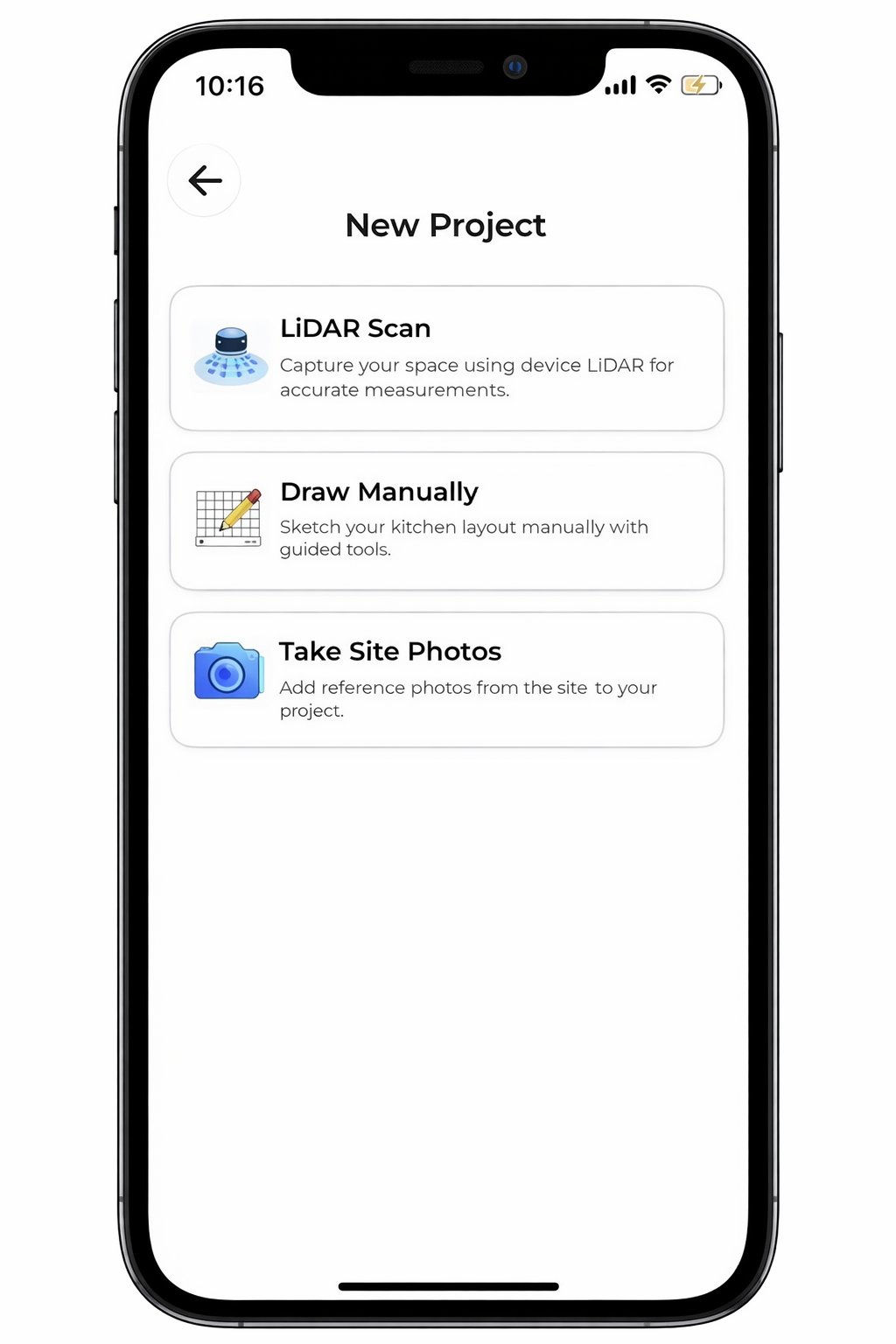
ArchKit isn't just another CAD program. It's a field-first tool designed specifically for the realities of a physical job site. While other alternatives to 2020 design software often try to cram complex desktop features onto a smaller screen, ArchKit builds its entire workflow around the mobile professional. You don't need a degree in architecture to map a room. You just need your phone and a few minutes. This efficiency turns your initial consultation into a high-impact design session. Point your device. Scan the room. Build the layout. It's that simple.
The core of the ArchKit experience is LiDAR-powered scanning. Point your device at the walls and capture every dimension with precision. The app generates an error-free room map instantly. Once the shell is ready, you pull from U.S. standard cabinet catalogs to build your layout. This ensures your estimates are grounded in industry-standard specifications rather than guesswork. You close the gap between the first visit and a signed contract by delivering results while the client's excitement is at its peak. Don't let the lead go cold while you're back at the office drafting.
Why Contractors Choose ArchKit Over 2020
The biggest win is the death of the "office day." You no longer have to spend your Saturdays translating paper sketches into a desktop computer. ArchKit moves the entire process to the kitchen island. You get professional 3D kitchen visualizer features without the steep learning curve of legacy software. The UI is clean, fast, and responsive. It's built for pros who value their time above technical fluff.
Pricing is another major differentiator. Instead of the high-cost, rigid models found in traditional suites, ArchKit offers transparent options that fit a small business budget. You get the power of high-end visualization and accurate cabinet lists without the administrative burden or the massive annual bill. It's a pragmatic choice for the modern remodeler who wants to scale without adding overhead. Focus on your craft, not your software subscription.
Getting Started with a Mobile Workflow
Transitioning is simpler than you think. Start by downloading the free kitchen design app to test the LiDAR scanner on your current project. See how fast the room maps. Once you're comfortable, move your active project list into the mobile system. You'll find that having all your data, layouts, and cabinet lists in your pocket makes every job site visit more productive. No more lost sketches. No more "I'll get back to you on that."
Stop letting your office desk dictate your schedule. Embrace a workflow that keeps you in the field where the projects actually happen. You've seen the alternatives to 2020 design software, and the choice is clear. Move your business forward with a tool built for the modern age. Check ArchKit pricing and get started today to reclaim your time and impress your clients with immediate, professional results.
Modernize Your Kitchen Design Workflow Today
The remodeling industry is moving toward immediate, on-site results. You've seen how legacy systems create bottlenecks and administrative fatigue. Whether you choose a high-end desktop suite or an agile mobile app, your goal remains the same: faster approvals and zero errors. Moving your design process to the job site isn't just a trend. It's a competitive necessity for the modern contractor. You need tools that work as hard as you do in the field.
When you evaluate alternatives to 2020 design software, prioritize platforms that respect your time. You need professional results without the office-day delay. ArchKit delivers this through LiDAR-powered accuracy and a comprehensive U.S. Standard Cabinet Catalog. It's built specifically for iPhone and iPad to ensure you can map, design, and estimate while standing in the client's kitchen. This immediate feedback loop builds trust and secures deposits faster.
Don't let another project stall behind a desktop screen. Take control of your workflow and impress your clients with instant visualizations. Stop wasting time in the office; Get Early Access to ArchKit. It's time to build a more efficient, profitable business. You're ready to lead the way in modern kitchen remodeling.
Frequently Asked Questions
Is there a free alternative to 2020 Design software?
Yes, several modern platforms offer free tiers for basic layout tasks. ArchKit provides a free plan that includes essential features like LiDAR scanning, 2D and 3D views, and basic cabinet layout tools. This allows you to test the on-site workflow and verify measurement accuracy before committing to a paid subscription. It's an ideal way for solo contractors to modernize their process without immediate overhead.
Can I use SketchUp instead of 2020 Design for kitchens?
You can use SketchUp as one of the alternatives to 2020 design software, but it requires significant manual setup. While SketchUp offers total creative freedom, it isn't built specifically for kitchens out of the box. You'll need to source cabinet components or install third-party plugins to generate the accurate cabinet lists and floor plans that kitchen pros require. It's a powerful tool for custom work but can be slower for standard remodels.
What is the easiest kitchen design software for contractors to learn?
Mobile-first apps like ArchKit are generally the easiest for contractors to learn because they use intuitive touch controls and automated room mapping. Legacy desktop programs often have a steep learning curve that requires days of specialized training. In contrast, modern apps focus on the field experience. You can often master the process of scanning a room and placing cabinets in a single afternoon, allowing you to produce professional results immediately.
Do I need an iPad Pro to use modern kitchen design apps?
You don't strictly need an iPad Pro, but you do need a device equipped with LiDAR sensors for the best results. This technology is found in recent iPad Pro models and iPhone Pro models starting with the iPhone 12 Pro. LiDAR is what enables instant, accurate room mapping without a tape measure. If you use a device without this sensor, you'll likely have to input measurements manually, which negates the speed advantage of on-site design.
How do mobile design apps handle standard U.S. cabinet sizes?
Professional mobile apps include built-in catalogs that adhere to standard U.S. cabinet specifications. These libraries feature base, wall, and tall cabinets in standard 3-inch width increments. This ensures your designs are realistic and ready for ordering. ArchKit uses these standard catalogs to help you build accurate layouts on-site, ensuring that the cabinets you visualize will actually fit the physical space when you place the order.
Can I export designs from mobile apps to other CAD software?
Most professional mobile design tools allow you to export your work in common formats like PDF or DXF. This is critical for collaborating with trade partners or architects who may still use traditional desktop CAD software. You can capture the initial room map and layout in the field, then send the file to your office or a sub-contractor for further technical refinement. It keeps the project moving without data silos.
Is 2020 Design software available for Mac or iPad?
2020 Design is built specifically for the Windows operating system and doesn't run natively on Mac or iPad. This limitation is a primary reason why many professionals seek alternatives to 2020 design software that offer cross-platform compatibility. If you prefer using Apple hardware on the job site, you'll need to choose a cloud-based or mobile-first solution designed for iOS or macOS to avoid using complex workarounds or remote desktops.
How much does professional kitchen design software cost in 2026?
Pricing in 2026 reflects a divide between legacy suites and modern SaaS models. Traditional desktop software like ProKitchen and Design Flex typically costs between $1,795 and $2,495 for an annual subscription. Modern mobile-first apps often provide more accessible entry points, including free versions for single projects and tiered monthly plans for active contractors. This allows you to choose a pricing structure that matches your specific project volume and business size.


