
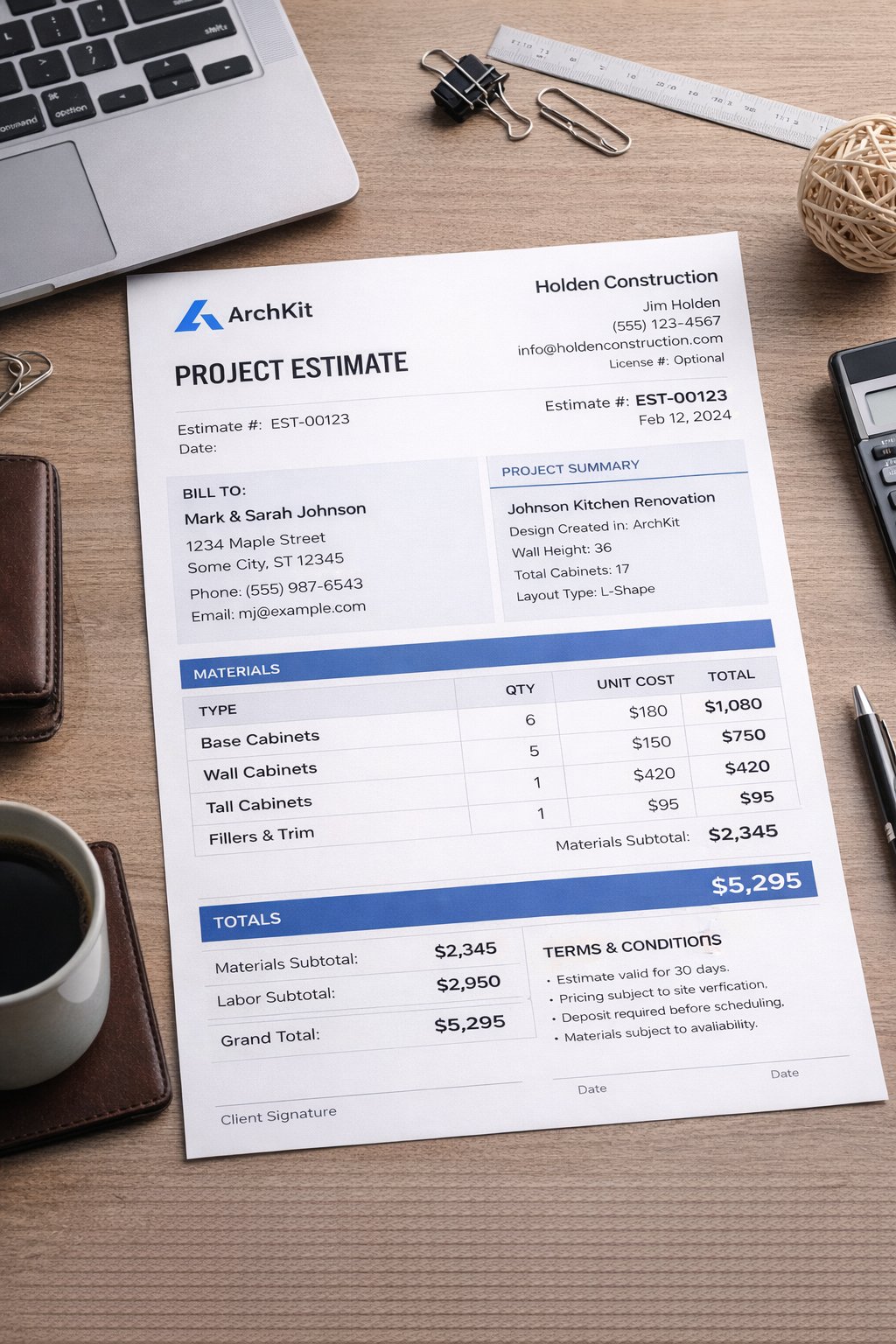
Imagine standing in a client's outdated kitchen on a Friday afternoon, scribbling measurements on a scrap of plywood while knowing you still have hours of office work ahead just to build a quote. You shouldn't have to choose between accuracy and your evening. Data from the U.S. Small Business Administration shows that contractors who quote within five minutes of an inquiry close at dramatically higher rates; however, manual counting often keeps you chained to a desk. Adopting a mobile kitchen cabinet list generator allows you to flip that script. You can build a complete, error-free inventory of every base, wall, and pantry unit before you even leave the jobsite.
It's frustrating to lose bids because your estimate took three days to process or contained a simple measurement error. This guide shows you how to ditch administrative fatigue and generate professional, client-ready cabinet lists in minutes. We will explore how modern mobile workflows and tools like ArchKit transform your phone into a high-precision estimating engine. You'll learn to leverage LiDAR scanning and AR visualization to produce instant project estimates that impress homeowners and secure more contracts on the spot. Stop the manual counting. Start winning more bids with a faster, smarter on-site workflow.
Key Takeaways
- Distinguish between manufacturing cut lists and contractor order lists to ensure your estimates align with standard U.S. cabinet specifications.
- Stop the "Admin Tax" by using a mobile kitchen cabinet list generator to eliminate manual counting and office-bound data entry.
- Leverage mobile LiDAR scanning to create precise floor plans instantly, reducing the risk of expensive measurement errors and project delays.
- Streamline your on-site workflow by dropping standard cabinet sizes into 3D layouts for immediate client visualization and approval.
- Learn how ArchKit provides a field-ready solution for generating professional inventory lists that help you close deals faster and more accurately.
What is a Kitchen Cabinet List Generator?
A kitchen cabinet list generator is a digital tool that instantly converts a visual kitchen layout into a detailed inventory list. Think of it as the bridge between your tape measure and your supplier's order form. It takes the spatial data from your job site and organizes it into a functional Bill of materials. This ensures every filler, toe kick, and wall cabinet is accounted for before you ever place an order. Instead of manually counting boxes on a sketch, you let the software handle the inventory logic.
In 2026, relying on paper sketches is a liability. A kitchen cabinet list generator eliminates the manual counting that leads to expensive re-orders. It provides a clean breakdown of cabinet types, sizes, and quantities. You get rough pricing for estimates immediately. This transition from counting boxes to generating lists means fewer trips back to the site to double-check a single measurement. It turns a complex design into an actionable shopping list in seconds.
Administrative fatigue is a silent profit killer. Most contractors spend their evenings re-typing job site notes into office software. This "Admin Tax" drains your energy and delays your bids. A digital generator handles the data entry for you. It captures the project requirements during the initial walkthrough. Your office time is spent managing the business, not squinting at messy handwriting on a greasy legal pad.
The Evolution of Cabinet Planning
The old way involved a legal pad and a prayer. Traditional measurements are slow and prone to human error. Today, we've moved to LiDAR scanning and mobile-first design. Tools like ArchKit Design allow you to scan a room with your phone and generate a floor plan instantly. This shift accelerates the project approval timeline. You aren't waiting until Monday morning to send a quote; you're doing it while the client is still excited about the vision. Modern remodelers use mobile kitchen layout software to stay ahead of the competition.
Core Benefits for Kitchen Professionals
- Accuracy: LiDAR-driven lists eliminate measurement drift by capturing room dimensions with sub-inch precision.
- Speed: Build a comprehensive inventory and provide a preliminary quote before you even leave the client’s driveway.
- Professionalism: Delivering an organized, digital inventory list on the spot positions you as a high-tier professional who values the client's time.
By automating the inventory process, you reduce the risk of "measurement drift," where small errors compound into major installation headaches. You get a precise count of every 36-inch base, every corner unit, and every trim piece needed for the job. This level of detail builds massive trust with homeowners and ensures your margins stay protected.
Cut Lists vs. Order Lists: Choosing the Right Generator
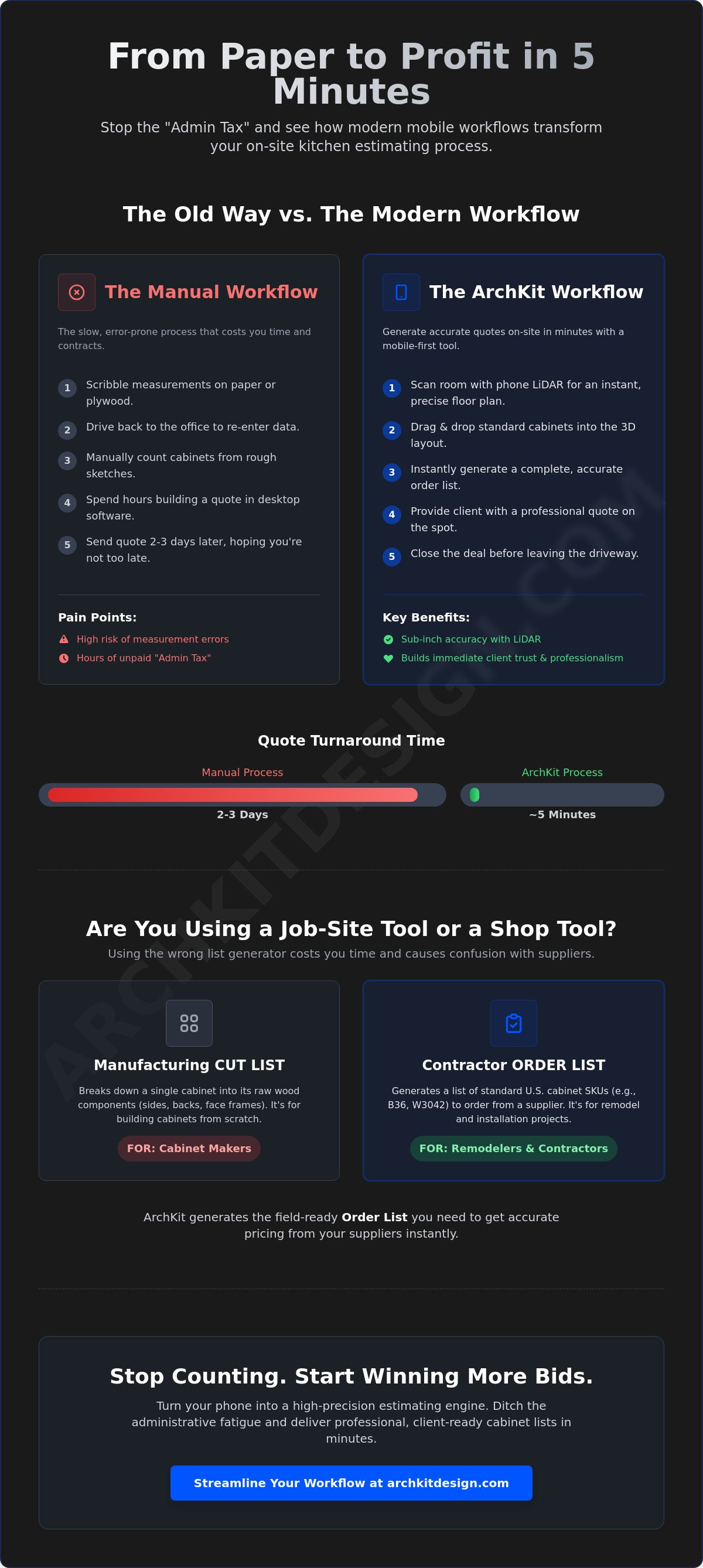
Understanding the difference between a shop-floor tool and a job-site tool is critical for your bottom line. A manufacturing generator produces a cut list. It breaks a cabinet down into its raw components: sides, backs, face frames, and door panels. This is the specific world of Cabinetmakers and Bench Carpenters who build from scratch. If you are a remodeler ordering from a manufacturer, a cut list is useless to you. You need an order list.
A contractor-focused kitchen cabinet list generator focuses on standard U.S. cabinet sizes. It identifies that you need a B36 base cabinet or a W3042 wall unit. It doesn't care about the thickness of the plywood or the tenon length of the rails. Trying to use shop-first software in the field slows you down. These tools often require dozens of technical inputs before they output a single line item. In the field, you have minutes, not hours. Don't spend your time engineering a cabinet when you should be selling the project.
Catalog-based lists are the lifeblood of semi-custom and stock cabinet workflows. Most modern projects rely on pre-manufactured lines. Your supplier needs to know the SKU and the quantity. A field-ready generator allows you to select these standard sizes from a digital catalog as you walk the room. This ensures your estimate matches the reality of what you will actually buy. You can streamline your estimating process today by choosing a tool built for the job site.
When to Use Manufacturing Software
Manufacturing software is the right choice for custom shops building everything in-house. It requires a deep understanding of joinery and material specs. These tools are stationary. They live on a desktop in the office because they demand high processing power and complex user interfaces. If your goal is to feed a CNC machine, stick to manufacturing software. If your goal is to win a bid, look elsewhere.
When a Field-Ready Generator Wins
Field-ready generators are built for speed and mobility. They are ideal for remodelers using semi-custom lines where the box sizes are fixed. You scan the room, place the cabinets in 3D, and generate the list immediately. These tools are mobile-optimized. You use your iPhone or iPad directly on the job site. There is no re-typing notes later. You walk out of the house with a completed inventory. This is how you reclaim your evenings and eliminate "measurement drift" before the cabinets are even ordered.
The Cost of Manual Lists: Why Paper and Pencil Kill Your Profit
Manual lists are more than just a nuisance. They are a direct drain on your company's bank account. Every hour you spend sitting at a kitchen table re-typing job site notes into an Excel sheet is an hour you aren't selling new projects. This "Admin Tax" is a hidden overhead cost that most contractors fail to track. According to fundamental construction cost estimating principles, the speed and precision of your initial takeoff dictate the eventual profitability of the entire build. When you rely on a legal pad, you're inviting measurement drift into your workflow.
Measurement drift occurs when small, manual errors compound over a project's timeline. A simple 1/4-inch mistake on a hand-drawn sketch can lead to a cabinet run that doesn't fit the actual wall. If your list is wrong, you face the high price of re-ordering custom units and paying installers to wait on-site. Using a kitchen cabinet list generator eliminates this risk by anchoring your inventory to digital precision. It ensures that what you see on the screen matches exactly what arrives on the delivery truck.
Slow estimates also lead to lost bids. Homeowners often equate speed with competence. If you take three days to deliver a quote while a competitor provides a professional list before leaving the driveway, you've already lost the edge. A digital workflow stops the administrative fatigue that causes these delays. It allows you to move from measurement to a finalized list without the "ripple effect" of manual revisions or back-and-forth emails with suppliers.
Calculating the Administrative Burden
Track your time for one week. You'll likely find that manual data entry consumes 5 to 10 hours per project. This is a massive opportunity cost. If your hourly rate for site work is $100, you're effectively paying $1,000 in "Admin Tax" for every kitchen you estimate. Automation recovers this time. It lets you focus on high-value tasks like finding new leads or managing active jobsites instead of doing clerical work in a home office.
Eliminating the "Oops" Factor
Common manual errors like missing fillers, wrong hinge directions, or miscounted upper cabinets can cost thousands in lost time. A single typo on a handwritten order form can trigger a two-week delay for a replacement unit. You can protect your margins by standardizing your workflow with a reliable cabinetry layout tool. Tools like ArchKit Design ensure every component is accounted for automatically. Your inventory stays locked to the layout. Your orders stay accurate. Your profit stays in your pocket.
Generating Cabinet Lists On-Site: A 5-Minute Workflow
Speed is your biggest competitive advantage in a crowded market. A kitchen cabinet list generator shouldn't be a tool you only use back at the office. It needs to work where you work. By moving the estimating process to the job site, you eliminate the "dead time" between the first meeting and the final quote. This 5-minute workflow turns your mobile device into a high-speed production engine.
- Step 1: Scan the room. Use mobile LiDAR technology to capture the room geometry. Walk the perimeter and let the software build a precise floor plan in seconds.
- Step 2: Drop cabinets. Select standard U.S. cabinet sizes from the digital catalog. Drag base units, wall cabinets, and tall pantries directly into the 3D layout.
- Step 3: Refine with the client. Adjust configurations in real-time. If they want a drawer bank instead of a standard base, swap it instantly while standing in their kitchen.
- Step 4: Generate the list. Tap a single button to produce a professional PDF or CSV file. Your kitchen cabinet list generator organizes everything by type and size.
- Step 5: Secure the deposit. Share the inventory list and 3D visualization with the homeowner. Finalize the deal before you even leave the driveway.
This process removes the guesswork that often plagues manual takeoffs. You aren't guessing if a 36-inch base will fit next to the dishwasher; you're seeing it happen on the screen. It's a linear, logical progression that moves the project forward at a rapid pace. You can get early access to professional AR tools and start using this workflow on your next project.
Leveraging LiDAR for Instant Accuracy
LiDAR technology captures room geometry faster and more accurately than a laser tape or manual measure. It fires thousands of laser points per second to map walls, windows, and door casings. This allows you to create 2D floor plans and 3D layouts simultaneously during the initial walk-through. Because the digital model is built from millions of data points, it ensures the final inventory list matches the physical reality of the space. You eliminate the risk of ordering cabinets for a wall that is actually three inches shorter than your manual sketch suggested.
The Power of On-Site AR Visualization
Showing a client a list of SKUs is one thing; showing them their future kitchen in Augmented Reality is another. AR visualization brings the cabinet list to life by overlaying digital models onto the existing room. This "wow" factor builds immediate trust. More importantly, it reduces "change of mind" revisions. When a client sees how a specific layout looks in their actual home, they are more likely to finalize the list on-site. This clarity prevents the back-and-forth emails that often stall projects for weeks.
ArchKit: The Field-Ready List Generator for Modern Contractors
ArchKit isn't just another software package. It's a specialized tool built for the dust and noise of an active job site. Most design programs assume you have a desk, a mouse, and an hour to kill. ArchKit assumes you have an iPhone, a client watching over your shoulder, and five minutes to close the deal. This kitchen cabinet list generator bridges the gap between a visual dream and a hard inventory list. It puts the power of a full design studio in your pocket.
Access a comprehensive catalog of standard U.S. cabinet sizes instantly. You don't need to manually type in dimensions or SKUs. Select the unit, drop it into your LiDAR-generated floor plan, and watch the list populate in the background. This immediate feedback loop allows you to generate precise estimates and visual presentations without a single office visit. You walk in as a contractor and leave as a high-tech partner who has already solved the client's biggest layout hurdles.
Integration is seamless. The data you capture on-site feeds directly into your overall project management workflow. Whether you need a PDF for a client signature or a CSV for your supplier's ordering system, the output is ready in seconds. This eliminates the "re-entry error" that typically occurs when moving from field notes to digital orders. Your inventory remains locked to the layout. Your margins remain protected. You close deals faster because you provide answers while the competition is still "getting back to them."
Built for Speed, Not Jargon
Forget the steep learning curve of traditional CAD software. ArchKit requires no previous design experience. Use intuitive drag-and-drop cabinet placement to build your layout. The interface is clean and functional. It produces professional, easy-to-read lists your suppliers will love. Eliminate the laptop. Ditch the legal pad. Run your entire on-site kitchen design workflow from an iPad or iPhone. It is that simple.
Scale Your Business with Better Tools
Growth requires efficiency. You can handle more leads by shortening the design-to-estimate cycle from days to minutes. Shortening this window is the most effective way to increase your closing rate. Clients value transparency and speed. When you provide a detailed kitchen cabinet list generator output on the spot, you remove the friction that causes homeowners to hesitate. Reduce your overhead by eliminating expensive, bulky desktop software that keeps you chained to an office chair. Check out ArchKit pricing to find the right plan for your team and start scaling your remodeling business today.
Master the Modern Job Site Workflow
Adopting a mobile workflow isn't just a convenience; it's a competitive necessity. You've seen how manual counting and office-bound design tools drain your profit through administrative fatigue and measurement drift. By integrating a kitchen cabinet list generator into your on-site routine, you reclaim your evenings and eliminate the "Admin Tax" that holds your business back. You're no longer just sketching ideas. You're generating actionable data that moves projects forward immediately.
Leveraging LiDAR-powered accuracy and a comprehensive standard U.S. cabinet catalog ensures your orders are right the first time. You provide clients with instant 3D and 2D layouts that build massive trust before you even leave the driveway. This shift from stationary office work to immediate field results is how you scale your remodeling business in a fast-paced market. Stop the manual revisions and start winning more bids with professional, on-the-spot presentations.
Start generating professional cabinet lists with ArchKit today. Take control of your time and your margins. The future of remodeling is mobile, precise, and remarkably fast.
Frequently Asked Questions
Can I export the cabinet list to Excel or a PDF?
Yes, you can export your inventory list as a professional PDF or a CSV file immediately after finishing a layout. This flexibility ensures your suppliers receive data in their preferred format while clients get a clean, branded document. It eliminates manual data entry and prevents the errors common when re-typing quantities into different systems back at the office.
Does the list generator include standard U.S. cabinet sizes?
Yes, a professional kitchen cabinet list generator includes a comprehensive catalog of standard U.S. cabinet sizes. You can select base, wall, and tall units based on industry-standard dimensions like 24-inch depths or 30-inch heights. This catalog-driven approach ensures your on-site layout matches the actual stock available from your preferred manufacturers.
How does LiDAR improve the accuracy of my cabinet list?
LiDAR technology maps room geometry with sub-inch precision by firing thousands of laser points per second. This process captures every wall deviation and casing detail that a manual tape measure might miss. By anchoring your design to an accurate digital twin, you prevent measurement drift and ensure your cabinet list fits the physical reality of the site.
Can I use a cabinet list generator for semi-custom cabinets?
Yes, you can use these tools for semi-custom workflows by adjusting standard dimensions or adding specific filler requirements. Because the layout is digital, you can account for custom modifications in real-time. This allows you to produce a precise inventory for projects that require more than just basic stock configurations without needing complex desktop CAD software.
Do I need an internet connection to generate a list on-site?
Most modern mobile tools allow you to perform LiDAR scans and build layouts without an active internet connection. You can capture dimensions and place cabinets in remote jobsites where cellular service is spotty. You only need a connection when you are ready to sync your project to the cloud or email the final PDF list to a client or supplier.
Will this tool help me provide faster estimates to clients?
Yes, using a kitchen cabinet list generator allows you to deliver professional quotes before leaving the client’s home. Data from the U.S. Small Business Administration confirms that contractors who quote within five minutes of an inquiry close at significantly higher rates. By removing the need for office-bound estimating, you shorten your sales cycle and beat slower competitors.
Is there a free version of a kitchen design app for contractors?
Yes, there is a free version available for contractors who want to test the mobile workflow. ArchKit offers a Free Plan at $0 that allows you to explore the basic design and measurement features on-site. For professionals needing advanced LiDAR capabilities and full export options, regular and pro subscription plans provide more robust tools for high-volume estimating.


