
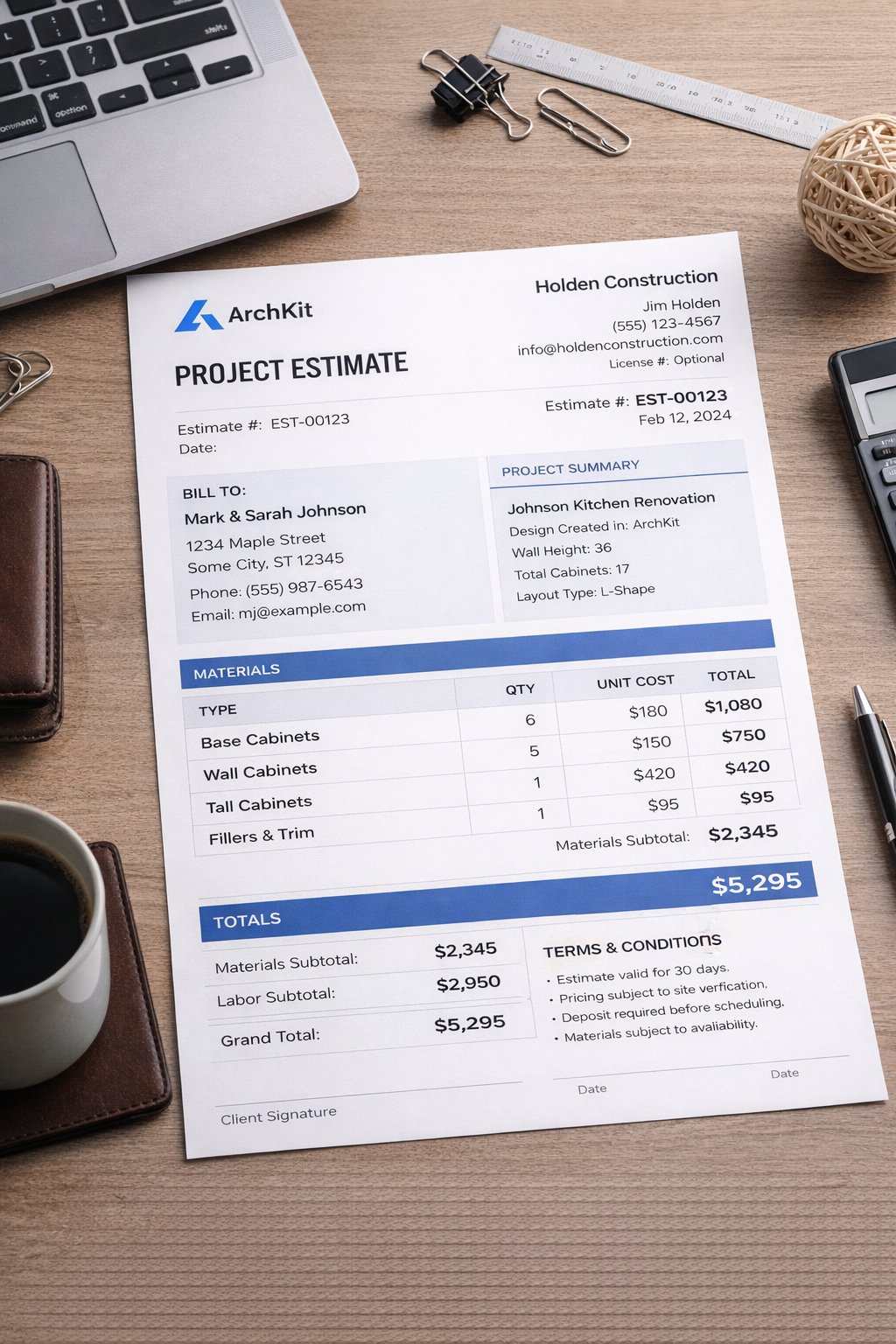
Why are you still paying thousands for a bulky software license that forces you back to the office every time a client wants to move a sink? You know the frustration of manual measurements leading to a costly cabinet re-order. Understanding kitchen design software pricing in 2026 requires looking past the high annual fees of legacy desktop tools. You need a solution that works where you do. Most contractors are tired of paying for features they never use while their mobile workflow remains stuck in the past.
It's time to stop losing bids because your presentations take too long to generate. We promise to show you how to master these costs and choose a high-ROI solution that fits your actual contracting workflow. This guide explores how to reduce project approval times and eliminate measurement errors using modern technology. We will preview the top software options and explain how tools like ArchKit allow you to design, estimate, and visualize directly on-site. Get ready to turn your mobile device into your most profitable tool.
Key Takeaways
- Identify the three pillars of software value to ensure you only pay for the accuracy and library depth your specific projects require.
- Compare the long-term savings of SaaS models against perpetual licenses to maintain flexibility as your contracting volume fluctuates.
- Account for hidden expenses like training hours and hardware needs when evaluating kitchen design software pricing for your firm.
- Boost your bid-to-win ratio by swapping slow manual sketches for immediate 3D visualizations and high-speed LiDAR measurements.
- Learn how ArchKit streamlines your on-site workflow to eliminate costly cabinet re-orders and secure faster client approvals.
Understanding the True Cost of Professional Kitchen Design Software
Sticker shock is common when researching kitchen design software pricing, but the headline subscription fee is only part of the story. Professional tools in 2026 generally fall between $50 per month for mobile-first applications and $3,000 per year for enterprise-grade CAD platforms. For example, a single license for 2020 Design Flex costs approximately $2,495 annually. While that number seems high, the real cost of ownership involves three core pillars: accuracy, library depth, and presentation quality. If your software fails in any of these areas, you aren't just paying for a tool; you're paying for the mistakes it creates.
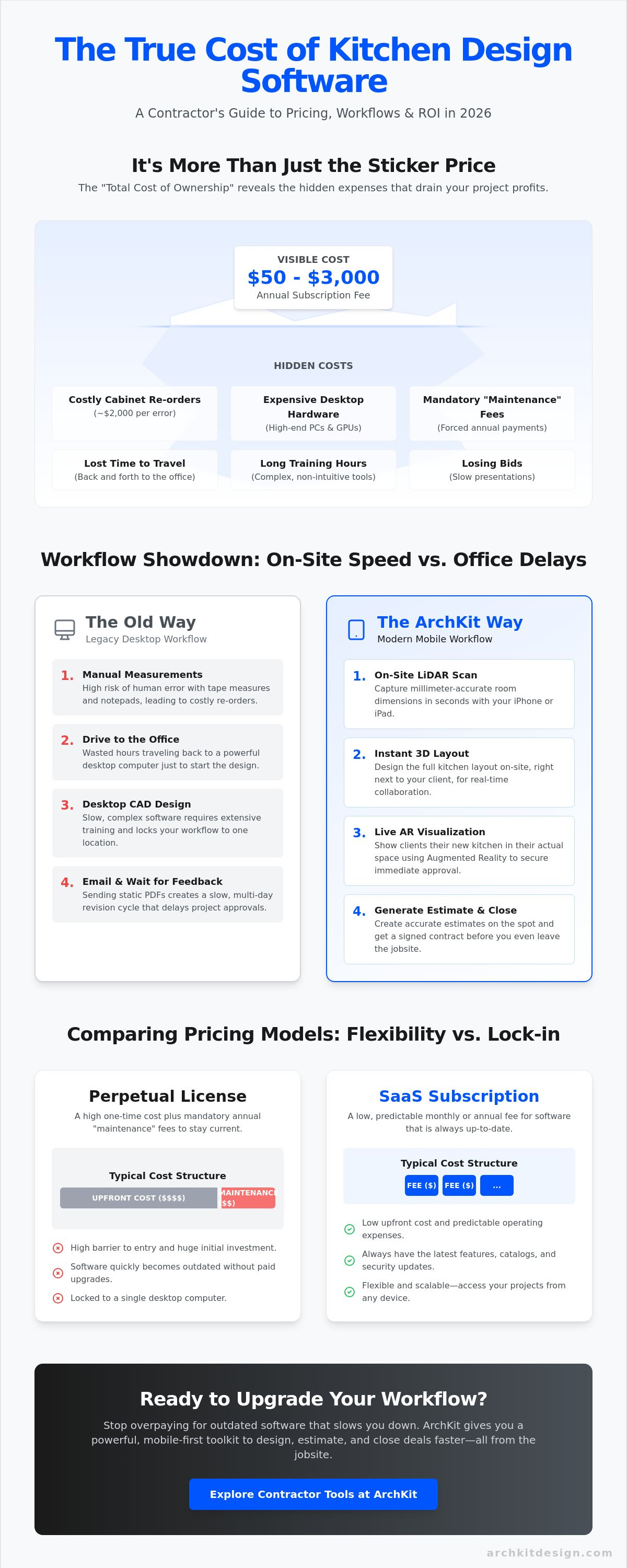
True professional value is found in the "Total Cost of Ownership." For a small firm with two designers, the combined cost of licenses, high-end computer hardware, and manufacturer catalog fees can reach between $25,000 and $35,000 per year. This is why many contractors are moving toward agile, mobile solutions. The goal is to find a tool that pays for itself by preventing a single $2,000 cabinet re-order or by closing a high-margin remodel through better client visuals.
Why Free Design Apps Often Cost More in the Long Run
Free or low-cost consumer apps often lack the localized specifications and US standard cabinet sizes required for a professional jobsite. Using these tools often leads to "administrative fatigue," where you must manually fix data or re-enter measurements between different programs. Inaccurate measurements are the silent killer of profit margins. One measurement error can lead to ordering the wrong cabinet, causing weeks of project delays and eating your entire profit on a job. While virtual home design software has become more accessible, professional contractors need tools built for the high stakes of a physical remodel, not a hobbyist's mood board.
The Shift from Desktop CAD to Mobile-First AR Workflows
Legacy software requires stationary desktop computers with powerful graphics cards to function. This forces you to leave the jobsite to finish a design, slowing down your project approval time. Modern AR apps change this dynamic by utilizing the LiDAR sensors in an iPad Pro or iPhone to capture dimensions instantly. This shift allows you to handle the entire workflow, from measurement to 3D visualization, while standing in the client's current kitchen. By choosing a mobile-first contractor kitchen workflow tool, you eliminate the need for expensive office hardware and reduce the time spent on revisions. You get immediate results, higher accuracy, and a faster path to a signed contract.
- Accuracy: LiDAR scanning reduces human error in measurements.
- Speed: Generate 3D layouts in minutes, not days.
- Profit: Professional presentations justify higher project bids.
Comparing Software Pricing Models: SaaS vs. Perpetual Licenses
The market for kitchen design software pricing has undergone a massive transformation. By 2026, the transition from perpetual licenses to Software as a Service (SaaS) is nearly complete. Legacy brands that used to sell a one-time disc now push monthly or annual subscriptions. This shift isn't just about how you pay; it's about how you work. SaaS models offer cloud-based project management that keeps your office and jobsite in sync. If you still own a perpetual license, you're likely paying for a mandatory "Maintenance Agreement" just to keep the software from crashing on modern operating systems. These hidden annual fees often rival the cost of a new subscription.
Comparing paid and free kitchen design software reveals that professional-grade tools prioritize reliable uptime and seamless data transfer. While free tools might offer basic sketching, they rarely provide the robust back-end support needed for complex remodels. SaaS platforms ensure you always have the latest features without the need for manual installs or hardware upgrades. It's a cleaner, more predictable way to manage your technology overhead.
Monthly vs. Annual SaaS Subscriptions
Flexibility is the primary benefit of the monthly model. It's the right move if you're testing a new workflow or scaling up for a busy season. You don't get locked into a long-term commitment. However, established firms usually find better ROI in annual plans. Paying upfront for the year can slash your total software overhead significantly. Evaluate your project pipeline. If you have consistent work booked through the next twelve months, the annual discount is essentially free money for your business.
What is Included in a Professional Subscription Tier?
When you step up to a professional tier, you're paying for tools that eliminate guesswork. These packages typically include unlimited LiDAR scanning and high-fidelity 3D visualization. You also gain access to comprehensive libraries containing US standard cabinet sizes. This ensures your designs aren't just pretty pictures but accurate blueprints for your installers. Professional kitchen design software pricing usually reflects these high-value features that consumer apps lack.
A pro tier should offer specific utility for the field:
- Instant Export: Send 2D plans and 3D renderings to clients or subs with one tap.
- Live Collaboration: Update a layout on-site and have it reflect on the office dashboard immediately.
- Advanced Visualization: Use AR to place virtual cabinets in the actual room to close the sale.
Stop wasting hours on desktop software that keeps you chained to a desk. You can join our waitlist to see how a mobile-first workflow saves your billable hours and simplifies your tech stack.
Hidden Costs: Training, Hardware, and On-Site Efficiency
Don't ignore the physical tools required to run your digital stack. Your kitchen design software pricing calculation must include the hardware on your hip. Legacy CAD programs often demand heavy workstations with dedicated GPUs and massive RAM. These high-end laptops can easily cost $2,500 to $4,000 before you even install the software. Mobile-first tools change the math. They leverage the iPhone or iPad you likely already carry. By using devices built for the field, you eliminate the need for a separate "office computer" just to draft a basic cabinet layout. This hardware-software synergy is often the difference between a tool that drains your budget and one that fuels your growth.
On-site efficiency is a direct financial gain that most contractors overlook. Moving from manual tape measurements to digital scans isn't just about looking tech-savvy. It's about recovering billable hours. If you spend two hours measuring a kitchen and another four hours drafting it at home, you've lost nearly a full day of production. Modern workflows allow you to compress that entire process into a single site visit. When your software lives on your mobile device, you finish the work while the client is still excited about the project. This speed reduces the "lag time" that often kills deals before they start.
The Hardware Factor: iPad Pro and LiDAR Integration
Speed on-site depends on the quality of your sensors. Professional LiDAR kitchen scanner apps require compatible hardware to deliver the accuracy your cabinet orders demand. An iPad Pro with LiDAR functionality allows for instant spatial mapping of a room. It captures every corner, soffit, and plumbing stub in seconds. Compare the cost of this tablet against a bulky CAD laptop. The iPad is more portable, has better battery life for a full day of site visits, and doubles as your presentation screen. You stop paying for "office days" because the drafting happens in real-time. This portability is a massive differentiator that legacy desktop software simply cannot match.
Training and Onboarding: Time is Money
Billable hours are your most valuable asset. Avoid software that requires a multi-day certification course just to draw a simple floor plan. If your team can't master the interface in an afternoon, the tool is too expensive regardless of the subscription price. Evaluating the Best Kitchen Design Software often highlights that user experience is as critical as feature depth. Complex systems lead to administrative fatigue and team pushback. ArchKit focuses on an intuitive, contractor-first interface that mirrors your actual jobsite workflow. You can start designing on your first day. This eliminates the "downtime" costs associated with steep learning curves. You get a professional result without the academic overhead.
- Zero Office Time: Design while standing in the kitchen you are remodeling.
- Immediate ROI: Save 5-10 hours per project by eliminating manual drafting.
- Reduced Errors: LiDAR precision prevents the $2,000 "wrong cabinet" mistake.
Calculating ROI: How Kitchen Design Software Pays for Itself
Stop viewing your digital tools as a line-item expense. They are revenue generators. When you evaluate kitchen design software pricing, you must calculate the return on your time and your reputation for accuracy. A single cabinet ordering error often costs upwards of $2,000 in materials and lost labor. Preventing just one of these mistakes covers the cost of a professional subscription for the entire year. Track your metrics. Measure the gap between manual tape measurements and LiDAR scanning. You'll find that digital tools recover hours of billable time on every single project. This efficiency allows you to take on more jobs without increasing your headcount or your stress levels.
The financial gain isn't just about avoiding mistakes. It's about capturing more of the market. High-ROI software pays for itself by shortening the "lag time" between the first site visit and a signed contract. Every day you spend drafting at a desk is a day your client could be talking to a competitor. Move fast. Deliver results in the moment. When your software lives on your mobile device, you eliminate the administrative fatigue that kills your momentum and your margins.
Closing More Sales with Instant 3D Visuals
Clients buy what they can see. Hand-drawn sketches and verbal descriptions leave too much room for uncertainty. Using professional 3D kitchen visualizers builds trust instantly. It transforms a standard sales pitch into a collaborative design session. When you can show a client exactly how their new cabinets will look in their actual space, you remove the friction of doubt. This immediate visualization significantly increases your "Bid-to-Win" ratio. You look more professional than the competition. You shorten the sales cycle by securing design approval before you even leave the initial meeting. Don't wait three days to send a rendering. Close the deal in the room while the excitement is high.
Reducing Rework and Material Waste
Consistency is the foundation of a profitable remodel. Manual data entry and hand-written notes are breeding grounds for discrepancies that lead to rework. Digital layouts ensure your cabinet runs fit the first time, every time. Automated cabinet lists generated by a mobile-first workflow eliminate the administrative burden of double-checking every SKU. This precision trickles down to your installers. They spend less time shimming and modifying because the layout matches the reality of the walls. You reduce material waste and protect your margins. One accurate scan prevents the administrative fatigue of re-ordering parts and rescheduling crews. Your team stays on schedule, and your profit stays in your pocket.
- Higher Closing Rates: Professional visuals justify your premium pricing and win more bids.
- Faster Approvals: Use AR walkthroughs to help clients commit to the layout on the spot.
- Zero Waste: Accurate digital lists mean you only order what you actually need.
Ready to stop leaving money on the table? Get early access to ArchKit and start maximizing your project ROI today.
ArchKit Pricing: Professional AR Tools for the Modern Contractor
Transparency is rare in the world of kitchen design software pricing. Many enterprise providers hide their costs behind "request a quote" buttons or bury you in mandatory success plan fees. ArchKit breaks this cycle with a streamlined, mobile-first pricing model built specifically for field professionals. You choose the tier that matches your project volume. Whether you need flexible monthly access for a single remodel or a discounted annual plan for a high-volume firm, the costs are clear and predictable. There are no hidden hardware requirements. You don't need a $3,000 workstation to run this tool. It lives on the mobile hardware you already carry, providing professional features like LiDAR scanning and 3D visualization without the legacy overhead.
Modern contractors need tools that move at the speed of a jobsite. Legacy software often feels like a burden, requiring constant office time and complex updates. ArchKit focuses on utility. Every subscription tier includes access to standard cabinet catalogs and professional export features. You get the power of high-end CAD with the simplicity of a mobile app. This approach ensures your software investment pays for itself through increased accuracy and faster project turnarounds. Stop paying for bloated features you never touch. Invest in a workflow that prioritizes your time in the field.
Why ArchKit is the High-Value Choice for Remodelers
Legacy CAD tools are built for architects sitting in climate-controlled offices. ArchKit is different. It is engineered specifically for the kitchen design app for contractors niche. The interface focuses on the high-value tasks you actually perform on-site: capturing measurements, planning cabinet layouts, and visualizing the final result with the client. By stripping away the bloat of traditional desktop software, ArchKit delivers a faster, more intuitive experience. You can see ArchKit pricing options to find the plan that fits your specific workflow. It's about empowering you to close more deals and eliminate measurement errors before they reach the cabinet shop.
Get Started with Professional AR Design
You don't need to commit to a massive annual contract to modernize your business. Test the workflow yourself with a free kitchen design app trial. Experience the speed of LiDAR scanning and see how 3D visuals transform your client presentations. As your business grows, you can scale into professional tiers that offer unlimited projects, cloud syncing, and advanced estimate creators. This flexibility ensures your kitchen design software pricing stays aligned with your actual revenue. The future of contracting is mobile, fast, and accurate. Get early access to our latest 2026 updates and join the waitlist for exclusive features designed to maximize your jobsite ROI.
- Flexible Tiers: Scale from a single project to a full-service remodeling firm.
- No Hidden Fees: Forget about mandatory maintenance agreements or success plans.
- Mobile First: Use the power of LiDAR and AR on the devices you already own.
Modernize Your Jobsite Workflow Today
Success in 2026 belongs to contractors who trade their desks for the jobsite. You've seen how kitchen design software pricing is more than a line-item expense. It's a strategic investment in your speed and accuracy. Stop paying for legacy overhead that keeps you away from your clients. Focus on tools that deliver immediate results in the room. High-ROI solutions move the needle by shortening your sales cycle and protecting your margins from costly manual mistakes. Don't let administrative fatigue slow your growth.
Take control of your profitability. Leverage LiDAR-accurate measurements in seconds and professional 3D AR walkthroughs that secure instant trust. Use standard U.S. cabinet catalogs to plan layouts while standing in the kitchen you're about to remodel. It's time to replace guesswork with precision. View ArchKit Pricing and Start Designing On-Site. Your most profitable projects are just one scan away. Build faster. Win more. Grow your firm with confidence.
Frequently Asked Questions
How much does kitchen design software cost for a small contracting business?
Professional costs range from $50 per month for mobile apps to $3,000 per year for enterprise CAD platforms. Small firms should prioritize subscription models that scale with project volume to avoid high upfront licenses. This approach allows you to manage overhead without sacrificing 3D visualization quality or measurement accuracy. It's a pragmatic way to ensure your software remains a tool rather than a financial burden.
Is there a free kitchen design app that is actually professional enough for contractors?
Most free apps target homeowners and lack the localized specifications or LiDAR precision required for professional cabinet ordering. While you can find free trials or basic versions, professional contractors need tools that include US standard cabinet sizes and exportable 2D plans. ArchKit offers a free version to test the on-site workflow before committing to a paid tier. It's a risk-free way to verify accuracy before investing.
Does kitchen design software pricing usually include manufacturer catalogs?
Catalog access depends on the software provider and the specific subscription tier you choose. Some legacy desktop programs charge additional fees for specific manufacturer libraries, which can add thousands to your annual cost. Modern mobile-first tools often include standard cabinet catalogs as part of the base price to streamline your on-site estimating. This integration ensures your layouts are grounded in real-world specifications from the very first scan.
What hardware do I need to run a LiDAR-based kitchen measurement app?
You need a mobile device equipped with a LiDAR sensor, specifically an iPhone 12 Pro or newer, or an iPad Pro from 2020 or later. These sensors allow the app to map the room in 3D with professional accuracy. Using existing mobile hardware eliminates the need for expensive, bulky laptops or separate laser measuring tools that don't sync with your design software. It's the most efficient way to capture dimensions instantly.
Can I pay for kitchen design software monthly instead of annually?
Most modern SaaS providers offer monthly payment options to provide better cash flow flexibility for smaller firms. Choosing a monthly plan for your kitchen design software pricing allows you to test the tool on one or two jobs without a long-term commitment. Annual plans remain available for established businesses looking to secure the lowest possible per-month rate. You get the same professional features regardless of the billing cycle you choose.
How does the ROI of an AR kitchen design app compare to traditional CAD?
AR apps deliver a faster ROI by moving the design process from the office to the jobsite. Traditional CAD requires hours of manual drafting and expensive hardware, while AR visualization helps clients commit to a design during the first meeting. This speed reduces your sales cycle and minimizes the administrative fatigue associated with back-and-forth office revisions. You win more bids by showing clients exactly what they're buying in real-time.
Do I need a separate subscription for cabinet layout and 3D rendering?
Professional contractor tools like ArchKit combine cabinet layout, 3D rendering, and LiDAR measurements into a single subscription. Bundling these features into one kitchen design software pricing model prevents data loss between different apps. You save money by eliminating multiple software licenses and ensure that your 2D plans always match your 3D visualizations. It's a streamlined approach that prioritizes your productivity and reduces your total software overhead.


