
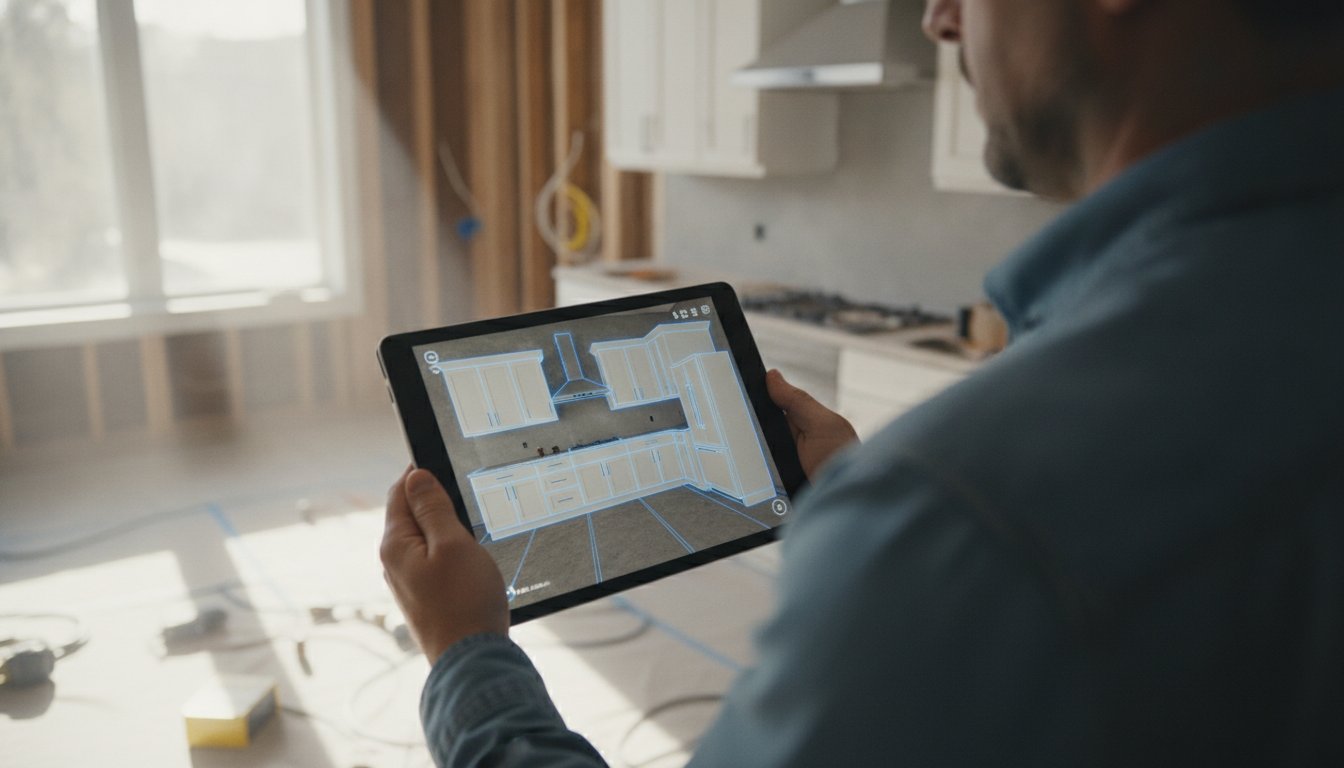
Research shows that 78% of homeowners hire the first contractor who responds to their inquiry. In 2026, responding doesn't mean sending an email three days later. It means closing the deal before you leave their driveway. You know the frustration of a tablet crashing during a high-stakes presentation. You've struggled with screens that wash out in bright sunlight and sensors that miss critical measurements. Finding the best tablet for on-site kitchen design isn't a luxury; it's a functional necessity for any pro who wants to stop wasting time on manual drafting.
When you pair a high-performance device with a tool like ArchKit, you transform a simple site visit into a live design session. Use LiDAR to scan the room in seconds. Drop in cabinet catalogs instantly. Show the client their dream kitchen in AR while you're still standing in their current one. This guide breaks down the top hardware for 2026, from the powerful iPad Pro M4 to rugged Windows machines. We'll help you choose a tool that handles 3D room scans and professional presentations without breaking a sweat.
Key Takeaways
- Prioritize high-performance GPUs and neural engines to run complex 3D visualizations smoothly during live client presentations.
- Evaluate the iPad Pro M4 and Surface Pro 11 to identify the best tablet for on-site kitchen design that fits your specific software ecosystem.
- Leverage professional-grade LiDAR sensors to capture room dimensions with the precision required for custom cabinetry layouts.
- Select hardware with at least 1000 nits of brightness and military-grade protection to handle high-glare environments and accidental drops.
- Use the ArchKit workflow to sync LiDAR scans with cabinet catalogs, allowing you to finalize layouts and close bids on the spot.
Why Hardware Specs Matter for On-Site Kitchen Design
Kitchen design has moved from the stationary office desk to the active job site. You aren't just looking at PDFs or checking emails anymore. You're building a digital twin of a client's home in real time. If your hardware can't keep up, you look amateur. A tablet that stutters while rendering a cabinet layout kills the "wow factor" and erodes client trust. Finding the best tablet for on-site kitchen design means looking under the hood at the processor and sensors, not just the price tag.
The cost of lag is higher than you think. When a device freezes during a presentation, the client starts questioning your technical competence. High-performance GPUs and neural engines are now essential. They allow you to manipulate 3D models and high-resolution textures without a hitch. The best tablet for on-site kitchen design must handle these heavy workloads while you're standing in a dusty, unconditioned room. Accuracy starts with the hardware sensor, not just the software you install.
The Death of the Manual Tape Measure
Measuring with a tape and a notepad is slow. It invites human error. One misread digit can lead to a $10,000 cabinet mistake. Digital tools replace that risk with precision. Modern tablets use sensors to map space instantly, creating an immediate professional edge. You show up, scan the room, and have a 3D model ready before the client finishes their coffee. This speed isn't just about showing off. It's about data integrity that starts at the hardware level. Digital measurement ensures your base dimensions are locked in before you ever start the layout.
Processing Power: Beyond Basic Browsing
Kitchen design apps aren't simple web browsers. They manage massive cabinet catalogs and high-resolution textures. This requires significant RAM and a high-performance GPU. When using Augmented Reality (AR) to overlay new designs on an existing wall, your tablet's Neural Engine is doing the heavy lifting. It processes millions of LiDAR data points per second to keep that virtual cabinet pinned to the floor as you move around the room.
Cheap consumer tablets often suffer from thermal throttling in unconditioned job sites. They overheat, dim the screen to save power, and lag when you need them most. Professional workflows require hardware that handles the heat of a July remodel without dropping frames. Tools like the ArchKit free kitchen design app are built to leverage this processing power. The software is only as fast as the chip inside your device. If your hardware is weak, your workflow will be too.
The Top 3 Tablets for Kitchen Pros in 2026
Choosing the right hardware is a balance of power, weight, and sensor accuracy. You need a device that stays comfortable during a two-hour site walk but packs enough punch to render high-resolution cabinet textures. While many devices claim to be the best tablet for on-site kitchen design, only a few survive the rigors of active scanning and real-time client feedback. Industry experts often rank these as the best tablets for creative professionals who require mobile performance without compromise.
In 2026, the market has stabilized around three primary contenders, each serving a different workflow style:
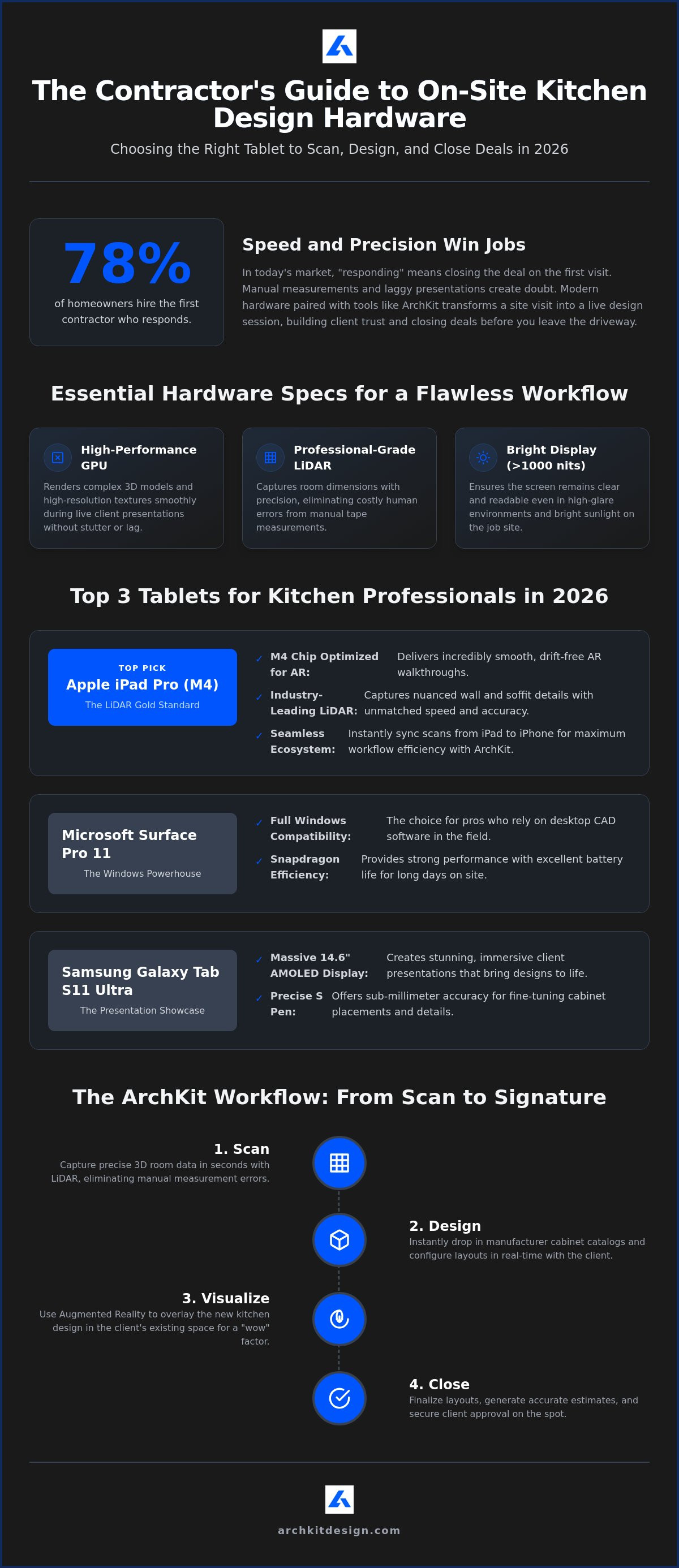
- Apple iPad Pro (M4): The undisputed leader for LiDAR scanning and mobile-first AR apps.
- Microsoft Surface Pro 11: The choice for contractors who need full Windows compatibility for desktop CAD software.
- Samsung Galaxy Tab S11 Ultra: A massive 14.6-inch AMOLED display that excels at immersive client presentations.
Battery life is the silent dealbreaker. Active 3D scanning sessions can drain a standard tablet in hours. The M4 iPad Pro and Snapdragon-powered Surface Pro 11 both offer significant efficiency gains, but you should still plan for mid-day charging if you're hitting multiple job sites. Stylus precision has also reached a peak; the Apple Pencil Pro and Samsung S Pen now offer the sub-millimeter accuracy needed to fine-tune cabinet placements on a 2D floor plan.
Apple iPad Pro (M4): The LiDAR Gold Standard
The iPad Pro M4 is built for speed. Its M4 chip is specifically optimized for AR walkthrough apps, allowing you to move through a virtual kitchen without the "drift" common in older hardware. The 13-inch model includes a LiDAR sensor that remains the gold standard for kitchen mapping. It captures the subtle nuances of walls and soffits with incredible speed. For those using the ArchKit ecosystem, the ability to scan on an iPad and instantly sync that data to an iPhone for quick reference is a major workflow advantage. If you want to see how this hardware transforms your bidding process, you can sign up for early access to our latest mobile tools.
Microsoft Surface Pro: The Full CAD Powerhouse
If your workflow depends on desktop-class software like Revit or full-scale AutoCAD, the Surface Pro 11 is your engine. It runs a full version of Windows 11 on a Snapdragon X Elite processor. The trade-off is clear: you get superior software compatibility but lose the specialized AR sensor precision found on iOS. However, for rapid estimating and data entry, the integrated keyboard and desktop environment are hard to beat. It’s a literal office in your hands, making it a strong contender for the best tablet for on-site kitchen design when your projects require complex, multi-layered architectural files.
LiDAR and AR: The Non-Negotiable Specs
LiDAR stands for Light Detection and Ranging. It works by firing thousands of laser pulses per second and measuring how long they take to bounce back. This creates a "point cloud," a dense map of dots that represents the physical room in three dimensions. For a general floor plan, basic sensors might suffice. For a $75,000 kitchen remodel, they don't. You need high point cloud density to distinguish between a finished drywall corner and a door casing. The best tablet for on-site kitchen design must provide the precision required for cabinetry-level tolerances.
Standard room scanning on a basic smartphone often misses the subtle details that matter to a contractor. Sensor range and point cloud density are the two factors that separate consumer toys from professional tools. If your sensor can't accurately "see" the ceiling height or the depth of an alcove from across the room, your cabinet order will be wrong. High-density data ensures that every 1/8th of an inch is accounted for, preventing the nightmare of a cabinet that is just slightly too wide for its opening.
Achieving Sub-Inch Accuracy
Kitchens are notoriously difficult environments to scan. Stainless steel appliances and glass backsplashes often confuse standard sensors by reflecting the laser pulses. When using a professional LiDAR kitchen scanner app, you must understand how to navigate these obstacles. Calibrate your device regularly to maintain data integrity. To get the best results on reflective surfaces, scan at an angle rather than head-on. This simple adjustment helps the laser bounce back to the sensor correctly, ensuring your digital model is a true reflection of the job site.
Visualizing Cabinets with AR
Once your scan is locked in, Augmented Reality (AR) becomes your most powerful sales tool. You can place 3D cabinet models directly into the scanned room. This isn't just a visual aid; it's a communication bridge. Most clients struggle to visualize how a 42-inch upper cabinet will look compared to a 36-inch one. With the best tablet for on-site kitchen design, you can perform a live "walk-through" presentation. They see the layout at scale. They experience the flow of the new workspace immediately. This level of clarity reduces project approval time and helps you manage client expectations through accurate digital overlays before the first demo hammer swings. Using a tool like ArchKit allows you to bridge this gap between a scan and a signed contract in a single visit.
Protecting Your Tablet: Job Site Survival Guide
A $1,500 tablet is a precision instrument. On a job site, it's a liability if not protected. Sawdust, drywall spray, and concrete floors are the enemies of high-end glass. Even the best tablet for on-site kitchen design will fail if it's not ruggedized for the field. You need more than a basic consumer case. Look for MIL-STD-810H certification. This ensures your device survives the inevitable drop from a countertop height onto subflooring. Don't risk your primary sales tool on a flimsy plastic shell.
Screen brightness is the most overlooked spec. Most consumer tablets hover around 500 nits. This is useless in a sun-drenched kitchen with the windows out. You need 1000+ nits of peak brightness to see your 3D layout clearly. Just as professional guides understand that lighting and timing are everything when capturing a view—to see a prime example of this in nature, click here—contractors must ensure their screens can handle high-glare environments. Dust management is equally critical. Look for an IP65 or higher rating. Sawdust is microscopic and abrasive. It finds its way into charging ports and speaker grilles, eventually causing internal shorts. Pro support and extended warranties are worth the premium. When your tablet is your office, a 24-hour replacement guarantee keeps your projects moving.
Ruggedization and Ergonomics
Hand straps are non-negotiable for on-site work. You can't hold a tape measure and a tablet simultaneously without one. A rotating hand strap allows you to switch from portrait to landscape mode instantly while scanning. Ensure your screen protector is "LiDAR-compatible." Some thick glass protectors can refract the laser pulses, leading to the measurement inaccuracies we covered earlier. Heat management is also vital. High-performance processors generate significant internal heat. Combined with a 90-degree job site, this leads to thermal shutdown. Keep your device in the shade between scans to avoid the "black screen of death."
Power Management for Long Days
LiDAR and AR visualizations are battery killers. They tax the GPU and the sensor array simultaneously. Expect your battery to drop 20% to 30% per hour during active scanning sessions. Carry a 20,000mAh power bank with Power Delivery (PD) support. This allows for fast mid-day top-ups between client meetings. Optimize your settings by turning off background app refresh and lowering brightness when you aren't actively presenting. To stay ahead of the curve with tools designed for this rugged environment, get early access to the ArchKit workflow and streamline your on-site process.
The ArchKit Workflow: Maximize Your Tablet's Potential
The best hardware requires a workflow that matches its speed. You've chosen the best tablet for on-site kitchen design to stop wasting hours on manual drafting and office-bound revisions. Now, use ArchKit to bridge the gap between a raw room scan and a professional estimate. This isn't about just drawing lines; it's about building a project in real-time. ArchKit turns the iPad Pro’s LiDAR data into a functional floor plan before you’ve even finished your site walk. With mid-range kitchen remodels in 2026 often exceeding $75,000, clients expect a level of professionalism that matches their investment.
On-Site Design and Estimation
Scan the kitchen in under 60 seconds. ArchKit processes the LiDAR point cloud to identify corners, openings, and obstructions with professional precision. Once the room is mapped, start the layout. You don't need to guess at dimensions or wait for an office-based designer to send back a rendering. Drag and drop 3D cabinets into the digital space. You have instant access to U.S. standard cabinet sizes directly on your tablet. This ensures your layout is accurate and ready for ordering. Review the ArchKit pricing tiers to find the right fit for your project volume and overhead.
Winning the Bid Before You Leave
Beat the competition by delivering results in minutes, not days. Most contractors leave a site visit with a handful of notes and a promise to "get back to them next week." You can do better. Use an AR kitchen layout tool to show the client exactly what they're buying. Let them walk through their new kitchen while standing in their old one. Change the cabinet style or move the range with a tap. This immediate visualization reduces the design-to-approval loop significantly.
When a client sees their dream kitchen in AR, they aren't just looking at a bid; they're looking at their future home. Secure the project by getting client sign-off on the digital model before you leave the driveway. It eliminates the administrative fatigue of back-and-forth emails. If you're ready to modernize your trade and reclaim your time, get early access to professional AR design tools and start closing more bids on-site. Scan. Design. Close.
Build Your Future on the Field
The transition from stationary office CAD to mobile job site design is complete. In 2026, your competitive edge depends on the hardware in your hand. Selecting the best tablet for on-site kitchen design isn't just about screen size. It's about securing 1000+ nits of brightness to fight glare and high-performance GPUs to render complex 3D visualizations without lag. You've seen how LiDAR eliminates manual measurement errors and how AR helps clients commit to a layout in real time.
Stop wasting time on back-and-forth revisions. Transform your workflow by pairing a high-end device with professional-grade software. Get early access to ArchKit and transform your tablet into a design powerhouse. This tool is specifically optimized for iPad Pro LiDAR, allowing for instant 2D and 3D layout generation. It includes a standard U.S. cabinet catalog so you can finalize designs before you even leave the driveway. Take control of your projects and start winning more bids today.
Frequently Asked Questions
Do I really need an iPad Pro for kitchen design, or will a standard iPad work?
Yes, the Pro model is essential for professional LiDAR scanning. Standard iPads lack the specialized LiDAR sensor required for the ArchKit workflow. Without this sensor, you lose the ability to capture accurate 3D room dimensions instantly. The Pro's M4 chip also ensures the 3D rendering doesn't lag while you're presenting to a client on-site. It's the difference between a toy and a professional tool.
Is LiDAR accurate enough for final cabinet measurements?
LiDAR provides high-precision room mapping, but you should verify critical "tight-fit" dimensions with a laser distance meter. For most layout and estimating tasks, LiDAR is more than sufficient for cabinetry tolerances. It captures the overall geometry of the space, including wall deviations and soffit heights. Use it to build your digital twin and then double-check the final sink-center or appliance-clearance spots before ordering.
Which tablet has the best screen for bright, sunny job sites?
The iPad Pro (M4) with its Ultra Retina XDR display is the top choice for visibility. It reaches a peak brightness of 1,600 nits, making it the best tablet for on-site kitchen design when working in unfinished rooms with direct sunlight. High brightness prevents the "washout" effect that makes standard tablets impossible to use near large windows. It ensures your client can see the design as clearly as you do.
Can I run full CAD software like 2020 Design on a tablet?
You can run full Windows-based CAD programs only on tablets like the Microsoft Surface Pro 11. Since 2020 Design requires a Windows environment, it won't run natively on an iPad or Android tablet. However, many contractors now use mobile-first tools like ArchKit for the initial on-site design. They then export those files to their office-based CAD software for final production drawings, combining mobile speed with desktop depth.
How do I protect my tablet from drywall dust and debris?
Invest in a case with an IP65 or higher rating to seal out fine particulates. Drywall dust is abrasive and can ruin charging ports or speakers quickly. Look for ruggedized cases that include port covers and built-in screen protection. Regular maintenance is also key. Use compressed air to clear the LiDAR sensor and ports daily. This simple habit will extend your hardware's life in harsh environment.
What is the best tablet for contractors on a budget in 2026?
The Samsung Galaxy Tab Active5 Pro is the leading budget-friendly option for rugged field work. It offers a durable, IP68-rated design and a removable battery, which is a rarity in 2026. While it lacks the advanced LiDAR precision of the iPad Pro, it's a reliable workhorse for basic 2D layouts and project management. It's built to survive drops and spills that would kill a standard consumer tablet.
Does the ArchKit app work on Android tablets?
ArchKit is currently optimized for the iOS ecosystem to take full advantage of Apple's specialized LiDAR hardware. While some features may be accessible on high-end Android devices, the full 3D scanning and AR visualization experience is best on an iPad Pro. This focus ensures that the app remains stable and accurate for professional contractors. It avoids the fragmentation issues that often cause software crashes on varied Android hardware.
How long does a tablet battery last when using AR and LiDAR scanning?
Expect about 3 to 4 hours of continuous use when running heavy AR and LiDAR tasks. These sensors and the high-brightness screen settings required for job sites drain power rapidly. If you're visiting multiple sites a day, keep a high-wattage power bank in your truck. Fast-charging features on the M4 iPad and Surface Pro 11 allow you to regain significant power during a 30-minute lunch break.

