
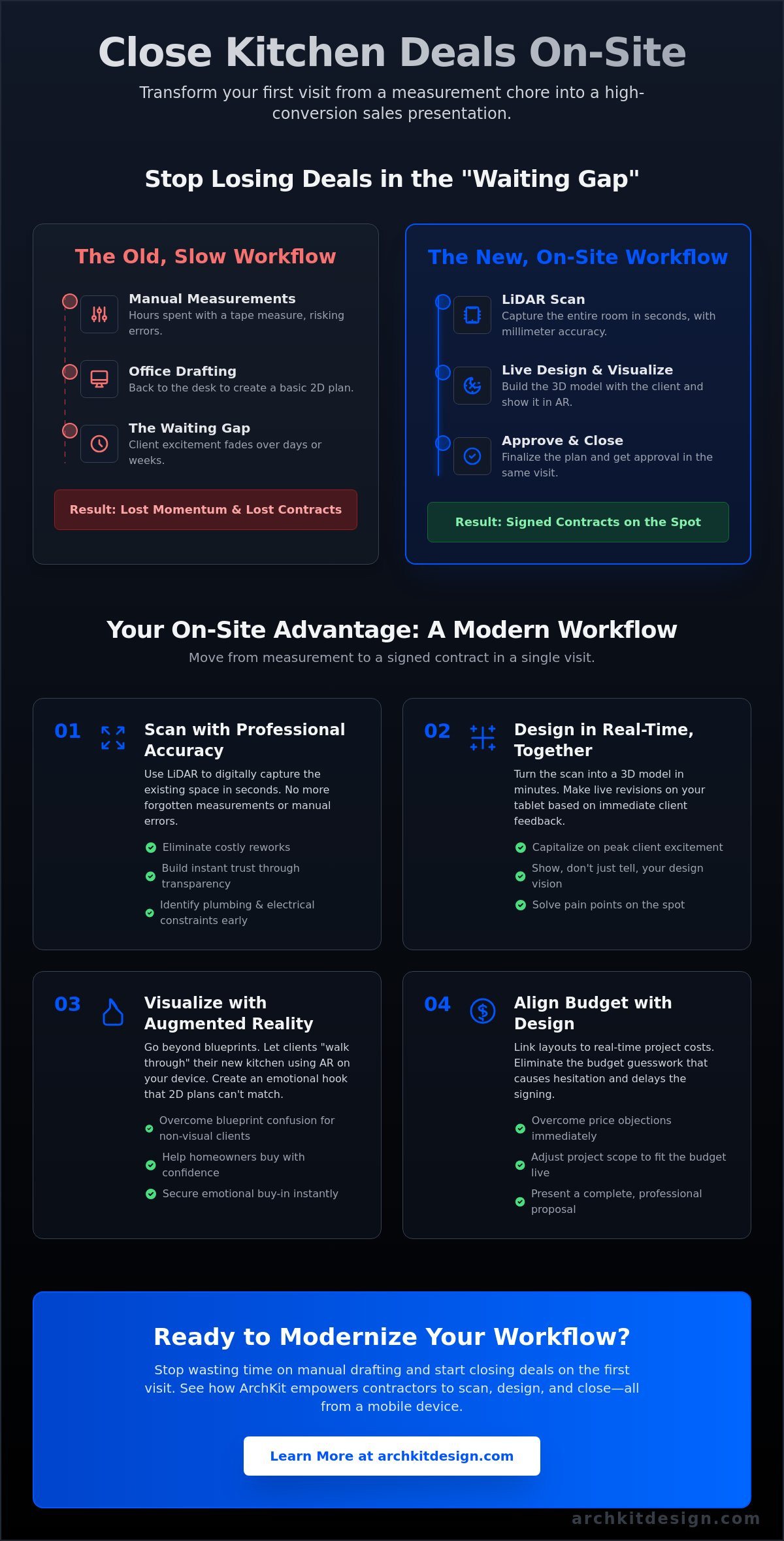
The fastest way to lose a kitchen contract is to tell a homeowner you'll "get back to them next week with a drawing." You know the feeling. You spend hours measuring and even longer at the office drafting a 2D layout, only for the client's excitement to fizzle out during the wait. It's exhausting to lose momentum to administrative fatigue and manual drafting errors. Mastering how to sell a kitchen design concept to clients isn't about being a better talker. It's about changing where and how you present. You can close deals faster by transforming your on-site workflow into a high-conversion sales presentation that happens right in the kitchen.
This guide shows you how to eliminate the "office-work" delay that kills sales. We'll explore how to use modern tools like ArchKit to leverage LiDAR scanning and AR visualization. These technologies help you avoid costly reworks and show non-visual clients exactly what they're buying. Learn to move from measurement to approval in a single visit, boosting your professional image while securing more contracts. We're cutting the fluff and focusing on the practical, on-site strategies that turn leads into signed projects today.
Key Takeaways
- Close the "waiting gap" by moving from measurements to professional visualizations in minutes. Speed secures the contract.
- Master how to sell a kitchen design concept to clients. Use LiDAR scanning to prove your accuracy and build trust.
- Use AR and 3D walkthroughs to bypass blueprint confusion. Create an emotional hook that 2D plans can't match.
- Link layouts to real-time project costs. Eliminate the budget guesswork that causes client hesitation and delays.
- Capture feedback and make live revisions on-site with ArchKit. Scan. Design. Close.
The On-Site Advantage: Why Speed is Your Best Sales Tool
The "Waiting Gap" is where most kitchen remodel deals go to die. You know the cycle. You visit the site, take manual measurements, and tell the client you'll have a drawing ready in a week. During those seven days, the client's peak excitement fades. They start browsing Pinterest, talking to other contractors, or questioning the project's cost. Every hour you spend back at the office drafting is an hour your competitor has to steal the lead. Speed isn't just about efficiency; it's your most powerful sales tool. Mastering how to sell a kitchen design concept to clients means closing that gap entirely.
An on-site concept isn't a rough pencil sketch on a napkin. It's a professional, high-fidelity visualization created before you even leave the driveway. By moving from measurements to a 3D model in minutes, you capitalize on the client's immediate emotional investment. You establish authority instantly. While your competition is still fumbling with a metal tape measure and a notepad, you're already showing the client their future home. This shift positions you as the expert who values their time and delivers results without the administrative lag.
Eliminating the Office-Work Delay
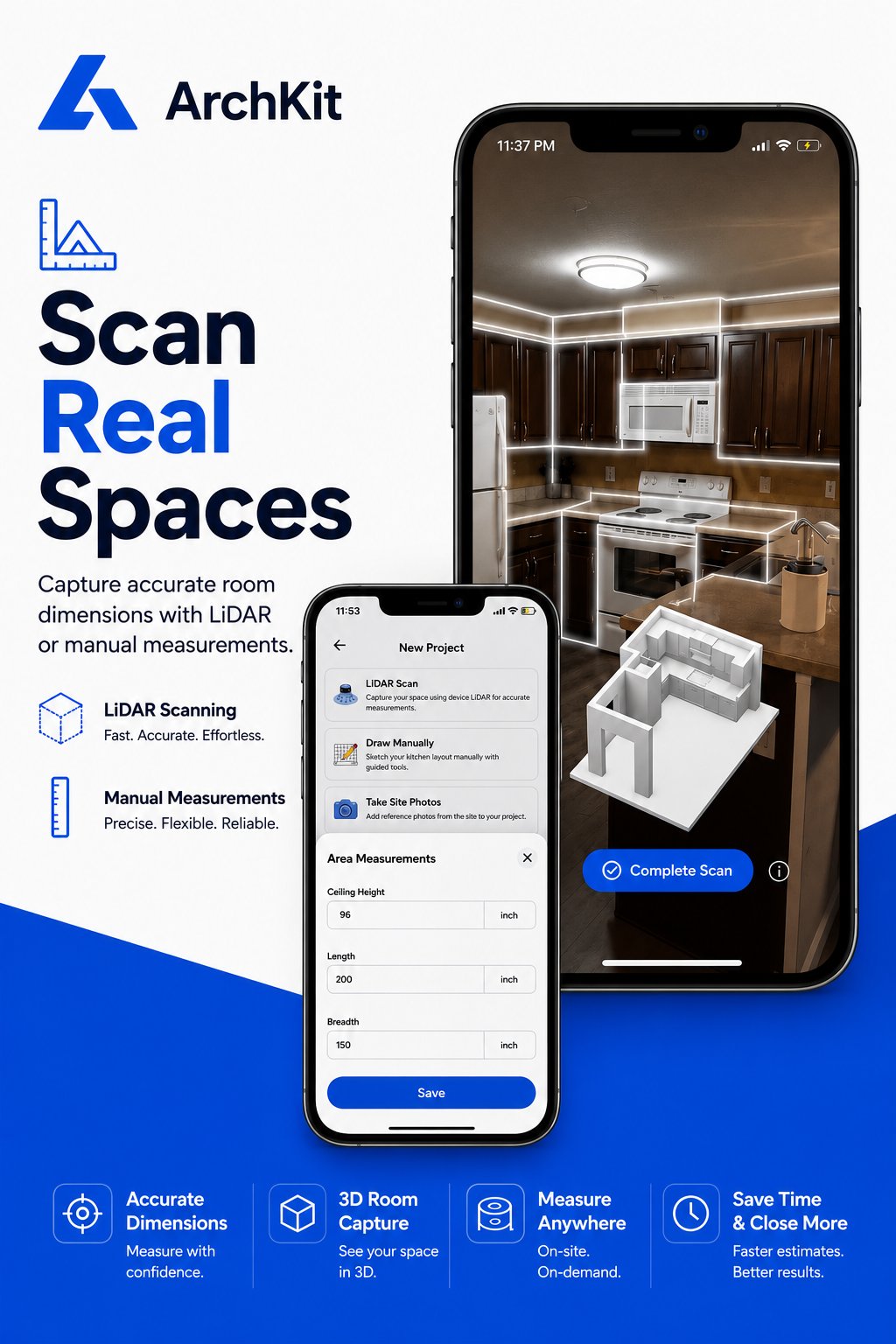
Stop taking your work home with you. Manual drafting is a relic of the past that leads to administrative fatigue and measurement errors. Use your mobile device to capture every dimension. By using a mobile workflow, you can build layouts while you're still standing in the kitchen. This approach automates the transition from a scan to a workable model. If you follow a LiDAR kitchen scanner app guide, you'll see that accuracy and speed go hand-in-hand. Use tools like ArchKit to generate a base layout in seconds. You save hours of office time and provide the client with an immediate "wow" factor that no 2D floor plan can match.
Building Trust Through Transparency
Clients often feel "hidden error" anxiety when a contractor disappears to work on a quote. They wonder if you missed a detail or if the final price will skyrocket. Modern technology removes that mystery. When you scan a room, show the client the digital twin appearing on your screen. This level of transparency builds instant trust. It shows them exactly what you're seeing. Since the history of kitchen design began, the goal has always been to optimize space and function. Doing this live allows you to capture their immediate reactions. If they want a larger island or a different cabinet run, you can adjust the layout on the fly. You aren't just selling a kitchen; you're building it with them.
Gathering Intel: The Foundation of a Concept That Sells
A successful pitch starts with a "Deep Dive" interview, but it shouldn't be a separate step from the walkthrough. Integrate your questions with your digital scan. As you move through the space, identify the pain points of their current kitchen. Is the storage insufficient? Is the lighting dim? Is the flow congested? Mapping these frustrations directly to the digital model allows you to solve them instantly. This integration is a core part of how to sell a kitchen design concept to clients because it proves you've listened to their specific needs.
Don't just measure the walls. Mark the "invisible" constraints that derail projects. Locate plumbing lines, gas valves, and potential load-bearing walls during the initial scan. This level of detail prevents expensive "change order" surprises later. It also demonstrates a level of technical competence that a standard tape measure can't convey. By accounting for these variables early, you align your design concept with practical kitchen layout principles like the Work Triangle. You aren't just presenting a pretty picture; you're presenting a functional, buildable solution.
The LiDAR Advantage for Accuracy
Use LiDAR room mapping to capture every corner, window, and outlet in seconds. This isn't just about speed. It's about professional reliability. Accuracy becomes a sales feature when you can guarantee that cabinets will fit without on-site modifications. You eliminate the embarrassment of the "I forgot to measure that" second visit. High-precision digital tools like ArchKit show the client that you're a modern professional who gets it right the first time. If you want to elevate your process, consider how to secure early access to these mobile tools.
Identifying Client Needs on the Fly
Discuss appliance preferences and cabinet sizes while you're still in the room. If a client wants a 36-inch professional range, verify the clearance immediately. This prevents the "office-work" delay where you realize their dream layout doesn't actually fit. Use the mobile app to drop in standard cabinet blocks. It keeps expectations realistic and helps the client visualize the final footprint. By making these decisions on-site, you reduce revisions and move closer to a signed contract before you even walk out the door.
Beyond Blueprints: Using AR and 3D to Visualize the Future
Most clients can't read a floor plan. They see a confusing mess of lines, door swings, and dimensions. You see a finished, functional room. This disconnect is a major reason why projects stall or clients hesitate. If you want to master how to sell a kitchen design concept to clients, you have to bridge this imagination gap immediately. Move beyond static 2D blueprints that require a leap of faith. Use 3D renderings and Augmented Reality (AR) to create an emotional hook. Letting a client "walk through" their new space before you swing a hammer changes the conversation. It shifts the focus from "how much will this cost?" to "when can we start?" because they can finally see the value.
Competitor tools often rely on generic AI-generated inspiration photos. These look nice on a screen but often ignore the real-world structural constraints of the client's actual house. A plumbing stack in the corner or a load-bearing post doesn't matter to an AI photo, but it matters to your build. By using visualization tools built directly on your actual LiDAR scan, you show a buildable reality. This builds deep professional credibility. It also drastically reduces revision cycles. When you confirm the "big picture" visually on day one, you stop the endless back-and-forth emails that eat your profit margins.
The AR Walkthrough Experience
Hand the iPad to the client and let them lead. When they see the new pantry projected into their current kitchen, the project becomes real. Use a 3D kitchen visualizer for professionals to toggle between a large island and a galley layout. This solves spatial anxiety instantly. If a client asks, "Will this island be too big?" you don't have to guess. You show them the actual footprint in AR. They can walk around it. They can feel the clearance. This immediate feedback loop removes the "no" before it even leaves their mouth.
Standardizing the Visual Presentation
Don't get bogged down in paint colors or hardware finishes too early. Focus on flow and utility. Use a standard U.S. cabinet catalog within your design software. This ensures the 3D model matches what you can actually order and install. It prevents the "bait and switch" feeling that happens when custom renderings don't match available inventory. ArchKit turns your LiDAR scans into immersive 3D walkthroughs instantly. It’s a seamless process: Scan. Design. Visualize. No office trips or stationary workstations required.
Overcoming the Price Objection: Aligning Budget with Design
Price is the ultimate deal-breaker. Vague "ballpark" figures lead to client hesitation and lost trust. To master how to sell a kitchen design concept to clients, you must align the budget with the visualization in real-time. Don't wait until you get back to the office to calculate costs. Link your cabinet layout directly to your project estimates while you are still on-site. This immediate connection between design and dollars removes the "Estimate Gap" that kills momentum. When a client sees the price move as they make design choices, the mystery of the quote disappears.
Utilize a "Good-Better-Best" strategy to handle budget concerns. If the initial concept exceeds their comfort zone, swap cabinet tiers or material finishes on the fly. Showing the price impact of a premium drawer slide versus a standard one empowers the homeowner. Transparency acts as a powerful closing tactic. Show them the digital component list. When they feel in control of the variables, they are far more likely to sign the contract. It shifts your role from a salesperson to a trusted advisor helping them manage their investment.
Using Cabinet Catalogs for Accuracy
Precision prevents profit bleed. Refer to a cabinetry layout tool guide to understand how standard sizing impacts your bottom line. Use these standards to show clients how avoiding custom-built oddities saves them money. Generate a preliminary cabinet list before you leave the kitchen. This provides a "ballpark" that sticks because it's based on the actual room dimensions you just scanned. Accuracy isn't just a technical requirement; it's a sales feature that proves your professionalism and protects your margins.
Addressing the "Why So Much?" Question
Labor costs are often invisible to homeowners. Use your 3D model to point out complex areas that drive the price. Highlight the relocation of gas lines or the intricacy of stacked crown molding. Explain how digital precision reduces material waste, which keeps their costs down. If you offer transparent design-fee structures, point them to your pricing page to build further trust. Showing the "why" behind the numbers turns a price objection into a value conversation. Ready to streamline your estimating? Get early access to our on-site workflow tools today to start closing deals faster.
Closing the Deal: Turning a Concept into a Signed Contract
The goal of the on-site strategy is simple: don't leave without a commitment. You've scanned the room, visualized the layout, and aligned the budget. Now, transition from the walkthrough to the project agreement. This is the "now or never" moment where momentum is at its peak. Mastering how to sell a kitchen design concept to clients requires you to capture immediate feedback and remove the last "no" on the spot. If the client has a minor concern about a cabinet placement or a walkway clearance, make the tweak in the AR model immediately. Seeing the final adjustment in real-time removes the friction that usually leads to a "let me think about it" delay.
Set the next steps before you even start your truck. Export the approved layout and send the formal proposal from your mobile device while you're still in the driveway. This level of speed and professionalism is a major differentiator. You aren't just another contractor; you're the one who provided a complete, visual solution in a single visit. Send the client a link to the 3D model so they can share the vision with family or friends. This keeps the project top-of-mind and reinforces the emotional hook you built during the consultation. It turns a static bid into a living project they are already excited to start.
Finalizing the Design Approval
Ask the commitment question. "If we can execute this exact layout within your budget, are you ready to get on the schedule?" It’s a direct, professional way to gauge readiness. Once they agree, use ArchKit to export a clean PDF of the approved layout for the contract documents. This ensures everyone is signing off on the same visual reality. You can also encourage clients to get early access to their own project portal. This keeps them engaged and provides a central hub for all project communication from day one. You've moved from a lead to a signed contract without a single trip back to the office.
Streamlining the Handover
The value of on-site design extends far beyond the initial sale. Accurate LiDAR data ensures your subcontractors have exactly what they need for a smooth, error-free installation. You drastically reduce the "I thought it would look different" complaints from homeowners. Archive the approved AR views to serve as a permanent visual record of the agreement. This protects your margins and reduces the risk of costly post-demo changes. If the client wants to experiment with minor finish details later, invite them to try the free kitchen design app. It keeps them involved in the creative parts of the process while you focus on the build. Scan. Design. Close. It's that simple.
Take Control of the Kitchen Sales Cycle
The traditional kitchen sales cycle is too slow for today's market. Every day you spend back at the office drafting is a day the client could lose interest or find a competitor. By mastering how to sell a kitchen design concept to clients right in their own homes, you eliminate the "waiting gap" and secure projects faster. You've seen how LiDAR-powered precision removes measurement anxiety and how AR-driven walkthroughs create an emotional connection that 2D blueprints simply can't match. It's about being the most professional person in the room.
Integrating U.S. standard cabinet catalogs into your live presentation ensures your concepts are buildable and your estimates are accurate. You don't need a stationary workstation to be a high-performance designer. You just need the right mobile workflow. Stop losing momentum to administrative fatigue and manual errors. Download ArchKit and start closing more kitchen deals on-site today. It's time to modernize your trade and win more contracts. Your next project is waiting for a signature.
Frequently Asked Questions
How do I present a kitchen design to a client who cannot visualize 2D plans?
Use 3D renderings and AR walkthroughs to show the finished project in their actual room. Most homeowners struggle to interpret flat blueprints; they need to see depth and scale to feel confident. Modern mobile tools bridge this imagination gap by projecting the design into their current space. This visual clarity is essential for anyone learning how to sell a kitchen design concept to clients who need to "see it to believe it."
Can I really create a professional kitchen design concept on-site during the first visit?
Yes, you can generate a buildable layout during your initial walkthrough using LiDAR scanning and mobile design apps like ArchKit. These tools allow you to scan a room and drop in standard cabinet blocks in minutes. You leave the driveway with a professional visualization rather than a promise to follow up next week. This speed keeps the client's excitement high and prevents them from shopping around while you're at the office drafting.
What is the best way to handle design revisions without losing money?
Capture immediate feedback on-site to eliminate the back-and-forth email cycle. Make live adjustments to the 3D model while you're still standing in the kitchen with the homeowner. Linking your layout to real-time estimating ensures that any change is immediately reflected in the project price. This transparency protects your margins from scope creep and ensures the client understands the cost impact of every revision instantly.
Is LiDAR scanning accurate enough for ordering custom kitchen cabinets?
LiDAR technology provides high-precision data that captures wall irregularities and outlet locations manual tape measures often miss. It’s reliable for primary design, layout planning, and estimating. For high-end custom cabinetry, always verify critical dimensions before placing the final order; however, the digital twin serves as an excellent foundation for your initial buildable concept. It reduces the risk of major measurement errors that lead to costly reworks.
How does Augmented Reality (AR) help in selling a kitchen remodel?
AR places the new design directly into the client’s current room to create an emotional connection. It removes spatial doubt by showing exactly how much room an island or pantry will occupy. When a client walks through their future kitchen using an iPad, the project feels real and urgent. This immersive experience is a powerful closing tool that helps you secure a commitment before you even leave the site.
What should be included in a professional kitchen design presentation for a homeowner?
Include an immersive 3D walkthrough, a preliminary cabinet component list, and a clear project estimate linked to the layout. Your presentation should focus on solving their specific pain points, such as traffic flow or storage needs. Providing an immediate PDF export of the approved on-site layout adds professional authority. This document serves as the baseline for your project contract and ensures everyone is on the same page from day one.
How do I justify the cost of high-end kitchen design software to my clients?
Frame the software as a tool for accuracy and transparency that protects the client's investment. Explain how digital precision reduces material waste and prevents the delays caused by on-site errors. When you demonstrate how to sell a kitchen design concept to clients with professional visualization, you position yourself as a tech-forward expert. Clients are often willing to pay a premium for contractors who provide a predictable, professional experience without the "office-work" delays.


