
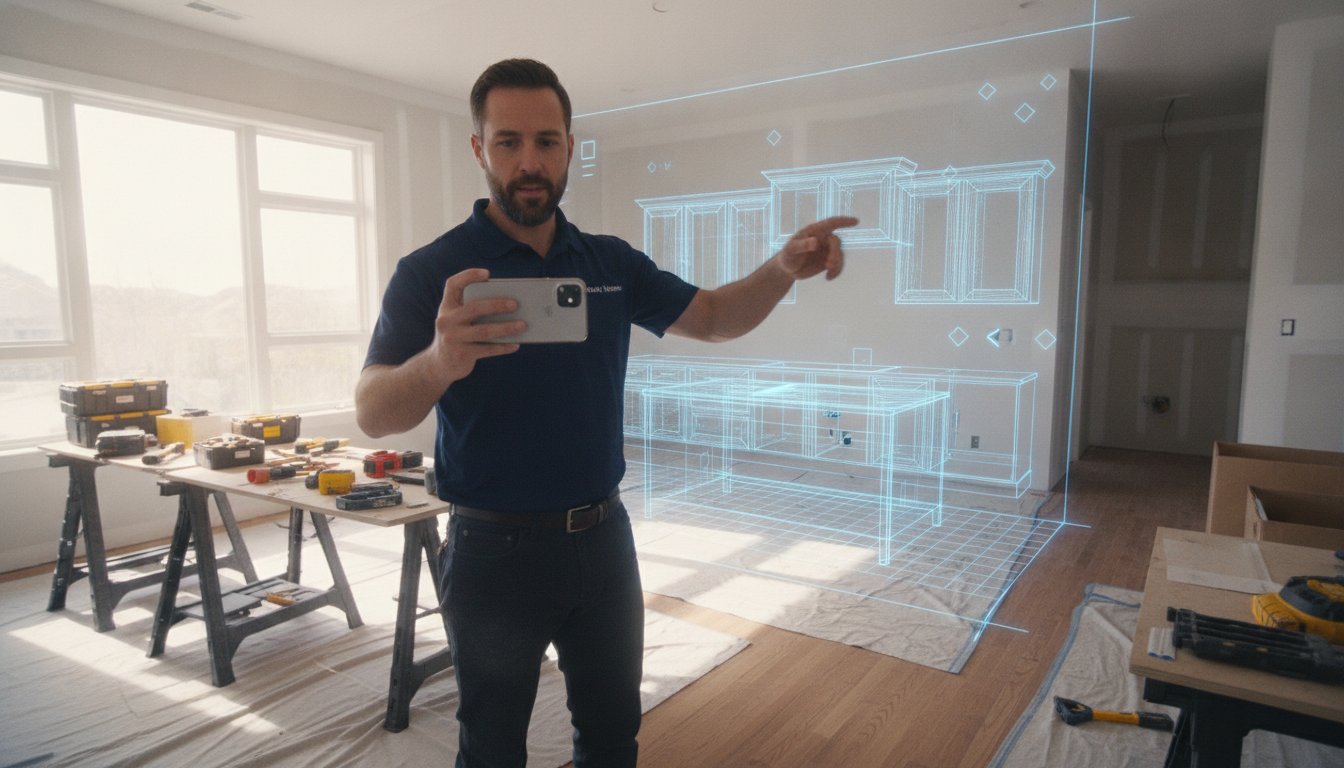
A single measurement error can trigger restocking fees as high as 25%. It's a high-stakes gamble every time you rely on manual notes and tape measures. You're likely tired of spending hours after the job site visit translating scribbles into a bill of materials. Integrating a mobile app for kitchen cabinet parts list into your workflow eliminates this administrative fatigue. The old office-dependent process is slow, prone to mistakes, and keeps your clients waiting while they struggle to visualize the final result. According to recent industry data, 73% of homeowners hesitate on renovations due to this visualization gap.
Stop the manual grind. Learn how to inventory an entire room in minutes. This guide explores how to generate precise cabinet lists and 3D visualizations instantly using professional AR and LiDAR technology. We'll show you how ArchKit helps you capture zero-error data, deliver professional presentations on the spot, and move projects from measurement to order. Measure. Design. Deliver. It's time to bring your estimating process directly to the job site and eliminate the guesswork for good.
Key Takeaways
- Replace manual tape measurements with 30-second LiDAR scans to capture every dimension accurately. It's the fastest way to build a digital twin of any kitchen.
- Generate a professional mobile app for kitchen cabinet parts list instantly on your iPhone. You'll save hours of administrative time by avoiding late-night office work and manual data entry.
- Eliminate the visualization gap that stalls many renovation projects. Use AR technology to show clients exactly how their new cabinets will look before you leave the job site.
- Protect your margins by removing the risk of measurement errors. Accurate digital inventories mean no more expensive restocking fees or project delays caused by wrong orders.
- Master a contractor-first workflow with ArchKit to handle layouts and estimating in one go. It's built for professionals who need high-performance tools in a fast-paced environment.
The End of Manual Counting: Why You Need a Mobile Kitchen Cabinet List App
A mobile app for kitchen cabinet parts list is more than a digital sketchpad. It is a field-ready inventory engine designed to replace the unreliable tape measure and notepad. Traditional workflows are slow. You measure the space, drive back to the office, and manually type dimensions into a spreadsheet. This "Administrative Fatigue" drains your productivity and delays project starts. It is the weight of office-dependent design that keeps you stuck behind a desk instead of closing deals on the job site.
Modern digital scanning flips the script. Instead of manual counting, you use LiDAR to capture the room. This creates a bridge between the physical job site and professional documentation. This process leverages the foundations of Computer-aided design (CAD), allowing you to generate manufacturing-ready data without touching a desktop computer. You move from vague sketches to a precise digital twin in minutes.
The High Cost of Measurement Errors
Precision is not optional in cabinet work. A single measurement error on a pantry or a corner unit can trigger restocking fees as high as 25%. These mistakes create a ripple effect. Manual data entry is the primary culprit. When you transcribe numbers from a paper notepad to an order form, the risk of a typo is high. A mobile workflow establishes a "Single Source of Truth." The dimensions captured during the scan are the same ones used for the final list. You eliminate the translation layer where most errors occur. Accuracy becomes automated, not an administrative burden.
Empowering the On-Site Professional
The phrase "I’ll get back to you with a quote" is a conversion killer. In today's market, speed is your sharpest tool. Clients want immediate answers and professional visuals. Using a kitchen design app for iPhone like ArchKit transforms the consultation. You don't just talk about the layout; you build it. You generate the inventory, show the 3D model, and present a technical parts list before the client finishes their coffee. This builds instant authority. You aren't just another contractor. You're a high-performance professional who values their time and guarantees accuracy. Measure. Design. Deliver. Do it all before you leave the driveway.
From Scan to Spreadsheet: How LiDAR Generates Parts Lists in Seconds
LiDAR isn't just for surveyors or high-end engineering firms anymore. It's built into the device in your pocket. Understanding how LiDAR technology works is simple for the job site; it fires rapid light pulses to map every surface in three dimensions. For a kitchen remodeler, this means capturing every wall, corner, and bulkhead with millimeter precision. Using a mobile app for kitchen cabinet parts list allows you to skip the manual sketching entirely. You walk the room, scan for 30 seconds, and let the software build the digital twin. It's fast. It's accurate. It's the new standard for field work.
The app doesn't just see shapes. It identifies structural obstacles automatically. It recognizes where a window interrupts a backsplash or where a plumbing stack limits your cabinet depth. This automated detection ensures your inventory list accounts for real-world constraints from the very first step. You move from a raw 3D scan to a structured parts list without opening a laptop or drawing a single line on paper.
Mapping the Kitchen Footprint
Establish your boundaries first. A quick scan captures the exact floor plan, including out-of-square walls that a tape measure might miss. You can tag utility locations like electrical outlets and gas lines directly in the 3D space. This creates a 2D floor plan that serves as the foundation for your entire project. It's a reliable way to start an estimate without returning to the office to redraw your notes. You get an "as-built" model that is ready for layout immediately.
Automatic Cabinet Population
Once the footprint is locked, you stop measuring and start designing. You select standard cabinet types from the catalog and place them into the digital layout. The software calculates the necessary quantities and sizes based on the scanned dimensions. This is the critical transition from a 3D model to a structured inventory. You get an instant project estimation that you can review with the client on the spot. It eliminates the "visualization gap" and provides the technical data you need for ordering.
ArchKit streamlines this entire progression. It takes the raw data from a LiDAR scan and converts it into a clean, actionable cabinet inventory. If you want to see how this workflow can cut your estimating time in half, you can get early access to the platform today. The results are immediate; the list is accurate; the workflow is professional. Stop dragging and dropping manual boxes and start using a system that inventories the room for you.
Automated Inventory vs. Manual Measurements: Speed Comparison
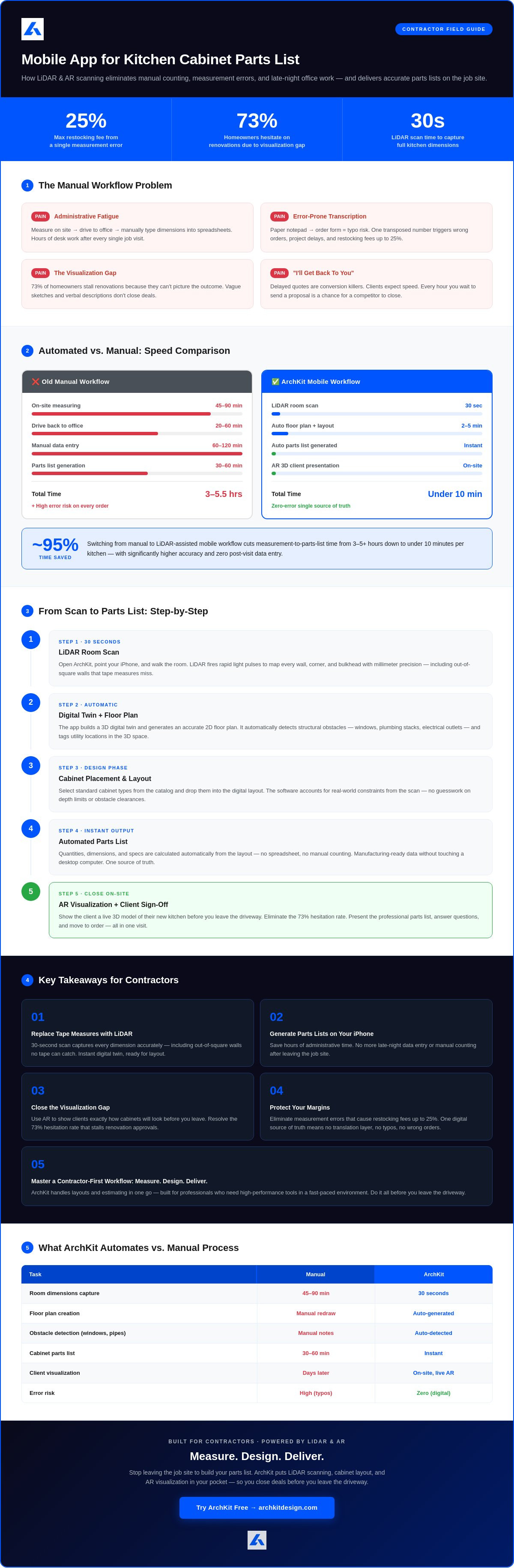
Legacy measurement methods are a drag on your profit margins. The "Tape Measure and Notepad" workflow is a two-step process that doubles your labor. You spend an hour on-site wrestling with a tape, then another two hours at the office transcribing scribbles into a spreadsheet. This disconnect is where errors live. A mobile app for kitchen cabinet parts list merges these steps into one fluid motion. You scan the room, and the list builds itself. There is no transcription. There is no second-guessing your own handwriting. You leave the job site with a completed inventory, not a homework assignment.
The speed advantage isn't just about the initial scan. It's about the office-to-field ratio. Manual methods often require follow-up visits to verify a single missed dimension. LiDAR and AR technology capture the entire environment in a single pass. You eliminate the "Administrative Fatigue" that comes from back-and-forth communication and manual data entry. By shifting the workload to the device in your pocket, you free up hours of billable time every week. This isn't just a minor tweak to your day; it's a total modernization of your business model.
The ROI of Digital Tooling
Time is your most expensive resource. If you save four hours of design and transcription time per project, the math is simple. Over a month of leads, that's an extra work week recovered. Beyond time, consider the cost of "Redo" orders. Manual errors in cabinet sizing lead to expensive restocking fees and project standstills. A digital inventory provides a precise bill of materials that matches the actual "as-built" conditions. This accuracy means you order once and install once. The software often pays for itself within a single project by preventing one misordered pantry or corner unit.
Reducing Client Revisions
Client indecision is a major bottleneck in the sales funnel. When you use AR to visualize the layout on-site, you close the "visualization gap" instantly. You aren't asking the homeowner to imagine a new kitchen; you're showing it to them through their phone screen. This immediate feedback allows you to get client sign-off on the layout before the parts list is even finalized. It prevents mid-project changes that wreck your schedule. For a deeper look at how this technology fits into your daily routine, check out The Best Kitchen Design App for Contractors. Speed up your workflow. Secure the contract. Move to the next job. It's the only way to stay competitive in 2026.
How to Build an Accurate Cabinet Parts List Directly on Your iPhone
Building a mobile app for kitchen cabinet parts list starts with a high-fidelity scan. Open your device and capture the room's geometry first. Once you have a clean LiDAR model, you stop guessing and start specifying. The interface allows you to drop digital assets into the space that correspond to actual manufacturing standards. It’s a direct path from a physical wall to a digital SKU. You aren't just drawing lines; you're building a database of physical components in real-time.
Working with U.S. Standard Sizes
Speed on the job site depends on a reliable catalog. Manual entry is for the office; standard sizes are for the field. Most professional apps provide a range of U.S. standard widths, typically from 9" to 48" in 3" increments. Standard depths for base (24") and wall (12") cabinets are pre-set to ensure your layout is physically possible. This consistency is vital for quick estimating because it aligns your design with what cabinet shops actually build. For a deeper dive into choosing the right software for this task, consult our Professional Cabinetry Layout Tool Guide.
Within the mobile interface, you can toggle between Base, Wall, and Tall units with a tap. You aren't just placing boxes; you're building an inventory. Specify drawer banks, sink bases, or pantry units as you move around the room. The software tracks every selection. If you need to adjust a 36" base to a 33" to accommodate a plumbing stack, you do it on the screen in seconds. The parts list updates immediately. This level of customization ensures that the final order matches the reality of the space.
Visualizing the List with AR
The final check happens in Augmented Reality. You overlay the generated cabinet list onto the physical room to verify the fit. Check for clearance issues like door swings or appliance depths. This is where you catch "workflow killers" before they become "order errors." If the 3D model shows a drawer hitting a radiator, you fix it now. Finalize the inventory with total confidence. You can get early access to ArchKit to start building your own error-free parts lists today.
Once the layout is locked, export the data. This is the ultimate payoff of using a mobile app for kitchen cabinet parts list. You get a structured spreadsheet containing every cabinet code, dimension, and quantity. Send it to your supplier or attach it to your client's estimate immediately. No transcription. No delays. Just a professional, order-ready list generated before you leave the kitchen.
ArchKit: The Contractor-First App for Professional Cabinet Layouts
ArchKit is a dedicated tool for professional remodelers who need immediate results. It isn't a generic design tool or a homeowner-focused planner. It is a high-performance system built for the high stakes of a physical job site. While consumer tools like the IKEA planner lock you into a single brand, ArchKit provides the professional flexibility you need. It integrates a comprehensive U.S. standard cabinet catalog. You design with the widths and depths your local suppliers actually carry. This makes it the most effective mobile app for kitchen cabinet parts list generation on the market today. You aren't just sketching; you're specifying manufacturing-ready components.
The workflow is linear and logical. You start with a LiDAR scan to capture the "as-built" conditions. You move to 3D visualization to confirm the layout with your client. You finish by generating an accurate, professional cabinet inventory. This LiDAR-to-3D-to-List process removes the administrative burden that slows down your business. It replaces stationary office equipment with a mobile powerhouse. You get the satisfaction of immediate results and the confidence of zero-error data. It is a professional solution for a fast-paced environment.
Professional Features for the Field
Stop worrying about project limits. ArchKit offers unlimited scanning and 3D visualization capabilities. You can map as many kitchens as your schedule allows without hitting a ceiling. The cloud-based project management features ensure your team stays synchronized. Share models and lists with your crew or office staff instantly. This collaboration eliminates communication gaps and keeps projects moving toward the installation phase. You can find a plan that matches your project volume by visiting the ArchKit Pricing page. High-performance tools should be accessible and scalable.
Get Started Today
Modernize your contracting business in minutes. Setup is simple on any compatible iPhone or iPad. There is no steep learning curve or complex jargon. It is a no-nonsense approach to kitchen design that values your time above all else. You can Get Early Access to the latest features and start streamlining your on-site estimating today. Join the community of professionals who are leaving the tape measure behind.
Accuracy is your competitive edge. Speed is your closing tool. ArchKit provides both. Move your design process from the office to the field. Eliminate the transcription errors that drain your profits. Impress your clients with immediate, professional technical output. It is time to stop the manual grind and start using a tool built for the reality of construction. Measure once. Order once. Install with confidence.
Modernize Your Field Workflow Today
Transitioning from manual measurements to digital scanning is the most effective way to protect your project margins. By leveraging LiDAR-powered accuracy and a standard U.S. cabinet catalog, you eliminate the transcription errors that lead to expensive restocking fees. You move from "I'll get back to you" to immediate, professional technical output. This shift doesn't just save time; it builds trust through on-site 3D visualization that helps clients commit to the project faster.
Adopting a mobile app for kitchen cabinet parts list generation is a competitive necessity for the modern contractor. It removes the administrative fatigue of office-dependent design and replaces it with the satisfaction of immediate results. You capture every dimension, identify every obstacle, and build your inventory list before you leave the driveway. Stop the manual grind and reclaim your billable hours. It's time to lead your business with high-performance tools built for the reality of construction.
Start your professional kitchen design workflow with ArchKit today and experience the freedom of a truly digital job site. Your next project deserves the precision of a modern workflow.
Frequently Asked Questions
Can a mobile app really generate a full cabinet parts list?
Yes, a mobile app for kitchen cabinet parts list uses LiDAR data and pre-loaded catalogs to automate the inventory process. Once you scan the room and place your units, the software compiles every SKU, dimension, and quantity into a structured bill of materials. This eliminates the need for manual counting and prevents transcription errors during the ordering phase. It's a professional tool built for immediate field results.
Does the app work with custom cabinet sizes or only standard ones?
ArchKit and similar professional tools utilize a standard U.S. cabinet catalog while allowing for specific size adjustments. You can toggle between base, wall, and tall units and modify widths in standard increments to fit the unique geometry of your job site. This flexibility ensures your digital layout matches the actual manufacturing capabilities of your cabinet shop. You aren't locked into a single manufacturer's specifications.
Do I need an internet connection to scan a kitchen on-site?
No, you don't need a live internet connection to perform the initial room scan or create a layout. The LiDAR sensors and processing happen locally on your device. You can capture the "as-built" data and generate your inventory in the field even in remote areas. You only need a connection when you're ready to sync to the cloud or export the final spreadsheet for your supplier.
Is LiDAR required to use a kitchen design app for parts lists?
LiDAR is not strictly required, but it's the industry standard for professional-grade accuracy. While some apps allow for manual dimension entry, LiDAR-equipped devices capture the entire environment in seconds with superior precision. If you want a zero-error mobile app for kitchen cabinet parts list, using a device with a LiDAR scanner is the most reliable choice for field professionals who value their time.
How accurate are the measurements taken by a mobile app?
Professional LiDAR scanning provides millimeter-level precision for room dimensions. This technology captures out-of-square walls and structural obstacles that manual tape measures often miss. By creating a high-fidelity digital twin of the kitchen, you ensure that every cabinet in your inventory fits the physical space perfectly. This accuracy removes the need for shims or field adjustments and prevents expensive redo orders later.
Can I export the cabinet list to my estimating software?
Yes, you can export your completed inventory as a structured file for immediate use. Most professional tools allow you to generate CSV or PDF files that integrate directly with your existing estimating or ordering software. This seamless data transfer removes the administrative burden of manual data entry. It speeds up the transition from quote to contract and keeps your project moving forward without office-dependent delays.
Does ArchKit support both 2D and 3D layouts?
Yes, ArchKit generates both 2D floor plans and 3D visualizations from a single scan. The 2D view provides the technical foundation for your layout and parts list. Meanwhile, the 3D mode allows you to walkthrough the design in AR. This dual-view approach ensures you have the technical data for production and the visual tools for client approval. It's a comprehensive solution for design and documentation.
Is there a free version of the kitchen design app for contractors?
ArchKit offers tiered professional plans designed specifically for active contractors and remodelers. While some basic apps offer free versions with limited features, professional-grade tools focus on high-performance LiDAR scanning and manufacturing-ready exports. These features are essential for reducing errors and saving time on professional jobs. Check the latest pricing on the official website to choose a plan that fits your project volume.


