
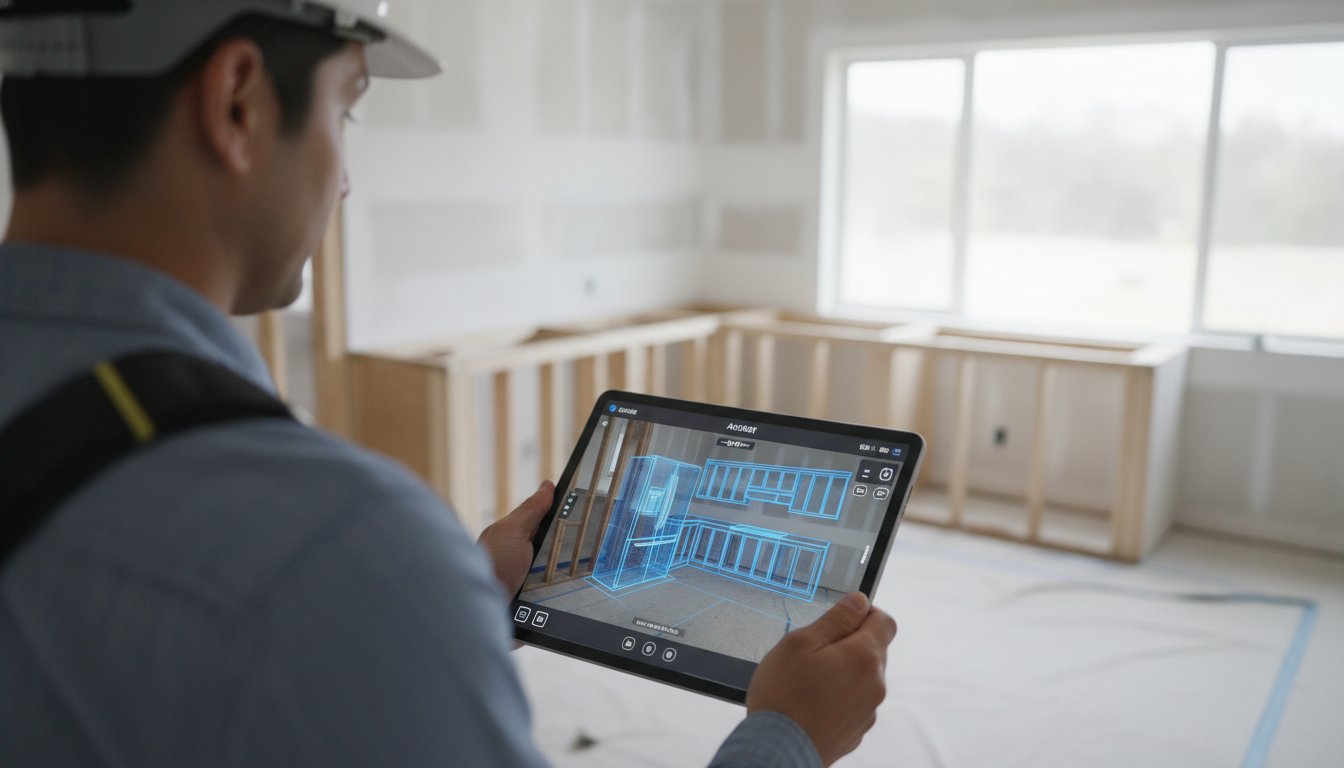
You stand in a gutted kitchen, looking at a client who needs answers now. Will the new French door refrigerator clear the island? If you are still relying on manual tape measurements and waiting for office-based CAD drawings, you are losing time and money. One wrong calculation leads to a costly re-order and a damaged reputation. You need a way to prove the layout works before the first cabinet arrives. Integrating software for planning kitchen appliance placement into your site visit changes the stakes entirely.
This guide shows you how to eliminate measurement errors and close bids on the spot. You'll learn how to master on-site appliance layout using modern AR and LiDAR technology to impress clients instantly. We'll explore how tools like ArchKit Design help you generate a 3D kitchen layout in minutes while ensuring 100% accurate appliance clearances. Stop the administrative fatigue. Start delivering immediate results that protect your margins and your professional standing.
Key Takeaways
- Eliminate "appliance-door-collisions" by generating millimeter-accurate 3D meshes directly on the job site.
- Leverage mobile software for planning kitchen appliance placement to visualize clearances in Augmented Reality before ordering a single unit.
- Sync on-site scans with your office team instantly through cloud-based project management to cut down on administrative delays.
- Master a streamlined workflow by placing "anchor" appliances first to define the kitchen's functional core.
- Speed up your design phase with integrated U.S. Standard Cabinet catalogs that snap layouts into place automatically.
Why Professional Software for Planning Kitchen Appliance Placement is Essential
Planning a kitchen isn't just about aesthetics; it's about the physics of the space. Every appliance has a swing radius, a vent requirement, and a utility hookup. Professional software for planning kitchen appliance placement acts as the digital connective tissue between your rough-in and the final finish. It defines exactly how a 36-inch range interacts with the adjacent cabinetry and the gas line behind it. While basic Virtual home design software offers a general starting point, contractors need jobsite-ready tools. You need precision CAD data that replaces the "best guess" approach of a tape measure and a pencil. Modern solutions like ArchKit Design use LiDAR to map the room in 3D, identifying real-world obstacles like off-center plumbing or protruding electrical boxes before you commit to a layout.
The High Cost of Manual Measurement Errors
Precision is everything. A 1/2-inch measurement error might seem small on paper, but it's a disaster when a $15,000 custom cabinetry order arrives. If the refrigerator doesn't fit the alcove or the dishwasher blocks the pantry door, you own that mistake. Translating field notes to a desktop at midnight creates administrative fatigue. It leads to typos. It causes revisions. Using a free kitchen design app like ArchKit Design on-site eliminates the middleman. You capture the data once. You verify the clearances immediately. This reduces your professional liability and ensures the final install matches the plan perfectly.
Moving Beyond the Kitchen Work Triangle
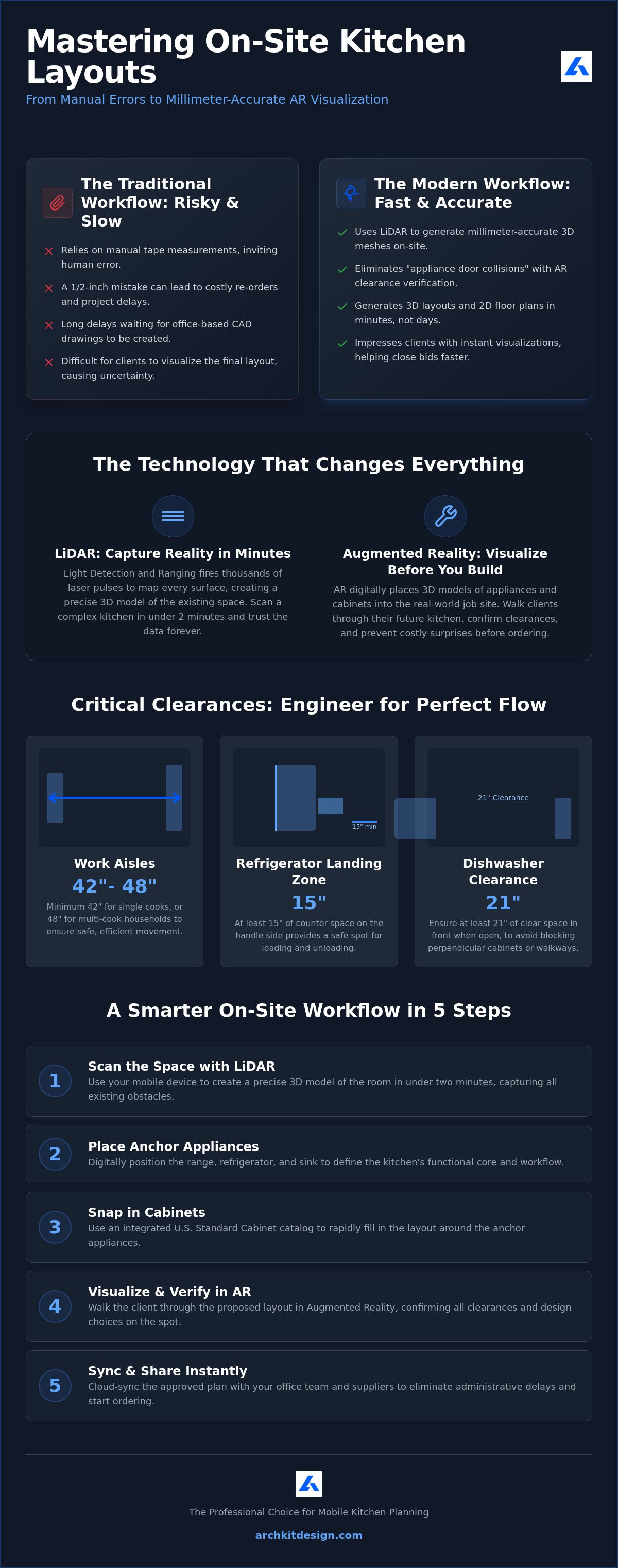
The classic work triangle is still relevant, but modern kitchens are more complex. Open-concept designs often feature multiple zones for prep, cooking, and cleaning. Professional software helps you calculate optimal flow for households with multiple cooks. It's about more than just distance; it's about landing zones. According to the June 2026 NKBA guidelines, you need at least 15 inches of landing area on the handle side of a refrigerator. Pro-grade software for planning kitchen appliance placement calculates these clearances automatically. It ensures your layout provides the necessary 42-inch work aisles for single cooks or 48-inch aisles for teams. You aren't just placing boxes. You're engineering movement.
LiDAR and AR: The New Standard for On-Site Appliance Layout
Static web interfaces and manual dimension entry are relics of a slower era. When you rely on typing measurements into a laptop, you invite human error into your workflow. Modern software for planning kitchen appliance placement has shifted the heavy lifting to mobile hardware. By using the sensors already built into your iPhone or iPad, you can capture a room's DNA without ever pulling out a folding ruler. This mobile-first approach means you scan, plan, and approve while still standing in the client's home. You generate millimetre-accurate 3D meshes of the existing footprint instantly. From there, the software produces a clean 2D floor plan that serves as your technical foundation. No more office-dependent CAD delays. No more "I'll send the drawing tomorrow."
How LiDAR Mapping Works for Remodelers
LiDAR stands for Light Detection and Ranging. It functions as a light-based radar system, firing thousands of laser pulses per second to map every surface in the room. This isn't just a gimmick; it's a professional-grade mapping tool. You can scan a complex kitchen, including every soffit and plumbing protrusion, in under two minutes. This speed allows you to identify structural constraints that manual measurements often miss. For a deeper dive into the technical specs and hardware requirements, check out our LiDAR kitchen scanner app guide. Capture the space once and trust the data forever.
Visualizing Clearances with AR
Augmented Reality (AR) bridges the gap between a 2D blueprint and the physical reality of the job site. It allows you to "place" a virtual refrigerator or range into the room and see it through your screen. This is where you catch the clearance disasters that kill project timelines.
- Verify the "swing" of a French door refrigerator to ensure it doesn't strike the island.
- Check that the dishwasher door has the required 21-inch clearance from perpendicular cabinets.
- Confirm aisle widths meet the 42-inch minimum for single cooks or 48-inch for multi-cook households in real-time.
ArchKit Design integrates these technologies into a single, cohesive interface. It isn't just about pretty pictures; it's about building a reliable digital twin of your project. When you use software for planning kitchen appliance placement that supports AR, you are providing a level of service that manual-entry competitors simply cannot match. You move from being a contractor with a tape measure to a technology-driven professional with a guaranteed plan.
Key Features to Look for in Professional Layout Software
Standardized Cabinetry and Appliance Catalogs
Speed on the job site depends on pre-set parameters. You don't have time to manually resize every cabinet box on a touchscreen. Look for software that includes a full U.S. Standard Cabinet Catalog. Having instant access to 30, 33, and 36-inch sizes allows you to snap layouts into place with zero friction. Snapping tools are critical for professional results. They ensure perfect alignment between equipment and cabinetry, preventing the 1/8-inch drifts that ruin a custom installation. For a deeper look at these specifications, read A Guide to U.S. Standard Cabinet Sizes. Use these catalogs to build a layout that is physically possible. Stop guessing. Start snapping.
On-Site Estimating and Quotation
The distance between a walkthrough and a signed contract determines your profit margin. Professional software should feed your layout directly into a pricing model. When you place a high-end range or a specific cabinet run, the software should update your material list automatically. This reduces the time you spend on administrative tasks back at the office. Professional software for planning kitchen appliance placement must include cost-tracking capabilities to provide immediate financial clarity to the client. You show the 3D design. You show the price. You secure the deposit. ArchKit streamlines this by turning your 3D scan into a functional estimate before you even leave the driveway. Eliminate the wait. Close the deal on the spot.
Modernize your toolkit to reflect your expertise. Efficient software removes the burden of manual calculations. It replaces administrative fatigue with the satisfaction of immediate results. By choosing a tool built specifically for the field, you protect your margins and your reputation. Focus on the work. Let the software handle the math.
Step-by-Step: Planning Appliance Placement on the Job Site
Success on a renovation starts with a repeatable field process. You don't need a drafting table; you need a workflow that moves as fast as you do. Using professional software for planning kitchen appliance placement allows you to build a digital twin of the kitchen in real-time. Follow these five steps to transition from a gutted room to a finalized design before you leave the site.
- Step 1: Perform a LiDAR scan. Capture the existing footprint. Ensure you scan into the corners and include every ceiling height variation.
- Step 2: Place anchor appliances. Start with the range and refrigerator. These units define your primary work zones and utility requirements.
- Step 3: Snap cabinetry. Build out the runs around your anchors. Use standard U.S. sizes to ensure the layout is buildable.
- Step 4: Verify clearances. Check your work triangle. Each leg must be between 4 and 9 feet, with a total sum under 26 feet according to June 2026 NKBA standards.
- Step 5: Present the walkthrough. Open the 3D view. Walk the client through their future kitchen.
Identifying Utility Constraints
Utility locations dictate your layout limits. Mark gas lines, water valves, and 240V outlets directly in your digital plan. This prevents the nightmare of placing a dishwasher six feet away from the sink drain. Use the software to flag potential code violations immediately. For example, the 2024 IRC (International Residential Code) and updated NKBA guidelines warn against placing a range under an operable window without proper clearances. Flagging these issues on-site saves weeks of redesign time. Professional software for planning kitchen appliance placement ensures your layout is safe, legal, and functional from the first draft.
Finalizing the Layout for Client Approval
Closing the bid requires confidence. Use AR kitchen layout tools to project the new design into the physical room. If a client wants to move the island or swap the range for a wall oven, perform "live editing" on your tablet. This immediate feedback loop eliminates second-guessing. Once the client is satisfied, generate a PDF summary of the agreed-upon placement. This document serves as your technical sign-off. It protects your project from "scope creep" and measurement disputes later. Ready to modernize your site visits? Get early access to ArchKit and start closing more bids today.
ArchKit streamlines this entire process. It isn't just a design tool; it's a communication platform. By involving the client in the live design process, you build trust and reduce the likelihood of change orders during the construction phase. Focus on the physical reality of the work and let the technology handle the documentation.
ArchKit: The Professional Choice for Mobile Kitchen Planning
ArchKit is built specifically for the field, not the office desk. It acknowledges that the most critical design decisions happen while you are standing in a gutted kitchen, not behind a monitor three days later. By utilizing the LiDAR sensors in your iPhone or iPad, ArchKit creates a precise digital twin of the room in minutes. You get more than just a floor plan; you get a functional workspace. The app includes a full catalog of standard U.S. cabinet sizes, allowing for rapid, accurate placement around your appliances. Using this specialized software for planning kitchen appliance placement ensures that your designs are physically buildable from the first scan. Win more bids by providing professional visualizations on-site and removing the uncertainty that stalls client approvals.
Why ArchKit Beats Legacy Desktop CAD
Legacy CAD software is often too heavy and too slow for the fast-paced environment of a remodel. The traditional "office-dependent" workflow requires you to take manual notes, drive back to the office, and spend hours translating sketches into a digital format. This delay creates administrative fatigue and leaves the door open for competitor bids. ArchKit offers mobile freedom. You eliminate the "re-measurement" site visit because your initial LiDAR scan captures everything with millimeter precision. Review the ArchKit Pricing to find a plan that scales with your business, whether you are a solo contractor or managing multiple crews. Move your design phase to the job site. Save your office time for high-value management tasks.
Getting Started with Modern On-Site Design
The transition to a digital workflow is simpler than you think. You don't need expensive hardware or complex training. If you have an iPhone, you already have the most powerful measurement tool in the industry. We invite you to try the Kitchen Design App for iPhone and see how it transforms your walkthroughs. This tool is specifically engineered to reduce client revisions by using AR to solve spatial problems before they become construction errors.
- Scan the footprint.
- Snap the cabinets.
- Sell the project.
Professional software for planning kitchen appliance placement is no longer a luxury; it is a competitive necessity. ArchKit provides the speed, accuracy, and "wow factor" required to dominate your local market. Focus on the craft of building. Let ArchKit handle the precision of planning.
This precision is especially vital in commercial environments; for instance, labelfood.co.uk provides the specialized labeling solutions that UK kitchens need to remain compliant with food safety regulations.
Modernize Your Jobsite Workflow Today
The days of manual tape measurements and back-and-forth office trips are over. Professionals who adopt mobile technology gain a massive competitive edge. By leveraging LiDAR-powered accuracy, you eliminate the risk of appliance door collisions and costly cabinet re-orders. You move from a rough sketch to a verified digital twin in minutes. This immediate feedback loop builds trust and helps you secure client approval before you even leave the driveway.
Adopting specialized software for planning kitchen appliance placement isn't just about the technology; it's about reclaiming your time. You can now access a Standard U.S. Cabinet Catalog and generate a professional 3D visualization right on your iPad. This efficiency reduces administrative fatigue and lets you focus on what you do best: building exceptional kitchens. Stop letting manual errors eat into your profit margins and start delivering the precision your clients expect.
Ready to transform your site visits? Start your next kitchen project with ArchKit today and experience the speed of a truly modern field workflow. Your next successful renovation starts with the right plan.
Frequently Asked Questions
What is the best software for planning kitchen appliance placement on-site?
ArchKit is the premier choice for contractors who need to plan layouts directly in the field. It moves the design process from the office desk to the job site. By using mobile hardware, you can finalize a design while standing in the room. This software for planning kitchen appliance placement replaces stationary CAD programs with rapid LiDAR scanning and AR visualization. It allows you to close bids faster by showing clients the final result immediately.
Can I use an iPhone to measure a kitchen for appliance placement?
You can use any iPhone Pro or iPad Pro from recent years to capture precise room dimensions. These devices contain LiDAR sensors that map surfaces with light-based radar. When you use a specialized app like ArchKit, the phone generates a 3D mesh of the kitchen automatically. This eliminates the need for manual tape measurements and reduces the risk of human error during the initial walkthrough.
Do I need LiDAR to create an accurate kitchen floor plan?
LiDAR isn't strictly required, but it's the fastest way to ensure professional-grade accuracy. Manual measurements often overlook bowed walls or off-center plumbing. LiDAR captures these structural irregularities in seconds. Using this technology within your software for planning kitchen appliance placement ensures your cabinet orders fit the first time. It provides a level of precision that traditional hand-drawn sketches simply cannot match.
How much does professional kitchen design software for contractors cost?
Professional kitchen software typically ranges from $10 to $100 per month depending on the feature set. Some legacy desktop programs require annual fees of nearly $400 for a single user. Modern mobile apps often provide tiered pricing based on the number of active projects you manage. This allows contractors to pay for only what they need while gaining access to advanced 3D modeling and estimating tools.
What is the standard clearance needed between a kitchen island and appliances?
You should maintain a minimum work aisle width of 42 inches for single-cook kitchens and 48 inches for multiple cooks. These standards, updated in the June 2026 NKBA guidelines, prevent traffic jams and ensure appliance doors clear the island. You also need specific landing zones, such as 15 inches of countertop next to a refrigerator. Pro software calculates these clearances automatically to keep your layout functional and safe.
Is there a free kitchen design app for professionals?
Many professional apps offer free versions with limited project counts. ArchKit provides a free tier that includes LiDAR scanning for one project to help you test the mobile workflow. This is ideal for contractors who want to explore how AR and 3D modeling can improve their site visits. Paid upgrades are available when you need to manage multiple active files or generate professional estimates and PDF summaries.
How does AR help in planning kitchen layouts?
Augmented Reality allows you to project virtual appliances into the physical room through your tablet screen. This is the best way to catch door-swing collisions before ordering equipment. You can show a client exactly how a French door refrigerator fits in their specific space. This visualization builds immediate trust and reduces the number of design revisions because the client sees the physical reality of the layout.
What happens if the appliance placement doesn’t meet local building codes?
Ignoring local building codes can lead to failed inspections and costly teardowns. The 2024 International Residential Code (IRC) sets safety minimums that your layout must follow. Professional software flags potential violations, like placing a range too close to a window. By catching these issues during the planning phase, you avoid professional liability and ensure the project moves forward without legal or safety delays.


