
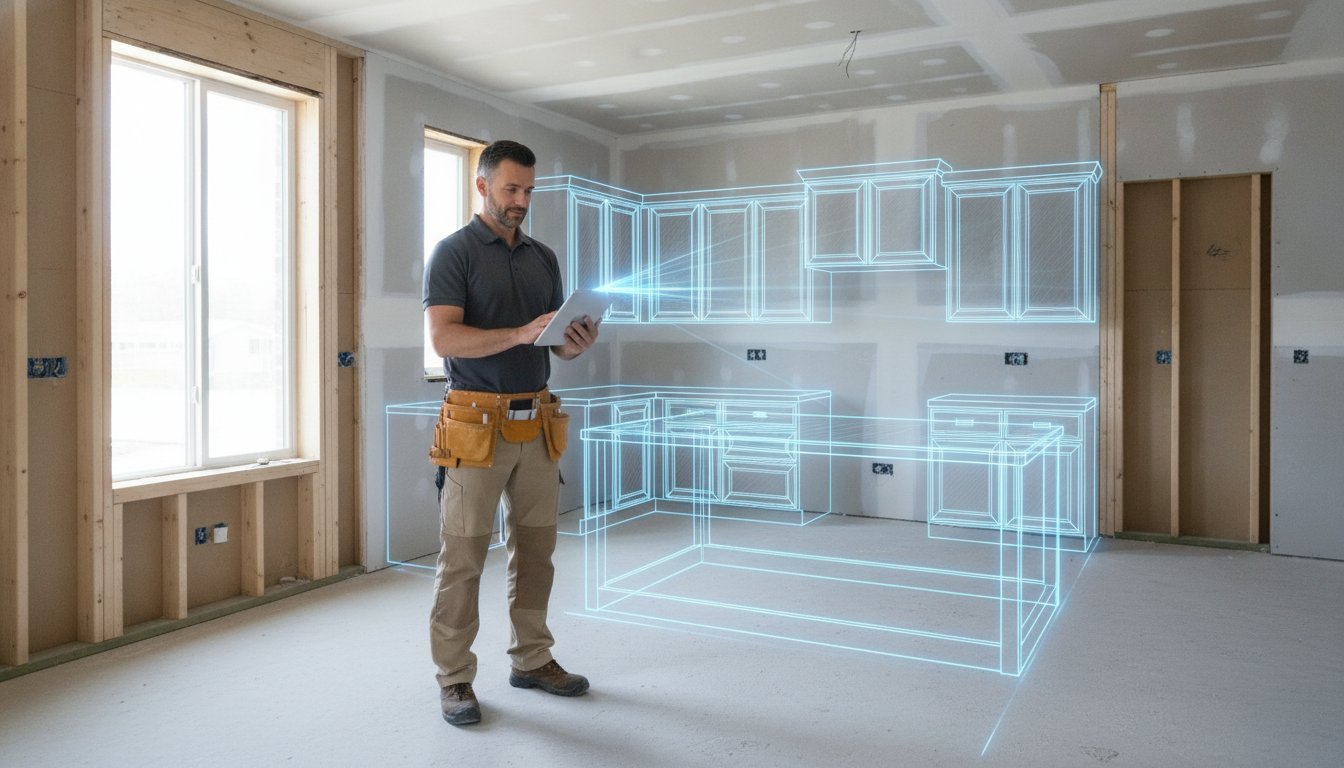
Install day arrives. You stage the boxes. You realize the sink base is two inches too wide. A scribbled field note was misread at the office. It's a $500 mistake you'll have to eat. Your sub-contractors are now standing around on your dime. Finding the right software to prevent cabinet ordering mistakes is no longer a luxury. It's a survival strategy. You already know manual measurements and paper sketches are the weak links in your chain. One missed filler or a forgotten panel can derail a project for weeks.
We've all felt the sting of a project delay caused by a simple data entry error. This guide will show you how to master a zero-error workflow. Bridge the gap between your initial measurements and the final order form. Learn how to leverage tools like ArchKit to generate instant 3D layouts and automatic cabinet lists. Do it all before you leave the client's house. Stop relying on office-dependent design. Embrace a mobile-first approach that ensures what you measure is exactly what gets delivered. Turn your iPad into your most profitable tool with LiDAR scanning and AR visualization.
Key Takeaways
- Establish a "Digital Foundation" using LiDAR to capture sub-inch site dimensions. Stop guessing and start measuring with professional-grade accuracy.
- Use Augmented Reality (AR) to overlay cabinet layouts onto the physical room. Identify missing fillers and panel conflicts before you place the order.
- Implement specialized software to prevent cabinet ordering mistakes to bridge the gap between field sketches and final manufacturer SKUs.
- Replace stationary office software with mobile-first tools like ArchKit for immediate on-site results. Cut your design time from days to minutes while increasing client confidence.
- Follow a proven 5-step on-site workflow that generates accurate cabinet lists automatically. Eliminate the tedious manual translation of field notes into office spreadsheets.
What Is Software to Prevent Cabinet Ordering Mistakes?
Effective software to prevent cabinet ordering mistakes acts as a digital bridge. It connects the chaotic reality of a physical job site to the rigid requirements of a manufacturer's SKU list. Most contractors confuse "ordering portals" with "on-site design tools." An ordering portal is where you spend money; an on-site design tool is where you ensure you aren't wasting it. Modern workflows replace the risky "measure now, design later" habit with immediate, on-location validation.
The legacy workflow relies on a tape measure and a prayer. You scribble notes, drive back to the office, and hope you didn't miss a plumbing stack or a weird bulkhead. The digital workflow uses LiDAR technology to create a perfect 3D twin of the room. This shift isn't just about cool tech. It's about protecting your profit margins from re-stocking fees, lost labor, and a damaged reputation. When you use a free kitchen design app to verify your layout in the field, you eliminate the guesswork that leads to "it doesn't fit" phone calls.
The True Cost of a 1/4-Inch Error
A single 1/4-inch error on a long cabinet run is a project killer. It's rarely just one box that's wrong; it's the entire sequence. If the last cabinet in the run is too wide, the countertop template is delayed. When the countertop is delayed, the plumber can't set the sink. The tile professional loses their window for the backsplash. This "measurement drift" happens during the translation from field notes to office software. You lose thousands in trade delays and emergency shipping fees for a single filler you forgot to account for.
Why Desktop CAD Often Fails the Field Contractor
Desktop CAD creates an "Office Bottleneck." You leave the job site and immediately lose the "feel" of the space. Did you notice the light switch that will hit the crown molding? Did you see the radiator pipe that blocks the corner lazy susan? By the time you sit at your desk, those details are gone. Designing on-site is the ultimate error-prevention strategy. Using mobile software to prevent cabinet ordering mistakes allows you to catch these physical obstacles while you're still standing in the room. It turns your tablet into a high-speed validator that catches errors before they become expensive plywood realities.
Eliminating Human Error: How LiDAR and AR Secure Your Dimensions
The biggest threat to your profit margin isn't the cost of materials. It's the human factor. Traditional measurement relies on "passive" data collection. You pull a tape, read a number, and scribble it down. If you misread the tape by an eighth, or your handwriting is illegible two days later, the order is compromised. LiDAR is a technology that captures thousands of data points per second to create a precise digital twin of a room. This "active" measurement method removes the contractor’s bias and ensures the data you send to the manufacturer is grounded in physical reality.
Using modern software to prevent cabinet ordering mistakes means moving beyond the limitations of manual tools. LiDAR sensors, now standard in professional mobile devices, don't just measure distance. They map the entire volume of a space. This technology detects the subtle nuances that a tape measure misses, such as walls that aren't plumb or corners that are slightly out of square. When you rely on a single point-to-point measurement, you're guessing. When you use a digital twin, you're verifying.
LiDAR Room Mapping vs. Manual Tape Measures
Manual measurements are prone to "rounding errors" and transcription mistakes. You might think a wall is 120 inches, but if the drywall bows in the center, your cabinets won't fit. LiDAR scanning captures the entire surface area. It creates a high-fidelity floor plan that identifies every dip and curve in the wall. This eliminates the "I can't read my own notes" problem. Your measurements are stored digitally, with sub-inch accuracy, ready to be exported directly into your layout. It's the difference between a rough estimate and a surgical blueprint.
AR Visualization: Catching Conflicts Before the Order
Augmented Reality (AR) provides the ultimate "Visual Sanity Check." Instead of looking at a 2D line on a screen, you overlay the actual cabinet boxes onto the physical room. This allows you to see immediate conflicts that CAD software often misses. Catching these errors on-site saves you from the nightmare of field-modifying cabinets or paying for rush re-orders.
- Window Casing Clearance: Ensure your upper cabinets don't overlap the trim.
- Door Swing Paths: Verify that the dishwasher or oven door won't hit a kitchen island.
- Walkway Widths: Walk through the virtual kitchen to confirm the flow is functional.
If a layout looks wrong in AR, it's wrong in the house. Stop relying on office-bound CAD and start validating your designs where the work happens. To start building your own zero-error digital twins, you can get early access to our LiDAR measurement tools and see the difference in your next site visit. Modernize your workflow. Secure your dimensions. Protect your profits.
Comparing Modern Mobile Tools vs. Legacy Design Software
Legacy CAD is a ball and chain. It tethers you to an office desk while the real work happens in the field. Using modern software to prevent cabinet ordering mistakes requires a shift in mindset. You don't need a high-end workstation to produce a professional layout. You need the device already in your pocket. Desktop programs often require weeks of specialized training. Mobile AR tools are intuitive. You can master them in minutes. This transition isn't just about convenience; it's about eliminating the "office bottleneck" that breeds errors.
Speed is your competitive edge. Legacy systems force a tedious back-and-forth quote cycle. You measure, go home, design, and email a quote days later. By then, the client's excitement has cooled. Mobile tools enable "Instant Estimates." You close the deal before you leave the driveway. Is an iPhone really as accurate as professional CAD? Absolutely. LiDAR sensors are professional-grade technology. They capture room volumes with a precision that manual entry can't touch. They remove the human factor from the data collection process.
Standard U.S. Cabinet Catalogs in Your Pocket
Designing with standard sizes prevents "impossible" layouts. ArchKit includes built-in catalogs of standard U.S. cabinet dimensions. You won't accidentally specify a box that a manufacturer doesn't build. The app generates 2D floor plans and 3D views automatically. This bridges the gap between design and estimating on-site. You see the layout. You see the price. The client sees their future kitchen. This immediate verification ensures that every SKU on your list actually fits the physical space you just scanned.
Cloud Sync: Connecting the Field to the Cabinet Shop
Data siloes cause expensive mistakes. Cloud sync ensures every stakeholder looks at the same accurate model. The contractor, the designer, and the homeowner stay aligned in real-time. No more "forgotten files" or outdated paper sketches left in the truck. Project data moves instantly from the job site to the office. This connectivity reduces revisions and keeps the project on schedule. For a deeper look at this process, see how Mobile CAD: Streamlining Your On-Site Design Workflow can transform your daily operations. Stop waiting for the office to catch up. Take control of the design where the cabinets will actually live.
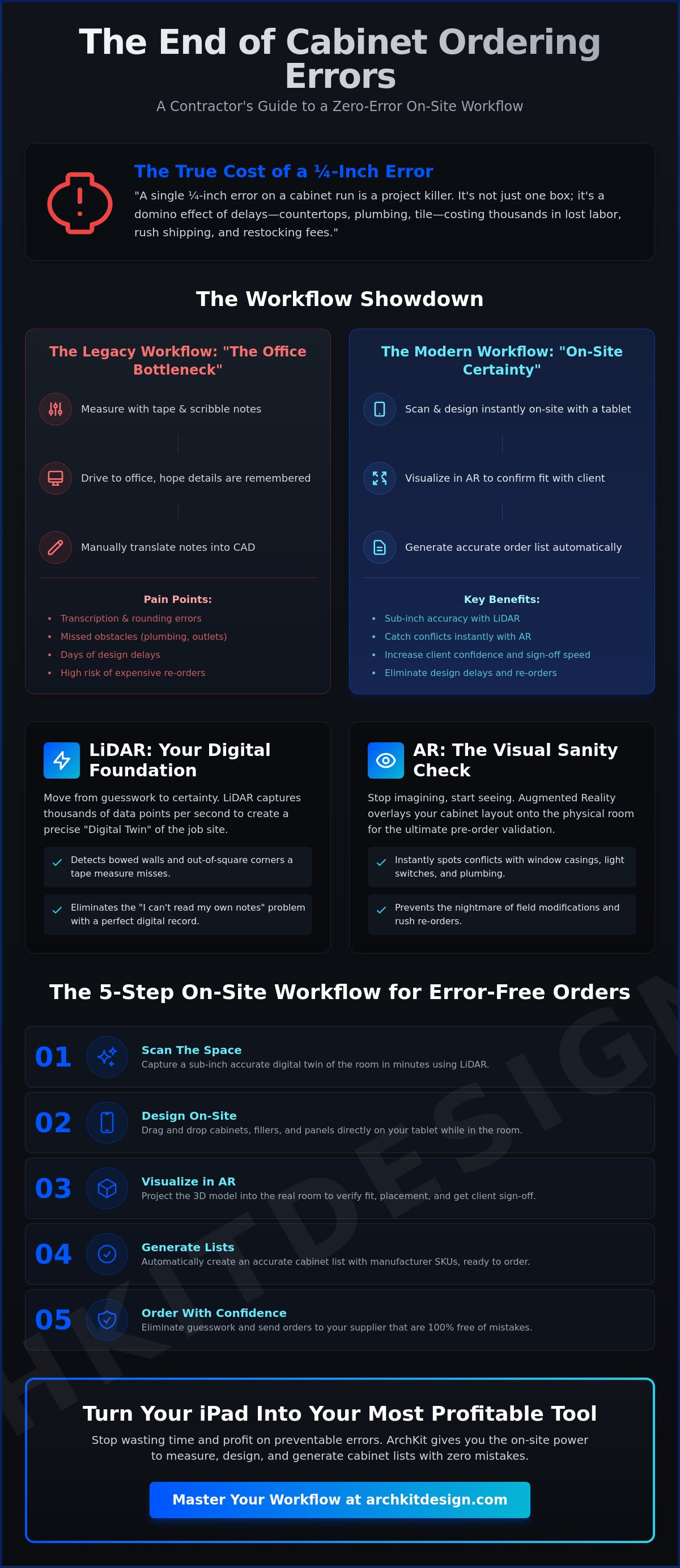
The 5-Step On-Site Workflow for Error-Free Cabinet Lists
Install day should be a victory, not a salvage operation. A structured workflow is your best defense against re-order fees. By using software to prevent cabinet ordering mistakes, you turn a chaotic site visit into a surgical data collection event. This process moves you from a rough sketch to a verified order in a single visit. Stop guessing. Start following a repeatable system that protects your profit margins and keeps your sub-contractors on schedule.
- Step 1: LiDAR Scan the space to establish your Digital Foundation. Capture every wall, window, and bulkhead.
- Step 2: Overlay standard U.S. cabinet sizes using AR. Check for physical fit against existing plumbing and electrical.
- Step 3: Generate an instant 2D and 3D layout. Verify your Work Triangle and ensure all door clearances are functional.
- Step 4: Review the automated cabinet list with the client. Get immediate sign-off on the layout while you're still in the room.
- Step 5: Export the verified layout. Send the data directly to your supplier or ordering portal without manual re-entry.
Step 1 & 2: Capturing the Reality of the Room
A perfect scan requires a clean site. Clear the clutter from countertops. Open the curtains for better lighting. Focus your device on the corners where walls meet the ceiling. Capturing a 3D scan on-site significantly reduces measurement errors compared to manual methods. Once the scan is complete, drop in your base and upper cabinets. The ArchKit Design platform automatically matches the scan to standard depths. You'll see instantly if a 36-inch sink base is too tight for the corner. No more making it work in the field with a reciprocating saw.
Step 3 & 4: Instant Visualization and Approval
Seeing is believing. Show the client the 3D render right where the cabinets will sit. Use the AR Kitchen Layout Tool from ArchKit Design to handle what-if scenarios on the fly. If they want to move the pantry, move it. If they want to see a larger island, resize it. This transparency builds trust. It also provides a psychological benefit. When a client signs off on a visual model, change-order friction disappears. They know exactly what they're getting. You know exactly what to order.
Stop relying on office-bound design cycles that slow you down. You can get early access to our mobile workflow tools and start capturing zero-error layouts today. Move faster. Eliminate re-orders. Secure your next project with confidence.
ArchKit Design: The Professional’s Defense Against Cabinet Errors
ArchKit Design is the specific tool engineered for the physical job site. It isn't just another design app. It's professional software to prevent cabinet ordering mistakes by locking in accuracy from the first scan. The LiDAR Kitchen Measurement Tool captures sub-inch dimensions instantly. You move from an empty room to a full 3D layout in under 10 minutes. This speed secures the project while you're still face-to-face with the client. It eliminates the "I'll get back to you" delay that kills sales. You provide answers when the client is ready to buy.
Precision matters. ArchKit Design utilizes a comprehensive database of standard U.S. cabinet sizes. This ensures your estimates are grounded in physical reality. You aren't just drawing generic boxes; you're specifying physical products that exist in your supplier's catalog. This prevents the "impossible design" trap where a layout looks great on screen but can't be manufactured. It's a professional-grade defense for your profit margins. Every cabinet you drop into the AR layout is a cabinet you can actually buy. No more custom-shop prices for a stock-cabinet budget.
The transition from measurement to order form is seamless. Because the app generates cabinet lists automatically, you skip the tedious manual entry phase. This is where most transcription errors occur. ArchKit Design bridges that gap. It turns your mobile device into a high-performance workstation that operates in the palm of your hand. You capture the data. You verify the fit. You generate the list. It's that simple.
Built for the Job Site, Not the Office
Leave the laptop in the truck. ArchKit Design works on iPhone and iPad. It offers maximum mobility in tight kitchens or active construction zones. The interface is built for rugged simplicity. It's a tool that works as hard as you do in the field. No more fumbling with chargers or finding a flat surface for a mouse. View ArchKit Design Pricing to see how this modern workflow fits your business model. Stop paying for bloated desktop software you only use half the time. Embrace the freedom of a mobile-first design process.
Start Preventing Mistakes Today
The ROI is simple. One mis-ordered cabinet often costs more than a full year of software access. Preventing that single error pays for the tool instantly. Join the digital transformation of the kitchen and bath industry. Bulletproof your next project with data-driven layouts that leave no room for doubt. Use technology to impress your clients and win more contracts. Get Early Access to ArchKit Design and stop eating the cost of manual errors. Build faster. Order smarter. Grow your reputation as a zero-error professional.
Build Your Zero-Error Reputation
The days of "measure once, cut twice" are over. You've seen how LiDAR-powered accuracy and instant 3D AR visualization turn your iPad into a professional-grade workstation. By using a standard U.S. cabinet catalog on-site, you eliminate the data translation errors that lead to expensive re-order fees. Adopting specialized software to prevent cabinet ordering mistakes isn't just about avoiding a single sink base error; it's about reclaiming your time and securing your reputation as the most reliable professional in your market. You now have the tools to bridge the gap between field sketches and final delivery, ensuring everything from the boxes to the tile accents featured on nycabinets.com fits perfectly the first time.
Stop letting office-bound design cycles slow your business down. You have a proven five-step workflow to capture reality, verify the fit, and get client sign-off in under ten minutes. It's time to replace your tape measure with a digital twin. Capture the room. Verify the layout. Close the sale. Start designing on-site for free with ArchKit and bulletproof your next project today. Your margins will thank you. Modernize your trade and take control of every order before you leave the job site. You've got this.
Frequently Asked Questions
How does software prevent cabinet ordering mistakes?
Digital tools create a verification layer between your field measurements and the final order form. Implementing software to prevent cabinet ordering mistakes ensures that your site data matches the manufacturer’s SKU requirements exactly. It flags physical conflicts, identifies missing fillers, and removes the risk of human transcription errors during the data entry phase.
Can an iPhone app really be as accurate as a laser measure or tape?
Yes, LiDAR-equipped devices using ArchKit Design capture room volumes with a level of detail that point-to-point laser measures cannot match. While a tape measure only gives you a single dimension, LiDAR creates a high-fidelity digital twin. This technology identifies bowed walls and out-of-square corners that a manual tape often misses.
What are the most common cabinet ordering errors for contractors?
The most frequent errors involve forgotten fillers, incorrect door swing clearances, and miscalculating appliance depths. These often stem from "measurement drift" when translating handwritten notes to office software. Using software to prevent cabinet ordering mistakes allows you to catch these conflicts in AR while you are still standing in the room.
Does ArchKit Design include standard U.S. cabinet sizes?
Yes, ArchKit Design features a built-in catalog of standard U.S. cabinet dimensions. This ensures that every layout you create is grounded in physical reality. Designing with standard sizes prevents the "impossible design" scenario where a layout looks perfect on screen but cannot be manufactured using stock boxes.
How much money can a contractor save by using design software on-site?
The ROI is immediate because the cost of a single mis-ordered cabinet often exceeds the price of a yearly software subscription. Beyond material costs, you save on lost labor and trade scheduling delays. Protecting your profit margin starts by ensuring your first order is the only order you have to place.
Do I need an internet connection to use ArchKit Design on a job site?
No, you do not need an active connection to scan a room or create a layout. ArchKit Design processes LiDAR data and AR visualizations locally on your iPhone or iPad. You can complete your entire on-site workflow in basements or new builds without Wi-Fi; your project data will sync to the cloud once you return to a network.
Is LiDAR available on all smartphones for kitchen scanning?
Professional-grade scanning requires the LiDAR sensors found in Apple’s Pro and Pro Max tier devices. While basic layout features may work on other hardware, ArchKit Design leverages these specific sensors to provide the sub-inch accuracy required for complex kitchen and bath remodeling projects.
How do I share my ArchKit Design layouts with cabinet manufacturers?
You can export your verified layouts as professional PDF reports or 3D files directly from the job site. These exports include your automated cabinet lists, 2D floor plans, and site photos. This data can be sent instantly to your supplier or uploaded to their ordering portal to ensure a perfect match for production.


