
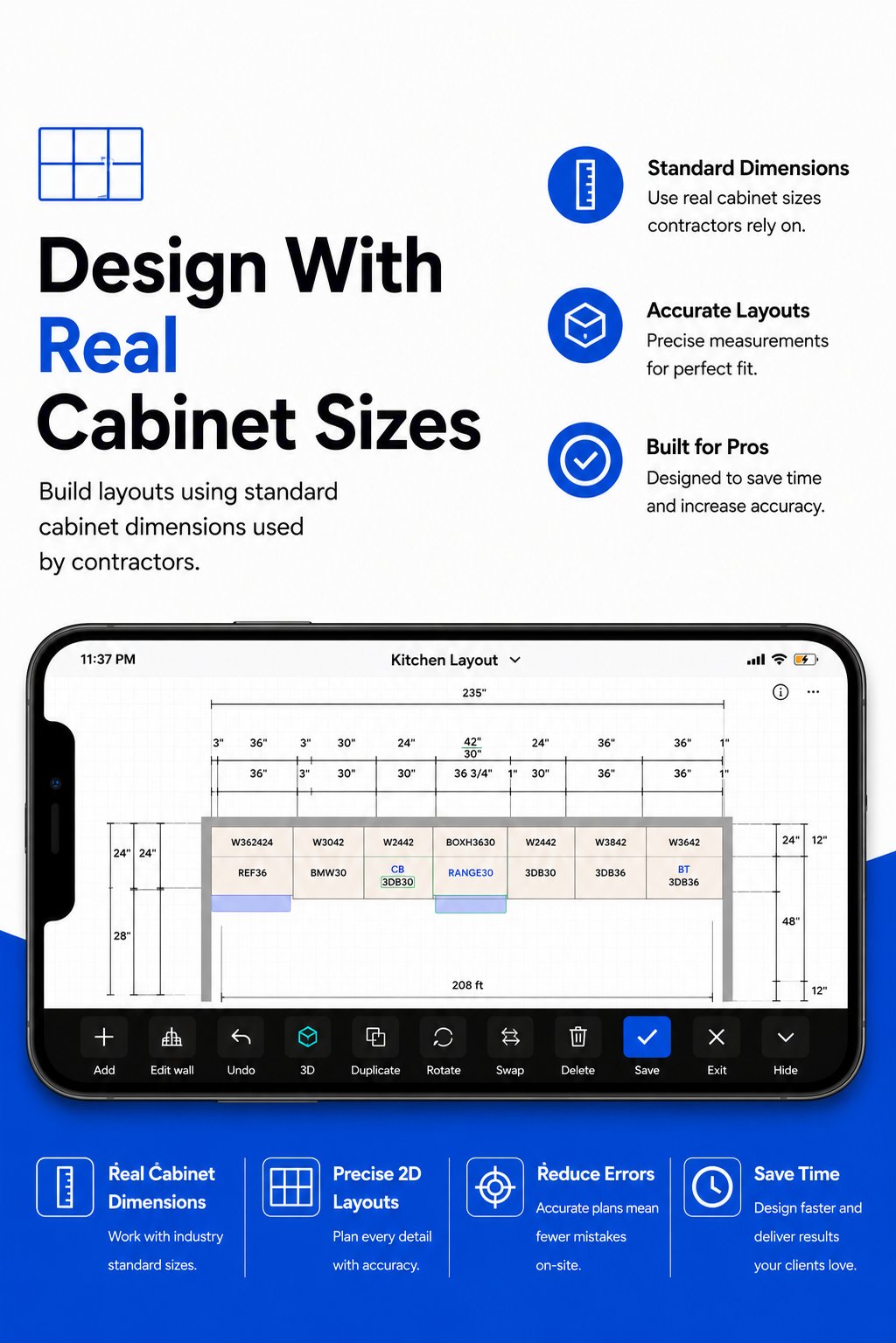
Why are you still driving back to the office to finish a design that should've been closed at the kitchen island? You know the drill. A tape measure, a scribbled notepad, and three days of CAD work just to get a "maybe" from the client. It's time to stop guessing. Using the right software to create kitchen floor plans on-site isn't just a luxury in 2026; it's a competitive necessity. Manual measurement errors lead to cabinet misfits and drained margins. You deserve a workflow that moves as fast as you do.
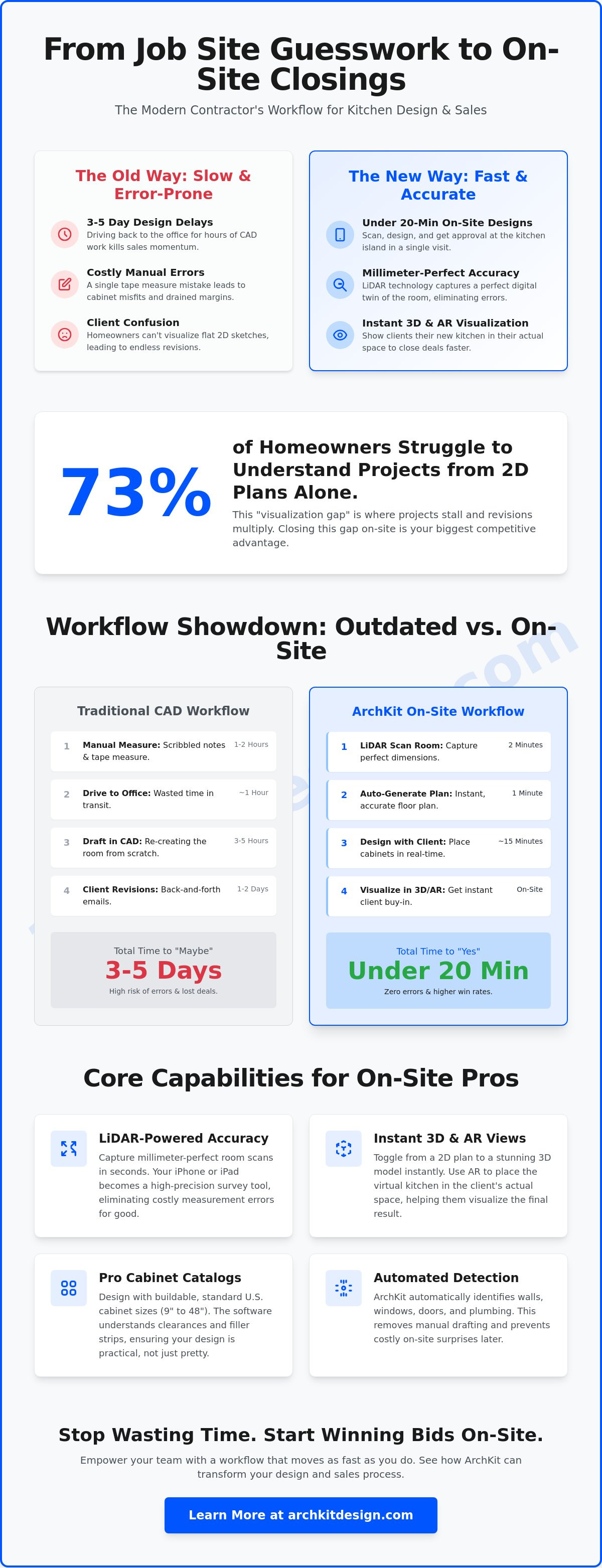
We agree that the traditional design cycle is too slow for today's market. You shouldn't lose projects because a homeowner can't visualize a flat sketch. Research shows that 73% of homeowners struggle to understand projects from 2D plans alone. This guide teaches you how to eliminate errors and generate professional layouts in minutes using modern mobile tools. We'll explore how ArchKit uses LiDAR and AR to scan rooms and create instant 3D views. Learn to cut your design time to under 20 minutes and secure project approvals before you even leave the driveway.
Key Takeaways
- Replace paper sketches with LiDAR mapping. Capture millimeter-perfect dimensions instantly and eliminate the risk of manual measurement errors.
- Adopt software to create kitchen floor plans on-site to close deals faster. Transition from scanning a room to presenting a professional layout in under 20 minutes.
- Use integrated cabinet catalogs to ensure buildable designs. Automated detection of windows, doors, and plumbing stacks prevents costly jobsite surprises.
- Close the visualization gap with instant 3D and AR views. Helping clients see the final result on-site significantly reduces project approval time and design revisions.
- Scale your business by moving design tasks to the field. Empower your team with ArchKit to submit higher-quality bids and increase your overall win rate.
Why On-Site Floor Plan Software is the New Contractor Standard
In 2026, carrying a clipboard and a pencil to a site visit is a liability. Homeowners expect speed, and waiting three days to send a design is a fast way to lose the contract. Modern software to create kitchen floor plans on-site has replaced the "measure now, design later" headache. This technology uses mobile sensors like LiDAR and AR to map every wall, outlet, and plumbing stack in real time. It isn't just about drawing lines; it's about capturing a digital twin of the room before you finish your first walkthrough. This is the new baseline for professional remodeling.
The shift from abstract numbers to client-ready 3D models happens in minutes, not days. When you can show a homeowner exactly how a new island fits while you're still standing in their kitchen, the sales dynamic changes. You move from being a contractor who "might" do the job to a professional who has already solved the layout. Speed is your biggest competitive advantage. By using software to create kitchen floor plans on-site, you can finalize the layout and close the deal before you even leave the driveway.
The High Cost of Manual Measurement Errors
A single quarter-inch mistake can kill your profit margin. If a cabinet doesn't fit because of a crooked wall you didn't catch with a tape measure, you're looking at a two-week delay and a costly reorder. Manual sketches are prone to human error. You might misread a pencil mark or forget to note the exact location of a window casing. These "one more measurement" trips waste hours of labor and frustrate clients. By integrating a kitchen design app for iPhone into your workflow, you capture the entire floor plan with digital precision. ArchKit ensures that every dimension is locked in during the initial scan, reducing the friction that usually leads to site errors and expensive revisions.
The Power of LiDAR Technology in 2026
LiDAR stands for Light Detection and Ranging. It pulses light to measure distances with millimetric accuracy, allowing your device to "see" the room in three dimensions. LiDAR is the gold standard for site surveys in 2026. Your iPhone Pro or iPad Pro is no longer just a communication tool; it's a high-precision scanner. Traditional CAD tools often force you to type in wall lengths manually, which is where errors creep in. True on-site software scans the space for you, automatically detecting openings and obstacles. This technology removes the guesswork from the survey process. You get a perfect foundation for your design in seconds, allowing you to focus on the layout rather than the math.
Core Capabilities of Professional On-Site Design Tools
Professional software to create kitchen floor plans on-site doesn't just sketch; it interprets. While entry-level apps require you to drag and drop wall segments manually, pro-grade tools use automated detection. The software identifies wall junctions, window headers, and door swings during your initial walkthrough. This automation removes the cognitive load of drafting. You focus on the layout while the hardware handles the geometry. It's the difference between being a data entry clerk and a renovation expert.
Generic design tools often fail because they lack trade-specific logic. A contractor needs more than "basic blocks." You need a catalog that mirrors the real-world inventory you actually install. Professional tools include integrated libraries featuring standard U.S. cabinet sizes in 3-inch increments, ranging from 9" to 48". This ensures your design isn't just a pretty picture; it's a buildable plan. Using software to create kitchen floor plans on-site allows you to toggle between 2D layouts for technical accuracy and 3D elevations for client presentations instantly.
Integrated Cabinet Catalogs for Accurate Estimating
Precision in the design phase dictates the accuracy of your quote. When your software understands standard dimensions, you can visualize filler strips and corner clearances in real-time. You don't have to guess if a blind corner cabinet will clear the dishwasher handle. Utilizing a 3D kitchen visualizer for professionals allows you to swap styles and finishes while standing in the room. This level of detail helps you generate a firm estimate before you finish your coffee. It eliminates the "let me get back to you" delay that often kills sales momentum.
Instant 3D Visualization and AR Walkthroughs
The most powerful feature of modern on-site tools is the ability to bridge the visualization gap for the homeowner. Augmented reality systems have evolved from academic concepts into practical jobsite essentials. You can now overlay new cabinetry directly onto existing, dated walls. Let your clients "walk" through their new galley or L-shaped kitchen before a single sledgehammer swings. This immersive experience secures immediate buy-in. It reduces "change order fatigue" because the client has already experienced the flow of the space and approved the footprint.
Collaboration doesn't end with the homeowner. Professional tools offer robust export options. You can send high-resolution PDF layouts to the client or DXF files directly to your cabinet shop or subcontractors. This ensures everyone works from the same millimeter-perfect data. If you're ready to modernize your site visits and eliminate manual drafting, you can get early access to these professional features today.
Mobile AR vs. Traditional CAD: Speed and Accuracy in the Field
Traditional desktop CAD forces a broken, inefficient workflow. You measure the space. You drive back to the office. You spend hours behind a desk fighting with complex software. Finally, you return to the client days later, hoping they haven't called a competitor in the meantime. This "Measure, Office, Design, Return" cycle is a relic of the past. Mobile software to create kitchen floor plans on-site collapses this timeline into a single visit. It moves the entire design engine from your office to your pocket. You stop being a draftsman and start being a closer.
Eliminating the Back-to-the-Office Delay
Efficiency isn't just about working faster; it's about staying present during the sales cycle. A typical kitchen project using legacy tools requires roughly 6 hours of total design and travel time before a first draft is ready for review. With an on-site workflow, that window drops to 30 minutes. Homeowners feed off that momentum. When they see a professional layout appear on your tablet while they're still excited about the project, their confidence peaks. It removes the "dead time" where doubt and second-guessing usually creep in. For a deeper look at the technical specs behind these scans, check out our LiDAR kitchen scanner app guide.
Accuracy in Complex Environments
The learning curve is the final barrier for many firms. Traditional CAD software takes weeks of dedicated training and expensive certifications to master. It's complex, bloated, and requires a stationary workstation. Modern apps like ArchKit are built for the field. Onboarding takes minutes. You don't need a degree in architecture to use software to create kitchen floor plans on-site; you just need a job site and a goal. Ditch the desk. Stop wasting fuel on return trips. Focus on building and selling instead of drawing.
How to Create a Professional Kitchen Plan in 15 Minutes
Speed is useless without a repeatable process. To hit the 15-minute mark, you need a workflow that minimizes backtracking and manual data entry. Using the right software to create kitchen floor plans on-site allows you to automate the technical drafting while you focus on the layout. This isn't about rushing the design; it's about removing the administrative friction that usually eats up your afternoon. By following a structured approach, you can move from a blank room to a signed contract during a single site visit.
Scanning the Existing Space
Clear the perimeter before you start. Boxes, loose tools, and renovation debris block sensors and create "noise" in your digital mesh. Keep your movement steady as you sweep the room. Slow, deliberate motions increase data point density, which results in a more accurate model. While the technology is precise, trust but verify. Perform one manual check-point on a long wall to confirm your device is calibrated. If you're working in a dim residential kitchen, turn on every light or bring a portable LED. LiDAR works well in low light, but the visual sensors used for AR visualization need contrast to keep your digital cabinets locked to the floor.
Dropping in Standard Cabinetry
Once the room mesh is set, define your openings. Mark windows, doors, and plumbing stacks first. This creates the boundaries for your layout. Open the professional catalog and begin dropping in base units. Use the "snap-to-wall" feature to ensure perfect alignment without manual nudging. This feature is a massive time-saver compared to traditional CAD, where you might spend minutes just trying to align a cabinet to a crooked wall. You can adjust cabinet heights for custom ceiling requirements or tall crown molding instantly. ArchKit handles the math, ensuring your 3-inch increments stay consistent throughout the run.
Finalize the 3D render and walk the client through the new space. Adopting software to create kitchen floor plans on-site isn't just about speed; it's about professionalizing your entire sales process. When the client sees the cabinetry list generated on the fly, they know you're prepared. You can even get a digital signature right on the screen to lock in the design. If you're ready to stop drawing and start closing, you can get early access to the ArchKit workflow today.
Scaling Your Business with ArchKit’s On-Site Workflow
Scaling your remodeling business requires more than just a higher lead volume. It requires a faster path to a signed contract. By adopting software to create kitchen floor plans on-site, you bypass the traditional office bottleneck. Stop waiting for drafts. Start closing in the field. This workflow empowers your project managers to handle the design, the estimate, and the layout in a single visit. You reduce overhead by removing the need for a dedicated drafting department for every initial bid. You move faster, bid smarter, and win more often.
Integration is the key to full digital transformation. Your design data shouldn't live in a vacuum. It should feed directly into your project management and estimating tools. This connectivity ensures that the measurements captured on-site stay accurate through the entire build cycle. It creates a seamless transition from the first scan to the final cabinet installation. This isn't just a new app; it's a foundation for a more profitable operation.
Impressing Clients with Instant Professionalism
Clients choose the contractor who makes them feel most confident about the future. In a market where 73% of homeowners struggle to visualize projects from 2D sketches, showing them a 3D model immediately is a massive competitive win. It builds trust through data-driven transparency. You aren't just quoting a number; you're demonstrating the solution. This level of professional presentation often justifies a higher price point because you've already proven your expertise. You can view ArchKit Pricing to find a plan that scales with your crew size and project volume.
Streamlining the Approval Process
The "he-said-she-said" disputes that ruin installation days often start with vague initial plans. Digital documentation eliminates this ambiguity. Using cloud sharing, you can send the finalized on-site plan to the office and the homeowner before you leave the driveway. Everyone stays on the same page. This speed also protects your supply chain. You can send accurate cabinetry lists to your supplier the same day you meet the client, securing your place in the production queue. To modernize your site visits and start closing more projects, get early access to the ArchKit platform today.
- Increase your win rate: Present professional 3D views while the client is still excited.
- Reduce administrative drag: Eliminate the need for return trips and office-bound drafting.
- Protect your margins: Use software to create kitchen floor plans on-site to catch errors before they reach the job site.
- Empower your team: Give your field staff the tools to close deals without waiting for office support.
Own the Kitchen Before You Leave the Site
The days of the clipboard and the return trip are over. You've seen how mobile workflows replace office-bound drafting and eliminate the "measure, office, design" delay. Adopting software to create kitchen floor plans on-site gives you back your afternoons and your competitive edge. You get LiDAR-powered accuracy that manual tape measures can't match. You access a standard U.S. Cabinet Catalog to build layouts that are ready for the job site. You generate instant 2D and 3D exports to keep homeowners and subcontractors aligned from day one.
Don't let another lead go cold while you're stuck behind a desk. Ditch the legacy CAD systems for a tool built for the field. It's time to professionalize your sales cycle and protect your profit margins with millimeter-perfect data. Experience the speed of a digital transformation and show your clients the future of their home in real time. Stop drawing and start closing.
Start your free trial of ArchKit and design on-site today
Your next project is waiting. Go out and win it.
Frequently Asked Questions
Is mobile kitchen design software as accurate as a laser tape measure?
Yes, LiDAR-powered software is as accurate as a laser tape measure for capturing complex room geometry. While a laser measure is excellent for single point-to-point distances, mobile software captures the entire three-dimensional volume simultaneously. This prevents errors caused by crooked walls or non-square corners that a simple tape measure might miss. It provides a millimetric baseline for your cabinetry layout.
Do I need an iPad Pro to use LiDAR-based floor plan software?
You need a device equipped with a LiDAR sensor to access the most precise scanning features. This includes the iPad Pro (2020 and later) and the iPhone Pro or Pro Max (12 Pro and later). Standard models can still use AR-based measurement, but they lack the millimetric precision provided by the specialized light-sensing hardware found in the Pro series devices.
Can I export my on-site designs to other CAD software like 2020 or AutoCAD?
Yes, most professional on-site tools allow you to export designs in DXF or PDF formats. This allows you to start the project on-site and finish complex technical details in your preferred desktop program if needed. It bridges the gap between field work and office documentation. ArchKit ensures your data remains consistent across platforms to prevent manual re-entry errors.
Does the software include standard U.S. cabinet sizes?
Yes, professional software to create kitchen floor plans on-site includes catalogs built on standard U.S. trade increments. Most libraries feature base and wall units in 3-inch width intervals, typically ranging from 9 to 48 inches. This ensures your on-site designs are buildable and reflect the actual inventory available from your suppliers, making the estimating process much faster.
Can I use this software for commercial kitchen layouts as well?
You can use the software for commercial layouts, though the default catalogs are often residential-focused. The scanning technology captures any physical environment regardless of its use case. You can map large commercial footprints quickly and add custom equipment dimensions manually. It is an efficient way to capture "as-built" conditions for restaurants, cafes, or office breakrooms during a single visit.
For those managing even more complex commercial or industrial environments that require real-time situational awareness and large-scale video displays, you might want to check out Activu Corporation.
How much does professional on-site kitchen design software typically cost?
Professional software to create kitchen floor plans on-site usually follows a subscription model, with prices ranging from $20 to over $150 per month. Most providers offer tiered plans based on the number of active projects or export capabilities. Always check if the plan includes the specific features your team needs, such as 3D visualization or cabinetry list exports, before committing to a subscription.
What happens if the kitchen is full of clutter during the scan?
Clutter won't stop the scan, but it can hide critical data points like baseboards or floor-to-wall junctions. LiDAR can "see" through some gaps, but clearing the perimeter is the best practice for a perfect model. If a kitchen is packed with boxes, scan the ceiling and upper wall sections to establish the room's footprint. You can always refine the measurements later.
Can I create 3D renderings for my clients while still on-site?
Yes, modern AR-driven software generates 3D views and walkthroughs instantly as you scan the room. This instant visualization is a core feature of modern mobile workflows. It allows the homeowner to see exactly how the new layout fits their physical space. Getting this buy-in on-site significantly reduces the number of design revisions and speeds up the project approval process.


