

What if your site survey took ten minutes instead of two hours and guaranteed a perfect cabinet fit every time? For most contractors, out-of-square walls are a hidden profit killer that only shows up during the final install. Relying solely on a notepad and a metal blade is a risk your margins can no longer afford. This guide settles the tape measure vs LiDAR for kitchen accuracy debate for the 2026 market.
Discover how to eliminate measurement errors by combining traditional precision with modern scanning technology. We'll show you how ArchKit Design turns your iPhone or iPad into a professional LiDAR kitchen measurement tool. Learn to generate accurate 2D and 3D layouts on-site. Move from manual sketches to digital twins that secure client approvals in seconds. It is time to modernize your workflow and protect your bottom line.
Key Takeaways
- Understand the critical differences between a tape measure vs LiDAR for kitchen accuracy to capture complex room geometry and out-of-square walls that manual tools often miss.
- Reduce site survey time by 50% or more by replacing manual sketches with automated LiDAR room mapping on your iPhone or iPad.
- Protect your profit margins by eliminating the measurement errors that lead to cabinet installation delays and expensive field modifications.
- Secure faster client approvals by generating professional 3D layouts and AR visualizations on-site using standard U.S. cabinet sizes.
The Accuracy Trap: Why Manual Tape Measures Fail in Modern Kitchens
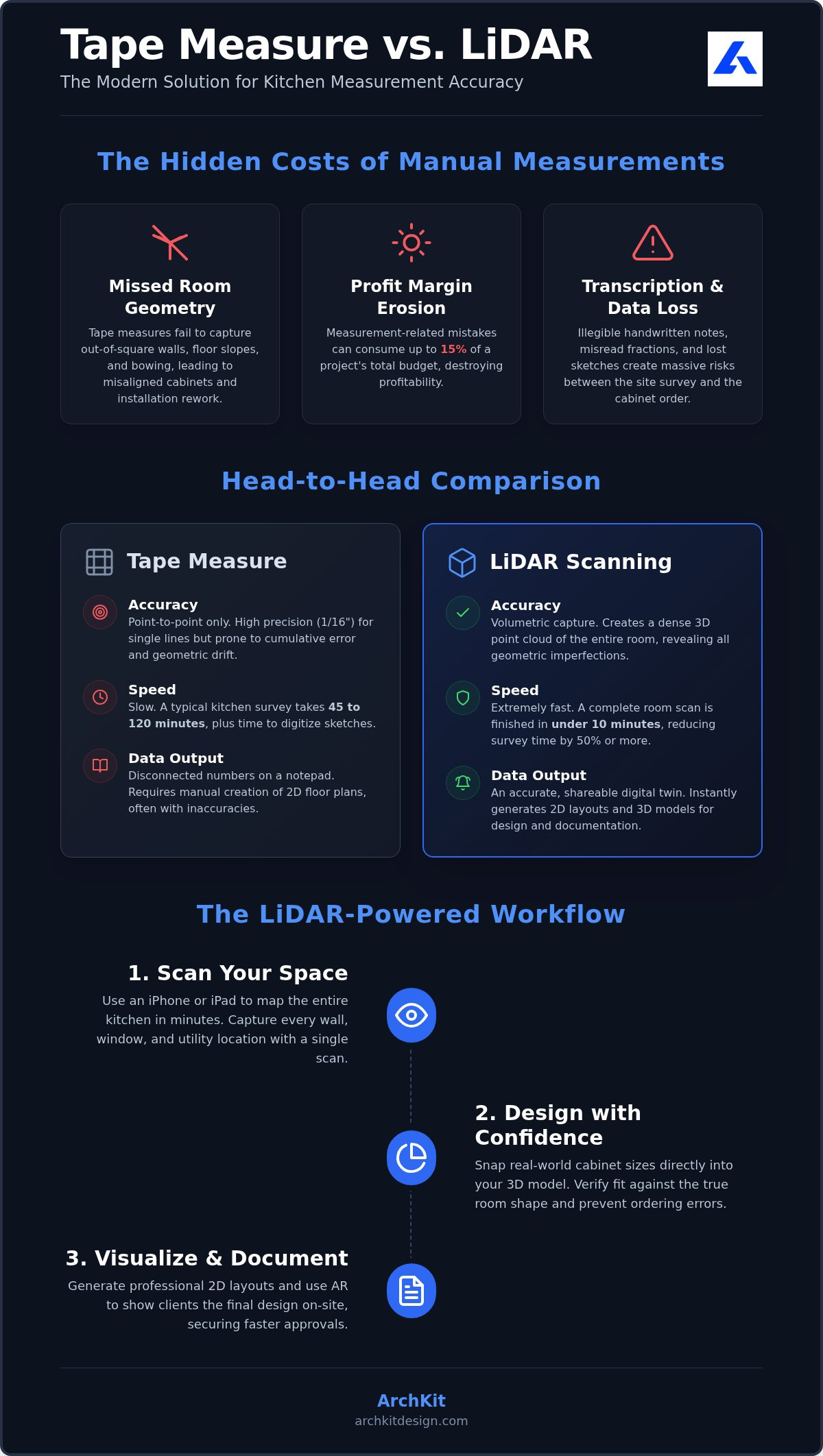
Manual tape measures are a job site staple, but they have a fatal flaw. They capture isolated points while ignoring the room's total envelope. When you're comparing a tape measure vs LiDAR for kitchen accuracy, you're really choosing between disconnected numbers and a complete digital twin. A tape tells you how far it is from point A to point B, but it doesn't see the reality of the space in between.
Out-of-square walls are the top reason for cabinet installation delays. The tape measure vs LiDAR for kitchen accuracy debate ends the moment a cabinet hits a bowed wall that your tape missed. A standard tape might show a wall is 120 inches long at the base, but it won't reveal an 88-degree corner or a significant mid-wall crown. These errors lead to expensive rework and hours of shimming. Measurement-related mistakes can drain up to 15% of your total project budget, which is a massive risk when average remodeling margins sit near 6.3%. Human error during transcription adds even more danger. Misreading a measurement or writing a digit incorrectly on a notepad can ruin an entire custom order. You also risk missing plumbing stubs and electrical offsets that hand sketches frequently overlook.
Identifying Invisible Errors in Manual Site Surveys
Wall bowing and irregular corners create distorted 2D sketches that don't match the physical space. Manual point-to-point methods lack the volumetric data provided by Lidar technology. Geometric drift in manual kitchen mapping is the cumulative inaccuracy created when separate measurements are joined without a unified spatial reference.
Stop guessing. Use a professional kitchen measurement app on your iPhone or iPad to map the entire room in seconds. Capture every detail, from floor-to-ceiling height to exact pipe locations. It's the only way to ensure your cabinet layout fits the actual room, not just your sketch.
LiDAR vs. Tape Measure: A Head-to-Head Accuracy Comparison
Choosing between a tape measure vs LiDAR for kitchen accuracy isn't about which tool is better, but how they work together. A manual tape provides 1/16th inch precision for a single linear distance. LiDAR technology creates a dense cloud of thousands of points to capture the entire room volume at once. Adhering to standards for terrestrial LiDAR ensures your digital data is reliable for professional documentation. While manual surveys often take 45 minutes to two hours, a digital scan finishes in under ten minutes. This speed recovery allows you to bid more projects in less time.
Digital files solve the problem of data continuity. Paper sketches get lost or become illegible on the job site. Digital scans provide a permanent, shareable record that lives in your project cloud. You do need to consider environmental factors. High-gloss finishes, mirrors, and extreme low light can impact sensor performance. Check your site conditions before you start. Ensure clear sightlines to walls to maximize the density of your point cloud. This digital-first approach creates a robust data set you can reference back at the office without driving back to the site for missed measurements.
The Hybrid Workflow: When to Scan and When to Pull the Tape
Smart pros use a combined approach to protect their margins. Use LiDAR for the room envelope, window placements, and appliance offsets. This builds the foundational 3D layout in seconds. Reserve the manual tape for critical tight-fit cabinet runs where every fraction matters. This combination provides the ultimate safety net for your installation. For specific hardware optimization tips, read our LiDAR Kitchen Scanner App Guide. To start building your digital twin, download the ArchKit Design app and test your first scan today.
Eliminating Rework with ArchKit’s LiDAR-Powered Workflow
Modernizing your site survey means moving beyond raw numbers. ArchKit transforms your iPhone or iPad Pro into a high-performance kitchen measurement app that maps spaces in seconds. Stop sketching on pads. Start scanning the physical room envelope to create an instant 3D model. This workflow closes the gap in the tape measure vs LiDAR for kitchen accuracy debate by providing a visual, volumetric foundation for every design decision.
Integration is the key to profitability. ArchKit includes a catalog of standard U.S. cabinet sizes that snap directly into your LiDAR scan. This allows you to verify fitment against out-of-square walls in real time. If a cabinet run is too tight, you'll know before you leave the driveway. You can also generate sub-ready documentation and detailed 2D layouts without returning to the office. This "on-site first" approach eliminates administrative fatigue and keeps your projects moving at a high velocity.
Visualization prevents costly material waste. Use the AR kitchen design features to project your layout onto the existing room. Walk through the space with your client. Check appliance clearances and door swings. Catching a design flaw now saves thousands in rework later. It's about being the most professional contractor in the room and securing more contracts through transparency.
Turning Site Scans into Professional 3D Layouts Instantly
Drop standard cabinets into your scanned room to see an immediate transformation. This process ensures your designs follow essential Kitchen Layout Principles while respecting the physical limits of the space. Don't wait until the install to find an error. Download ArchKit on the App Store to start your first scan and experience the speed of a digital-first workflow.
Build Better Kitchens with Digital Precision
Modernizing your kitchen measurement workflow isn't just about speed; it's about protecting your profit margins. By understanding the trade-offs of a tape measure vs LiDAR for kitchen accuracy, you can eliminate the costly rework caused by out-of-square walls and human transcription errors. Professional-grade LiDAR technology on your iPhone or iPad provides the volumetric data a manual tape simply can't capture.
ArchKit bridges the gap by combining these precise scans with a catalog of U.S. standard cabinet sizes. You can generate sub-ready 2D and 3D layouts before you even leave the job site. This immediate visualization secures client trust and ensures every cabinet fits perfectly the first time.
Take control of your site surveys and lead your business into a more efficient, digital-first future. Your next successful remodel starts with a single scan.
Frequently Asked Questions
How accurate is LiDAR for measuring kitchen cabinets?
LiDAR provides high-precision data for room envelopes and structural mapping. When you compare tape measure vs LiDAR for kitchen accuracy, LiDAR wins by capturing thousands of points to map walls and openings in seconds. While manual tapes offer pinpoint precision for single lines, LiDAR builds a complete 3D layout. This helps you verify cabinet fitment before finalizing orders.
Do I still need a manual tape measure if I use a LiDAR kitchen design app?
Yes, use a hybrid workflow for the best results. Use your kitchen measurement app to scan the entire room and create a digital twin. This captures the overall geometry and identifies out-of-square walls instantly. Use a manual tape measure for critical, tight-fit cabinet runs or final appliance clearances. This combination provides a safety net that eliminates measurement-related rework during installation.
Which iPhone or iPad models support LiDAR kitchen scanning?
You need an Apple device with a built-in LiDAR sensor to use ArchKit’s scanning features. Supported models include:
- iPhone 12 Pro, 13 Pro, 14 Pro, 15 Pro, and 16 Pro (plus Max versions)
- iPad Pro 11-inch (2nd generation or later)
- iPad Pro 12.9-inch (4th generation or later)
Standard iPhone models and iPad Air lack the sensor needed for automated room mapping.
Can LiDAR detect if a kitchen wall is out of square?
Yes, detecting out-of-square walls is LiDAR’s superpower. While a tape measure captures isolated numbers, LiDAR maps the entire room volume. It reveals wall bowing and irregular corner angles that hand sketches often miss. Identifying these geometric issues early prevents cabinet installation delays. You can catch these flaws on-site using the 3D visualization features before ordering any materials.


