
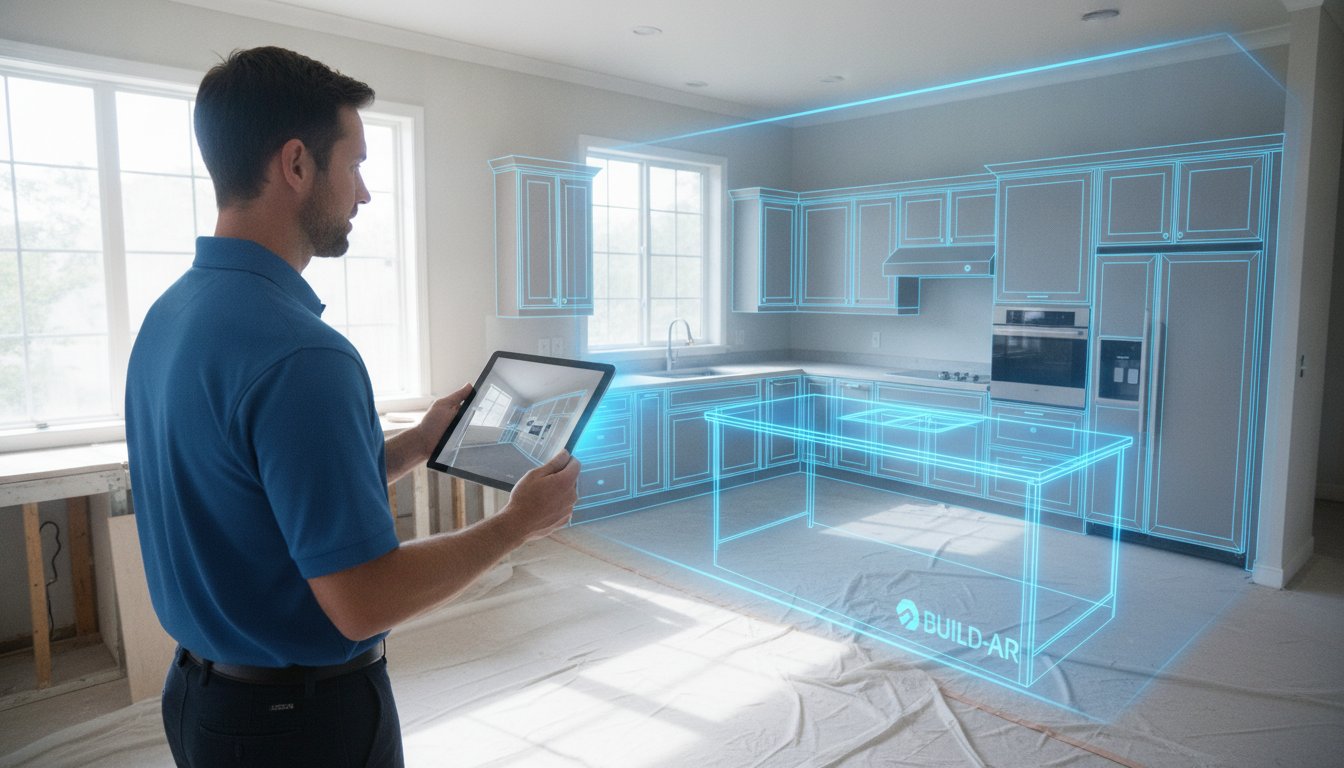
You're standing in a client's outdated kitchen, tape measure in hand, knowing that one missed fractional inch could cost you thousands in cabinet refitting later. It's a familiar pressure. Most contractors still lose hours to manual sketching and even more time back at the office fighting with complex CAD software on a bulky laptop. Finding the right kitchen design app for iPad Pro isn't just about convenience; it's about survival in a market that demands instant results. You already know that the traditional measure today, bid next week workflow is losing you jobs to faster competitors.
This guide will show you how to leverage 2026 LiDAR technology to generate 3D layouts in minutes and close bids before you even leave the driveway. We'll explore the top professional tools, including how ArchKit uses on-site scanning and standard US cabinet libraries to eliminate measurement errors entirely. From AR walkthroughs that wow clients to instant material lists, you're about to transform your iPad into your most profitable tool on the jobsite. Stop carrying the weight of office-based design and start closing more contracts with speed and accuracy.
Key Takeaways
- Trade the bulky office laptop for a mobile workflow that delivers real-time 3D rendering and professional layouts on-site.
- Discover how a kitchen design app for iPad Pro uses LiDAR technology to capture precise room dimensions and eliminate manual measurement errors.
- Focus on professional-grade layouts that utilize standard U.S. cabinet sizes and automatic snapping for instant, accurate bidding.
- Reduce your design time significantly by moving from a raw room scan to a complete 3D model in less than 10 minutes.
- Impress clients and secure approvals faster with immersive AR walkthroughs that bring their new kitchen to life before you leave the jobsite.
Why the iPad Pro is the Ultimate Tool for Kitchen Contractors in 2026
The days of lugging a heavy workstation to a job site are over. Your iPad Pro is no longer just a tablet for emails; it's a high-performance CAD station that fits in one hand. With the launch of the M4 chip, the hardware now handles complex 3D rendering and real-time lighting calculations that previously required a dedicated graphics card. This raw power allows a professional kitchen design app for iPad Pro to run fluidly without the lag or crashes that plague older mobile devices. You can manipulate a full kitchen layout with hundreds of high-resolution textures while standing in the client's current, gutted space.
Visual impact is your strongest sales tool. The Liquid Retina XDR display provides up to 1,600 nits of peak brightness, making your designs pop even in bright, sun-drenched kitchens. When you show a client their new cabinetry on this screen, the deep blacks and vibrant colors create a level of realism that a printed floor plan can't match. Pair this with the Apple Pencil Pro for surgical precision. Use it to snap cabinets into place, annotate plumbing locations, or sketch custom crown molding details directly onto your 3D model. It's tactile, fast, and professional.
LiDAR Hardware: The Pro Contractor Advantage
LiDAR technology is the secret weapon for modern remodeling. This sensor sends out laser pulses to build a dense point cloud of the environment. It doesn't just see a wall; it understands the room's geometry in three dimensions. While a manual tape measure invites human error, LiDAR captures the entire room mesh in seconds. It accurately identifies window casings, door swings, and even small plumbing stubs that are easy to miss during a busy walkthrough. You eliminate the "measure twice" anxiety because the digital twin of the room is already locked into your software. This precision ensures that when the cabinets arrive, they fit the first time.
Mobile CAD vs. Desktop Software
Traditional Computer-aided design (CAD) software used to tether you to an office desk. You'd take notes on-site, drive back to the office, and spend hours translating those chicken-scratch sketches into a digital format. That delay creates administrative fatigue and gives the client time to second-guess the project. Mobile workflows break this cycle. Apps like ArchKit allow you to finish the design before you even leave the driveway. Because these tools are built for the field, they prioritize speed and immediate execution over bloated feature sets. Everything stays synced to the cloud, meaning your team back at the shop sees the final layout the moment you hit save. You move faster, reduce overhead, and win more bids by being the most responsive pro in the room.
LiDAR Scanning: Eliminating Measurement Errors in Seconds
Manual measurements are the silent killer of project profitability. One slight misread of the tape or a forgotten wall thickness leads to "cabinet creep," where an entire run of expensive boxes fails to fit by a half-inch. Modern LIDAR technology solves this by firing thousands of laser pulses per second to map your environment. This isn't just a gimmick; it's a structural audit. Using a professional kitchen design app for iPad Pro, you can capture every corner, plumbing line, and electrical outlet with surgical precision. The software translates these pulses into a high-fidelity 3D mesh, giving you a perfect digital replica of the jobsite.
This technology excels at finding the "invisible" obstacles that ruin a layout. Think about soffits, hidden bump-outs, or walls that aren't quite plumb. LiDAR identifies these discrepancies instantly. Instead of discovering a plumbing conflict during installation, you see it on your screen while you're still standing in the kitchen. For contractors in 2026, LiDAR sensors on the iPad Pro provide sub-quarter-inch accuracy across a typical kitchen footprint, virtually eliminating the risk of custom cabinet misfits.
The Scan-to-Plan Workflow
Efficiency starts with preparation. Clear the counters of clutter to give the sensors a clear line of sight to the backsplash and wall intersections. When you begin the scan, move in a slow, steady arc. Capture the ceiling height first, then sweep the corners. This ensures the app builds a watertight room mesh. Always verify the mesh before leaving the site. A quick 30-second review of the digital floor plan against a physical reference point confirms the measurement integrity. It's the modern version of "measure twice, cut once," but it happens in a fraction of the time.
Reducing Material Waste and Revisions
Every second trip to a jobsite to double-check a measurement is money out of your pocket. Accurate LiDAR scans remove this necessity. By capturing the full geometry of the space on your first visit, you have all the data needed for complex revisions later. If the client decides to move the island six inches to the left, you already have the clearance data stored. This reduces administrative overhead and prevents the costly waste of misordered materials. Using a dedicated kitchen design app for iPad Pro ensures your data is actionable. You can get early access to these advanced scanning workflows and start protecting your margins today. ArchKit integrates these LiDAR capabilities directly into your bidding process, making sure your first estimate is also your final one.
Professional Cabinetry Layout vs. Consumer Design Apps
Most free design apps found in the App Store are built for homeowners dreaming about a remodel, not the contractors actually executing them. These consumer tools often rely on generic furniture blocks or specific retail catalogs that don't reflect the realities of professional cabinetry. A professional kitchen design app for iPad Pro must do more than just visualize; it has to calculate. When you're on-site, you need a tool that understands standard U.S. cabinetry specifications and the strict tolerances required for a successful installation.
The difference lies in buildability. Consumer apps allow you to stretch a cabinet to any arbitrary width, which leads to impossible orders and frustrated installers. Professional tools use automatic snapping and alignment features to ensure every unit sits exactly where it should. This precision is further enhanced by Augmented reality in architecture, allowing you to overlay your precise digital layout onto the physical room to spot potential conflicts with plumbing or electrical runs before they become expensive change orders.
Standardized Catalogs for Accurate Bidding
Precision bidding requires using real-world dimensions. Professional software like ArchKit provides libraries based on standard 3-inch increments, ranging from 9-inch to 48-inch widths. This ensures your digital model translates directly to your cabinet order. To create a truly professional layout, your mobile workflow should include:
- Fillers and Moldings: Account for wall irregularities and ceiling transitions to prevent on-site surprises.
- Toe Kicks and Finished Ends: Detail the small components that impact your material list and final cost.
- Integrated Estimates: Link your layout directly to a material list. When you place a 36-inch base cabinet, the app should automatically update your bid.
Designing for Functionality and Codes
A beautiful render is useless if the kitchen doesn't function. Professional apps incorporate dynamic spacing rules to protect the "Work Triangle" and ensure proper flow between the sink, stove, and refrigerator. They also run automated clearance checks. For instance, the software can flag if an island is placed too close to a wall oven, violating local building codes or making it impossible for two people to pass. For a deeper dive into these requirements, review our guide on Standard Kitchen Layout Dimensions Every Pro Should Know. By catching these errors during the initial walkthrough on your iPad Pro, you eliminate the revision cycles that typically eat into a contractor's profit margins.
Streamlining the On-Site Workflow: From Scan to Client Approval
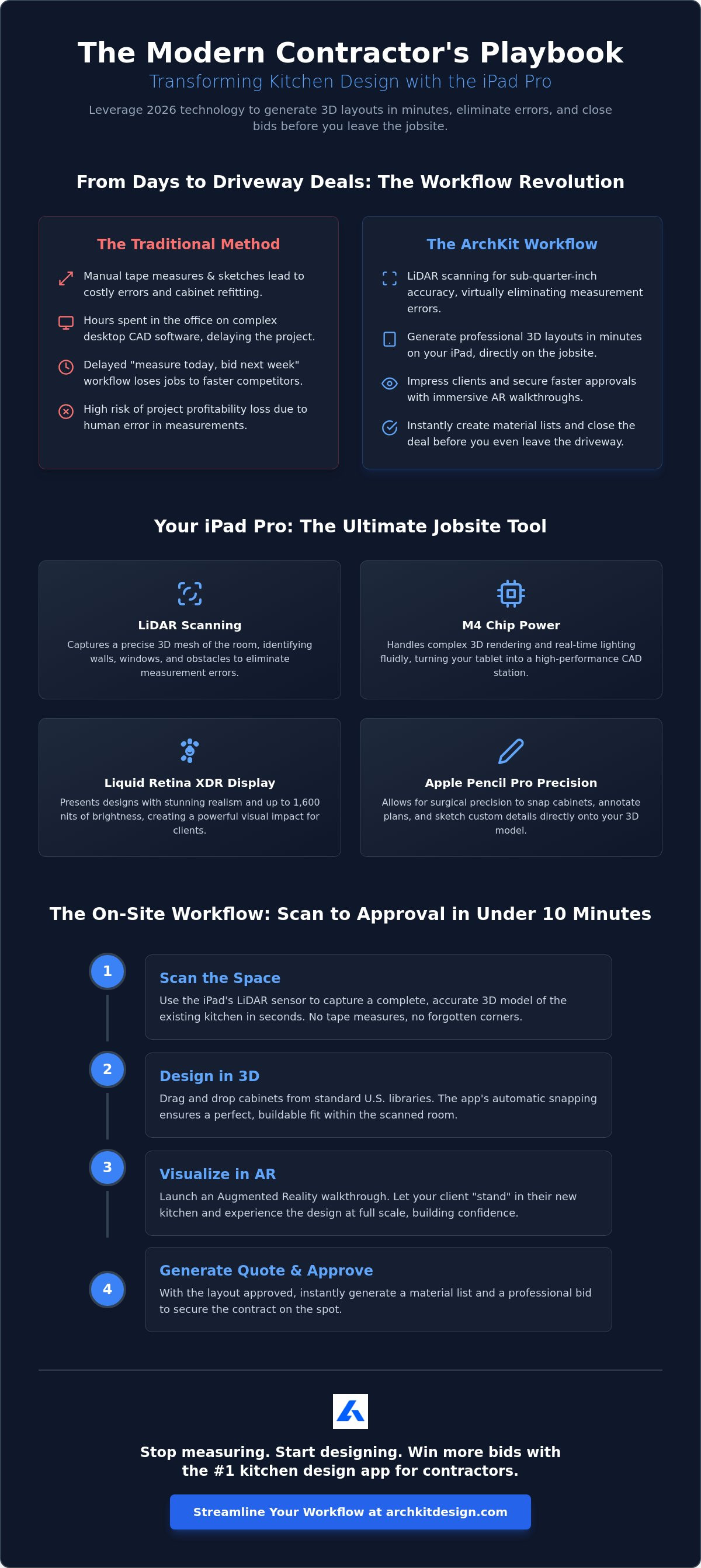
Winning a contract in 2026 requires more than a handshake and a rough estimate. It requires proof. By using a professional kitchen design app for iPad Pro, you transform the initial consultation from a fact-finding mission into a sales event. You no longer need to sketch on paper, drive to the office, and wait three days to email a proposal. The entire design cycle happens in one visit. This speed doesn't just save you administrative time; it creates a psychological advantage. You're providing answers while your competitors are still sharpening their pencils.
Efficiency follows a specific, repeatable sequence. Follow these five steps to master the on-site workflow:
- Step 1: Build the Shell. Use the LiDAR scanner to create a 3D room mesh. Capture every wall, window, and plumbing stub in under two minutes.
- Step 2: Place Cabinets. Drag and drop standard U.S. catalog presets. The software's snapping engine ensures perfect alignment with your scanned walls.
- Step 3: Customize the Look. Apply textures and finishes. Swap hardware or countertop materials to match the client's vision in real-time.
- Step 4: Immerse the Client. Launch AR mode. Let the homeowner walk through their new kitchen while standing in the old one.
- Step 5: Secure the Job. Export the material list and estimate. Get a digital sign-off on the spot and move straight to the deposit.
Winning More Bids with AR Visualization
Augmented Reality is the ultimate objection-handler. When a client worries that an island will feel too cramped, don't argue with them. Show them. By placing the new design directly over their existing space, they can physically walk the clearances. They "feel" the workflow before a single demo hammer swings. This transparency builds immediate trust. If they want to see a different cabinet color, you change it with a tap. You're not just a contractor; you're a partner in their vision. This interactive experience is why ArchKit is the preferred choice for pros who value speed and clarity. To further enhance this vision, many contractors also recommend professional architectural and landscape lighting from LED Artistry to ensure the home's exterior looks as impressive as the new interior design.
Professional Presentations That Close Sales
You don't need a desktop workstation to produce high-end visuals. The M4 chip handles complex lighting and shadows, allowing you to generate 3D renders that look like professional photography. Use a 3D kitchen visualizer for professionals to give your bids a competitive edge. Once the design is finalized, share the project files via the cloud. This allows the client to review the layout on their own device, keeping the project moving forward. Ready to eliminate the office-based bottleneck? You can get early access to the full suite of ArchKit's contractor tools and start closing bids faster today.
ArchKit: The Professional AR Solution for Modern Contractors
ArchKit isn't just another software option. It is a specialized tool built for the dust and pressure of a live job site. Most design tools are too fragile or complex for field use. This kitchen design app for iPad Pro cuts through the noise. It prioritizes speed and reliability over unnecessary aesthetic fluff. You can move from a raw room scan to a fully furnished 3D model in under 10 minutes. This efficiency allows you to maintain your momentum while the client is still excited about the project. Don't let the technical side of the business slow down your sales cycle.
The software is engineered to leverage the specific hardware strengths of the iPad Pro. By integrating directly with the LiDAR sensor and the M-series processors, ArchKit ensures your designs are as accurate as they are beautiful. This isn't just about drawing boxes. It's about creating a digital twin of the kitchen that serves as the foundation for your entire project. From the first scan to the final material list, the ArchKit mobile ecosystem keeps your data organized and your workflow streamlined. Scan. Design. Close. This is the new standard for professional remodeling.
Why Pro Remodelers are Switching to ArchKit
Professional contractors need consistency and buildability. ArchKit delivers this through a no-nonsense interface designed for rapid input and immediate results. You get instant access to standardized cabinetry catalogs. This ensures your plans are always realistic and ready for ordering. Unlike consumer-level apps that require a constant high-speed connection, ArchKit offers reliable on-site performance. It works where you work. Whether you are in a remote residential basement or a high-rise with spotty reception, your design data remains accessible. This offline capability eliminates the frustration of technical delays during a client presentation.
Get Started with ArchKit Today
Stop losing hours to office-based CAD work and administrative fatigue. Download the app today and transform your iPad Pro into a high-performance design studio. You can also get early access to the latest LiDAR features by joining our professional pilot program. This gives you a competitive edge by putting the newest visualization tools in your hands before they hit the general market. Review the ArchKit Pricing page to find a professional plan that fits your business volume. Take control of your design process. Impress your clients. Grow your margins.
Take Control of Your Jobsite Workflow
The landscape of kitchen remodeling has shifted. Speed and accuracy now define the market. You've seen how LiDAR-powered precision eliminates measurement errors. You know the value of a Standard U.S. Cabinet Catalog for buildable bids. By adopting a mobile-first strategy, you ditch the office-bound CAD station and reclaim your schedule. Choosing a specialized kitchen design app for iPad Pro isn't just a tech upgrade; it's a competitive necessity for winning contracts in 2026.
Clients demand transparency. They want results now. With ArchKit, you deliver both through immersive AR Walkthrough Mode and instant rendering. You aren't just estimating; you're proving your value before you leave the site. Stop the revision cycle. Start closing jobs with total confidence. Your iPad Pro is the most profitable tool in your truck when paired with the right software. For professionals looking to expand their digital toolkit, RockCam offers professional photo booth software with AI features that can transform your project showcases and marketing events into interactive experiences.
Start Designing On-Site with ArchKit and modernize your business today. Your next project deserves a pro who moves at the speed of the jobsite.
Frequently Asked Questions
Is the iPad Pro LiDAR accurate enough for custom cabinetry?
Yes, LiDAR provides professional-grade accuracy within fractions of an inch for standard room layouts. It creates a high-fidelity 3D mesh that captures wall lengths, ceiling heights, and structural obstacles instantly. While you should always verify critical "tight-fit" dimensions with a manual tape, LiDAR is the gold standard for rapid on-site planning and eliminating major measurement oversights.
Do I need an internet connection to use ArchKit on a job site?
No, you don't need a constant connection to design or scan a space. ArchKit is built for the realities of the construction site, including basements and remote locations with poor signal. Perform your LiDAR scan and build your layout entirely offline. The app will automatically sync your project data to the cloud once you return to a Wi-Fi connection.
Can I export my iPad kitchen designs to other CAD software?
Yes, professional apps allow you to bridge the gap between the field and the office. You can export your 2D floor plans, 3D visualizations, and material lists in standard formats for further refinement. This ensures your on-site work integrates seamlessly with your existing shop drawings or architectural documentation process without requiring you to start from scratch.
Which iPad models support the LiDAR scanning features?
LiDAR technology is exclusive to the iPad Pro line starting from the 2020 models and later. This includes the 11-inch (2nd generation or newer) and the 12.9-inch (4th generation or newer), as well as the latest M4 iPad Pro models. Standard iPad, iPad Air, and iPad Mini models do not currently house the hardware sensor required for instant 3D room scanning.
How much does professional kitchen design software for iPad cost?
Professional tools typically follow a subscription model to provide regular software updates and cloud storage. Most high-performance options offer a free version for basic sketching with paid tiers for advanced features like LiDAR scanning and full cabinetry catalogs. Investing in a professional kitchen design app for iPad Pro is a direct overhead cost that pays for itself by reducing design time.
Can ArchKit help me generate a material list for cabinet orders?
Yes, the app tracks every component you place in your 3D layout. Because it uses standard U.S. cabinet sizes, it can generate an automated list of base units, wall cabinets, and tall pantries. Export this list directly to your supplier to streamline the ordering process. This feature eliminates manual counting errors and ensures your bid matches your actual material requirements.
What is the learning curve for a contractor moving from paper to iPad design?
The transition is remarkably fast because the interface is visual and tactile. Most contractors become proficient with a kitchen design app for iPad Pro within a few hours of use. You aren't learning complex coding; you're dragging and dropping real-world objects into a digital twin of your jobsite. It's an intuitive shift that replaces tedious sketching with rapid, accurate digital input.
Can I use ArchKit for bathroom or laundry room layouts as well?
Yes, the software is versatile enough for any room requiring cabinetry and precise layout planning. Use the LiDAR scanner to capture the dimensions of a cramped bathroom or a utility room just as easily as a kitchen. The standard cabinet libraries and snapping tools work perfectly for vanities, linen closets, and laundry storage units, making it a total remodeling solution.


