
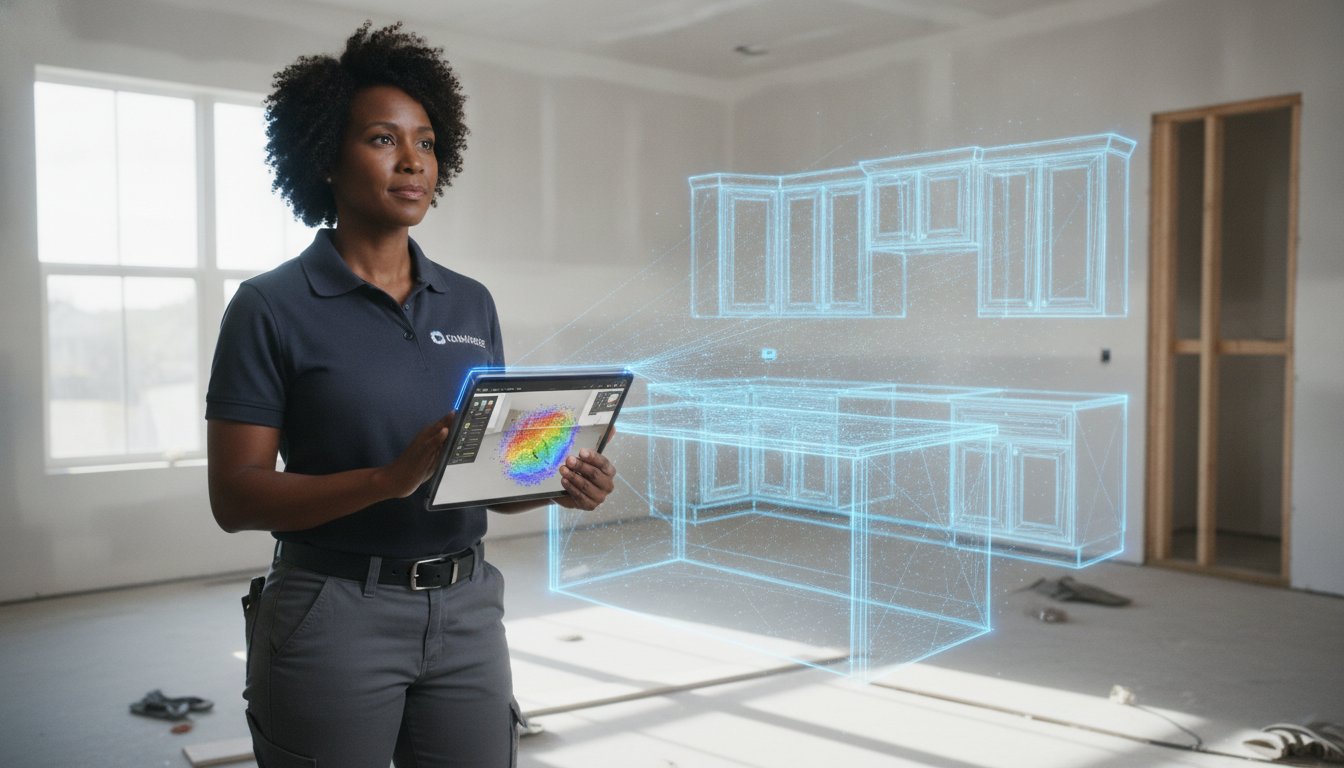
Stop treating software training like a corporate seminar. Real field adoption doesn't happen in a breakroom; it happens on the job site with a live project in hand. You've likely felt the frustration of a crew that sticks to manual tape measures because the new tech feels like a bottleneck rather than a tool. With nearly half of all construction businesses now leveraging mobile apps to stay competitive, falling behind isn't an option, but neither is losing billable hours to a steep learning curve while training your team on new design software.
Effective field adoption requires a shift from abstract theory to immediate, on-site utility. This guide delivers a field-tested strategy to master the transition to modern AR and LiDAR tools while eliminating downtime and securing total crew buy-in. We will explore how to integrate mobile workflows like ArchKit Design to achieve faster design approvals and zero measurement errors. You'll move from administrative fatigue to a streamlined process that replaces manual struggle with digital precision. You'll finish projects faster, impress clients instantly, and secure more contracts.
Key Takeaways
- Stop the classroom sessions. Move training to the job site using live project data to solve real-world measurement frustrations.
- Master training your team on new design software by prioritizing immediate field utility over complex office-based administrative tasks.
- Use the 15-minute rule to ensure your crew can scan a room and generate a 3D layout without slowing down the project timeline.
- Secure total crew buy-in by highlighting how AR tools eliminate return trips for missed dimensions and accelerate client approvals.
- Deploy a phased adoption strategy, starting with a single project champion to demonstrate ArchKit's speed and accuracy to the entire team.
Why Traditional Software Training Fails for Construction Teams
Traditional training models assume your crew has the patience for a three-hour software demo. They don't. Training your team on new design software often fails because it prioritizes the office over the job site. When you pull a lead carpenter off a deck or out of a kitchen to sit in front of a desktop, you've already lost them. They value tools that solve immediate physical problems, not programs that require a mouse and a swivel chair. This "Office-First" trap creates a mental disconnect where the software feels like "extra work" rather than a faster way to finish the job.
Administrative fatigue is another silent project-killer. If a design app requires twenty clicks just to set a wall height, your team will revert to a pencil and a scrap of drywall before the first cup of coffee is cold. Overly complex interfaces kill morale because they interrupt the flow of the build. You need a tool that mirrors the speed of a physical measurement. In 2026, field-ready tech like ArchKit Design is defined by its ability to stay out of the way. It automates the tedious parts of cabinet layout planning, allowing the professional to focus on the craft instead of the computer.
Legacy workflows carry hidden costs that most firms ignore. Every time a measurement is written on paper and then manually entered into a desktop CAD program later that night, you are paying for the same task twice. This transcription process is where the most expensive errors occur. A missed quarter-inch on a sink base can derail an entire cabinet order. Transitioning to a mobile-first workflow isn't just about tech; it is about protecting your profit margins from the inevitable human error of manual entry. You need a single source of truth that starts the moment you walk into the room.
The Friction Between Field and Office
Your lead carpenter likely resents desktop-only software. It represents a bottleneck where the field is dependent on someone in an office to finalize a layout. This friction often leads to "Shadow IT," where crew members use their own unapproved apps to get fast answers. This fragmentation makes it impossible to maintain a single source of truth for kitchen measurements. A contractor-grade tool must live where the work happens, providing instant answers that keep the project moving.
The Psychology of Tool Adoption
Software must feel like a power tool, not a spreadsheet. This is rooted in the Technology Acceptance Model, which proves that perceived ease of use is the biggest predictor of tech adoption. If the crew doesn't believe the app makes their life easier within the first five minutes, they won't use it. You aren't just training your team on new design software; you are building their confidence in a new way to work. Small, on-site wins are the only way to replace the "it worked fine for 20 years" mindset with a drive for modern efficiency.
The Field-First Approach: Training Your Team Where the Work Happens
Ditch the training manual. If you want a crew to adopt technology, they need to see it solve a problem they have right now. Training your team on new design software should happen on a live kitchen remodel, not in a breakroom. When a lead installer sees a digital twin of a room appear on their screen in seconds, the value becomes undeniable. This immediate validation is the only way to replace the legacy habits mentioned earlier with a genuine desire for modern efficiency. Use real-world client data from day one to prove that the software is a tool, not a chore.
Establish the 15-minute rule. If your crew can't scan a standard kitchen and generate a base layout in 15 minutes, the training is failing. Speed is the only currency that matters on a job site. Mobile-first tools like ArchKit Design are built to leverage iPhone and iPad Pro LiDAR for instant feedback. If the digital workflow isn't faster than a tape measure and a pencil, your team will abandon it before the first coffee break. High-performance software must deliver results at the speed of the site.
Many professionals face significant barriers to construction tech adoption, usually rooted in the fear that new tools will complicate an already demanding schedule. Combat this by focusing on tactile wins. Let the team see the LiDAR point cloud snap into a clean 2D floor plan. When the digital output matches their physical reality, the psychological barrier to adoption drops. This isn't just about learning a program; it's about mastering a new way to finish projects ahead of schedule.
Mastering LiDAR Scanning on Day One
Focus on the "sweep." Teach your crew to keep the device steady and move in a continuous arc to ensure full room coverage, including floor-to-ceiling corners. They don't need to clear the room; they just need to scan around appliances and existing cabinetry. Verify accuracy immediately. Have them pull one manual check on a long wall. When the LiDAR matches the tape, the skepticism vanishes. This tactile verification builds the trust necessary to retire the old measurement pads for good.
Visualizing in AR: The Ultimate Client Closer
Train your team to lead a "digital walkthrough." Show them how to guide a client through a 3D AR kitchen layout while standing in their actual home. Teach the team to swap cabinet sizes or move an island on-site to address client feedback instantly. This real-time visualization prevents the "I didn't realize it would look like that" complaints that lead to expensive revisions. To start streamlining your client meetings today, get early access to ArchKit Design.
Overcoming Buy-In Barriers: Proving Immediate ROI
Contractors don't care about "digital transformation" in the abstract. They care about billable hours and getting home for dinner. To succeed when training your team on new design software, you must frame the technology as a solution to their most hated tasks. Start with the measurement headache. Every veteran pro has experienced the "forgotten measurement" return trip. It is a drain on fuel, time, and morale. Show them how a single scan captures every dimension the first time, effectively ending the need for follow-up site visits.
ROI also translates to faster pay. When your crew can generate an accurate layout on-site, the estimating process moves at light speed. Quicker estimates lead to faster project funding and fewer disputes over scope. Beyond the numbers, there is the professionalism factor. Using high-tech tools in front of a client positions your crew as the top-tier choice in a crowded market. It builds immediate trust. When you eliminate manual drafting and office-bound CAD work, you give your team hours back in their day. That is the only ROI that truly matters to a busy field professional.
Addressing the Tech-Skeptic
The best way to win over a skeptic is the "No-Manual" challenge. Modern apps like ArchKit rely on intuitive UI rather than thick training binders. If a tool requires a week-long course, it isn't field-ready. Focus on error reduction. Use LiDAR kitchen scanner apps to prove that the tech is more reliable than a sagging tape measure or a misinterpreted pencil sketch. Don't lead the training yourself. Let your most tech-savvy pro lead the demo. Peer-to-peer instruction carries more weight than a directive from the front office.
Connecting Software to the Bottom Line
Data doesn't lie. Track the time saved per project during the first 30 days of adoption. Calculate the "Cost of Error" by looking at past cabinet re-orders or layout revisions that could have been avoided. This makes the value proposition undeniable. High-performance 3D kitchen visualizers for professionals do more than just plan; they increase closing rates on-site. When a client sees their new kitchen in AR before you leave the driveway, they are significantly more likely to sign the contract. This immediate impact on the bottom line is the ultimate cure for crew resistance.
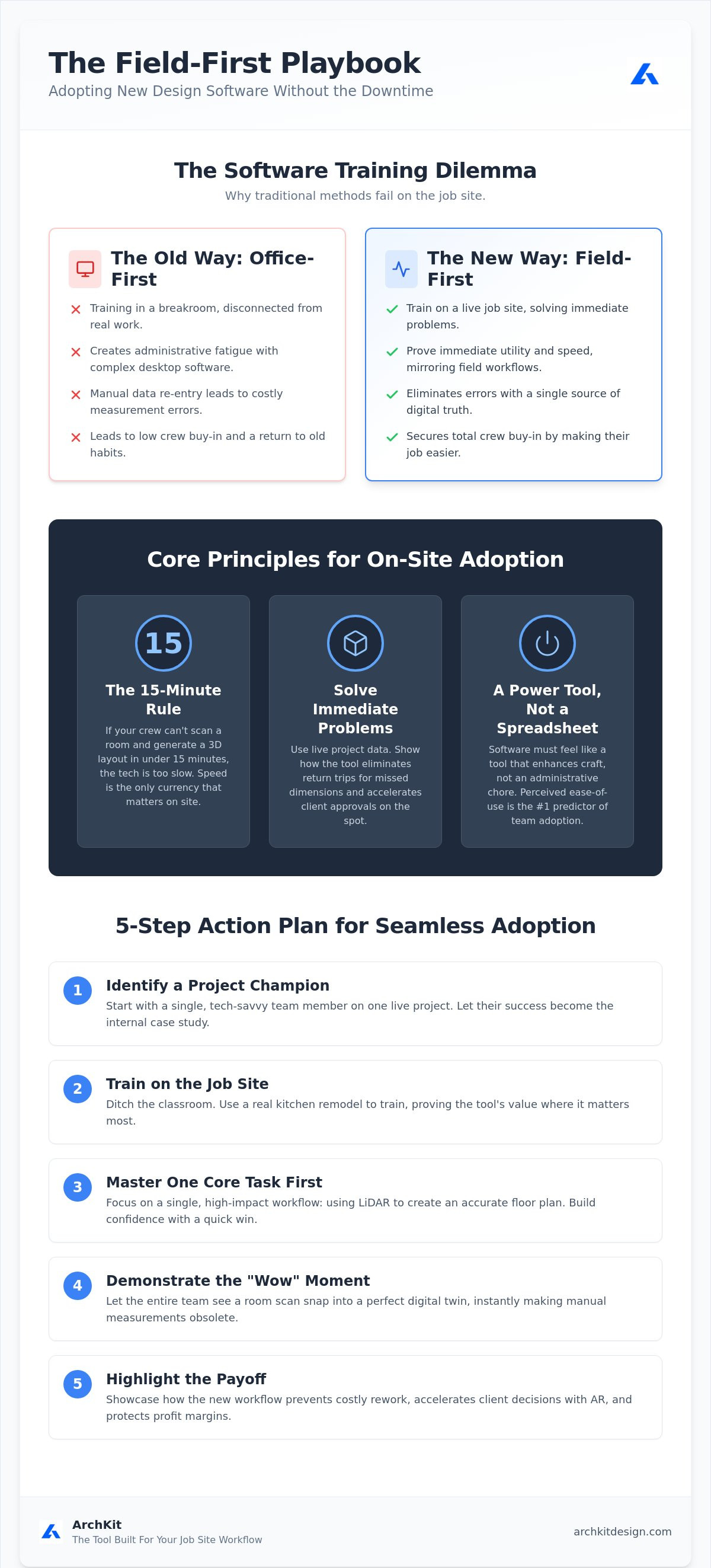
A 5-Step Action Plan for Seamless Software Adoption
Successful training your team on new design software doesn't happen by accident. It requires a tactical rollout that prioritizes quick wins and minimizes frustration. You can't expect a crew to switch from paper to iPad overnight. Instead, follow a structured, five-phase plan that moves the team from skepticism to total reliance on digital tools. This approach ensures that the technology becomes a natural extension of their existing craft rather than an administrative burden.
Step 1: Selecting Your Software Champion
Identify one "Champion" to master the app before the rest of the crew. This should be your lead designer or a tech-savvy project manager who understands the nuances of your specific workflow. Their job is to iron out the kinks and set expectations for the pilot phase. Have them create a company-specific "Cheat Sheet" that outlines your standard cabinet heights, toe-kick dimensions, and common filler requirements. When the rest of the team sees a peer using ArchKit successfully, the barrier to entry drops significantly.
Once the Champion is ready, move to Phase 2: The On-Site Demo. Gather the crew in a real kitchen and show them a scan-to-3D model in under 5 minutes. Don't explain the settings; just show the result. Speed is the hook that secures buy-in. If they see a completed layout before they would have finished drawing the first wall on a notepad, they're in.
Step 3: The "Live Fire" Training Session
Phase 3 is Supervised Practice. Run a mock measurement session on a live job site. Every team member must complete one full room scan under the Champion's guidance. Focus on building a layout in real-time using US standard cabinet sizes to prove the software's accuracy. This is the time to troubleshoot common on-site scanning issues. Teach the crew how to handle reflective surfaces like glass backsplashes or mirrors, which can sometimes confuse LiDAR sensors. Explain how to adjust lighting or use physical markers to ensure the scan stays locked on the room's geometry.
Phase 4 involves a Feedback Loop. After a week of field use, meet to identify workflow bottlenecks. Is the cabinet catalog navigation slowing them down? Are they struggling with window placements? Address these friction points immediately to prevent the crew from sliding back into old habits. Finally, move to Phase 5: Full Integration. Retire the old measurement pads. Make the app the "Source of Truth" for all project data. To start your team's transition today, get early access to our professional design tools.
ArchKit: The Tool Built for Your Job Site Workflow
ArchKit is the rejection of the stationary office. It is a tool designed specifically for those who understand the grit and pace of a physical job site. When training your team on new design software, you shouldn't have to sacrifice billable project hours for endless software tutorials. ArchKit removes that burden. Its interface is built for the field, requiring zero classroom time to master. By focusing on the physical reality of the kitchen, it turns complex LiDAR data into actionable layouts in seconds.
The automation is the primary differentiator. Our LiDAR-to-Layout technology handles the heavy lifting of room geometry. Your crew simply sweeps the room. The app populates a precise 3D model. They then have instant access to a standard U.S. Cabinet Catalog. This means they are working with the exact box sizes they'll be installing, from standard base cabinets to specialized pantry units. No more guessing. No more manual drafting. The entire presentation happens on the client’s kitchen island, allowing for immediate feedback and a level of professionalism that secures the contract on the spot.
Streamlining the Approval Process
ArchKit eliminates the dead time between the initial site visit and the final design approval. By generating 2D and 3D exports while still on-site, you get immediate client sign-off. This reduces the administrative back-and-forth that often stalls projects for weeks. You move from the initial scan to a confirmed layout without ever opening a laptop. Check out ArchKit pricing to see how this efficiency scales with your specific team size and project volume.
Empowering Your Crew with Modern Tech
Better tools lead to better retention. There is a specific satisfaction in a job well-scanned. When your crew sees their work visualized in high-fidelity AR, they feel empowered and professional. They aren't just taking measurements; they are using high-performance technology to solve complex spatial problems. This reputation helps you attract top-tier talent who want to work with modern kitchen design apps for iPhone rather than outdated paper processes.
Don't let your workflow stay anchored to the office. Give your team the tools they need to succeed in the field. You can expect faster approvals, zero measurement errors, and a crew that takes pride in their digital precision. Scan. Design. Close. It's that simple. Get started today with early access to ArchKit and transform how your team handles every kitchen project.
Build a Faster, More Accurate Field Team
You've seen how classroom sessions fail and why a field-first approach is the only way to secure crew buy-in. By focusing on immediate, on-site utility, you transform technology from a burden into a high-performance tool. Successful training your team on new design software depends on proving that the digital workflow is faster than the old tape measure and notepad. It is about moving from administrative fatigue to the satisfaction of immediate results.
LiDAR-powered accuracy ensures zero measurement errors from the start. Built-in standard U.S. cabinet sizes streamline layout planning directly in the room. AR walkthroughs provide instant client approval, removing the friction from your sales process and accelerating project funding. It's time to retire the manual drafts and lead the market with a tech-forward firm that values efficiency above all else.
Your crew is ready for better tools that actually work at the pace of the job site. Start your team with the ArchKit Kitchen Design App today. Take the first step toward a more professional, productive, and profitable kitchen design workflow.
Frequently Asked Questions
How long does it take for a contractor to learn new design software?
Most contractors can master the basics of training your team on new design software in under an hour when using mobile-first tools. Unlike complex desktop CAD programs, field-ready apps prioritize scanning and layout speed. A typical crew member can perform their first accurate LiDAR scan and generate a 3D model after just one supervised session on a live job site. The key is practicing on real projects rather than in a classroom.
Does my team need a specialized background in CAD to use ArchKit?
No specialized CAD background is required to use ArchKit. The software is built for field professionals who understand construction reality, not office-bound draftsmen. If your team can navigate a smartphone and read a tape measure, they can use the interface. It automates technical tasks like wall joining and cabinet snapping, allowing your crew to focus on the physical layout and client needs rather than complex geometry.
What hardware is required for LiDAR-based kitchen design apps?
You need an Apple device equipped with a LiDAR sensor, specifically an iPhone 12 Pro or later, or an iPad Pro from 2020 or later. These devices use light detection and ranging to map room dimensions with high precision. While the app runs on various iOS versions, the LiDAR sensor is essential for the instant sweep-to-scan functionality that replaces manual measurement pads and reduces transcription errors during the estimating phase.
How do I handle employees who are resistant to using mobile apps on-site?
Address resistance by highlighting how the tool eliminates their most hated tasks, like return trips for forgotten measurements. Let your most tech-savvy pro lead the demo to build peer-to-peer trust. When a skeptic sees a coworker finish a layout in minutes that used to take an hour, the resistance usually fades. Focus on the physical relief of less paperwork and the satisfaction of immediate, accurate results.
Can I use this software for estimates as well as design?
Yes, accurate layouts are the foundation of precise estimates. By generating a digital twin of the kitchen on-site, you can immediately export the dimensions and cabinet counts needed for your estimating software. This reduces the gap between the initial site visit and the final proposal. It ensures your quotes are based on real-world data, not rough sketches, which protects your profit margins and improves client trust.
What happens if the LiDAR scan misses a measurement?
You can easily add manual adjustments or re-scan specific sections if the initial sweep misses a detail. LiDAR is highly accurate, but reflective surfaces like mirrors or poor lighting can occasionally create gaps. The software allows for manual overrides, ensuring you always have a complete dataset before leaving the site. Always perform one manual check on a long wall during training to verify the scan and build team confidence.
Is it better to train the whole team at once or in phases?
A phased approach is superior for training your team on new design software. Start with a single Champion who masters the app first and irons out any workflow kinks. This individual then leads on-site demos for the rest of the crew. Phasing prevents widespread downtime and allows you to solve specific bottlenecks in a controlled environment before full company-wide integration. It builds momentum through small, visible successes.
How does AR visualization actually help with client communication?
AR visualization bridges the gap between a contractor’s vision and a client’s imagination. By walking a client through a 3D layout in their actual kitchen, you eliminate the "I can't picture it" excuse. It allows for real-time changes to cabinet placements or island sizes. This transparency builds trust, reduces the need for multiple revisions, and typically results in faster project sign-offs and fewer "change order" disputes later in the build.


