
You're standing in a gutted kitchen with a tape measure in one hand and a client's expectant gaze on the other. You realize the standard 30-inch wall cabinet won't clear their new backsplash trim, and your bulky reference catalog is sitting in the truck. It's a classic jobsite bottleneck that leads to manual errors and delayed estimates. Finding a reliable US standard cabinet sizes app isn't just about looking up numbers. It's about reclaiming your time and your professional edge.
We understand that manual sketches and paper catalogs belong in the past. This guide helps you master essential 2026 kitchen dimensions while showing you how to build accurate on-site layouts instantly. Since 73% of homeowners struggle to visualize 2D plans according to ArchKit Design research, using mobile technology to generate 3D models via LiDAR scanning is a total game changer. We'll cover the latest standards for base, wall, and tall units so you can scan, visualize, and deliver. It's time to eliminate the office-bound workflow for good.
Key Takeaways
- Master the three core cabinet categories and 24-inch standard depths to ensure seamless appliance integration on every project.
- Replace bulky catalogs with a high-speed US standard cabinet sizes app to access critical dimensions and specifications instantly from your pocket.
- Map kitchen footprints in seconds using LiDAR technology and automatically snap standard cabinet sizes to your digital room scans.
- Accelerate your sales cycle by converting on-site 3D layouts into professional estimates and detailed material lists before leaving the job site.
- Use ArchKit to bridge the visualization gap for clients, reducing revisions and boosting project approval rates through real-time AR design.
Mastering US Standard Cabinet Dimensions for 2026 Projects
Speed and accuracy define a successful job site. You can't afford to guess when a client is watching. Standardize your workflow by mastering the three core cabinet categories: base, wall, and tall units. Understanding these standard cabinet dimensions allows you to spot layout errors before the first box is even ordered. It's the difference between a seamless installation and a week of expensive delays. Using a US standard cabinet sizes app like ArchKit ensures these specs are always at your fingertips, replacing bulky catalogs with instant digital verification.
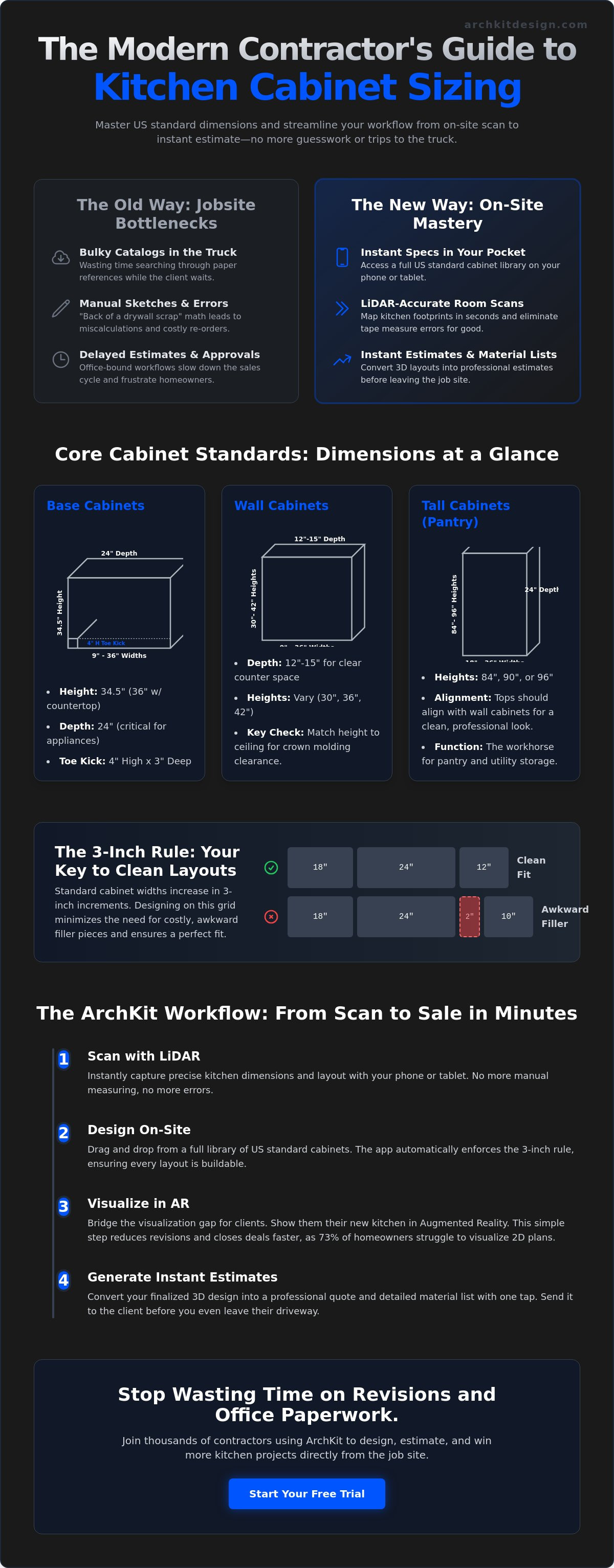
Always plan your layouts in 3-inch increments. Standard widths typically range from 9 to 36 inches in these specific steps. Sticking to this grid minimizes the need for custom fillers. Fillers are wasted space and extra cost. By designing within the 3-inch rule, you keep the project budget tight and the aesthetic clean. If you find yourself needing a 2-inch filler, re-evaluate your cabinet selection. A smarter layout usually solves the gap without custom millwork.
Base Cabinet Standards and Clearances
Base cabinets are the foundation of every kitchen. The standard height is 34.5 inches without the countertop. Once you add a standard 1.5-inch stone or laminate top, you hit the 36-inch finished height that homeowners expect. For professional teams like X Cabinet & Stone, these standard dimensions are the key to ensuring high-quality materials and construction fit perfectly on every job. Depth is equally critical. Verify base cabinet depths of 24 inches to ensure standard US appliances fit flush. Dishwashers and slide-in ranges are engineered for this specific footprint. If your depth is off, you'll deal with proud appliance faces that ruin the sightline. Don't overlook the toe kick. Maintain a standard 4-inch height and 3-inch depth for proper ergonomic relief. This small detail prevents back strain and ensures a professional finish.
Wall and Tall Cabinet Specifications
Wall cabinet depths typically sit between 12 and 15 inches. This depth provides enough storage for standard dinnerware while keeping the counter workspace below clear. Height selection is where most design errors occur. You must ensure wall cabinet heights match your ceiling clearances, especially when planning for crown molding. For a standard 8-foot ceiling, a 30-inch or 42-inch cabinet is common. If you're installing 42-inch uppers against an 8-foot ceiling, there is no room for molding. Use a 36-inch or 39-inch unit instead to leave breathing room for the trim. Tall cabinets, or pantries, usually match these vertical alignments at 84, 90, or 96-inch heights. Aligning the tops of your tall units with your wall units creates the continuous horizontal line that defines a professional kitchen.
Relying on a US standard cabinet sizes app during the initial walkthrough prevents these measurement traps. It's about making standard dimensions actionable on-site. When you can verify a clearance or a depth in seconds, you build trust with the client and eliminate the administrative fatigue of office-bound revisions.
Why Contractors Need a Dedicated Cabinet Size App
Carrying stacks of paper catalogs to a job site is a relic of the past. It's heavy, disorganized, and slows you down when a client expects answers. A professional US standard cabinet sizes app puts that entire library in your pocket. You aren't just looking up heights and widths. You're ensuring every unit meets KCMA performance and construction standards before you even place an order. This shift from physical catalogs to digital references isn't just about convenience; it's about eliminating the administrative fatigue that kills project momentum.
Manual measurement errors represent one of the highest hidden costs in remodeling. A single miscalculation on a cabinet run leads to a 3-inch gap that a filler can't hide. Digital tools remove this risk by using pre-set dimensional increments. When you work within a US standard cabinet sizes app, the software enforces the 3-inch rule, keeping your designs grounded in manufacturing reality. You spend less time second-guessing your tape measure and more time finalizing the layout.
Eliminating Manual Reference Errors
Stop doing math on the back of a drywall scrap. Manual calculations for cabinet runs and appliance gaps are prone to failure. Digital workflows automate these sequences, ensuring that wall units align perfectly with base units. You can verify clearances in 3D to prevent costly misorders. If a slide-in range requires a specific opening, the tool flags the conflict immediately. This level of verification syncs your on-site vision with actual manufacturer stock lists. It turns "I think this fits" into "I know this works."
Real-Time Client Communication
Clients struggle to visualize 2D sketches. They want to see how standard cabinets actually fit their unique space. When you adjust a layout instantly during the initial site visit, you build immediate authority. You move from vague promises to professional on-site visualizations. This shortens the approval cycle. You can show the homeowner exactly how a 36-inch pantry impacts their traffic flow or how a 12-inch wall cabinet clears their window trim. Clear communication reduces revisions and secures project buy-in faster than any office-bound software could.
Modernizing your trade means adopting tools that work as hard as you do. If you're ready to ditch the catalogs and close deals faster, you can get early access to the next generation of mobile design technology. It's time to replace the office desk with an on-site digital powerhouse like ArchKit.
Integrating LiDAR Accuracy with Standard Cabinet Layouts
Static charts tell you what a cabinet should be. LiDAR technology tells you what the room actually is. Legacy measurement methods are slow and invite human error; modern professionals use high-precision sensors to map kitchen footprints in seconds. By using a US standard cabinet sizes app, you don't just look up dimensions. You snap standard cabinet sizes to digital room scans automatically. This workflow eliminates the friction between your tape measure and your design software. It's about moving from a rough sketch to a verified 3D model before you leave the job site.
Precision matters when you're ordering thousands of dollars in millwork. LiDAR scanning delivers 1/8-inch accuracy across the entire kitchen layout. This isn't just about speed; it's about insurance. You can verify plumb and level issues before ordering standard boxes. If a corner is out of square or a wall has a significant bow, the digital scan flags it immediately. You can adjust your filler requirements on the fly rather than discovering a problem during the final installation. This level of on-site verification protects your margins and your reputation.
Beyond the Manual Tape Measure
Scan entire rooms to create precise 3D floor plans without touching a single piece of paper. Traditional tools miss the subtle wall irregularities that affect standard cabinet fitment. A digital scan captures the reality of the space, including ceiling slopes and floor heaves. For a deeper look at the technical side, check out this guide on using an app for measuring kitchens for pro-level results. ArchKit turns these complex data points into a workable layout, allowing you to focus on the design rather than the math. It replaces the stationary office desk with a mobile powerhouse that lives in your pocket.
Minimizing Field Measurement Risks
Detect obstacles like HVAC vents, electrical outlets, and plumbing stacks instantly. These hidden "project killers" often go unnoticed in manual sketches until the cabinets arrive. A LiDAR-driven US standard cabinet sizes app ensures your layout accounts for every obstruction. You can validate that standard sizes leave enough room for crown molding and window trim without secondary site visits. This "one-and-done" measurement approach saves hours of travel time and administrative fatigue. You get the data right the first time, shorten the approval cycle, and move straight to the build phase. It's a cleaner, faster, and more professional way to manage a kitchen remodel.
How to Generate Instant Estimates with a Mobile Workflow
A beautiful 3D model is useless if it doesn't translate into a dollar amount. For a contractor, the most critical moment is the transition from design to estimate. You've used your US standard cabinet sizes app to map the room and place the boxes. Now, you need to know what it costs. Modern mobile workflows allow you to convert that visual layout into a detailed cabinet list with a single tap. This automation removes the manual tallying that often leads to missing units or incorrect sizing. You aren't just designing; you're building a live material order in the field.
Apply your specific markup and labor costs directly to these standard sizes. Every contractor has a unique multiplier. Whether you're accounting for a complex install or a standard cabinet swap, your software should handle the math. This process ensures that you aren't leaving money on the table or overquoting the client. By generating these figures on-site, you reduce material waste. The system knows exactly how many 36-inch base units and 12-inch uppers are in the plan. It doesn't guess. It calculates based on the digital reality of the scan and the logic of your US standard cabinet sizes app.
From Digital Scan to Cabinet List
Manually transcribing dimensions from a sketch to an order form is where mistakes happen. A digital workflow automatically populates your lists based on US standard dimensions. This ensures that every item on your quote exists in the manufacturer's catalog. To see how this works in practice, read the kitchen cabinet list generator guide. You can verify quantities and sizes against the digital 3D model in real-time. If you delete a cabinet in the view, it disappears from the estimate. This synchronization keeps your project data clean and your orders accurate.
Closing More Bids on Location
Project momentum dies in the "office bottleneck." If you tell a client you'll send an estimate "by the end of the week," you're giving them time to call a competitor. Break that cycle. Impress them with a professional, immediate quote process while you're still in their kitchen. Since cabinets typically account for 40-50% of a total kitchen renovation budget according to Cuisine Idéale research, accuracy isn't optional. Sending a PDF estimate before you leave the driveway signals a level of professionalism that paper-and-pencil contractors can't match. You secure deposits faster because you provide transparent pricing on the spot. ArchKit empowers you to measure, quote, and close in a single visit.
Ready to stop the administrative leak in your business? You can get early access to the professional tools that make on-site estimating a reality. Stop waiting for the weekend to catch up on paperwork and start closing deals in the moment.
ArchKit: The Professional Standard for On-Site Cabinet Design
ArchKit isn't just another software package; it's a mobile command center built for the field. Modernize your trade by moving away from stationary office setups that slow your momentum. This US standard cabinet sizes app integrates every dimension we've discussed directly into a high-speed mobile interface. You get access to a comprehensive catalog of US standard cabinet sizes without digging through a briefcase or a bulky catalog. It's about speed, accuracy, and winning the job before you even leave the driveway. Check the ArchKit pricing page to see which professional subscription fits your business volume. From the free Early Access tier to the Pro plan for $19.99/month, there is a solution for every stage of your business growth.
Utilize advanced LiDAR for unmatched on-site measurement precision. ArchKit captures the physical reality of the room, identifying the wall bows and floor slopes that trip up traditional installers. You aren't just placing boxes; you're engineering a perfect fit. This level of technical authority builds instant trust with your clients. They see the 3D model take shape in real-time. They see the accuracy. They see a professional who is ready to build. It's a pragmatic approach to a complex trade.
Built for the Fast-Paced Job Site
Designed specifically for kitchen contractors and design pros, ArchKit values your time above all else. We know you don't have hours to spend navigating complex menus or fighting with office-bound software. The no-nonsense interface allows for rapid layout and estimation while you're still standing in the client's kitchen. It turns a walkthrough into a production-ready design session. If you're evaluating your options, read our cabinetry layout tool buyer’s guide to see why mobile-first design is the only way to scale your remodeling business in 2026.
The Future of Kitchen Remodeling
Replace alternatives to 2020 design software with mobile speed and on-site flexibility. Stationary software keeps you chained to a desk; ArchKit gives you the freedom of an office-independent design workflow. This US standard cabinet sizes app ensures your data is always current and your layouts are always accurate. You can generate estimates, visualize designs in AR, and secure project deposits in a single visit. Experience the satisfaction of immediate results and a shorter sales cycle. Download the free kitchen design app to start scanning and see the difference a professional tool makes.
Modernize Your Jobsite Workflow
Mastering standard dimensions is only the first step. True efficiency comes from applying those measurements in real-time. You've seen how LiDAR technology and automated list generation remove the administrative fatigue that haunts traditional remodeling workflows. It's time to stop second-guessing your tape measure and start delivering the high-precision results your clients expect. Transitioning to a digital process isn't just about convenience; it's about protecting your margins and your reputation.
Integrating a professional US standard cabinet sizes app into your daily routine transforms the initial walkthrough into a high-speed closing opportunity. With LiDAR-powered accuracy, a full US standard catalog, and on-site 3D visualization at your fingertips, you eliminate errors before they reach the manufacturer. You'll spend less time at your desk and more time on the job site. Ready to leave the bulky catalogs behind? Start your free trial of the ArchKit kitchen design app today and experience the freedom of a digital jobsite. Build faster, design smarter, and secure more contracts with practical confidence.
Frequently Asked Questions
What are the standard widths for US kitchen cabinets?
Standard widths for US kitchen cabinets range from 9 to 36 inches, moving in predictable 3-inch increments. This modular system ensures a consistent fit across various stock and semi-custom manufacturers. Stick to these standard steps to minimize the need for expensive custom fillers. Designing within these increments keeps your project budget under control and ensures a cleaner, more professional final installation.
How deep is a standard base cabinet including the door?
A standard base cabinet is 24 inches deep; with the door and hardware, it usually reaches 25 to 25.5 inches. This depth is the industry benchmark for standard US appliances like dishwashers and slide-in ranges. Using a US standard cabinet sizes app helps you verify these depths on-site. It ensures your appliances sit flush with the cabinet run rather than protruding into the walkway.
Can I use a phone app to measure for cabinets accurately?
You can use a mobile app to measure kitchens with professional-grade accuracy. High-performance tools like ArchKit replace manual tape measures and paper sketches with digital room scans. These apps allow you to build a complete 3D layout on-site, reducing the risk of manual measurement errors and administrative fatigue. It's the fastest way to move from a gut job to a production-ready design without returning to the office.
What is the standard height for upper kitchen cabinets?
Standard wall cabinet heights are 30, 36, or 42 inches. Your selection must account for ceiling height and crown molding clearances to avoid installation conflicts. For a standard 8-foot ceiling, a 30-inch cabinet provides ample space for decorative trim. A 42-inch unit creates a floor-to-ceiling look but leaves no room for molding. Always verify your vertical clearances before placing a final order.
Do I need LiDAR for an accurate kitchen design app?
LiDAR is critical if you want 1/8-inch precision in your kitchen design. While basic camera-based apps provide a rough estimate, LiDAR sensors map the actual geometry of the room in three dimensions. This technology detects wall bows and out-of-square corners that can ruin a cabinet installation. It's a non-negotiable feature for professional contractors who need to ensure standard boxes fit perfectly in real-world spaces.
How much space should be between the counter and wall cabinets?
Maintain a standard 18-inch gap between the finished countertop and the bottom of the wall cabinets. This distance provides the necessary clearance for standard countertop appliances like blenders and coffee makers. If you deviate from this standard, you risk complicating the vertical alignment of your tall cabinets and pantry units. Consistent spacing ensures a professional horizontal sightline that defines a high-quality kitchen remodel.
Can I export a cabinet list from a design app for ordering?
Professional design apps allow you to export a detailed cabinet list as a PDF or CSV file for immediate ordering. This automated process translates your 3D layout into a precise list of standard cabinet units. It eliminates the need for manual transcription and ensures your order matches your on-site design perfectly. Use this feature to reduce material waste and shorten the time between the initial scan and the build.
What is the standard size for a tall pantry cabinet?
Tall pantry cabinets are typically 84, 90, or 96 inches high and 24 inches deep. These heights are designed to align with the tops of wall cabinets, creating a clean horizontal line across the kitchen. Use a US standard cabinet sizes app to verify these vertical sightlines during the initial walkthrough. Matching these heights ensures your pantries and wall units look integrated rather than like a collection of mismatched boxes.


