
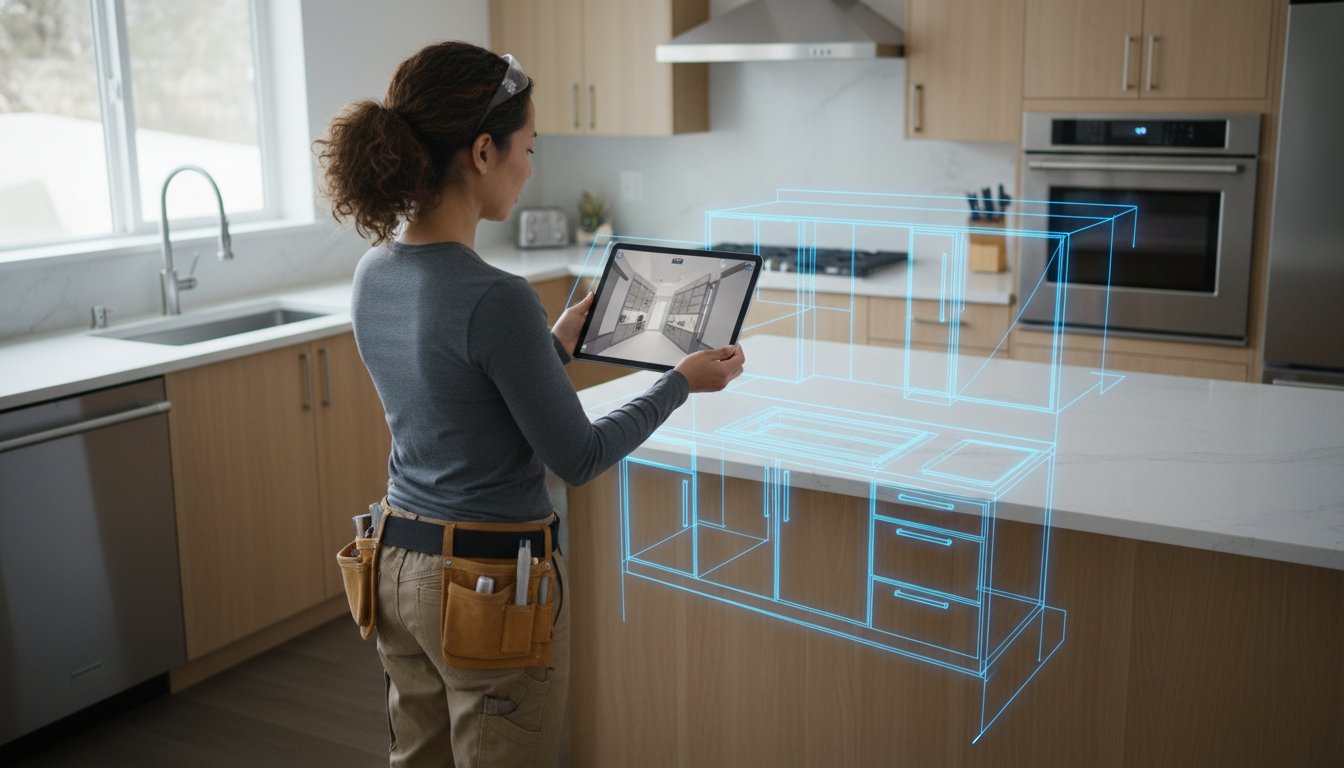
You're back at the office after a long day on-site, only to realize your hand-drawn sketch of that kitchen corner is illegible. Now you're facing a return trip or, worse, a cabinet that doesn't fit by half an inch. Finding the right ipad pro LiDAR scanner apps for contractors changes that dynamic instantly. Stop measuring twice and start scanning once. Your iPad Pro is a high-precision survey tool that fits in your hand. It's time to leave the tape measure in the truck.
You know the frustration of spending hours drafting floor plans after the sun goes down. It's a bottleneck that delays project approvals and leaves clients squinting at 2D sketches they can't visualize. This guide breaks down the top-rated LiDAR apps that turn your iPad into a professional-grade design tool. You'll discover how to generate 3D models on-site, reduce documentation time, and eliminate return trips for forgotten dimensions.
We'll compare 2026's leading options, from general-purpose tools to specialized kitchen design solutions like ArchKit Design. Get the data you need to choose the right software for your specific workflow. Let's modernize your job site and win more bids.
Key Takeaways
- Transition from manual tape measures to the precision of the iPad Pro M5 LiDAR sensor for all initial site surveys and as-built documentation.
- Evaluate the best ipad pro LiDAR scanner apps for contractors based on your specific need for raw technical data versus high-resolution client visualizations.
- Understand the "Precision Gap" in general-purpose scanners and why kitchen-specific tolerances require software tuned for millwork.
- Adopt a clockwise, 5-minute scanning protocol to capture plumbing and electrical fixed points without the risk of dimensional drift.
- Leverage ArchKit Design to snap standard US cabinet catalogs directly onto your scans for instant, on-site layouts that win more bids.
Why iPad Pro LiDAR is the Standard for Modern Contractors in 2026
Professional standards on the job site have shifted rapidly over the last two years. While manual tools still have a place in your bag, ipad pro LiDAR scanner apps for contractors are now the primary engine for site documentation. Relying solely on a tape measure for a complex kitchen layout is no longer just slow; it's a liability. Modern depth sensing allows you to capture the "truth" of a room, including the bows in the studs and the slight pitch of a floor, before you ever commit to a design.
The core of this efficiency is LiDAR technology, which uses pulsed lasers to map a room's geometry in three dimensions. In 2026, the hardware in the iPad Pro M5 delivers millimeter-level accuracy that minimizes rework costs. When your digital as-built is this precise, your cabinets fit the first time. You aren't just taking measurements; you're capturing an instant digital twin of every wall, window, and plumbing stub in a single pass. This level of detail ensures that nothing is left to memory once you leave the site.
The Speed Advantage: Site Survey to 3D Model
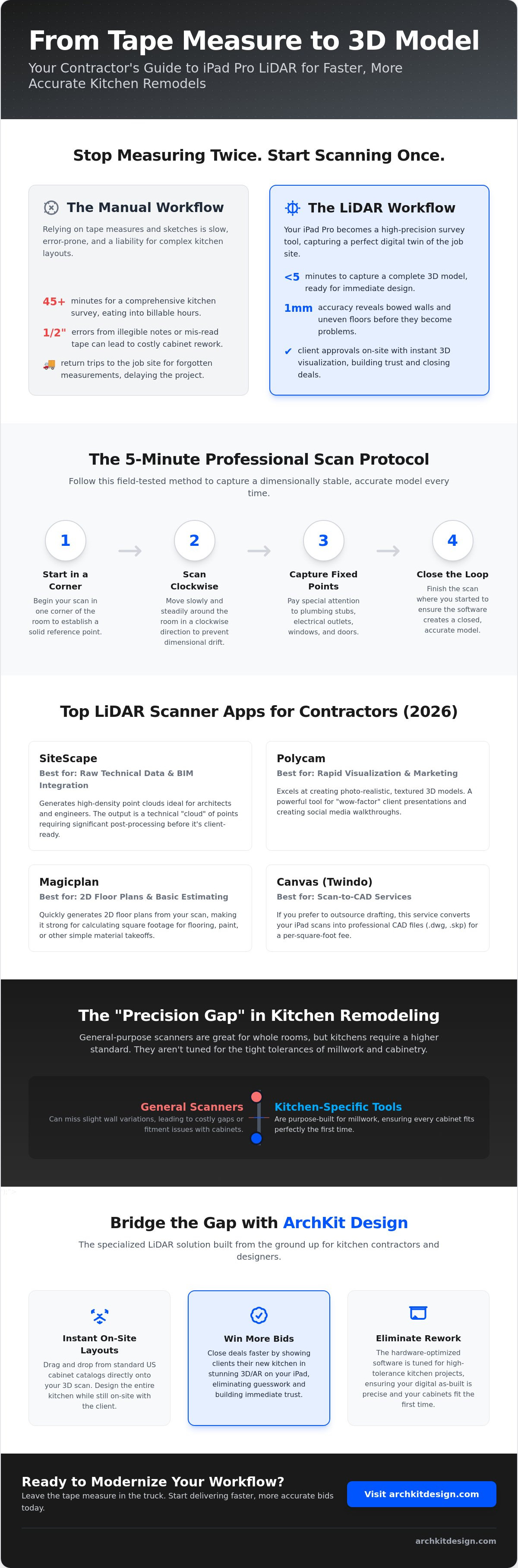
Traditional measuring is a bottleneck that eats into your billable hours. A comprehensive manual survey of a kitchen typically takes 45 minutes of measuring, sketching, and double-checking. With ipad pro LiDAR scanner apps for contractors, you finish the same task in under 5 minutes. This speed doesn't come at the expense of quality. In fact, LiDAR captures complex angles and non-square walls that manual tools frequently miss. It eliminates the friction of the "forgotten measurement" return trip. You leave the job site with a complete 3D model ready for immediate layout and client feedback.
Hardware Requirements for Professional Scanning
While the iPhone Pro includes a sensor, the iPad Pro is the superior choice for on-site client presentations. The larger screen makes it possible to walk a client through their new layout immediately after scanning, which builds trust and speeds up the approval process. Ensure your hardware is a Pro model from 2020 or later to utilize the dedicated sensor. The M5-equipped iPad Pro, released in October 2025, provides the processing power needed to handle high-resolution point clouds and heavy AI processing. Manage your storage by clearing high-resolution files after they are synced to the cloud. Using a tool like ArchKit Design ensures your iPad's hardware is optimized specifically for the high-tolerance requirements of kitchen remodeling without the overhead of general construction software.
Top LiDAR Scanner Apps for Construction and Remodeling
Selecting from the available ipad pro LiDAR scanner apps for contractors requires a clear understanding of your project's end goal. In 2026, the software landscape has matured, offering specialized paths for either raw data collection or streamlined design workflows. If you choose the wrong platform, you risk ending up with data that is too heavy for your office computer or too technical for your client to understand. You need a tool that bridges the gap between the physical job site and your final proposal.
SiteScape remains a dominant force for those who prioritize raw technical depth. It is highly regarded for its ability to facilitate LiDAR scanning for AEC professionals who need high-density point clouds for BIM integration. If your workflow involves documenting structural steel or complex MEP (mechanical, electrical, plumbing) runs, SiteScape delivers the granularity required. However, be prepared for a steep learning curve. The output is a technical "cloud" of points that requires significant post-processing before it looks like a kitchen to your homeowner.
For rapid 3D visualization and social media walkthroughs, Polycam is the current frontrunner. Its "Room Mode" has been refined to capture textured models that look remarkably like finished photography. It is an excellent tool for marketing or providing a "wow factor" during a preliminary sales meeting. Magicplan takes a different approach, focusing on the immediate generation of 2D floor plans. It is particularly strong for basic material estimating, such as calculating square footage for flooring or paint. If you prefer to outsource your drafting, Canvas (now Twindo) offers a "Scan to CAD" service that converts your iPad scans into professional .dwg or .skp files for a per-square-foot fee.
Comparing General Construction Scanners
SiteScape is built for structural documentation where every millimeter of raw data counts. Polycam is designed for speed and visual impact, making it a favorite for designers who need quick 3D assets. Magicplan excels at rapid floor plan sketching but lacks the millwork-specific depth found in more specialized tools. Each of these ipad pro LiDAR scanner apps for contractors serves a specific niche, but they often struggle when you need to transition from a room scan to a detailed cabinet layout. For those focused specifically on the kitchen and bath niche, you might explore how ArchKit Design simplifies this transition.
Choosing Based on Your Output Needs
Before you commit to a subscription, define your required output. Do you need a raw E57 file for an architect, or do you need a usable design layout to show a client? Most professional apps in 2026 now offer robust cloud sharing, allowing your back-office team to view a 3D model while you are still standing in the client's driveway. Costs vary, with some apps offering free basic scanning and others requiring monthly subscriptions for professional export features. Match the tool to your project volume to ensure the technology remains a profit center, not an overhead burden.
The Gap: Why General Scanners Struggle with Kitchen Remodels
Most general ipad pro LiDAR scanner apps for contractors are built for the "big picture." They serve architects or agents who need a clean room model for a floor plan. But for a kitchen remodeler, a clean model isn't enough. You need to account for the reality of a 1920s kitchen with bowed studs and hidden plumbing stacks. General apps often flatten these irregularities into a simple plane. This leads to cabinets that don't fit during installation. This is the "Precision Problem" that stops many digital workflows before they even start.
Obstructions create another layer of friction. Scanning around a massive island or a refrigerator creates data shadows in the point cloud. Specialized apps are designed to bridge these gaps. They ensure your layout remains accurate even when you can't see every inch of the wall. Without this logic, you're left with a broken model that requires manual fixing back at the office. This workflow break is where efficiency dies. If you can't turn a scan into a bid while standing in the home, you're still stuck with office-dependent homework.
Standardization is the key to a profitable bid. Generic apps give you cubes; you need actual inventory. A specialized on-site kitchen design workflow tool like ArchKit Design solves this by integrating libraries of standard 30 inch wall cabinets and 36 inch base units. It snaps real-world dimensions directly onto your scanned walls. This links your measurement to your material list instantly. It replaces generic geometry with actionable data that your clients can actually understand.
Addressing the #1 Contractor Objection: Accuracy
Contractors often ask if LiDAR can replace a tape measure for custom millwork. The answer lies in distinguishing between "Architectural-Grade" precision and "Contractor-Grade" utility. Use your iPad to establish the layout, verify clearances, and secure client buy-in. LiDAR provides the "frame" while ArchKit Design provides the "fit." Use the tech to win the project and the tape to finalize the high-stakes order before the check is cut for the manufacturer. It is about using the right tool for the right phase of the job.
How to Execute a Professional LiDAR Scan in 5 Minutes
Speed on the job site is useless without a repeatable process. To get the most out of ipad pro LiDAR scanner apps for contractors, you need a workflow that prioritizes data integrity over raw movement. A sloppy scan leads to "ghost" walls and inaccurate clearances. A professional scan takes five minutes but saves five hours of office work. Follow this field-tested sequence to ensure your digital twin is ready for a millwork-ready layout.
Clear the clutter before you tap the record button. LiDAR sensors need a clear line of sight to the junctions where the floor meets the wall and the wall meets the ceiling. Move small appliances, clear off the countertops, and open all interior doors. If the sensor can't "see" the corner, it has to guess the geometry. Don't let the software guess. Clear the room, secure the data, and move on.
The "Path of Success" is a simple clockwise loop. Start at the primary entry point and move slowly around the perimeter. Keep your iPad at chest height, tilting it slightly up and down to capture the baseboards and crown molding. This circular path allows the software to "close the loop," which significantly reduces the risk of dimensional drift. Focus your attention on critical infrastructure. Get close to plumbing stubs, electrical outlets, and gas lines. These are the fixed points that dictate your entire cabinet design.
Verify the mesh before you pack up your gear. Every professional app generates a 3D mesh in real-time. Look for "holes" or black voids in the model. These usually appear behind large appliances or in tight corners. If you see a hole, simply wave the iPad over that area again to fill in the data. Never leave the site until you've confirmed a solid, gap-free model. It's the only way to guarantee you won't need a return trip.
Lighting and Environment Tips
Lighting matters more than most contractors realize. Natural light is your best friend, so open the blinds and turn on every light in the room. Dark corners create "noise" in the point cloud, which can soften the edges of your measurements. Mirrors and glass are the only real weaknesses of the LiDAR sensor. The laser passes through glass or reflects off mirrors, creating "phantom rooms" in your data. Cover mirrors with a sheet or simply use the app's trim tools to delete the false data later. Managing homeowner expectations is part of the process. Explain that you're capturing a digital twin to ensure their cabinets fit perfectly. It builds confidence and justifies your professional fee.
From Scan to Layout: The Immediate Next Step
The real magic happens when you verify your floor plan while still standing in the kitchen. Check the primary wall lengths against a quick tape measurement to ensure the scale is perfect. Use your app to add digital notes and photos directly to specific points in the scan. If there's a weird plumbing offset, take a photo and pin it to that exact spot for your install team. For a deeper dive into maximizing these tools, check out our LiDAR kitchen scanner app guide. Ready to stop drawing and start designing? Get early access to ArchKit Design and transform your on-site workflow today.
ArchKit: The Specialized LiDAR Solution for Kitchen Contractors
General ipad pro LiDAR scanner apps for contractors provide the raw data, but ArchKit delivers the finished result. You don't need a point cloud of a kitchen; you need a kitchen design that fits. Most apps leave you with a complex 3D mesh that requires hours of office conversion. ArchKit bypasses this technical hurdle by turning your scan into a functional layout the moment you finish the walk-through. It's a tool built for professionals who know that a 36 inch base cabinet isn't just a cube; it's the foundation of your bid. Capture the space. Drop the cabinets. Win the bid.
The real power lies in the built-in catalog. Instead of manually drawing boxes, you drag and drop standard US cabinet sizes directly onto your LiDAR scan. The software snaps these elements to your walls with precision, accounting for the real-world irregularities captured during the scan. This isn't just about drawing; it's about verifying clearances for appliances and walkways before you ever place an order. You see the conflicts now, not during the installation. It replaces the "best guess" with a verified layout.
Closing the sale becomes a collaborative experience rather than a waiting game. Use the AR visualization feature to overlay the new design on the existing space. Show your clients their new kitchen before you leave their house. This immediate feedback builds massive trust and separates you from competitors who are still going home to "work on the sketches." When a client can see the result in their own home, the decision to sign becomes easy.
Design on the Spot, Not at the Office
Kill the administrative fatigue of the "office day." By completing your layouts on your iPad Pro while on-site, you eliminate the gap between the site visit and the proposal. This speed reduces revisions because you can address client concerns in real-time. If they want a larger island, you adjust it instantly and show them the impact on the floor plan. See our kitchen design app for iPhone and iPad to see how this workflow functions in the field.
Streamlining Your Estimating Workflow
Accuracy in design leads directly to accuracy in estimating. ArchKit generates precise cabinet lists and material requirements based on your 3D scan. You stop guessing on linear footage and start ordering with confidence. This precision reduces material waste and ensures your profit margins stay intact. Stop wasting time on manual data entry and start using a system that connects your measurements to your bottom line. Get early access to ArchKit and transform your workflow today.
Modernize Your Job Site Workflow Today
The shift toward digital site surveys isn't just about high-tech hardware; it's about reclaiming your time. You've seen how LiDAR replaces slow, error-prone manual processes with a 5-minute scan. While general ipad pro LiDAR scanner apps for contractors provide a solid foundation, the real profit lives in the design details. Moving from a raw point cloud to a client-ready layout while you're still on-site is the ultimate competitive advantage.
Stop losing your evenings to administrative fatigue at the office. ArchKit is built specifically for US kitchen contractors who need more than just a generic room scan. It leverages the iPad Pro LiDAR for inch-level accuracy and features an integrated catalog of standard cabinet sizes. Design, verify, and present a complete 3D model before you even leave the driveway. Capture the room. Place the cabinets. Close the bid.
Start designing on-site today with ArchKit and eliminate the friction from your next kitchen remodel. You're ready to lead the trade into a more efficient, professional future.
Frequently Asked Questions
Is the iPad Pro LiDAR scanner accurate enough for custom cabinetry?
LiDAR provides millimeter-level precision for layout and design, but you should always verify critical dimensions with a tape measure before ordering custom millwork. It is the perfect tool for establishing the frame of the project and identifying out-of-square walls. This ensures your initial design is based on reality rather than assumptions. Use the scanner to win the job and the tape to finalize the cabinet order.
Which iPad models have the LiDAR scanner required for these apps?
You need an iPad Pro model from 2020 or later to access the built-in LiDAR sensor. This includes the 11-inch and 12.9-inch (or 13-inch) models from the 4th generation onward. The latest M5-equipped iPad Pro released in October 2025 is the current gold standard for processing high-resolution scans. Standard iPad, Air, and Mini models do not currently feature the required depth-sensing hardware.
Can I export LiDAR scans from these apps into AutoCAD or Revit?
Most professional ipad pro LiDAR scanner apps for contractors allow you to export data in industry-standard formats like .DWG, .DXF, and .OBJ. Some specialized services even offer Scan to CAD conversion, delivering a fully layered Revit or AutoCAD file within 24 to 48 hours. This eliminates the need to manually trace your field measurements back at the office. You can move from site survey to drafting in a single digital step.
Do I need an internet connection to use LiDAR scanner apps on a job site?
You don't need an active internet connection to perform the actual LiDAR scan on-site. The iPad Pro processes the depth data locally using its internal chip. However, you will need a connection later to upload the model to the cloud or share the layout with your office team. Local processing ensures you can document remote job sites without worrying about signal strength or data caps.
How do LiDAR apps handle shiny surfaces like stainless steel appliances?
LiDAR sensors can struggle with highly reflective surfaces like stainless steel or mirrors because the laser beam reflects away from the sensor. To fix this, simply place a piece of painter's tape on the surface or use a dulling spray to give the laser a point to hit. Most modern apps also use AI to recognize these voids and patch the model automatically based on the surrounding geometry.
What is the difference between a point cloud and a 3D mesh in these apps?
A point cloud is a collection of millions of individual data points in 3D space, while a 3D mesh connects those points to create a solid, textured surface. Point clouds are better for high-level engineering and BIM modeling. A 3D mesh is far more useful for client presentations and kitchen layouts because it looks like a real room. Most contractor apps convert the raw cloud into a mesh instantly.
How much do professional LiDAR scanner apps for contractors typically cost?
Professional ipad pro LiDAR scanner apps for contractors typically follow a subscription model ranging from $8 to $40 per month. Some platforms use a pay-per-output model for CAD file conversions, while others offer a free basic version for simple room captures. Match your choice to your project volume to ensure the software pays for itself through saved drafting time and reduced site visits.
Can I use these apps to measure for countertops and backsplashes?
You can use LiDAR to generate accurate templates and estimates for countertops and backsplashes. The scanner captures the exact profile of the walls, including any bows or irregularities that would affect a tight-fitting stone installation. While a digital template is great for quoting, many installers still prefer a physical template or high-precision laser tracker for the final cut. Use the iPad to secure the bid and confirm material quantities.


