
What if you could stop paying for "measurement insurance" in the form of wasted cabinet materials and lost hours? You know the drill. A site visit leads to a week of office design work, only for the client to ask for a revision because they couldn't visualize the layout. It's a cycle of delays that kills your momentum and your margins. Adopting a modern kitchen design client collaboration app changes the game by moving the entire design process directly to the jobsite. With the interior design software market projected to hit $7.48 billion in 2026, the technology is finally fast enough to keep up with a busy contractor.
This guide shows you how to use LiDAR scanning and AR visualization to secure instant client approvals and deliver professional presentations from your mobile device. You'll learn to eliminate measurement errors and bridge the imagination gap that stalls project starts. We'll break down the top digital tools, including how ArchKit streamlines the on-site workflow from initial scan to final layout. Stop the back-and-forth between the office and the field. It's time to modernize your trade and close more contracts with immediate, high-impact results.
Key Takeaways
- Close the "office gap" and maintain project momentum by moving design work from the desktop to the job site.
- Eliminate cabinet re-order costs using LiDAR scanning to capture millimeter-perfect measurement accuracy in seconds.
- Leverage a kitchen design client collaboration app to bridge the imagination gap with real-time AR visualization.
- Accelerate project approvals by making layout changes and securing client sign-offs during the initial site visit.
- Modernize your workflow with mobile tools like ArchKit to replace cumbersome hardware with high-impact digital presentations.
Why Your Current Kitchen Design Workflow is Costing You Contracts
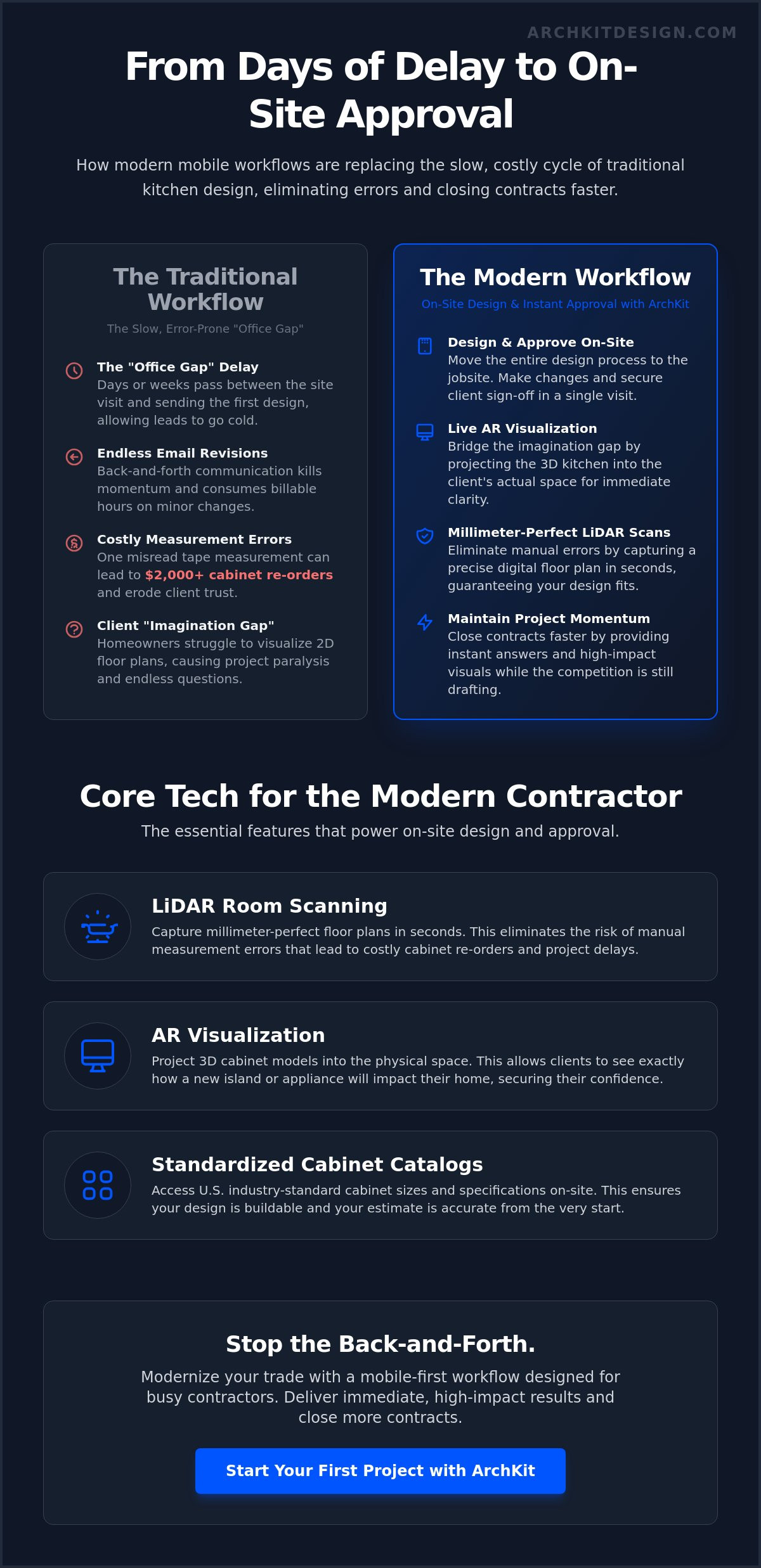
Every day you spend back in the office is a day your lead goes cold. Professionals call this the "Office Gap." You take measurements on Monday. You draft the layout on Tuesday. You finally send an email on Wednesday. By Thursday, the client has already started talking to another contractor who responded faster. Manual tape measurements are a massive liability in this process. One misread fraction or a forgotten wall return leads to a $2,000 cabinet re-order. These errors don't just cost money; they erode client trust. In 2026, homeowners expect speed and precision. If you're still relying on a clipboard and a pencil, you're falling behind.
The High Cost of Traditional Design Cycles
Stop the email ping-pong. Traditional design cycles are inherently slow and expensive. You lose billable hours on back-and-forth revisions that should take minutes on-site. This "cooling off" period is where projects go to die. When a client leaves the initial meeting without a visual, they start second-guessing the total cost. Stationary office equipment is your biggest operational bottleneck. If you can't finalize a design where the cabinets are actually going to be installed, you're wasting time. Using a dedicated kitchen design client collaboration app eliminates this friction. It moves the heavy lifting from the desk to the jobsite. You win by being the professional who provides answers while the competition is still "getting back to them."
Eliminating the 'Imagination Gap' for Homeowners
Most clients struggle to translate 2D lines into a 3D reality. They see a floor plan; you see a functional kitchen. This imagination gap causes project paralysis and endless revision requests. Modern Virtual home design software has evolved to bridge this divide using high-performance augmented reality. When a homeowner sees a finished cabinetry layout projected into their actual room, the decision becomes emotional. It isn't just a proposal anymore. It's their future home. Visual collaboration is the new baseline for professional remodelers. Delivering a professional-grade presentation during the first walkthrough creates a sense of immediate results. Tools like ArchKit allow you to scan a space and visualize changes instantly. This transparency builds confidence. It secures the contract before you even leave the driveway. Don't let a lack of visualization stall your pipeline. Use tech to make the invisible visible. You can even start today with a free kitchen design app to test the workflow on your next lead.
What is a Kitchen Design Client Collaboration App?
A kitchen design client collaboration app is more than a simple messaging portal or a shared folder for PDFs. It is a high-performance tool that integrates technical drafting, 3D visualization, and client feedback loops into a single mobile interface. These apps are built specifically for the field. They allow you to modify layouts, swap cabinet styles, and secure approvals while you are still standing in the client's home. This real-time capability is the primary differentiator. It moves the design process from the office desk to the jobsite, where the actual work happens.
Traditional software often isolates the contractor in a "design vacuum" for days. A collaboration app breaks this cycle. It uses hardware sensors like LiDAR to capture room geometry instantly. It then uses Augmented Reality (AR) to project your proposed cabinetry directly onto the existing walls. This isn't just about showing a picture. It's about creating an interactive environment where the client can walk through their new kitchen before a single demo hammer is swung. This level of transparency is what modern homeowners expect from a professional remodeler.
Must-Have Features for 2026 Field Work
Modern field tools must prioritize speed and accuracy. In 2026, a professional workflow requires three core capabilities to remain competitive:
- LiDAR Room Scanning: Capture millimeter-perfect floor plans in seconds. This eliminates the risk of manual measurement errors that lead to costly cabinet re-orders.
- AR Visualization: Project 3D cabinet models onto the physical space. This allows clients to see exactly how a new island or a double-oven cabinet will impact their floor space.
- Standardized Cabinet Catalogs: Access U.S. industry-standard cabinet sizes and specifications on-site. This ensures your design is buildable and your estimate is accurate from the start.
The Difference Between Portals and Design Tools
Don't confuse project management portals with design collaboration tools. Portals manage the "paperwork"—they handle invoices, schedules, and basic communication. Design apps manage the "vision." A portal tells a client when the plumber is coming. A design app shows the client why they should spend $50,000 on new cabinetry. You need a tool that handles the measurement and the visualization simultaneously to avoid administrative fatigue.
The industry is shifting from "showing a drawing" to "experiencing a space." When you use a dedicated kitchen design client collaboration app, you invite the homeowner into the process. They aren't just passive observers. They become active participants in the layout planning. This transparency builds massive trust and speeds up the "yes" significantly. ArchKit is built on this contractor-first philosophy. It focuses on the immediate, on-location experience to ensure you secure more contracts with less manual effort. If you're ready to modernize your presentations, get early access to our latest mobile design tools and start closing deals on the first visit.
Top 5 Kitchen Design Collaboration Apps for Professionals
Choosing the right kitchen design client collaboration app depends on your specific workflow. Some tools focus on the "paperwork" while others prioritize the "vision." In 2026, the most successful contractors are those who can bridge the gap between technical accuracy and client visualization without leaving the jobsite. Hardware is heavy; your software should be light and fast. Here is how the top contenders stack up for field use.
1. ArchKit: The On-Site AR Leader
ArchKit is built specifically for contractors who need to close deals during the first walkthrough. It eliminates the need for stationary office equipment by moving the entire design process to your mobile device. Scan the room. Drop the cabinets. Close the deal. This tool uses LiDAR technology to create millimeter-perfect floor plans in seconds. Unlike global apps that ignore regional specs, ArchKit populates designs with U.S. standard cabinet sizes. This ensures your on-site layout is actually buildable. Clients can walk through their new kitchen in AR, providing instant feedback that you can implement on the spot. It is the ultimate tool for reducing revisions and securing immediate project sign-offs. Start your next project with the ArchKit kitchen design app for iPhone to see the difference in your workflow.
2. Kitchen.co: The Administrative Hub
Kitchen.co excels at managing the "after-the-visit" logistics. It is an administrative powerhouse that centralizes client communication, invoicing, and file sharing. If your primary pain point is messy email threads and lost change orders, this is a strong choice. It provides a clean client portal where homeowners can track project progress and pay bills. However, it lacks the on-site AR visualization and LiDAR scanning capabilities found in design-first apps. Use it as a backend management layer rather than a frontline sales tool.
3. MagicPlan: The Measurement Specialist
MagicPlan is a veteran in the space for rapid floor plan generation. It uses mobile sensors to map out room dimensions and identify obstacles like windows and doors quickly. It is excellent for creating a digital footprint of a home. While it is great for initial estimates, it often lacks the deep cabinetry detail required for complex kitchen remodels. It is a measurement tool first and a design collaboration tool second.
4. SketchUp: The Custom Precision Tool
SketchUp remains the industry standard for high-detail custom 3D modeling. If you are building completely bespoke cabinetry from scratch, its precision is unmatched. However, it is notoriously difficult to use effectively on a small mobile screen during a site visit. It typically requires an office-based workflow where speed is less critical than granular detail. It is perfect for the showroom, but often too slow for the jobsite.
5. Foyr Neo: The High-Speed Renderer
Foyr Neo is designed for professionals who need lightning-fast, high-quality renderings. It is a cloud-based platform that can turn a floor plan into a photorealistic 3D image in minutes. This is ideal for impressing clients who need to see every texture and lighting detail. Like SketchUp, it is more of a desktop-centric solution. It works best when you have a dedicated design phase between the initial measurement and the final presentation.
How to Streamline Your On-Site Design Approval Process
Closing a deal shouldn't take three separate meetings. A high-performance kitchen design client collaboration app condenses your entire sales funnel into a single visit. Follow this five-step workflow to move from a cold lead to a signed contract before you leave the driveway. It's about speed, accuracy, and professional impact.
- Step 1: Scan. Use LiDAR to capture the existing space. Create a digital twin with 100% measurement accuracy in seconds.
- Step 2: Design. Drop in standard cabinet units. Build a functional layout that respects U.S. industry specifications.
- Step 3: Visualize. Switch to AR mode. Let the client step into their new kitchen to experience the scale.
- Step 4: Refine. Make real-time adjustments. Move the island or swap a pantry cabinet based on immediate feedback.
- Step 5: Approve. Generate a precise estimate. Secure a verbal or digital sign-off while the excitement is at its peak.
Mastering the LiDAR Scan
Accuracy starts with a clean scan. Cluttered kitchens are a reality, but modern sensors can see through the mess. Start in one corner and move steadily. Ensure you capture every window casing and door opening. Point. Scan. Done. Digital measurements eliminate the risk of ordering the wrong SKUs. This is the fastest way to protect your project margins. For technical tips on handling complex angles and lighting, check out our LiDAR kitchen scanner app guide. It covers how to maintain speed without sacrificing precision in the field.
Using AR to Handle Objections
AR is your best tool for overcoming project paralysis. When a client worries an island will feel too big, show them. Visualize how a 7-foot island impacts traffic flow in real-time. In 2026, data shows that 52% of homeowners upgrading their islands choose lengths over 7 feet. Use AR to prove it fits their lifestyle. You can also demonstrate the impact of different cabinet heights on ceiling clearance. This visualization justifies project costs. It turns a difficult price objection into a clear value conversation. Show the premium cabinetry in their space. Let them see the difference. This transparency makes the final "yes" inevitable. If you want to start using these tools on your next walkthrough, get early access to our mobile design platform and stop leaving money on the table.
Why ArchKit is the Pro’s Choice for Real-Time Collaboration
ArchKit is built with a singular focus: the jobsite. While other platforms prioritize showroom aesthetics or office-based drafting, this kitchen design client collaboration app is engineered for the fast-paced environment of a physical project. It addresses the reality of field work where you don't have hours to sit at a desk. You need answers now. By integrating LiDAR scanning and AR visualization into a mobile workflow, ArchKit removes the administrative burden that kills your productivity. It isn't just a design tool; it's a bridge between your technical expertise and your client's vision.
For small firms and independent remodelers, the cost of high-end desktop CAD software can be a major barrier. ArchKit minimizes this need. You get professional-grade results without the steep learning curve or the expensive hardware requirements of legacy systems. The focus remains on U.S. standard cabinetry. This ensures that every layout you create on-site is buildable, orderable, and accurate to the millimeter. You can start testing these high-speed workflows today with our free kitchen design app for initial project scanning and layout planning.
Accelerating the Sales Cycle
Speed is your greatest competitive advantage in a crowded market. On-site 3D visualization leads to significantly higher closing rates because it removes the "let me get back to you" delay that often stalls a lead. You reduce the number of site visits required to finalize a design from four or five down to just one or two. This efficiency allows you to take on more projects without increasing your overhead or office hours. As your business grows, you can explore ArchKit pricing for plans that scale with your crew and project volume.
Professionalism in the Palm of Your Hand
Your brand reputation is built on the experience you provide during the first walkthrough. Replacing the old-school tape measure and graph paper with a high-tech iPad or iPhone workflow signals that you are a modern, tech-forward contractor. It builds immediate authority. Clients feel more confident in your estimates when they see the precision of the digital tools you use. This isn't just about convenience; it's about being the most professional person in the room. We invite you to get early access to our latest AR features and start transforming how you use a kitchen design client collaboration app to secure more contracts today.
Modernize Your Kitchen Workflow Today
The "Office Gap" is a choice, not a project requirement. By moving your entire design process to the field, you eliminate the dangerous delays that cause clients to lose interest. A high-performance kitchen design client collaboration app gives you the power to scan, layout, and visualize cabinetry before you even leave the driveway. You have the tools to replace administrative fatigue with immediate, professional results. Use LiDAR-powered precision to remove the risk of measurement errors while AR visualization creates the instant "wow" factor needed to close deals.
Stop relying on stationary equipment and manual tape measures. With a U.S. Standard Cabinet Catalog at your fingertips, your on-site designs are always buildable and ready for ordering. Success in 2026 belongs to the pros who value their time and their client's vision equally. It's time to build your brand as the most efficient contractor in your market. Use technology to secure more contracts and reduce costly revisions.
Start your next kitchen project with ArchKit today and experience the satisfaction of instant project approvals. Your most productive site visit is just one scan away.
Frequently Asked Questions
What is a kitchen design client collaboration app?
A kitchen design client collaboration app is a mobile platform that combines technical drafting with augmented reality to bridge the communication gap between contractors and homeowners. It allows you to create buildable layouts and get instant feedback while standing in the actual space. This technology replaces the slow cycle of office-based design work with immediate, on-location results that secure faster project approvals and higher closing rates.
Can I use these apps on my iPhone or do I need an iPad Pro?
You can use these professional tools on any iPhone Pro model from the 12 Pro onwards, though an iPad Pro offers a larger canvas for client presentations. The LiDAR sensor is the critical hardware component needed for accurate room mapping. While the phone is more portable for tight corners, the tablet experience often provides a bigger "wow" factor when showing AR visualizations to homeowners during a walkthrough.
Do I need an internet connection to use ArchKit on a job site?
You don't need a constant internet connection to perform the heavy lifting of scanning and layout design with ArchKit. The app is built for the reality of job sites where service can be spotty or non-existent. You can capture measurements and drop in cabinetry while offline. Your project files will automatically sync to the cloud once your device connects to a stable Wi-Fi network back at the office or home.
How does LiDAR scanning improve kitchen measurement accuracy?
LiDAR scanning improves accuracy by firing laser pulses to measure distances, capturing millions of data points in seconds. This creates a "point cloud" that maps the room's geometry to the millimeter, including walls, windows, and floor obstructions. It eliminates the human error inherent in manual tape measurements, ensuring your cabinet orders fit perfectly the first time without needing expensive on-site adjustments or extra filler strips.
Can I export my designs from a mobile app to other CAD software?
Professional mobile apps typically allow you to export your site work into standard formats for further refinement in the office. ArchKit focuses on getting the initial layout and approval done quickly, but you can move those files into desktop CAD software if the project requires bespoke detailing. This workflow ensures your office-based drafting starts from a 100% accurate digital twin of the job site, reducing administrative fatigue.
How do these apps help in reducing project revisions?
These apps reduce revisions by solving the "imagination gap" through real-time AR visualization. When a client sees their new kitchen projected onto their existing walls, they can spot layout issues or traffic flow problems immediately. Making a change on a screen during the first visit takes seconds. Correcting a design after the cabinets have been ordered takes weeks and costs thousands in lost project margins.
Is there a free version of ArchKit for new contractors?
Yes, ArchKit provides a free plan that includes LiDAR scanning and the ability to manage one project file. This allows new contractors to test the mobile workflow and experience the accuracy of the scanning tools before committing to a subscription. It's a risk-free way to modernize your trade and see how a digital presentation impacts your closing rates during initial client walkthroughs without any upfront investment.
How do standard U.S. cabinet sizes work within the app?
The app populates your design with a catalog of standard U.S. cabinet units, typically following 3-inch width increments. This ensures that the layout you build in the kitchen design client collaboration app is actually buildable using standard inventory. You won't accidentally design a kitchen that requires custom-sized boxes unless you specifically choose to, keeping your estimates accurate and your project timelines predictable for your crew.


