
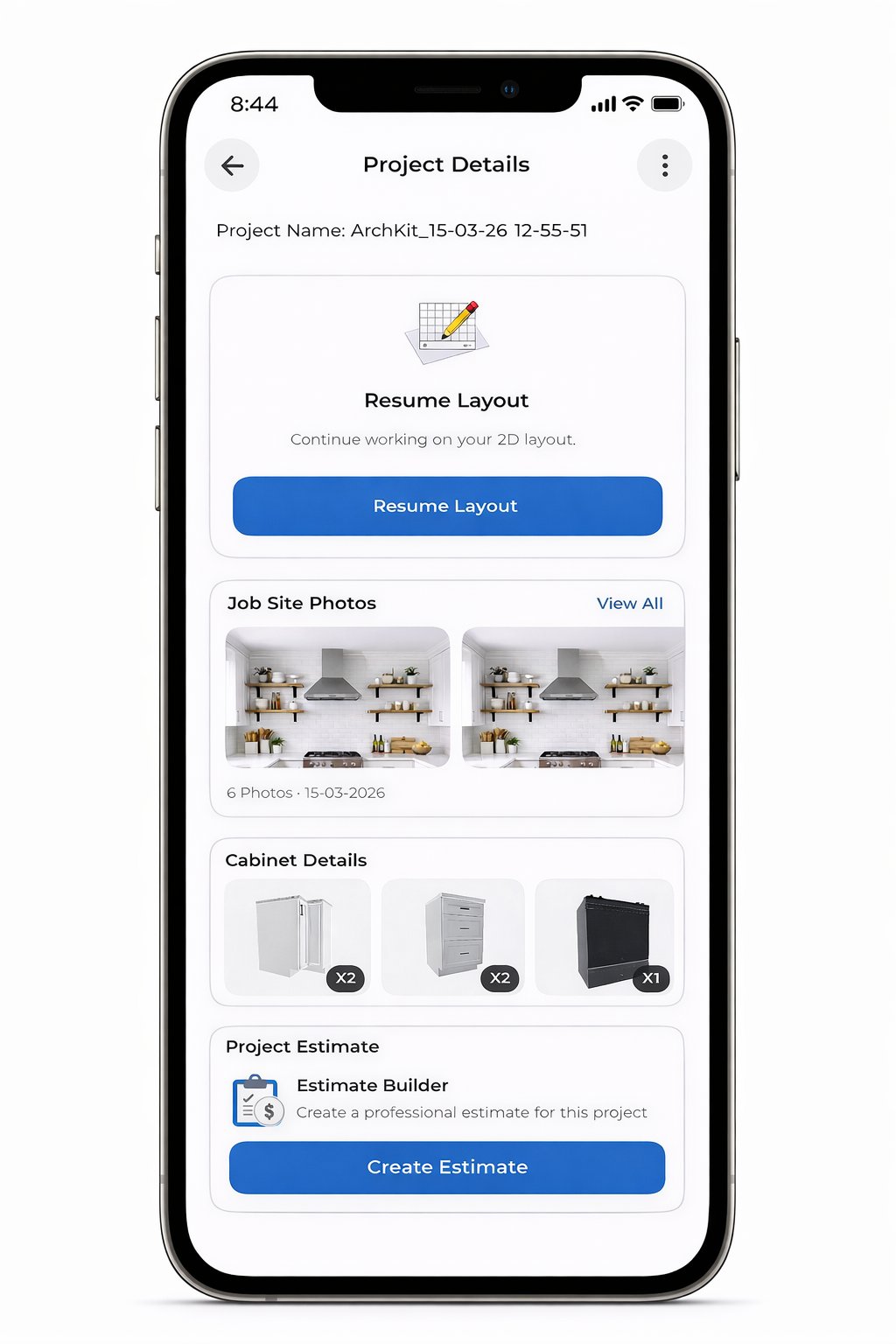
Last Tuesday, a veteran contractor spent three hours hand-measuring a galley kitchen, only to lose the lead because the client couldn't wait ten days for a CAD rendering. It's a common story. Manual measurements and office-bound drafting create a bottleneck that kills momentum. You need a professional kitchen design app for iPad that works as fast as you do. Stop carrying heavy laptops to job sites and start closing deals in the driveway.
You already know that the "office day" is the most expensive part of your week. It's where profit margins shrink under the weight of revisions and administrative fatigue. This guide shows you how to reclaim that time. We'll explore how modern tools like ArchKit Design leverage LiDAR scanning and AR visualization to turn your iPad Pro into a mobile sales engine. It is about moving from a tape measure to a digital workflow that impresses clients instantly.
Discover the top-rated software that allows you to generate 3D layouts in under 15 minutes and secure client approval on-site. We are breaking down the 2026 landscape of mobile workflows, from instant cabinet layouts to real-time estimating. It's time to ditch the manual errors and the two-week wait for a streamlined, professional experience that wins more contracts.
Key Takeaways
- Identify the "Pro" threshold for a professional kitchen design app for iPad by prioritizing LiDAR scanning and exportable CAD data.
- Execute a 60-second room scan to eliminate manual measurement errors and generate 3D layouts directly on-site.
- Leverage AR visualization to secure client approval in the driveway, bypassing the traditional two-week drafting delay.
- Utilize ArchKit to access US-standard cabinetry libraries, ensuring your designs translate perfectly to real-world installations.
- Eliminate the "office-day" bottleneck by shifting your entire design and estimating workflow to a mobile, iPad-first system.
What Defines a Professional Kitchen Design App for iPad in 2026?
In 2026, the line between a hobbyist tool and a professional toolkit is defined by speed and data integrity. A professional kitchen design app for iPad isn't just about drawing lines; it's about generating actionable project data while you're still in the client's home. The "Pro" threshold is no longer about having the most buttons. It's about three critical pillars: LiDAR scanning, US cabinet standards, and exportable data. Stationary office workstations are becoming relics. Today's remodelers need a workflow that lives on their belt, not a desk.
iPad Pro hardware has become the industry standard for a reason. Its M-series processors handle complex 3D rendering without lag. The built-in LiDAR sensor replaces the fallible tape measure. This hardware allows you to move from a blank space to a fully dimensioned layout before the client finishes their coffee. It's a high-velocity approach that eliminates the "office day" bottleneck.
Don't confuse consumer visualizers with contractor tools. Homeowner apps are designed for "inspiration." They use generic furniture blocks that don't match real-world cabinet specs. Professional software focuses on the build. It bridges the gap between a sales pitch and a construction set. It turns your iPad into a revenue generator by eliminating the steep learning curve of legacy Computer-aided design (CAD) systems. You need exportable files like DXF or OBJ to move projects into production immediately.
LiDAR Integration: The Accuracy Standard
LiDAR technology creates a 1:1 digital twin of the kitchen in seconds. It maps every wall, window, and outlet with sub-inch accuracy. Professional apps use this point-cloud data as the foundation for every cabinet placement. This isn't just room mapping; it's a structural survey. It eliminates the "measure twice, cut once" anxiety by ensuring your digital model matches the physical reality of the job site. Scan the room. Verify the dimensions. Start designing instantly.
US Standard Cabinet Catalogs
Generic furniture blocks fail when it's time for a real estimate. If your software doesn't support standard 3-inch increment cabinetry, your layout is just a guess. Real-world builders need precision. Solutions like ArchKit Design include pre-loaded catalogs based on US industry standards. This allows for rapid layout planning that actually fits the space. You can swap out a 33-inch base cabinet for a 36-inch model instantly, seeing the impact on both the floor plan and the budget in real-time. It's about accuracy, not just aesthetics.
Top 3 Categories of Kitchen Apps: Roundup for Professionals
The software market has split into three distinct lanes, and choosing the wrong one can stall your productivity. As digital platforms have changed interior design, the focus has shifted from stationary drafting to high-mobility execution. You need a professional kitchen design app for iPad that fits your specific business model. Don't fall into the trap of using a homeowner tool and expecting it to generate a contractor-grade cabinet list. Your choice depends on whether you prioritize bespoke artistry or project volume and sales speed.
Avoid "consumer-lite" visualizers like Room Planner or brand-specific apps like IKEA's home planner. While these are excellent for homeowners selecting paint colors, they lack the technical data needed for a professional install. They don't offer the sub-inch accuracy or the granular control required for structural remodeling. Instead, categorize your options by their primary function: high-end drafting, homeowner inspiration, or contractor-focused sales engines.
High-End CAD for Custom Cabinetry
Custom builders who manufacture their own boxes often turn to Shapr3D or SketchUp. These platforms offer total creative freedom, allowing you to model every dovetail joint or custom trim piece from scratch. The trade-off is a steep learning curve and a significant time investment per project. You might spend hours drafting a single island layout. If your business relies on unique, one-off builds, mobile CAD for kitchen design provides the precision you need, though it rarely helps you close a sale during the initial walkthrough.
The Efficiency Leader: ArchKit Design for On-Site Layouts
ArchKit Design is engineered for the remodeler who values speed and conversion. It bypasses the complexity of traditional drafting by using a LiDAR-first approach. This is the ultimate professional kitchen design app for iPad because it focuses on the "Scan, Design, Close" workflow. You scan the room in 60 seconds, drag-and-drop standard cabinetry, and show the client the final result in AR before you leave the site. It generates instant cabinet lists, removing the administrative fatigue of legacy systems. To see how these features streamline your sales process, get early access to the ArchKit Design contractor toolkit and start winning more bids today.
Criteria for Professional Selection
- Learning Curve: Can your team master the tool in an hour, or does it require weeks of training?
- Job Site Speed: Can you produce a dimensioned layout while the client is standing next to you?
- Technical Export: Does the app provide 2D plans and 3D models compatible with your crew's needs?
- Hardware Utility: Does the software fully leverage the iPad Pro LiDAR sensor for 1:1 accuracy?
Evaluating ROI: Features That Actually Save Contractors Time
ROI in the remodeling industry isn't just about material markups. It's about time recovery. Every hour you spend redrawing a floor plan in the office is an hour you aren't bidding new work. A professional kitchen design app for iPad pays for itself by shortening the sales cycle and eliminating administrative fatigue. You need a tool that moves as fast as a job site conversation. If a software requires a 40-hour certification course, it isn't a field tool; it's a liability. Modern contractors prioritize a 15-minute setup that delivers immediate results.
Winning More Bids with AR Visualization
Traditional sales pitches rely on the client's imagination. This is a primary cause of project hesitation and "let me think about it" delays. Using a 3D kitchen visualizer for professionals changes the dynamic of the initial consultation. You let the client walk through their new kitchen in their actual home using Augmented Reality. This "Wow Factor" isn't just for show. It provides the clarity needed to secure a signature before you leave the driveway. It removes the two-week wait for renderings and keeps the client's excitement level at its peak.
Eliminating Measurement Errors on Day One
A single 1-inch measurement error can trigger a cascade of expensive field corrections and cabinet re-orders. Manual tape measures are prone to human error and physical obstacles. Modern LiDAR kitchen scanner apps provide a digital safety net that manual methods cannot match. By 2026, LiDAR benchmarks for professional applications have reached sub-quarter-inch accuracy for structural mapping and cabinetry layouts. This precision ensures that your digital twin matches the physical reality of the site. ArchKit leverages this accuracy to generate 2D floor plans and cabinet lists that you can trust for ordering.
The shift toward mobile efficiency is replacing the need for complex, stationary desktop software. While academic programs often focus on professional interior design technology like Revit or AutoCAD, these systems are often too cumbersome for the field. You need the ability to move from a 3D scan to a 2D plan in seconds. Data export is the final piece of the ROI puzzle. If your app can't export a clean cabinet list or a DXF file for production, it's just a toy. Professional tools like ArchKit bridge this gap, ensuring that your on-site work feeds directly into your construction and estimating pipeline.
The On-Site Workflow: From LiDAR Scan to Estimate
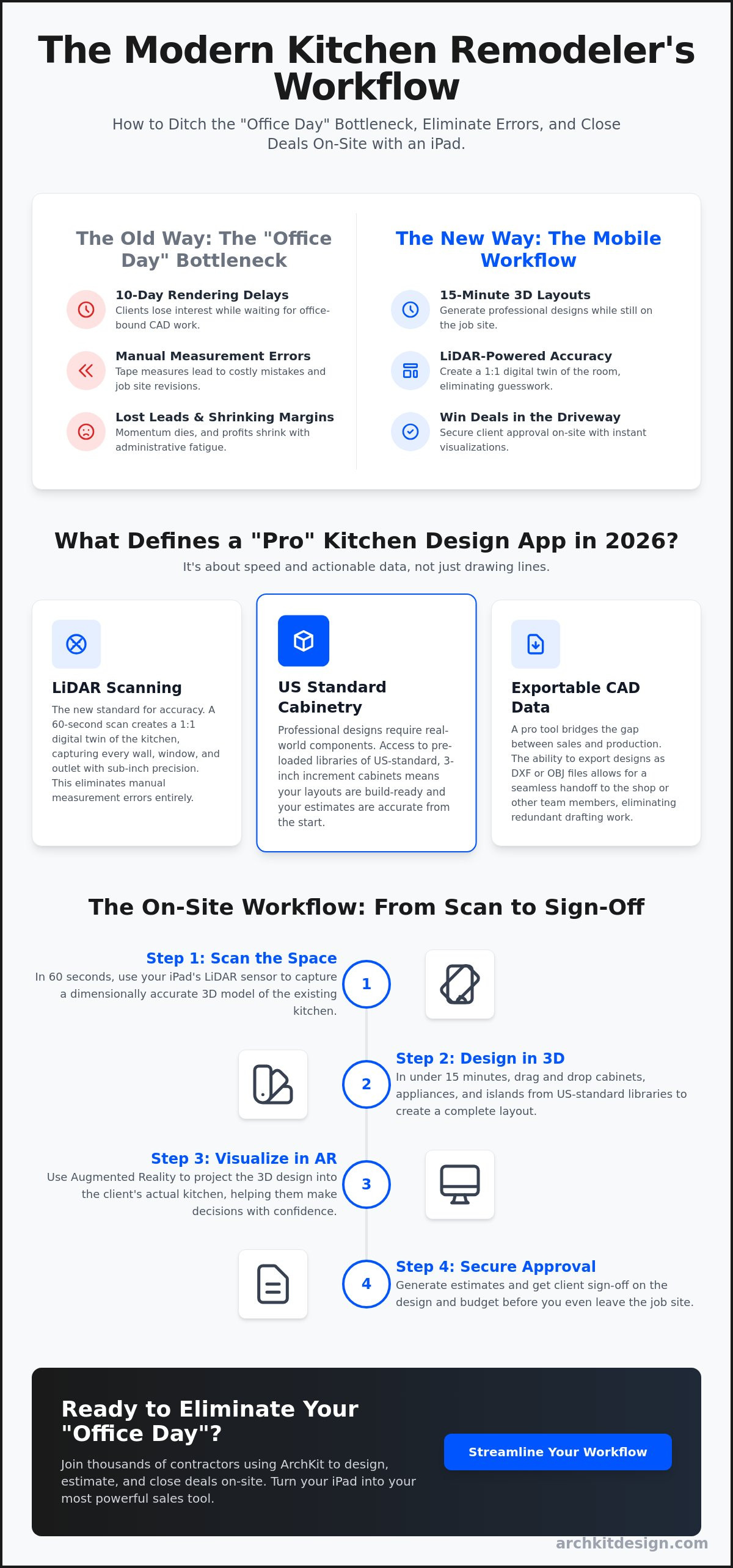
The primary goal of a professional kitchen design app for iPad is to condense the sales cycle into a single visit. Stop visiting the site twice for measurements you forgot the first time. Start closing the contract before you leave the driveway. The workflow is a linear progression that turns your iPad into a high-velocity production studio. It replaces the yellow notepad and the tape measure with a digital hub that captures every detail in real-time.
The process follows a tight, five-step sequence designed for speed and accuracy:
- Step 1: Scan. Use the iPad Pro LiDAR sensor to map the room geometry. It takes roughly 60 seconds to create a dimensionally accurate digital twin.
- Step 2: Layout. Deploy standard US cabinetry from the built-in catalog. Snap cabinets to walls and adjust sizes in 3-inch increments to find the perfect fit.
- Step 3: Review. Launch the AR walkthrough. Let the client stand in their own kitchen and see the new island or pantry layout at a 1:1 scale.
- Step 4: Data Export. Generate the cabinet list and estimate data instantly. The app compiles every SKU and dimension into a clean document for the office.
- Step 5: Secure the Deposit. Present the professional visualization and the final price. Use the momentum of the "Wow Factor" to get a signature and a deposit on-site.
Step-by-Step Room Scanning
Scanning a cluttered kitchen doesn't have to be a headache. You don't need a perfectly empty room to get accurate results. Focus on the floor-to-wall junctions and the ceiling height. Modern LiDAR sensors can distinguish between a countertop appliance and the actual wall surface. Ensure you map the exact locations of gas lines, water valves, and electrical outlets. Capturing these utilities early prevents "surprise" rerouting costs later. Adhering to kitchen layout principles during the scan ensures that your digital model is both accurate and functionally sound for the final build.
Generating Professional Estimates
Estimating is where most projects lose steam. If you go home to "crunch numbers," you give the client time to second-guess the investment. Your 3D model should be the immediate source of your estimate. See how ArchKit streamlines on-site estimating by automatically linking your cabinet layout to a project cost list. This eliminates the administrative gap between the first meeting and the final contract. When you provide a transparent, data-backed price while standing in the room, you build a level of trust that a delayed email can't match.
Ready to reclaim your office days and win more bids? Get early access to ArchKit's contractor toolkit and start transforming your on-site sales process today.
Why ArchKit is the Best Kitchen Design App for Contractors in 2026
The difference between winning a bid and losing a lead often comes down to the speed of your professional presentation. ArchKit is built on a LiDAR-first philosophy that prioritizes the reality of the job site over the comfort of the office. While other platforms focus on massive catalogs of generic consumer furniture, ArchKit focuses on the structural integrity of your layout. It is the professional kitchen design app for iPad that understands the high stakes of sub-inch accuracy and the competitive need to impress clients in the moment. By shifting the design process to the field, some industry professionals report that project approval times can be reduced by up to 50% compared to traditional back-and-forth drafting methods.
Small business remodelers need a mobile-first SaaS model that eliminates administrative fatigue. ArchKit provides a streamlined workflow that doesn't require a high-end desktop workstation or a dedicated CAD technician. You carry your entire design studio in your hand. This accessibility allows you to maintain a lean operation while delivering the high-performance visualization that modern homeowners expect. It is about removing the burden of cumbersome hardware and replacing it with immediate, actionable results.
Designed for the Field, Not the Office
Most design software is built for a quiet desk and a mouse. ArchKit features a no-nonsense interface specifically engineered for use in a dusty kitchen or a cramped hallway. Large touch-targets and intuitive gestures replace the cluttered menus of legacy desktop apps like 2020 Design. For most remodelers, the complexity of traditional CAD is a bottleneck, not a benefit. ArchKit provides the essential tools to scan, design, and estimate without the 40-hour learning curve. Explore more about how this tool serves as the best kitchen design app for contractors and see the difference in on-site efficiency.
Future-Proofing Your Remodeling Business
Adopting a professional kitchen design app for iPad gives you a distinct competitive edge. You become the tech-forward contractor who provides clarity instead of confusion. Your ability to show a client their new kitchen in AR while standing in their old one is a powerful closing tool. ArchKit is committed to continuous updates that reflect the latest iPadOS capabilities and regional industry standards. Don't let your business stay anchored to stationary office equipment and slow revision cycles. Embrace a modern, high-velocity workflow that secures more contracts. Join the waitlist for early access to ArchKit and be the first to modernize your remodeling process.
Modernize Your Workflow and Secure More Contracts
The transition from manual drafting to a digital-first job site is no longer optional for competitive remodelers. You've seen how LiDAR-powered accuracy eliminates measurement errors. AR visualization turns a standard sales pitch into an immersive experience. Selecting a professional kitchen design app for iPad allows you to remove the two-week wait for renderings. You provide the immediate clarity that clients demand in 2026. This isn't just about software. It's about reclaiming your office days and focusing on high-value production.
ArchKit bridges the gap between the initial scan and the final contract. Built-in US standard cabinetry catalogs ensure your designs are buildable from the start. Instant data export means your on-site work feeds directly into your estimating pipeline. Stop carrying heavy laptops. Start winning bids in the driveway. Take control of your project timeline and build a more efficient, tech-forward remodeling business today.
Ready to transform your sales process? Secure your spot for early access to the ArchKit professional toolkit and start closing deals faster. Your next project is waiting for a modern touch.
Frequently Asked Questions
Which iPad is best for professional kitchen design in 2026?
The iPad Pro with the M-series chip and built-in LiDAR sensor is the industry standard for professional remodelers. This hardware provides the processing power required for real-time 3D rendering and the sensor technology needed for sub-inch room mapping. While the iPad Air is capable for basic tasks, it lacks the LiDAR sensor essential for a professional kitchen design app for iPad to function at peak accuracy during on-site surveys.
Can an iPad app replace desktop kitchen design software like 2020 Design?
An iPad app can replace desktop software for the vast majority of on-site design and sales tasks. Legacy programs like 2020 Design offer deep catalog integrations but are often too slow for the field. Mobile tools like ArchKit focus on high-velocity layouts and immediate client approval. You can generate a dimensionally accurate plan and a cabinet list before you leave the job site, eliminating the office-day bottleneck.
Is LiDAR accurate enough for custom kitchen cabinetry layouts?
LiDAR technology in 2026 provides the sub-quarter-inch accuracy required for structural mapping and cabinetry layouts. It creates a 1:1 digital twin of the space, capturing wall lengths and ceiling heights in seconds. This digital safety net reduces the risk of human error associated with manual tape measures. For custom builds, it ensures your digital model matches the physical reality of the site, preventing expensive field corrections and re-orders.
Do I need an internet connection to use ArchKit on a job site?
You don't need an active internet connection to perform room scans or create layouts with ArchKit. The app processes LiDAR data and 3D renderings locally on your iPad's hardware. This ensures you can work in remote areas or basements with poor cellular reception without interruption. An internet connection is only required when you are ready to sync your projects to the cloud or export final estimate data to the office.
Does ArchKit include standard US kitchen cabinet sizes?
ArchKit is built specifically for the North American market and includes a comprehensive library of US standard cabinetry. You can drag and drop base, wall, and tall cabinets in standard 3-inch increments. This ensures your on-site designs translate perfectly to real-world ordering and installation. Unlike consumer apps that use generic furniture, ArchKit uses the specific dimensions that contractors and cabinet dealers rely on for accurate project estimating.
How long does it take to learn ArchKit for a professional remodeler?
Most professional remodelers can master the core workflow in roughly 15 to 30 minutes. The interface is designed for the field, not the office, so it avoids the steep learning curves of traditional CAD software. You can start your first scan and generate a 3D layout almost immediately. The focus is on productivity and speed, allowing you to spend less time training and more time closing contracts with new clients.
Can I export my iPad kitchen designs to other CAD software?
You can export your designs to industry-standard formats like DXF, OBJ, or PDF. This allows you to start a project on your iPad and move it into more complex software if bespoke detailing is required. This professional kitchen design app for iPad ensures your on-site data isn't trapped in a single ecosystem. It bridges the gap between a quick on-site consultation and a final set of construction documents for your crew.
How does a kitchen design app help in winning more bids?
A design app helps you win more bids by eliminating client hesitation through real-time visualization. Showing a client their new kitchen layout in Augmented Reality while standing in their existing space builds immediate trust. It removes the traditional two-week wait for renderings, keeping the project's momentum high. When you provide a professional 3D walkthrough and an estimate on-site, you position yourself as the most capable and tech-forward contractor in your market.


