
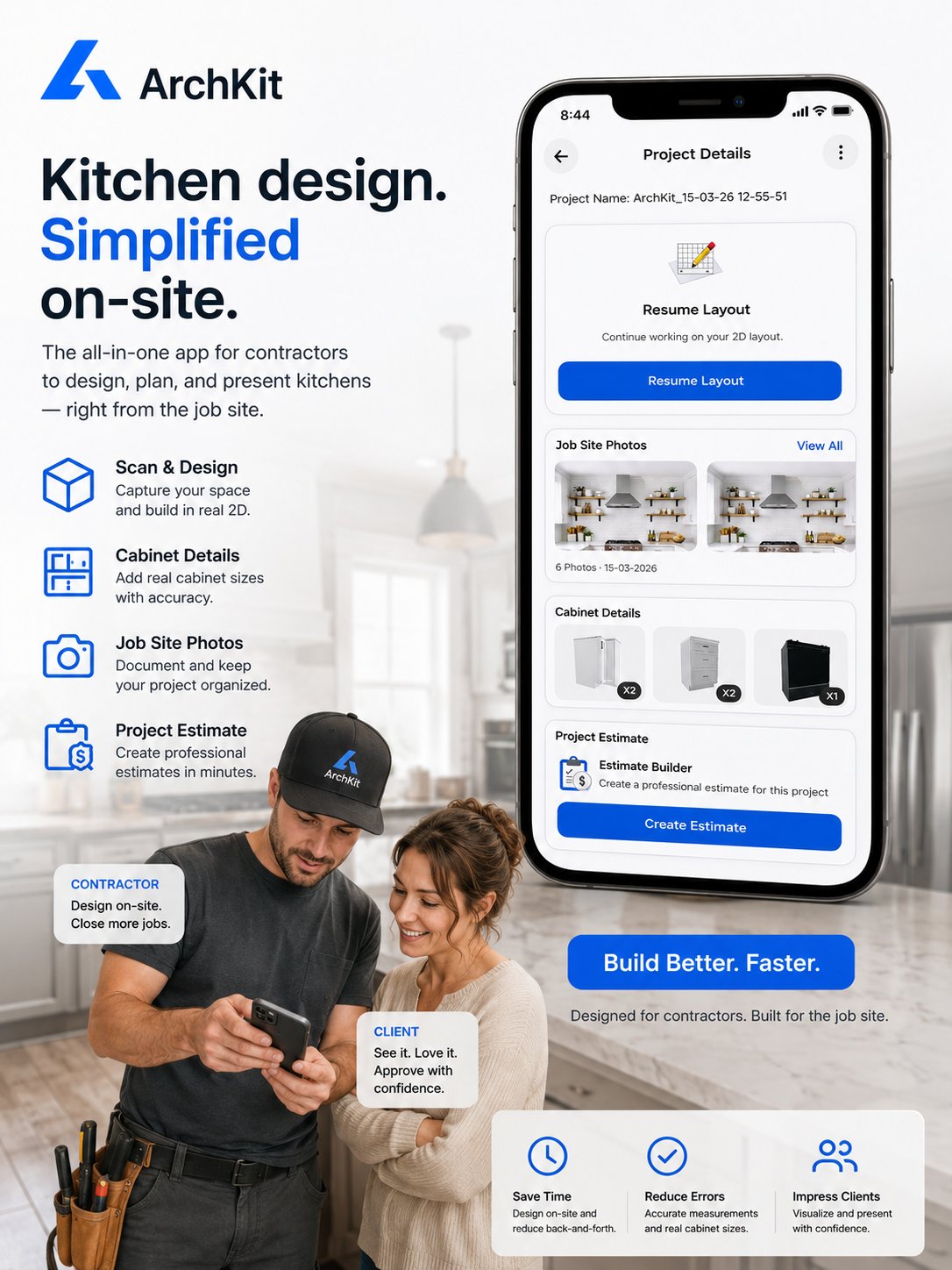
Imagine finishing an eight-hour day on-site only to realize your real work is just beginning. You still have to head home, fire up the desktop CAD, and spend hours inputting measurements into your kitchen design software with standard cabinet library templates. One wrong number leads to a costly cabinet re-order. It is a cycle that drains your time and your profits. You know that waiting days to send a quote often means losing the client to a faster competitor.
The shift to mobile efficiency changes everything. Build a complete 3D layout before you even walk out the front door. This guide explores how to slash your estimating time and eliminate measurement errors with ArchKit. You will learn to turn a simple walkthrough into a high-impact presentation that secures the contract immediately. We agree that the old way of measuring by hand and designing at a desk is a bottleneck for your growth.
Generate a precise 3D kitchen layout in under 20 minutes using LiDAR and AR visualization. Use standard U.S. cabinet sizes for instant estimates. Stop guessing. Start closing. It is time to ditch the stationary office equipment for a modern, on-site workflow that respects your time and impresses your clients from the first meeting.
Key Takeaways
- Eliminate manual geometry drawing by using kitchen design software with standard cabinet library catalogs for instant, accurate layouts.
- Harness LiDAR technology to generate precise 3D room shells in minutes, removing the risk of costly measurement errors.
- Close more sales by using Augmented Reality to place 3D cabinets in the actual room while the client is standing right there.
- Slash your administrative time by moving from complex desktop CAD to a streamlined mobile workflow that delivers estimates in 20 minutes.
- Build immediate professional authority and win the "speed to lead" race by providing visual bids directly on-site.
Why a Standard Cabinet Library is the Secret to Faster Kitchen Bids
Speed is the ultimate currency on a job site. When you walk into a kitchen for a consultation, the clock is ticking. You need to provide a professional vision before the homeowner starts second-guessing the project cost. This is where kitchen design software with standard cabinet library functionality becomes your most valuable tool. A standard cabinet library is not just a list of parts. It is a pre-built catalog of common U.S. cabinet sizes, including 24-inch base units, 36-inch wall cabinets, and standard pantry towers. Instead of drawing every box from scratch, you pull from a digital warehouse of ready-to-use components.
Traditional Computer-aided design (CAD) often requires you to define the height, width, and depth of every single object. That works for a factory floor, but it fails on a sales call. A standard library uses the 3-inch increments common in the U.S. market. This eliminates the need for manual geometry. You aren't "drawing" a kitchen; you are assembling one. This drag-and-drop efficiency allows for instant layout adjustments while the client watches. If they want to swap a drawer base for a cupboard, it takes two seconds, not twenty minutes of re-drafting.
The End of Manual Drafting on the Job Site
Sketching on paper is a liability. It leads to communication breakdowns where the client thinks they are getting one thing, but your chicken-scratch notes suggest another. Using presets over individual lines and boxes gives you a massive speed advantage. More importantly, it protects your profit. Standardized digital units help you spot layout issues immediately. You can see exactly where a door swing will hit an island or where corner clearance is too tight. These are the "hidden" errors that usually lead to expensive cabinet re-orders. With ArchKit, you catch these conflicts before you ever place an order.
U.S. Standard Sizes: The Contractor's Language
A professional library speaks your language. It includes the essentials: base cabinets, wall units, pantry fillers, and islands. These units follow the industry-standard 3-inch steps. Using these increments is vital for accurate project estimates. If you design with "custom" sizes that don't exist in a manufacturer's stock line, your estimate will be worthless the moment you try to buy materials. Standard libraries bridge the gap between a raw room scan and a final cabinet order by ensuring every piece fits the reality of the supply chain. This approach prioritizes speed and estimating accuracy over the tedious complexity of custom manufacturing software.
The Tech Behind the Tool: LiDAR and AR Visualization
If the cabinet library is the engine of your workflow, LiDAR is the high-octane fuel that powers it. Most contractors are tired of the slow crawl involved with a tape measure and a notepad. Modern kitchen design software with standard cabinet library integration changes the game by utilizing the LiDAR sensor built into pro-grade iPhones and iPads. LiDAR, which stands for Light Detection and Ranging, fires millions of laser points every second to create an instant, high-fidelity 3D map of the room. It doesn't just see a flat wall. It understands the exact depth of every niche and the precise location of every plumbing stub.
Augmented Reality (AR) takes that digital map and makes it interactive. Research from the University of Michigan on augmented reality in kitchen design shows how these tools help users understand complex spatial relationships. For a contractor, this means showing a client a 36-inch base cabinet exactly where it will sit in their actual home. You aren't pointing at a flat blueprint or a grainy laptop screen. You are viewing a 1:1 scale model through your device while standing in the physical space. This is the "Scan-to-Plan" workflow. You move from an empty, measured room to a fully populated 3D model in under five minutes.
Why LiDAR is a Game-Changer for Kitchen Pros
Accuracy is the difference between a profitable job and a week of unpaid rework. Traditional digital tape measure apps rely on camera visuals, which often drift or lose calibration in low light. LiDAR is superior because it uses physical light reflection to achieve accuracy within a fraction of an inch. It automatically captures complex elements that are easy to miss, such as window placements, electrical outlets, and ceiling soffits. This precision ensures your kitchen design software with standard cabinet library accurately reflects the job site reality. To learn more about the best hardware for this task, check out our guide on LiDAR kitchen scanner apps.
Visualizing the Future with AR
Spatial blindness is one of the biggest hurdles in the sales process. Most homeowners struggle to imagine how a new island will affect their floor plan. AR solves this by providing a "wow factor" that builds immediate trust. Let the client walk through their future kitchen before you order a single box. Use AR to verify island spacing and walkway clearances on the fly. If a 42-inch walkway feels too tight, you can swap the cabinet size in seconds to find the perfect fit. If you are ready to modernize your sales calls, you can get early access to our mobile platform to start designing on-site today.
Mobile Apps vs. Desktop CAD: Which is Right for You?
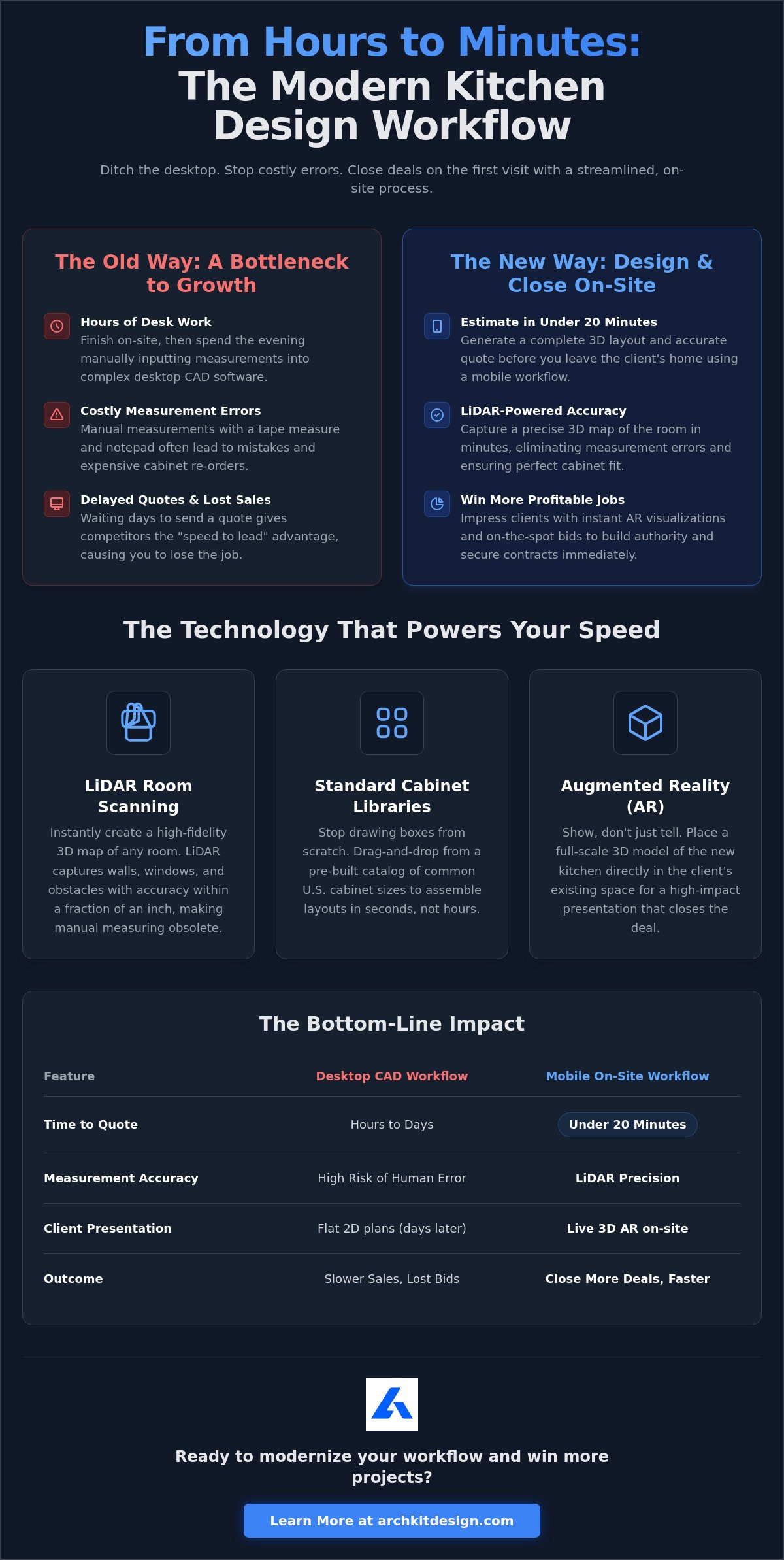
Choosing the right tool depends on your primary goal: are you trying to build a cabinet from scratch or close a $50,000 remodel? Legacy desktop CAD software is powerful but heavy. It requires a high-end PC, a dedicated office desk, and weeks of specialized training just to draw a basic room. In contrast, kitchen design software with standard cabinet library functionality on a mobile device allows you to start designing in minutes. You swap a $3,000 workstation for the iPhone already in your pocket. The learning curve drops from months to hours, allowing your entire team to produce professional results without a degree in architecture.
The most dramatic difference is the "Time to Estimate." An office-bound workflow typically takes 24 to 48 hours. You measure on-site, drive back, input data, and finally email a PDF. By then, the lead has often cooled. A mobile AR app slashes this to 20 minutes. You provide a visual bid before you even leave the driveway. This speed doesn't mean you sacrifice quality; it means you prioritize the sales cycle. When you need a specialized cabinetry layout tool for quick site surveys, mobile is the clear winner. Desktop suites remain the standard for complex blueprints, but they are rarely the right tool for the initial handshake.
The 'Office Fatigue' Factor
Every hour spent behind a desk is an hour you aren't finding new business or managing a crew. Legacy workflows create "office fatigue" by forcing you to spend your evenings and weekends drafting revisions. Mobile workflows allow you to reclaim your personal time. By handling measurements and layout adjustments on-site, you eliminate the back-and-forth driving. You reduce the "Design-to-Approval" cycle from several days to a single meeting. It is about working smarter, not longer. You eliminate the administrative burden that keeps you from growing your business.
When to Use ArchKit vs. Legacy Software
Most modern pros are adopting a hybrid approach. ArchKit is built specifically for the job site. It excels at scanning, estimating, and providing high-impact visualizations that win contracts. Legacy CAD is better suited for structural engineering and the final, complex construction documents required for high-end custom manufacturing. Use ArchKit to capture the room and secure the deposit. If the project requires deep architectural integration later, you can move those verified measurements into your office software. This strategy ensures you never lose a lead because your office work took too long.
Step-by-Step: Creating a Kitchen Layout in 15 Minutes
Time is your most limited resource during a consultation. You need to move from a raw space to a professional proposal before the client loses momentum. By using kitchen design software with standard cabinet library functionality, you can complete a full layout in the time it takes to drink a cup of coffee. Forget the graph paper and the complicated desktop software. Follow this streamlined workflow to deliver a visual bid directly on-site.
- Step 1: Scan the room. Use your device's LiDAR sensor to walk the perimeter. Generate a precise 2D and 3D shell of the existing kitchen in seconds.
- Step 2: Populate the walls. Open the kitchen design software with standard cabinet library and select your first unit. Drag and drop base cabinets, wall units, and tall pantries. The software snaps them to the walls automatically.
- Step 3: Fine-tune the details. Use the library to add filler pieces for tight gaps. Adjust dimensions for unique corner situations or custom cabinet depths to maximize storage.
- Step 4: Walk the space. Switch to AR mode. Let the client view the new layout at a 1:1 scale while standing in their kitchen.
- Step 5: Finalize the bid. Export a professional 3D layout and a complete cabinet list. You now have everything needed for an accurate estimate.
Pro Tip: Planning Around Obstacles
A beautiful design fails if it isn't functional. Use established kitchen layout principles to ensure a proper workflow. Focus on the Work Triangle between the sink, stove, and refrigerator. Drop standard fridge and range blocks into your design to check for clearance issues. The LiDAR scan already identified your plumbing and electrical stubs; now, you can adjust your cabinet placement to avoid expensive utility relocations. This proactive approach prevents "oops" moments during the installation phase.
Instant Revisions: The Client's Favorite Feature
Homeowners are famous for changing their minds mid-meeting. When a client asks, "What if the island was 6 inches longer?" you don't need to head back to the office. Make real-time changes to the standard library components while standing in the room. You can stretch the island, swap a drawer base for a microwave cabinet, or change the wall unit height instantly. This level of responsiveness prevents the "I'll get back to you" delay that often kills a potential deal. Ready to stop sketching by hand? Get early access to ArchKit and master your next site survey in record time.
Close More Sales: How Design Software Impacts Your Bottom Line
The ultimate goal of any site survey is a signed contract and a deposit check. High-quality 3D visuals aren't just for show; they are a powerful tool for justifying higher project costs. When a client sees their future space in 1:1 scale, the project moves from an abstract expense to a tangible reality. This clarity builds immediate trust. It reduces the "sticker shock" that often occurs when homeowners see a raw number without a corresponding visual. By using kitchen design software with standard cabinet library assets, you provide a level of transparency that "the guy with a tape measure" simply cannot match.
Speed is your greatest competitive advantage. In the remodeling industry, the "Speed to Lead" concept is a proven reality. The contractor who provides a professional, visual bid first usually wins the job. While your competitors are still at their desks fiddling with complex CAD settings, you've already sent a digital model. You can generate an accurate, transparent estimate using the cabinet list exported directly from the app. This reduces scope creep because every component is accounted for before the first demo day begins. Start your next project today by downloading the ArchKit free kitchen design app.
Professionalism as a Differentiator
Your presentation defines your brand. Showing up with an iPad and LiDAR scanning technology signals that you are a tech-forward professional who values precision. This modern approach drastically reduces project anxiety for the homeowner. They no longer have to wonder if the cabinets will fit or if the island will block the dishwasher. You can even create a "leave-behind" digital model. This keeps your bid top-of-mind long after you've left the house. It's a professional touch that separates elite remodelers from the rest of the pack.
Reducing Costly Mistakes and Re-Orders
A single mismeasured cabinet can destroy your profit margin on a small kitchen. Between the cost of the replacement unit and the shipping delays, one "oops" moment can stall a crew for a week. A kitchen design software with standard cabinet library ensures you are quoting items that actually exist in your supplier's catalog. You aren't guessing at custom dimensions that might be unavailable or overpriced. This accuracy protects your bottom line and keeps your schedule on track. Take a look at our pricing page to see how an app subscription pays for itself in just one project by eliminating these avoidable errors.
Master the On-Site Sale with Digital Precision
Ditch the office-bound drafting. Stop the back-and-forth driving. You've seen how modern kitchen design software with standard cabinet library functionality turns a simple site visit into a closed contract. LiDAR technology captures every inch. AR visualization removes every doubt. You move from measurement to estimate in 20 minutes; not two days. It's a shift from administrative fatigue to immediate results.
This is your competitive edge. You get professional LiDAR-powered accuracy and a full U.S. Standard Cabinet Library at your fingertips. There's no CAD experience required. It's a no-nonsense tool built for the reality of the job site. It empowers you to work faster, sell better, and eliminate the errors that drain your bank account. Stop guessing. Start closing.
Get early access to ArchKit and transform your on-site workflow. Take control of your schedule. Secure your next deposit before you even leave the driveway. Your business is ready for the future of remodeling.
Frequently Asked Questions
Does this software work on both iPhone and Android?
ArchKit is optimized for the iOS ecosystem to take full advantage of specialized hardware. LiDAR sensors are currently exclusive to iPhone Pro and iPad Pro models. Most Android devices lack the specific laser technology required for high-fidelity room mapping. This focus ensures your kitchen design software with standard cabinet library experience is stable, accurate, and professional without the glitches common in multi-platform apps.
Can I customize the cabinet sizes if they aren't in the standard library?
You can easily modify dimensions to fit unique job site requirements. The library provides a foundation of U.S. standard sizes, but it is not a rigid system. If you encounter a non-standard corner or need a custom-depth pantry, simply select the unit and adjust the parameters. This flexibility allows you to handle 'filler' pieces or specific site constraints while maintaining the speed of a drag-and-drop workflow.
How accurate is the LiDAR scanning for real cabinetry orders?
LiDAR scanning provides accuracy within a fraction of an inch. It is the gold standard for rapid on-site estimating and layout planning. For final cabinetry orders, we recommend a quick manual check of critical tolerances to account for out-of-plumb walls. This hybrid approach eliminates the majority of measurement errors while maintaining the speed required to close a sale during the initial consultation.
Do I need an internet connection to use the app on a job site?
You don't need an active internet connection to scan a room or place cabinets. The app handles the heavy processing locally on your device. This is vital for new construction sites or remote remodels where Wi-Fi is unreliable or non-existent. You only need a connection when you are ready to export your final report or sync your project data to the cloud for office access.
Can I export my designs to other CAD software like Chief Architect or AutoCAD?
Yes, you can export your 3D layouts to work with your existing office tools. ArchKit supports standard file formats that integrate with popular CAD suites. This allows you to capture the initial room map and layout on-site, then move to desktop software for complex structural engineering or final blueprints. It is the perfect bridge between a sales-focused mobile workflow and traditional office-bound drafting.
Is there a free version of ArchKit for contractors to try?
ArchKit offers a free version specifically for professionals to test the workflow. You can experience the LiDAR scanning and basic layout tools before committing to a subscription. This allows you to verify the accuracy and speed on a real project. It is the best way to see how kitchen design software with standard cabinet library features can reclaim your evenings by reducing office-based drafting time.
What iPad models support the LiDAR scanning features?
LiDAR scanning is supported on iPad Pro 11-inch (2nd generation or later) and iPad Pro 12.9-inch (4th generation or later). These models include the necessary sensor to create high-fidelity 3D maps. If you are using an older iPad or a standard model, you can still use the manual layout features. However, the Pro models are highly recommended for the fastest "Scan-to-Plan" experience on the job site.
How do I present the 3D layout to my client if they don't have the app?
You can show the 3D layout directly on your device using Augmented Reality. This is the most impactful way to present, as it lets the client "walk through" the design in their actual room. If the client is not present, you can export high-quality 3D renderings or a detailed PDF project report. These files are easily shared via email or text, ensuring your bid stays top-of-mind.

