
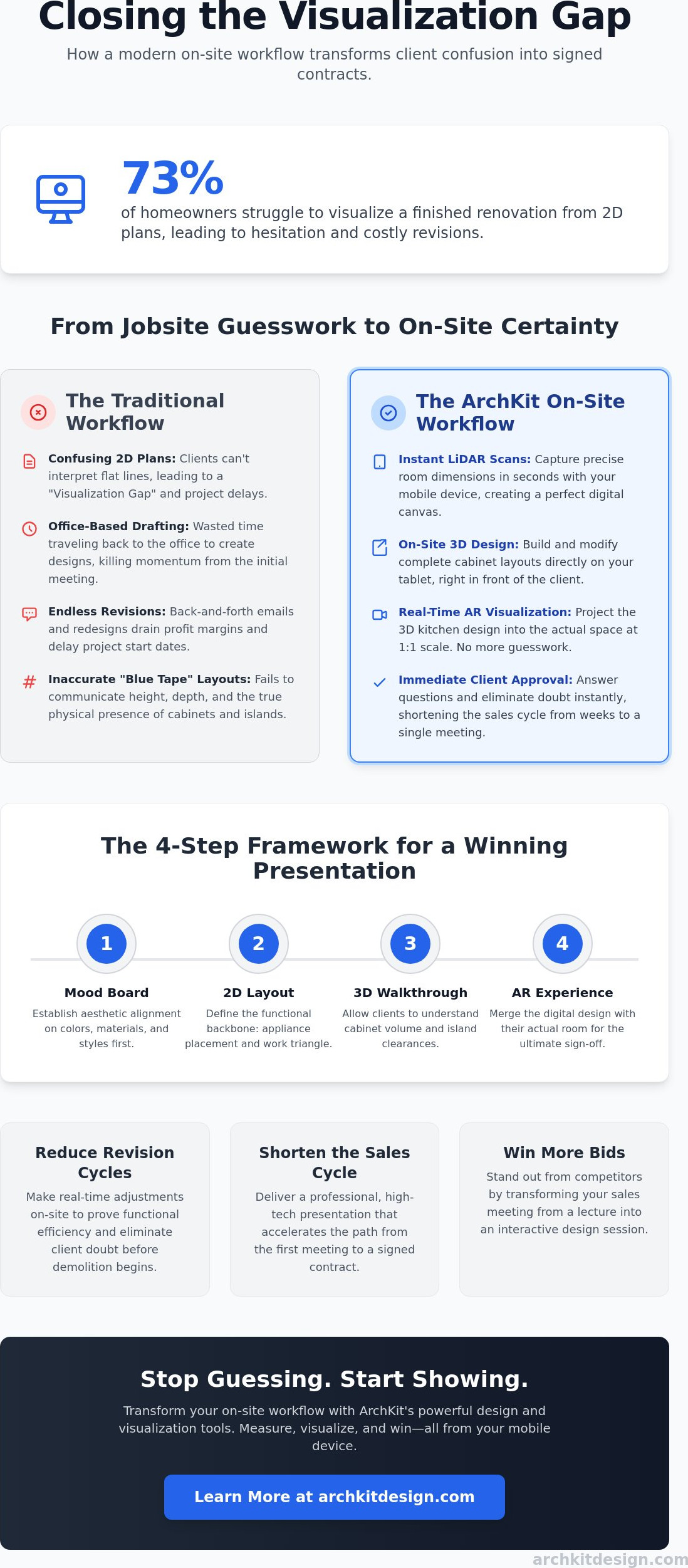
73% of homeowners struggle to picture a renovation until it's done. That’s a massive hurdle. When clients can't interpret 2D blueprints, they hesitate. They ask for revisions. They delay the job. Learning how to help clients visualize kitchen remodel outcomes is the best way to stop the bleed. It turns a confusing sales pitch into a concrete reality.
You know the feeling of standing in a gutted space trying to explain a layout. It’s exhausting. It’s inefficient. This guide shows you how to master on-site visualization to close more deals and kill doubt instantly. We’ll cover how modern LiDAR scanning and AR visualization through ArchKit Design can transform your workflow. Stop guessing. Start showing. Move faster, reduce waste, and win the bid. Measure. Visualize. Win.
Key Takeaways
- Bridge the visualization gap by understanding why traditional 2D plans often lead to client confusion and costly mid-project change orders.
- Discover how to help clients visualize kitchen remodel details instantly using mobile AR tools that bring your designs to life on the job site.
- Implement a faster on-site workflow with LiDAR scanning and ArchKit to create accurate 3D cabinet layouts without heading back to the office.
- Reduce revision cycles by making real-time design adjustments that prove functional efficiency and eliminate client doubt before demolition begins.
- Shorten the path from the first meeting to a signed contract by delivering professional, high-tech presentations that win more bids.
The Visualization Gap: Why Clients Struggle with 2D Kitchen Plans
The "Visualization Gap" is the silent deal-killer in residential remodeling. You see a finished, functional space when you look at a floor plan. Your client sees a confusing grid of lines and numbers. This disconnect is more than a minor misunderstanding; it is a fundamental barrier to project approval. Most homeowners lack the spatial reasoning to translate flat drawings into three-dimensional reality. They can’t sense the volume of a kitchen island or the reach of a corner cabinet from a top-down view. This is precisely why learning how to help clients visualize kitchen remodel projects is a core business skill. Without visual clarity, clients default to hesitation. They fear making a permanent, expensive mistake.
Traditional Computer-aided architectural design (CAAD) has long been the industry standard, but static office renders often arrive too late in the sales process. By the time you’ve gone back to the office to draft a 2D plan, the client’s excitement has cooled. If they can’t "feel" the kitchen’s flow during that first site visit, you’re fighting an uphill battle. For a deeper look at closing this gap, check out our guide on the 3D kitchen visualizer for professionals to see how modern tools boost on-site efficiency.
The High Cost of Miscommunication
Revisions are the hidden tax on your profit margins. Every hour spent on back-and-forth emails or re-drafting layouts is an hour you aren’t billing or selling. The revision loop is a profit-draining cycle where lack of visual clarity forces multiple redesigns, stalling your project schedule and eating your overhead. It drains your administrative energy and delays your start date. Worse, misaligned expectations often lead to mid-remodel "surprises." A client realizes only after the cabinets are hung that the walkway is too tight. That is a design error that could have been caught with better visualization, not just a standard change order. Clear visuals prevent these errors before they become physical problems.
Moving Beyond the Blue Tape
For decades, contractors used blue painter's tape on the floor to show cabinet footprints. It is better than nothing, but it fails to communicate height, bulk, or the physical presence of a wall oven. Modern clients expect a digital experience. They want to see the cabinetry in their actual room, not just a silhouette on the subfloor. You need to move from mental models to digital reality. Shift the conversation during your initial lead call. Tell them you use an on-site kitchen design workflow tool like ArchKit to build their kitchen in real-time. This sets the expectation that you are the most tech-forward pro in the room. It transforms the sales meeting from a lecture into an interactive demonstration.
A Modern Framework for Your Kitchen Remodel Client Presentation
Winning a high-value contract requires more than a portfolio of past projects. You need a structured presentation that builds confidence step-by-step. A successful pitch isn't a random collection of ideas; it's a logical progression from abstract concepts to physical reality. Start with the Mood Board. This establishes the aesthetic baseline. Use it to confirm colors, materials, and hardware choices before moving into technical details. This initial alignment prevents costly design pivots later in the process.
Next, introduce the 2D Layout. This is where you define the functional work triangle and appliance placement. While 2D plans are technical, they serve as the backbone for the spatial context provided by a 3D Walkthrough. The walkthrough allows the client to understand cabinet volume and island clearances. Finally, deploy the AR Experience. This is the ultimate closer for how to help clients visualize kitchen remodel details. It merges your digital design with their actual room in real-time. If you're looking for a starting point, the free kitchen design app from ArchKit provides the essential tools to build this multi-layered presentation on-site.
Layering Your Presentation for Maximum Impact
Don't jump straight to the "after" shot. Start with the problem. Highlight the cramped corners, poor lighting, or inefficient flow of the current space. Use digital overlays to show the transformation. This contrast makes the value of your design undeniable. Precision at this stage is critical. Your visual model must reflect standard U.S. cabinet sizes to remain realistic. Misrepresenting scale during the pitch leads to jobsite friction during installation. Following NKBA’s design presentation guidelines ensures your pitch meets industry standards for clarity and professionalism. It proves you aren't just a builder; you're a specialist who understands how to help clients visualize kitchen remodel outcomes accurately.
Tools of the Trade: Hardware and Software
The industry is shifting away from stationary office workflows. Speed wins bids. Mobile-first design tools have replaced bulky desktop CAD stations for initial consultations. An iPad Pro or iPhone Pro equipped with LiDAR is now a standard jobsite requirement. These sensors scan a room in seconds, providing a perfect digital canvas. ArchKit fits perfectly into this mobile tech stack, allowing you to generate 3D models and cabinet layouts without leaving the house. It's about being the most efficient pro in the room. Get early access to our professional tools and start closing deals faster with on-site visualization.
The On-Site Design Workflow: Creating Instant Visual Clarity
Efficiency in the field depends on speed. Traditional methods require you to measure, head back to the office, draft a plan, and wait days for a follow-up meeting. This delay kills momentum. By adopting an on-site design workflow, you provide immediate answers. You move the project forward while the client is still excited. This process isn't just about speed; it is about accuracy and professional authority. When you show a client exactly how to help clients visualize kitchen remodel possibilities while standing in their current kitchen, the sales barrier vanishes.
Follow this four-step workflow to streamline your next consultation:
- Step 1: Scan. Use LiDAR to capture the room’s geometry in minutes.
- Step 2: Populate. Place virtual cabinetry from a digital catalog directly into the 3D model.
- Step 3: Refine. Make real-time adjustments based on immediate feedback. If they want the island moved two inches, do it instantly.
- Step 4: Quote. Generate a ballpark estimate based on the digital layout to provide financial clarity on the spot.
LiDAR Scanning: Accuracy Without the Tape Measure
Manual measurements are prone to human error. A missed quarter-inch on a sink wall can lead to a cabinet ordering disaster. LiDAR technology changes the game by capturing precise dimensions of windows, doors, and plumbing locations automatically. It creates a high-fidelity digital twin of the space. To execute this effectively, use a professional kitchen design app for iPhone that leverages the built-in LiDAR sensor. This eliminates the need for cumbersome hardware and reduces the risk of measurement errors that drain your margins. You get a perfect canvas for your design before you even pull out a notepad.
The "While-You-Wait" Design Pitch
There is immense psychological power in showing a 3D model before you leave the driveway. It proves you are prepared and capable. By using AR visualization, you let clients "walk" through their new kitchen layout. They can see how the new traffic patterns feel. The "Aha!" moment occurs when a client sees virtual cabinets anchored to their real-world floor, turning a theoretical layout into a physical reality right before their eyes. This level of transparency eliminates the "visualization gap" discussed earlier. It makes the decision to sign a contract feel safe rather than risky. ArchKit enables this transition from measurement to visualization seamlessly, ensuring you remain the most tech-forward professional in the room.
Overcoming Client Doubt: Real-Time Revisions and Cabinet Layouts
Client doubt is the biggest obstacle to a signed contract. Most homeowners are terrified of making an expensive mistake. They worry about whether the island is too big or if the traffic flow will feel cramped. This is where how to help clients visualize kitchen remodel adjustments becomes your most powerful sales tool. Instead of asking them to trust your word, show them the data. Use a 3D cabinetry layout tool to place every unit with surgical precision. When a client sees the exact clearances in a digital model, their anxiety disappears. It replaces "what if" with "I see."
Functional efficiency is the heart of any kitchen. You can talk about the "Work Triangle" all day, but seeing it in action is different. Use your design software to trace the path between the sink, stove, and refrigerator. Ground your visual presentation in proven kitchen layout principles to ensure the design isn't just pretty, but practical. Comparing an L-shape layout to a Galley design takes seconds with digital tools. This speed allows you to test multiple theories without losing the client's attention. You provide immediate answers to complex spatial questions.
Handling Objections with Visual Proof
Objections are often just a lack of visual information. If a client says, "The island will make the kitchen feel too small," don't just argue. Launch an AR walkthrough. Let them stand in the room and see the 42-inch clearance for themselves. If they worry about storage, use ArchKit to generate an instant cabinet list. Show them exactly how many cubic feet of pantry space the new design provides. Validating kitchen layout dimensions in real-time proves that your design is physically viable. It turns a subjective debate into an objective reality. This is how to help clients visualize kitchen remodel success while eliminating the guesswork.
Building Trust Through Technical Authority
Modern clients want to work with professionals who use modern tools. By presenting a digital layout on-site, you position yourself as a tech-forward expert. This reduces the "salesy" feel of the meeting. You aren't just trying to close a deal; you're providing accurate data and visual reality. Transparency during the design phase leads to fewer disputes during construction. When the client has already "walked through" the kitchen virtually, they won't be surprised by the physical result. This level of clarity is the ultimate trust-builder. Get early access to ArchKit’s professional design tools and start eliminating client doubt on every bid.
Closing the Deal: Leveraging AR for Immediate Project Approval
Speed is the ultimate closer in the remodeling industry. When you master how to help clients visualize kitchen remodel projects on-site, you slash the time between the first walkthrough and a signed contract. You don't need to head back to the office for three days of drafting. You finalize the cabinetry list and project scope right there in the kitchen. This immediacy removes the "cooling off" period where clients start second-guessing the budget. You turn digital pixels into a firm project quote instantly. It's about striking while the iron is hot. Get early access to these professional tools to start streamlining your workflow today.
The transition from visualization to estimation is the most critical step in your sales funnel. Once the client approves the AR layout, your software should automatically compile the bill of materials. You aren't just showing them a kitchen; you're building the order list. This eliminates the manual tallying of cabinet boxes and fillers that often leads to pricing errors. By providing a ballpark quote based on a precise digital layout, you give the client the financial clarity they need to say "yes." It turns a design consultation into a professional business transaction. This is how to help clients visualize kitchen remodel success while maintaining your professional margins.
The 2026 Competitive Advantage
The market in 2026 rewards the tech-forward pro. With the average kitchen remodel cost reaching approximately $35,000 this year, clients demand high-fidelity proof of value. They won't settle for "trust me" anymore. Contractors using AR and mobile CAD are winning bids because they provide certainty. Traditional pros are still mailing 2D PDFs that homeowners can't understand. Use cloud-based project management to share your 3D models directly with the client's phone. This transparency builds a bridge of trust that legacy methods can't match. ArchKit bridges the gap between on-site scanning and closing the sale by making the design process interactive and undeniable.
Next Steps: Implementation
Integration is simple. Make AR visualization a standard part of your initial lead meeting. Don't wait for the second or third visit to show the potential. Check the pricing plans to see which tier fits your business volume. Create a repeatable presentation template for every new lead. Scan the room; place the cabinets; show the AR; close the deal. It's a linear, high-velocity process that puts you ahead of the competition. Stop drafting in the dark. Start closing in the light. Master the on-site pitch. Eliminate the office-dependent bottleneck. Win the contract.
Master the On-Site Pitch and Win the Contract
Mastering how to help clients visualize kitchen remodel details is no longer a luxury; it's a competitive necessity. You've seen how bridging the visualization gap with LiDAR scanning and AR layouts can eliminate the revision loop that drains your profits. By moving from static office renders to immediate on-site clarity, you build trust and authority before you even leave the driveway. Speed and accuracy aren't just about convenience. They are about closing deals before the competition even sends an email.
ArchKit provides the professional tools you need to execute this high-velocity workflow. It features LiDAR-powered accuracy and a standard U.S. cabinet catalog designed by pros for pros. Stop wasting weekends on manual drawings and start showing clients their future kitchen in real-time. On-site AR visualization turns a nervous homeowner into a confident client ready to sign. Get Early Access to ArchKit and Start Closing More Bids Today. Take control of your sales process and turn every consultation into a signed project.
Frequently Asked Questions
What is the best way to help a client visualize their kitchen remodel on-site?
The best way to help a client visualize their kitchen remodel on-site is through Augmented Reality (AR) overlays. This technology allows you to place digital cabinetry directly into their current space while you stand in the room together. It bridges the visualization gap instantly; clients see the scale and flow without needing to interpret flat drawings. This immediate experience builds confidence and moves the project toward approval faster than traditional methods.
Do I need expensive software to show clients a 3D kitchen design?
You don't need expensive, office-bound CAD software to create professional 3D designs. Modern mobile tools like ArchKit offer professional 3D layout capabilities on standard devices like an iPhone or iPad. This shift to mobile-first design reduces your administrative burden and eliminates the need for stationary hardware. You get high-end results with a tool that fits in your pocket, allowing you to design and estimate directly on the job site.
How does AR (Augmented Reality) help in kitchen remodeling presentations?
AR provides immediate spatial context by merging your digital design with the client's physical room. It allows them to physically walk through the new layout to test clearances, island placements, and traffic flow. This interaction proves your design works and eliminates the common anxiety regarding how a 2D plan translates to real life. It turns a theoretical conversation into a physical reality right before their eyes.
Can I generate a cabinet list directly from a 3D kitchen model?
Yes, you can generate a complete cabinetry list directly from a digital 3D model. Professional apps automatically compile a bill of materials based on your specific layout. This feature saves hours of manual office work and prevents the human errors that lead to ordering mistakes. You get an accurate tally of boxes, fillers, and hardware without having to count them by hand after the meeting.
How accurate are LiDAR scanning apps for kitchen measurements?
LiDAR scanning is extremely accurate for initial layout planning and often captures room dimensions within a fraction of an inch. It automatically detects wall placements, window openings, and door frames in seconds. This tech-forward approach is significantly faster than traditional manual measuring with a tape. It provides a reliable digital twin of the space that serves as a perfect canvas for your cabinet layout.
What should be included in a kitchen remodel client presentation template?
A professional template should feature a mood board for aesthetics, a 2D plan for function, and an AR walkthrough for spatial reality. Always include an instant estimate based on the digital layout. This multi-layered approach is the professional standard for how to help clients visualize kitchen remodel outcomes. It provides all the information needed to move from a first meeting to a signed contract without delay.
How can I reduce the number of design revisions for a kitchen project?
Reduce revisions by getting visual approval on-site during the first consultation. Use real-time 3D adjustments to address client concerns about island size or cabinet placement immediately. This on-location feedback loop stops the revision loop of endless back-and-forth emails. When a client sees the design in their own home, they make decisions faster and stick to them, protecting your project margins from schedule creep.
Can clients view the 3D kitchen design on their own devices?
Most modern design tools allow you to share cloud-based 3D models directly with clients. They can view the design on their own phones or tablets to stay engaged and show the plans to other stakeholders. This transparency is a core part of how to help clients visualize kitchen remodel details throughout the sales process. It keeps the project top-of-mind and proves you are the most tech-forward professional in the room.


