
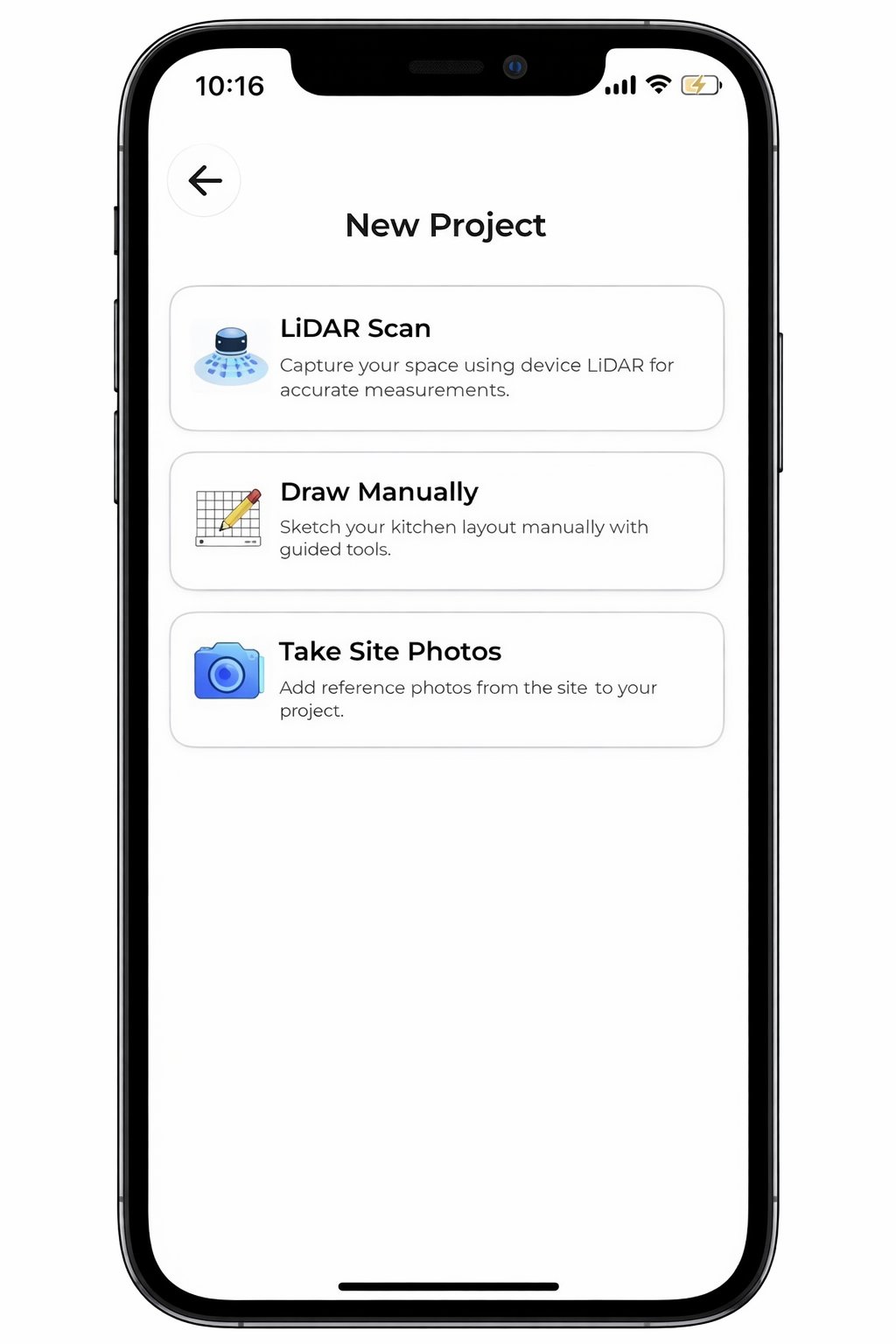
In 2026, a kitchen visualizer isn't a fun toy for homeowners. It's a high-velocity mobile CAD office that lives on a contractor's iPad. You know the frustration of spending hours with a tape measure only to lose another day at the office fighting with desktop software. By the time you finally send a rendering, the client's excitement has cooled. This delay is the primary reason project approvals stall and revisions never seem to end.
This guide shows you how a professional kitchen remodel visualizer app transforms messy job site notes into instant 3D layouts that close bids on the spot. You'll learn to use LiDAR scanning and AR visualization to eliminate manual errors and stop client indecision before it starts. We'll explore how mobile-first tools like ArchKit allow you to generate precise floor plans and cabinet layouts while you're still standing in the client's kitchen. It's time to trade administrative fatigue for immediate results, professional authority, and faster contract signatures.
Key Takeaways
- Learn how a professional kitchen remodel visualizer app replaces manual measurements with instant 3D renderings to eliminate office-dependent delays.
- Master LiDAR scanning to capture accurate room footprints in under five minutes without ever touching a tape measure.
- Discover why contractor-focused tools like ArchKit outperform DIY apps by using integrated catalogs of standard US cabinet sizes.
- Shorten your sales cycle by presenting real-time layout changes and 3D visualizations directly on the job site.
- Streamline your workflow by generating high-resolution project files and estimates on your mobile device before leaving the initial consultation.
Beyond the Gimmick: Why Modern Kitchen Visualizers are Essential for Pros
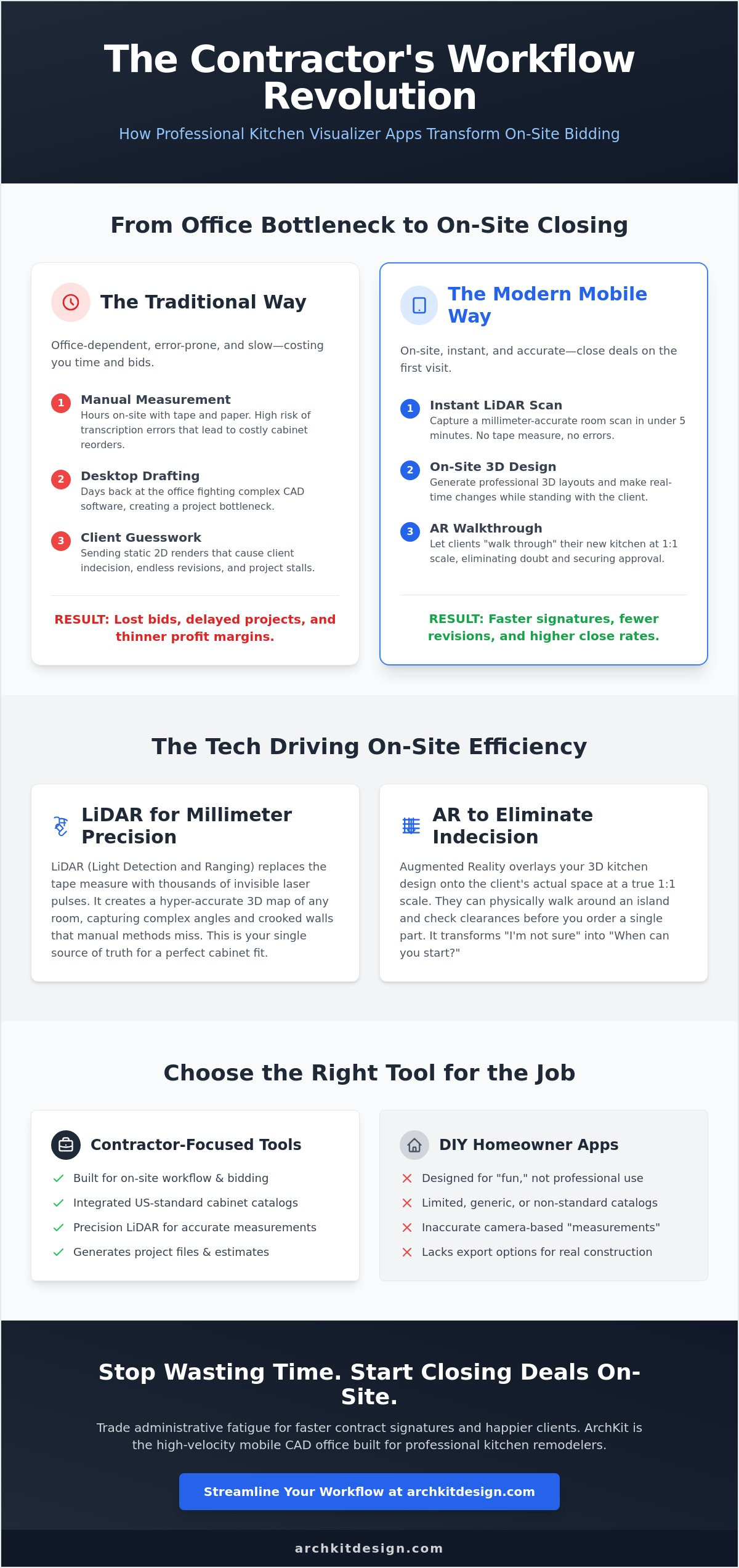
Stop treating visualization as a "bonus" for the client. In 2026, a professional kitchen remodel visualizer app is your mobile CAD office. The old way is dead. You used to visit a site, scribble on a notepad, and spend the next three nights at your desk. That office-first workflow creates a bottleneck. It delays your quotes and gives your competition a window to steal the job. The new digital reality happens on-site. You scan, you design, and you close. It's that simple. With 91% of homeowners planning renovations this year according to Home Interior Decor AI, you need every efficiency advantage to keep up with the demand.
This technology does more than show pretty pictures. It acts as the functional bridge between your initial measurements and the final estimate. By moving from static 2D sketches to immersive 3D environments, you eliminate the guesswork. You can find more details in our guide on The Best Kitchen Design App for Contractors. Designing in the field ensures that what the client sees is exactly what you build. It keeps the project moving forward without the friction of multiple trips back to the office.
The Death of the Manual Tape Measure
Manual measurements are a liability. Every time you pull a tape measure, you risk a transcription error or a misread mark. In a custom kitchen, being "just one inch" off isn't a small mistake. It's a reordered cabinet, a delayed install, and a massive hit to your profit margin. Since kitchen remodels in 2026 can cost upwards of $150,000, these errors are expensive. Digital tools create a single source of truth for the entire project. When you use a kitchen remodel visualizer app, the data is locked in. There are no misread numbers or lost scraps of paper. The software handles the math so you can focus on the craftsmanship.
Closing the Gap Between Vision and Approval
Client indecision is the number one killer of project momentum. Most homeowners struggle to visualize how a new layout fits their space. They say, "I'll get back to you," because they're afraid of making a permanent mistake. You can break that cycle with Augmented Reality (AR). Showing a client a 3D overlay of new cabinets on their actual walls changes the conversation. It removes the "maybe" and replaces it with "when can we start?" Tools like ArchKit make this transition seamless. You aren't just selling a kitchen. You're selling the confidence that the project will be perfect. This immediate validation leads to faster contract signatures and fewer revisions later.
The Tech Under the Hood: LiDAR and AR in 2026 Design Apps
The evolution of the kitchen remodel visualizer app relies on two core technologies: LiDAR and Augmented Reality (AR). In 2026, these aren't just buzzwords. They are the high-performance engines behind your on-site efficiency. Modern hardware like the iPad Pro and iPhone Pro series has made these tools accessible to every contractor. You no longer need $20,000 surveying equipment to get pro-grade results. Your mobile device is now a high-precision scanner. This accessibility allows you to skip the manual sketching phase and jump straight into a digital environment where errors are visible before they become expensive.
LiDAR Scanning for Millimeter Precision
LiDAR stands for Light Detection and Ranging. Think of it as "painting" the room with thousands of invisible laser pulses every second. These pulses bounce off surfaces and return to the sensor, creating an incredibly accurate map of the space. Unlike standard camera-based apps that guess dimensions based on photos, LiDAR-enabled tools measure the physical distance to every point. This is the professional application of LiDAR and AR that ensures your floor plans are accurate to the millimeter. It handles complex angles, ceiling soffits, and appliance bump-outs that usually cause measuring nightmares. By using light instead of a physical tape, you capture the as-built reality of a crooked wall or an unlevel floor that would otherwise ruin a cabinet install.
AR Walkthroughs: Walking Through a Future Kitchen
Once the room is scanned, AR takes over. It overlays digital 3D models onto the real-world job site through your screen. This isn't just for show. Use AR to check the spatial flow of a new layout at a true 1:1 scale. You can physically walk through the Work Triangle or dedicated prep zones before you order a single box. This immediate feedback loop identifies potential bottlenecks in the layout immediately.
- Check island clearances in real-time to ensure comfortable movement.
- Verify that dishwasher and oven doors won't block walkways when fully open.
- Test different cabinet heights against existing windows and trim.
Visualization at a 1:1 scale is the ultimate insurance policy against design errors. It helps you catch clearance issues that a 2D drawing might hide. If you want to see this in action, check out our deep dive into the 3D Kitchen Visualizer for Professionals.
Moving from 2D sketches to a live kitchen remodel visualizer app workflow saves hours of office-based revisions. You identify problems on-site, not during installation. This shift in workflow is about more than just speed. It's about professional authority. To start modernizing your process today, you can join the ArchKit waitlist for early access to these professional tools.
Professional vs. DIY: Evaluating Visualizer Apps for Your Toolkit
Don't confuse a consumer decorating app with a professional kitchen remodel visualizer app. DIY tools are built for homeowners who want to "play" with paint colors. They lack the precision, speed, and industry standards required to run a profitable remodeling business. When you're on a job site, you don't need inspiration. You need a mobile CAD solution that understands the physical reality of construction. A professional-grade tool must deliver three things: millimeter accuracy, high-velocity layout speed, and output that your installers can actually use.
The biggest differentiator is the output. Consumer apps often trap your data inside their ecosystem. A pro-level platform allows you to export high-resolution 2D floor plans and 3D renderings immediately. This ensures your team is working from the same single source of truth. If your app can't generate a dimensioned plan for the cabinet installer, it's a toy, not a tool. ArchKit bridges this gap by focusing on the contractor workflow, ensuring that every scan translates into a functional project file.
Catalog Depth: Beyond Basic Shapes
Generic 3D boxes don't cut it for a professional layout. You need a catalog that reflects US industry standards. A pro kitchen remodel visualizer app should feature specific 30, 36, and 42-inch wall cabinet models. It must also account for the technical details that make or break an installation. This includes fillers, end panels, and moldings. Without these elements, your visualization is just a guess. Precise modeling prevents the nightmare of a cabinet run that doesn't fit the actual wall. For a deeper look at what to look for, see our Professional Cabinetry Layout Tool Guide.
Workflow Integration: From Scan to Estimate
Efficiency dies when you have to manually transfer data between different pieces of software. A professional app should integrate your measurements directly into your estimating process. If you can't price the job while you're standing in the kitchen, you're losing time. Cloud syncing is also non-negotiable. Your field measurements should be available on your office computer before you even drive away from the house. However, "offline mode" is equally critical. You can't rely on a client's Wi-Fi or a weak 5G signal in a basement. Your tools must work anywhere, regardless of connectivity. This reliability is what separates an amateur workflow from a high-velocity professional operation.
5 Steps to Streamlining Your On-Site Client Presentations
Speed is your greatest sales tool. In a market where 91% of homeowners are looking to renovate, the contractor who provides the fastest, clearest vision wins. Stop telling clients what you can do. Show them. Integrating a kitchen remodel visualizer app into your initial consultation removes the friction that kills deals. Follow this high-velocity workflow to move from a cold lead to a signed contract in a single visit.
- Step 1: The Initial Scan. Open your app. Walk the perimeter. Capture the existing footprint, including plumbing stacks and electrical outlets, in under 5 minutes.
- Step 2: Defining the Layout. Test structural changes immediately. Swap a cramped L-shape for a modern island layout in real-time. Let the client see the spatial flow before you pull a single permit.
- Step 3: Component Placement. Drag and drop standard 36-inch bases and wall cabinets from the integrated catalog. Add appliances to verify the Work Triangle efficiency.
- Step 4: The AR Reveal. Hand the iPad to the client. Let them physically walk through the virtual design in their actual kitchen. This emotional connection closes bids faster than any 2D blueprint.
- Step 5: Instant Export. Generate a dimensioned 2D layout and a complete cabinet list. Send the project file to the client for an immediate digital signature.
The 'Wow' Factor: Winning the Bid on the Spot
Use AR to handle objections before they stall the project. If a client worries that a 48-inch island is too large for their floor plan, show them the clearance in a 1:1 scale walkthrough. You can even toggle between cabinet colors or wood tones like white oak and walnut, which are trending for 2026. This tech-forward approach positions you as an expert who values the client's time and precision. For more on mastering this hardware, read our guide to Mobile CAD for Kitchen Design.
Reducing Revisions and 'Change Order' Friction
Visualizers set clear expectations. They document the "as-built" reality versus the "as-designed" goal. When a client sees the final layout in 3D, they're less likely to say, "I thought it would look different," halfway through the install. This digital record protects your margins by reducing mid-project revisions. It turns vague ideas into a concrete plan that both parties agree on. To start closing more projects with this level of professional authority, secure your spot on the ArchKit waitlist today.
ArchKit: The High-Velocity Solution for Kitchen Remodelers
ArchKit is the kitchen remodel visualizer app built specifically for the high-velocity demands of US contractors. We didn't build this for homeowners to play with colors. We built it for pros who need a mobile CAD solution that works as hard as they do. Use LiDAR technology to transform a physical kitchen into a precise 3D model in seconds. Scan. Design. Close. This 'Scan to 3D' capability kills the manual measurement errors that lead to expensive cabinet reorders and wasted material costs.
Accuracy is only half the battle. You also need speed. ArchKit includes an integrated catalog of standard US cabinet sizes. Drag and drop 30, 36, and 42-inch units directly into your scan. Stop drawing boxes from scratch. This is professional-grade software for your iPad, not a stationary office computer. It moves the design process to the field where the decisions happen. To see how this fits your business model, check ArchKit pricing for our predictable professional subscription with unlimited scans.
Built for the Job Site, Not the Showroom
Job sites are messy. They're dusty, loud, and fast. ArchKit’s interface reflects this reality. We stripped the fluff to focus on rugged on-site performance. The controls are simple and direct. Navigate the app easily even in challenging environments. This focus on utility reduces measurement fatigue and keeps you focused on the client. Get the data you need without the administrative headache of traditional CAD software. It's about getting the job done right the first time and moving to the next project.
Get Started with ArchKit Today
Modernize your workflow immediately. Explore our features with the free kitchen design app. This version includes LiDAR scanning and basic layout tools to get you off the tape measure today. When you're ready to scale, our Pro plan offers up to 20 project files, full catalog access, and estimate creation. This ensures you have everything needed to provide a professional presentation before leaving the job site.
ArchKit is currently in an early access phase. We are onboarding a select group of professionals who want to lead the industry in digital efficiency. Join the early access program to secure your spot on the waitlist. Stop wasting time at the office. Start closing more bids on-site. Professional tools deliver professional results.
Take Control of Your Job Site Workflow
Manual measurements and office-bound design work are relics of the past. By adopting a professional kitchen remodel visualizer app, you reclaim your time and eliminate the errors that drain your profit margins. You've seen how LiDAR-powered precision creates a single source of truth for every project. You've learned how on-site AR walkthroughs build immediate client trust and eliminate indecision. These tools don't just save minutes; they save entire projects from the friction of revisions and change orders.
The future of remodeling belongs to the high-velocity contractor. Don't let project approvals stall while you're stuck at a desk. Move your CAD office to the field. Use standard US cabinet catalogs to verify clearances in real-time. This shift is about more than modernizing your tools. It's about building a more professional, successful business that secures more contracts with less administrative burden. You have the expertise. Now you have the digital edge to match it.
Stop the measurement fatigue and start delivering results that impress. Start your high-velocity kitchen design with ArchKit today. It's time to work smarter, build faster, and win the job on the spot.
Frequently Asked Questions
What is the most accurate kitchen remodel visualizer app for contractors?
LiDAR-powered solutions like ArchKit offer the highest accuracy for field professionals. These tools use laser pulses to map physical space rather than relying on camera-based estimations. This technology ensures your kitchen remodel visualizer app provides millimeter precision for cabinet runs and appliance clearances. It eliminates the risk of transcription errors from manual notes. You get a single source of truth before you even leave the job site.
Can I use an iPad Pro LiDAR scanner to measure for kitchen cabinets?
Yes, the iPad Pro’s LiDAR sensor is a powerful tool for measuring kitchen cabinets and layout footprints. It "paints" the room with light to capture every corner and plumbing stack instantly. This replaces the tedious process of pulling a manual tape measure across every wall. You get a digital floor plan that accounts for crooked walls and unlevel floors. This accuracy is essential for high-end cabinetry installs where every fraction of an inch matters.
Do kitchen visualizer apps include standard US cabinet sizes?
Professional platforms like ArchKit include integrated catalogs with standard US cabinet dimensions. You can drag and drop 30, 36, and 42-inch units directly into your 3D scan. This is a critical differentiator between contractor tools and DIY decorating apps. Having access to regional industry standards ensures your on-site layout is buildable. It prevents the frustration of designing a kitchen that won't fit the physical reality of the cabinets you order.
How do I show a client a 3D kitchen layout on-site?
You can demonstrate a 3D layout by using Augmented Reality (AR) features built into your mobile device. Simply scan the room and place your digital cabinets onto the existing walls through the screen. Hand the tablet to your client for a virtual walkthrough at a 1:1 scale. This interactive experience allows them to check clearances and spatial flow immediately. It’s the most effective way to resolve objections about island size or walkway width.
Is there a free kitchen design app that exports 2D floor plans?
Most free versions of a kitchen remodel visualizer app include basic scanning and layout tools but restrict professional outputs. For example, ArchKit’s free plan allows for LiDAR scanning and 3D views but excludes PDF exports and estimate creation. If you need dimensioned 2D plans for your installers, you generally need a professional subscription. Always verify the export capabilities of a free tool before relying on it for a client presentation.
Will a kitchen visualizer app work on an older iPhone without LiDAR?
Most modern design apps work on older iPhones using standard camera-based ARKit technology. You can still visualize layouts and show clients 3D models in their space. However, you won't have the millimeter precision that comes with a dedicated LiDAR sensor. These devices are excellent for the vision phase of a project but aren't recommended for final cabinet measurements. For high-stakes accuracy, upgrading to a Pro-level device is a standard industry recommendation.
Can I generate a cabinet list directly from a kitchen visualizer app?
Yes, professional visualizers automatically generate a comprehensive cabinet list from your 3D layout. This feature eliminates the manual task of counting boxes and fillers after the design is finished. It ensures that your estimate is accurate to the layout the client approved. By linking the visual design to the material list, you reduce the risk of ordering the wrong sizes. This integration is a key part of a high-velocity contractor workflow.
How much does professional kitchen design software cost in 2026?
Professional software pricing in 2026 typically follows a subscription model based on project volume and feature depth. Most platforms offer tiered plans ranging from free basic tools to comprehensive pro suites. You'll find that costs stay predictable when you choose a plan with unlimited scans and project files. While specific rates depend on the provider, investing in a professional tool is a standard cost of doing business. Check individual pricing pages for current specifications.


