
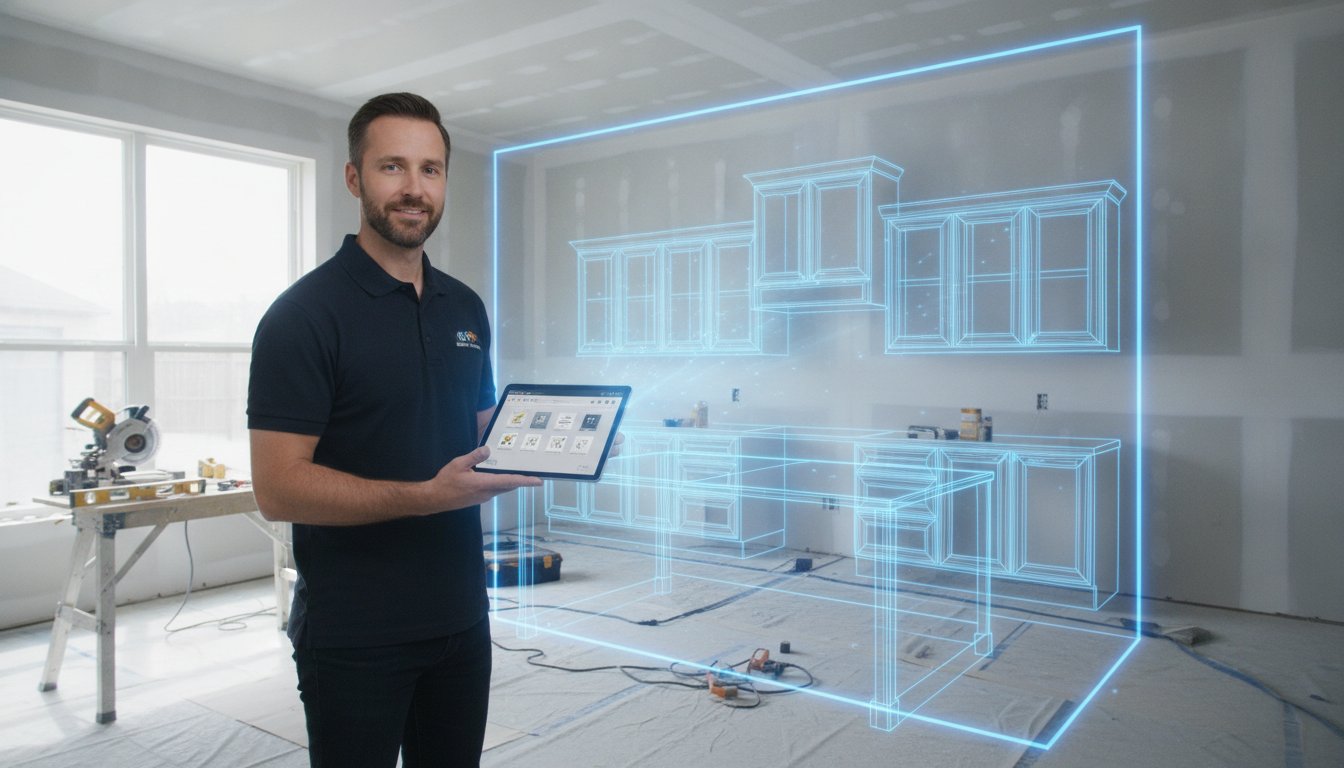
You're standing in a client's kitchen with a pencil and a notepad. One wrong digit on that pad leads to a custom cabinet that doesn't fit, eating your profit and killing your schedule. Finding the right kitchen design software for cabinet installers shouldn't require you to go back to an office and sit at a desk. The "Office Gap" between measuring and ordering is where project momentum dies and errors creep in.
This 2026 guide explores how mobile-first AR and LiDAR tools are replacing traditional CAD to streamline on-site measurements and cabinet layouts. We'll examine how tools like ArchKit Design turn your mobile device into a professional survey tool to generate instant 3D visualizations and accurate 2D floor plans in minutes. Stop carrying heavy laptops to dusty job sites. Start closing deals before you leave the driveway. Scan. Design. Approve.
Key Takeaways
- Eliminate project delays by moving your entire design process from a stationary office desk to a mobile-first jobsite workflow.
- Modern kitchen design software for cabinet installers utilizes LiDAR technology to generate millimeter-accurate 3D room models in seconds.
- Master a streamlined on-site process that takes you from an initial room scan to final client approval in a single sixty-minute visit.
- Use Augmented Reality (AR) to identify potential clearance issues and show clients their new space before any cabinets are ordered.
- Leverage professional field tools like ArchKit Design to switch instantly between 2D technical floor plans and immersive 3D perspectives.
Why Cabinet Installers are Abandoning Desktop CAD for Mobile Apps
Professional kitchen design software for cabinet installers has evolved. It’s no longer a clunky desktop program. It is now a mobile-first powerhouse that lives in your pocket. This technology combines precision measurement, instant 3D modeling, and real-time estimating in one device. For decades, Computer-aided design (CAD) required a high-end workstation and a quiet office. Those days are over. You need tools that work in the field, not just on a desk.
The "Office Gap" is the primary reason for this shift. When you leave a job site to "go home and draw it up," you kill project momentum. The client’s excitement cools. Details get lost in translation between your tape measure and your computer. Modern hardware, like the 2026 iPhone Pro and iPad Pro, eliminates this friction. These devices are now professional survey tools. They use LiDAR to capture every corner, utility, and obstruction with surgical accuracy. This isn't just a gadget. It's a competitive edge.
The Cost of Manual Measurement Errors
One bad measurement destroys your profit. Think about a single mismeasured 36-inch base cabinet. If that cabinet doesn't fit, you face a ripple effect. You lose the cost of the unit. You pay for rush shipping. You lose a day of labor. Worst of all, you lose client trust. Manual sketches often lead to interpretation errors. A "5" that looks like an "8" on a dusty notepad can cost thousands. Digital verification through a kitchen design app for iPhone ensures the data you capture is the data that gets ordered. Scan. Verify. Order.
Speed as a Competitive Advantage
In 2026, the "First-to-Quote" rule is absolute. Homeowners don't want to wait three days for a PDF. They want to see their future kitchen while you are still standing in their current one. Mobile software allows you to move from "I'll get back to you" to "Here is your kitchen" in under 15 minutes. Choosing the right kitchen design software for cabinet installers is about more than just drawing lines; it's about closing the deal before you leave the driveway. This immediate professional visualization builds instant authority. You aren't just a contractor. You're a solution provider. By presenting a 3D layout on-site, you answer questions before they are asked. You close the gap. You win the contract.
LiDAR and AR: The New Gold Standard for Kitchen Measurements
The days of fumbling with a tape measure while trying to balance a clipboard are over. Modern kitchen design software for cabinet installers leverages LiDAR technology to turn your mobile device into a high-precision scanner. LiDAR, or Light Detection and Ranging, works by firing thousands of laser pulses every second to map a physical space. It creates a dense 3D point cloud that captures the exact geometry of a room in real time. This isn't just about speed; it's about eliminating the human error that leads to mis-ordered cabinets.
Accuracy remains the biggest concern for any trade professional. While some skeptics argue that traditional laser distometers are superior, modern LiDAR sensors on the 2026 iPhone and iPad Pro models now rival dedicated hardware for cabinetry layout. These tools don't just measure a single point. They map the relationship between every surface in the room. By using these sensors, contractors are reducing site visit times by 50% while simultaneously increasing the reliability of their data. You can now walk into a kitchen and walk out with a perfect digital twin in minutes.
Scanning the Job Site with LiDAR
Capturing a room requires a systematic approach. Start at the entry and move slowly around the perimeter. Aim the device at the floor-to-wall junctions, then sweep upward to capture windows, doors, and plumbing points. The software automatically detects ceiling heights and floor irregularities that a standard tape measure might miss. For 2026 construction standards, LiDAR serves as the definitive digital foundation for all on-site spatial verification. If you want to master this process, check out this LiDAR kitchen scanner app guide for a deep dive into professional accuracy.
Visualizing the Future with AR Overlays
Once the scan is complete, Augmented Reality (AR) takes over. This technology allows you to overlay 3D cabinet designs directly onto the physical walls of the existing kitchen. Hand the iPad to your client. Let them walk through their "new" space. This immersive experience does more than just impress; it identifies critical clearance issues before you place an order. You can see if a fridge door will hit a new island or if a pull-out pantry has enough clearance. This level of detail is why the NKBA on 3D Design Software emphasizes the importance of visualization in modern workflows.
The "X-Ray" view is a particularly powerful feature. It allows you to visualize cabinet internals, like pull-out bins and tray drawers, in the real space. This transparency builds confidence and speeds up the decision-making process. To start using these tools on your next project, you can get early access to our professional field tools and see the difference on-site.
Essential Features of Professional Cabinet Layout Software
A pretty picture doesn't build a kitchen. Once your LiDAR scan is complete, your software must translate that data into a buildable layout. Professional kitchen design software for cabinet installers differs from consumer apps by prioritizing technical accuracy over generic style. You need a tool that understands the constraints of a physical box. This means having instant access to a comprehensive catalog of standard U.S. cabinet sizes and the ability to toggle between 2D technical floor plans and immersive 3D perspectives.
Cloud-based project management is equally critical. You shouldn't have to wait until you're back at a desk to share a layout with your shop or back-office. Modern field tools allow you to sync your site data immediately. This ensures that the person ordering the materials sees exactly what you saw on-site. It eliminates the "interpretation gap" that often leads to project delays. When the shop has the same data as the installer, the chance of a mis-ordered unit drops to near zero.
Standardized Catalogs vs. Custom Dimensions
Efficiency in the field depends on speed. You can't waste time manually drawing every box. Look for software that includes pre-loaded libraries with 9-inch to 48-inch standard increments. These should be ready to drag-and-drop into your 3D room model. However, real-world walls are rarely plumb. Your layout tool must allow for precise adjustments for fillers, toe-kicks, and scribe pieces. To understand what to look for in a professional-grade interface, read our full breakdown of The Professional Cabinetry Layout Tool. It covers the specific technical requirements for 2026 construction standards.
Automated Estimating and Cut Lists
The transition from design to dollars should be seamless. When you finish a layout, the software should generate an itemized list automatically. This reduces material waste by providing an exact cabinet count based on your 3D model. You can then generate a professional PDF quote to hand to the homeowner before you leave the job site. Exporting these layouts directly to manufacturers or wholesalers ensures that what you designed is exactly what gets delivered. This automated workflow turns a complex estimating task into a 30-second export process. Accuracy saves your margin. Speed wins the contract. Don't settle for tools that require manual tallying; your time is too valuable for basic math.
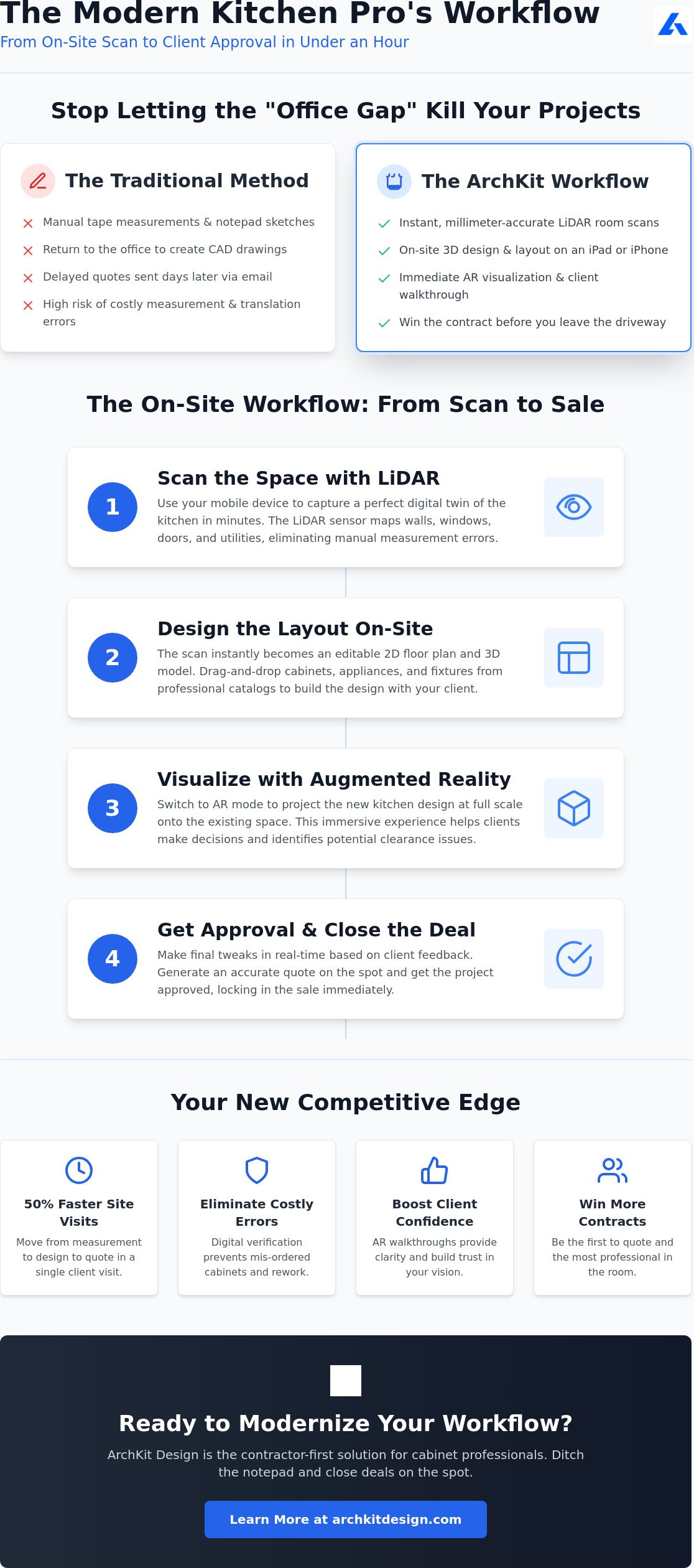
The On-Site Workflow: From Scan to Client Approval
The site visit is your primary opportunity to demonstrate expertise and secure a project. Speed is essential, but accuracy is what protects your profit. By utilizing professional kitchen design software for cabinet installers, you can compress the timeline from initial measurement to a signed contract into a single hour. This workflow moves beyond simple data collection, turning a routine survey into a collaborative design session that builds immediate client confidence. You eliminate the traditional delays of the office-bound design process by delivering results while you are still in the room.
Step 1: The Digital Site Survey
Success begins with a clean environment. Clear the counters and remove obstructions before opening the ArchKit Design app to scan the perimeter. While the LiDAR sensor maps the room geometry, you must actively mark "hard points" such as plumbing lines, gas valves, and electrical outlets within the model. This step prevents the nightmare of a cabinet blocking a critical utility or an appliance being placed over a vent. While the technology is highly precise, performing a quick manual check on critical tolerances provides a layer of digital verification that ensures a perfect fit every time.
Step 2: Rapid Layout Prototyping
Once the room is mapped, start placing cabinets to establish the functional "Work Triangle." Drop in the sink, stove, and refrigerator to see how the space flows. Use AR to walk the floor with the client, checking if an island leaves the necessary 42 inches of clearance for traffic. You can even verify if dishwasher doors or pull-out bins have enough room to fully extend without hitting the opposite cabinets. Seeing the layout at a 1:1 scale in the actual room solves spatial disputes before they become change orders. For a deeper dive into functional standards, see our Kitchen Layout Principles for Contractors.
Step 3: Presentation and Closing
Switch to "Presentation Mode" to hide technical grids and focus the client on the vision. This is your most powerful tool for securing a deposit. When a client asks to move a sink or adjust an island, you can make those changes in seconds rather than days. This immediate response shows that you value their time and understand their needs. Finalize the design and send a link directly to the client's phone for immediate review. When they can see their new kitchen on their own device, the decision to move forward is easy. To start closing more deals on your first visit, get early access to our professional on-site workflow tools.
ArchKit Design: The Contractor-First Solution for Cabinet Professionals
ArchKit Design isn't just another CAD program ported to a tablet. It is a purpose-built kitchen design software for cabinet installers who spend their days on active job sites. While legacy software focuses on the manufacturing plant, ArchKit Design focuses on the point of sale and the point of measurement. It bridges the gap between a client’s vision and a builder’s reality. By moving the design process to the field, you eliminate the administrative fatigue that comes with office-dependent workflows. You stop being a middleman between your tape measure and your computer. You become a high-velocity design professional.
The software leverages the raw power of 2026 mobile hardware to handle the heavy lifting. It uses a specialized U.S. cabinet catalog to simplify the estimating process. You don't have to build boxes from scratch. You select a 36-inch base, drop it into your LiDAR scan, and watch the estimate update in real time. This mobile-first approach is the new standard for the trade. It respects your time. It protects your profit. It makes you the most professional person in the room.
Built for iPhone and iPad Pro
Efficiency requires hardware that keeps up. ArchKit Design is optimized for the latest Apple silicon to ensure a fluid experience. There is no lag, even when navigating complex 3D models with hundreds of components. This performance is critical when you are standing in front of a client. You need results, not a loading screen. The offline mode is equally vital. You can scan, design, and estimate in basements, rural new builds, or steel-framed structures where Wi-Fi and cellular signals are non-existent. Your work doesn't stop just because the internet does. For a complete breakdown of these field-tested features, read ArchKit Design: The Ultimate Kitchen Design App for Contractors.
Pricing and ROI for Small Businesses
Legacy desktop software often carries a heavy upfront cost or restrictive enterprise contracts that don't fit a contractor's budget. ArchKit Design uses a flexible model designed for the independent professional and small remodel firm. The return on investment is immediate. Think about the cost of a single mismeasured corner cabinet or a wasted afternoon driving back to a site for a forgotten dimension. One avoided error pays for a year of service. You save hours of office work every week. You close deals on the first visit. You eliminate material waste. To find a plan that matches your project volume, view ArchKit Design pricing plans. Start your transition to a mobile-first workflow today and leave the stationary office equipment behind.
Take Command of the Job Site
The transition from stationary office CAD to mobile-first field tools is no longer a luxury. It is a survival strategy for 2026. By adopting professional kitchen design software for cabinet installers, you eliminate the administrative drag that leads to mis-ordered units and lost margins. You've seen how LiDAR-powered accuracy and instant 2D/3D generation turn a simple site survey into a high-conversion presentation. You don't just measure a room; you master it. The friction between your tape measure and your final order is finally gone.
Leveraging a standard U.S. Cabinet Catalog directly on your iPad ensures your estimates are as precise as your scans. This workflow allows you to close deals before you even leave the driveway. Stop waiting for the office to catch up. Deliver immediate results that impress clients and protect your bottom line. Trade your tape measure for a digital survey tool that works as hard as you do. Scan. Design. Approve.
Get early access to ArchKit and transform your on-site workflow. Your next successful project starts the moment you walk through the door. Build with confidence. Scale with speed. Win the contract.
Frequently Asked Questions
Is kitchen design software for cabinet installers accurate enough for final orders?
Yes, professional kitchen design software for cabinet installers is accurate enough for final orders when paired with LiDAR sensors. This technology captures dimensions within a fraction of an inch, creating a reliable digital twin of the job site. It eliminates the transcription errors common with manual measurements. We always recommend a quick manual check on critical tolerances to ensure your final order accounts for specific site conditions like out-of-plumb walls.
Do I need an internet connection to use ArchKit Design on a job site?
No, ArchKit Design includes a robust offline mode designed for the realities of the field. You can scan rooms, place cabinets, and generate 3D models in basements or new builds where cellular signals are non-existent. Your project data syncs to the cloud automatically once you return to a connected area. This ensures your workflow never stops just because you lack a stable Wi-Fi connection on-site.
Can I export my 3D designs to 2D floor plans for my installation crew?
Yes, you can generate detailed 2D technical floor plans directly from your 3D models with one tap. These plans include the specific dimensions, clearances, and cabinet schedules your installation crew needs for a successful build. Providing clear, digital documentation significantly reduces the risk of expensive on-site mistakes. It allows your team to move faster and work with higher confidence during the final installation phase.
Does the app support standard U.S. cabinet sizes?
Yes, the software includes a comprehensive catalog of standard U.S. cabinet sizes in standard 3-inch increments. You can quickly drag and drop base, wall, and tall cabinets into your layout without manual drawing. The library supports everything from 9-inch spice pull-outs to 48-inch pantry units. Adjusting for fillers, toe-kicks, and scribe pieces is simple, ensuring your digital layout matches the physical constraints of the kitchen.
What hardware do I need to use LiDAR scanning for kitchen design?
You need an iPhone Pro or iPad Pro model equipped with a LiDAR sensor to leverage automated room mapping. These devices use laser pulses to create a precise 3D point cloud of the space in real time. While older devices can still run the app for manual layout tasks, they won't support the rapid "scan-to-model" features. Using 2026 hardware ensures you get the maximum speed and accuracy required for professional cabinetry work.
Can I use the app to create a professional estimate for my clients?
Yes, ArchKit Design automatically generates itemized lists and professional PDF quotes based on your finished 3D layout. This feature allows you to provide a detailed estimate to the homeowner while you are still at the kitchen table. You reduce administrative time and improve your chances of securing a deposit on the first visit. Accuracy in estimating protects your profit margins and builds immediate trust with your clients.
How long does it take to learn how to scan a room with ArchKit Design?
Most professionals master the basic scanning process in less than 15 minutes of hands-on practice. The interface is built for the field, making it intuitive for contractors and remodelers who are used to physical tools. Start by clearing the counters and sweeping your device around the room perimeter. The app provides real-time visual feedback to ensure you capture every corner, utility, and plumbing point with professional precision.
Is there a free version of the kitchen design app available?
Yes, ArchKit Design offers a free version that includes LiDAR scanning and basic layout tools for a single project. This allows you to test the mobile-first workflow on a real job site before committing to a subscription. When you are ready to scale, you can upgrade to a professional plan for unlimited projects, PDF exports, and advanced estimating. It's the most efficient way to modernize your cabinetry business without upfront risk.


