

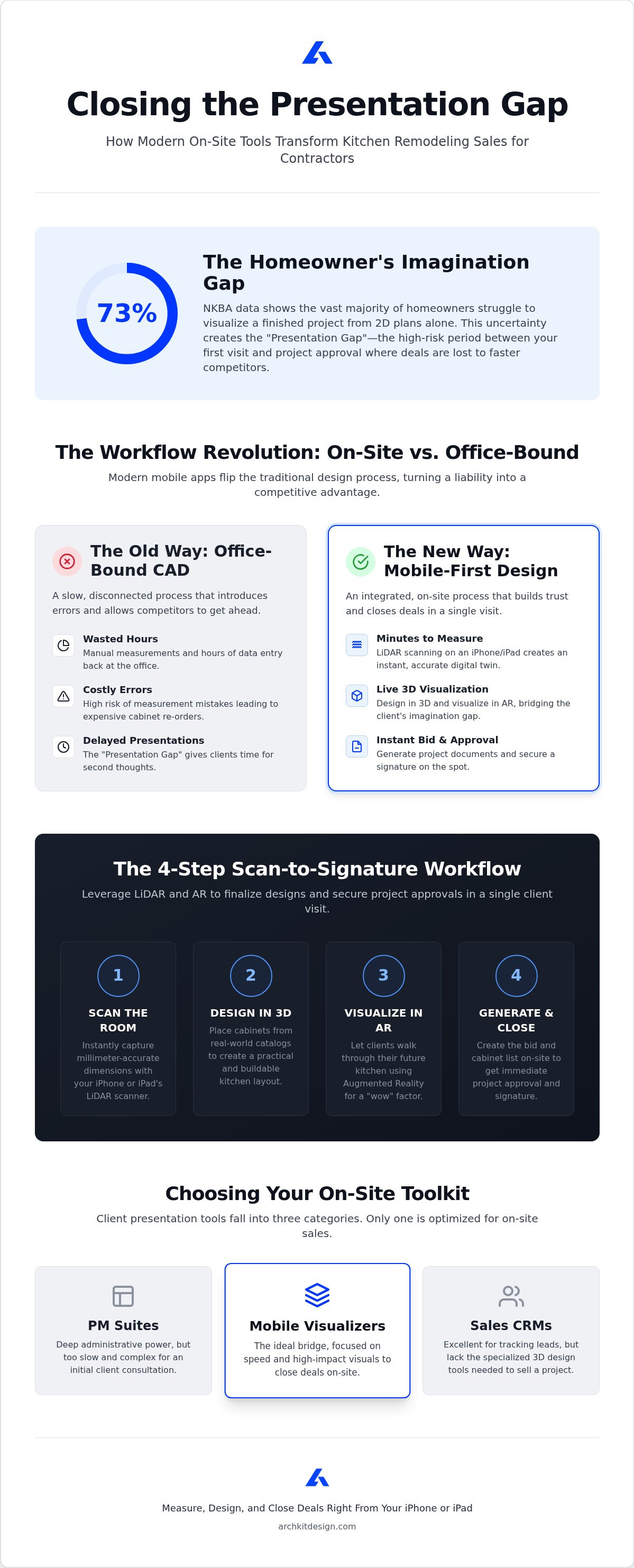
According to NKBA data, 73% of homeowners struggle to visualize a project from 2D plans alone. You know the frustration of watching a lead go cold because they can't see your vision. You spend hours in the office building renderings, only to find a competitor already closed the deal with a faster pitch. Finding the right client presentation software for kitchen contractors changes that. You'll discover how to turn a simple walkthrough into a high-impact sales event.
This guide reviews the best 2026 tools to help you generate instant 3D visualizations and accurate on-site estimates. We'll look at mobile-first solutions like ArchKit. These tools use LiDAR kitchen measurement to eliminate cabinet re-orders and slash approval cycles. Stop tethering yourself to a desk. It's time to measure, design, and close deals right from your iPhone or iPad.
Key Takeaways
- Eliminate the "Presentation Gap" by moving your design process from the office to the job site to prevent competitors from undercutting your leads.
- Compare the top three categories of client presentation software for kitchen contractors to identify which tools prioritize on-site portability and visual impact.
- Master a streamlined 4-step workflow that uses LiDAR technology to scan a room and generate a professional bid in minutes.
- Leverage Augmented Reality to bridge the imagination gap, allowing clients to walk through their new kitchen layout before construction begins.
Closing the Presentation Gap: Why Speed and Visuals Matter in 2026
The "Presentation Gap" is the high-risk period between your initial site visit and final design approval. In 2026, this gap is where deals often disappear. Every day you spend away from the client allows buyer's remorse to set in or a faster competitor to enter the chat. Modern client presentation software for kitchen contractors bridges this void by delivering high-impact visuals immediately. Seeing a photorealistic 3D model layered over their actual room via AR creates an instant emotional bond. It moves the project from an abstract idea to a concrete reality. Mobile CAD tools eliminate the "I'll get back to you next week" bottleneck by finalizing the design while you're still on-site.
The True Cost of Delayed Renderings and Office-Bound CAD
Legacy Computer-aided design (CAD) workflows tether you to a desktop for hours of manual data entry. You waste valuable time translating hand-drawn sketches into stationary software. This disconnect invites measurement errors that lead to expensive cabinet re-orders. Manual drafting is a liability that slows your growth. Adopting on-site kitchen design tools serves as a critical competitive differentiator. You verify dimensions in real-time, catching errors before they become costs. You reclaim the hours usually lost to office-bound rendering. Presenting a finished layout in minutes signals professional authority and builds trust. Speed ensures you secure the signature before the client has a chance to second-guess the investment.
Top Client Presentation Software for Kitchen Contractors Compared
Choosing client presentation software for kitchen contractors requires balancing three factors: speed, visual fidelity, and on-site portability. Most professional tools fall into three distinct categories. All-in-one Project Management (PM) suites offer deep administrative power but are often too slow for a first-visit consultation. Sales CRMs excel at tracking leads but lack the 3D design tools needed to close a deal. Mobile visualizers like ArchKit bridge this gap by focusing on the immediate presentation. They allow you to build a design and a bid simultaneously while standing in the client's kitchen, turning a simple estimate into a high-impact sales event.
Mobile-First Design Apps vs. Legacy Desktop Software
Legacy desktop software forces a "measure-then-draw" workflow that is becoming a liability. You take manual notes, drive back to the office, and spend hours in stationary CAD programs. Modern mobile apps flip the script with a "scan-to-design" process. By Leveraging Pocket Lidar technology, you capture room dimensions instantly on your iPhone or iPad. This ensures your floor plans are millimeter-accurate before you ever open a cabinet catalog, eliminating the risk of costly re-orders.
Professional presentations require realism. Using standard U.S. cabinet catalogs within your layout ensures your designs are buildable and your estimates are accurate. Before committing to a new tool, review this guide on kitchen design software pricing to help weigh your potential ROI. Benchmarks like ArchKit pricing show that professional mobile tools are now more accessible than traditional enterprise software. You can try the scan-to-CAD workflow today to see how much office time you can reclaim this week.
Presenting the Future: Using AR and LiDAR to Secure Project Approvals
The most effective client presentation software for kitchen contractors leverages a lean, four-step workflow. First, scan the room. Second, drop in standard U.S. cabinets. Third, visualize the layout in AR. Finally, generate the bid. LiDAR technology ensures millimeter-accurate measurements, which builds client trust instantly. You aren't just guessing; you're proving the design fits their physical space. This precision creates a "wow factor" that static 2D plans can't match. Hand the iPad to your client. Let them walk through their new kitchen before you've even touched a demo hammer. This immersive experience bridges the imagination gap and moves the project toward an immediate signature.
From 3D Scan to Client Signature in One Visit
Closing the deal on-site requires a structured approach. Use this checklist to maximize the impact of your 3D kitchen visualizer during the consultation:
- Scan every corner to create a digital twin of the current space.
- Place island and perimeter cabinets based on real-world dimensions.
- Toggle between different finishes to resolve aesthetic indecision.
- Review the generated cabinet list and project documentation together.
Handling objections becomes a live design exercise rather than a week-long email chain. If a client wants a larger island or a different cabinet layout, modify the 3D model instantly. The speed of a LiDAR kitchen scanner app ensures these changes are error-free. You provide a level of transparency that office-bound competitors can't replicate. Finalize the details, show the price, and secure the approval before you leave the driveway. This mobile-first workflow transforms your iPhone or iPad into a powerful closing tool.
Modernize Your Sales Process and Close Deals On-Site
Modernizing your kitchen remodeling business is no longer optional. It's a competitive necessity. You've seen how the right client presentation software for kitchen contractors eliminates the delays that kill project momentum. By switching from office-bound CAD to a mobile-first workflow, you reclaim hours of administrative time while providing the "wow factor" clients expect in 2026.
LiDAR-powered accuracy ensures your measurements are perfect from the start. Using a standard U.S. cabinet catalog allows you to generate instant 2D/3D layouts that are both beautiful and buildable. This level of transparency builds immediate trust and lets you secure project approvals before you even leave the driveway. Stop waiting for the office. Start closing today.
Take control of your workflow and impress your clients with professional, immediate results on every job site.
Frequently Asked Questions
What is the best client presentation software for small kitchen remodeling businesses?
The best client presentation software for kitchen contractors balances low overhead with high visual impact. Mobile-first tools like ArchKit are ideal because they replace expensive desktop CAD licenses. They allow solo contractors to present professional 3D designs on-site without a dedicated designer. This efficiency helps small firms compete with showrooms by offering faster turnarounds and immersive visuals.
Can I use an iPad to show 3D kitchen designs to my clients on-site?
Yes, you can use an iPad to present 3D designs directly to your clients during a walkthrough. Modern apps are built specifically for iPad Pro and iPhone models. These devices handle complex rendering effortlessly. It's more engaging than a printed plan because it allows for real-time adjustments while standing in the space. Hand the device to your client for a truly immersive experience.
How does LiDAR technology improve kitchen measurement accuracy for contractors?
LiDAR kitchen measurement technology uses laser pulses to create a precise digital twin of the room. It captures exact dimensions in seconds. This doesn't just save time; it eliminates the human error associated with manual tape measures. For contractors, this means fewer cabinet re-orders and a faster transition from the initial scan to a buildable 3D kitchen design.
Is there a kitchen design app that includes standard U.S. cabinet sizes?
ArchKit is a specialized kitchen design app that features a catalog of standard U.S. cabinet sizes. Designing with real dimensions ensures your layouts are physically possible and your estimates are accurate. Using standardized sizes helps you generate project documentation that dealers understand. This feature makes it a reliable cabinet layout tool for professionals who need precision on the job site.
How do AR walkthroughs help in getting project approvals faster?
AR walkthroughs allow clients to see their new kitchen overlaid on their existing space. This immersive experience bridges the imagination gap that often stalls a sale. When a homeowner walks through their future kitchen using an iPad, they feel more confident in the design. Increased confidence leads to faster approvals and fewer requests for major revisions during the project.
Do I need an internet connection to present 3D models to clients on a job site?
Most mobile-first design tools allow you to measure and design without a continuous internet connection. Local processing on your iPhone or iPad handles the LiDAR scanning and 3D rendering. You'll need a connection later to sync projects to the cloud or export PDF documentation. This flexibility ensures you can deliver a high-quality presentation even in homes with poor cellular reception.


