
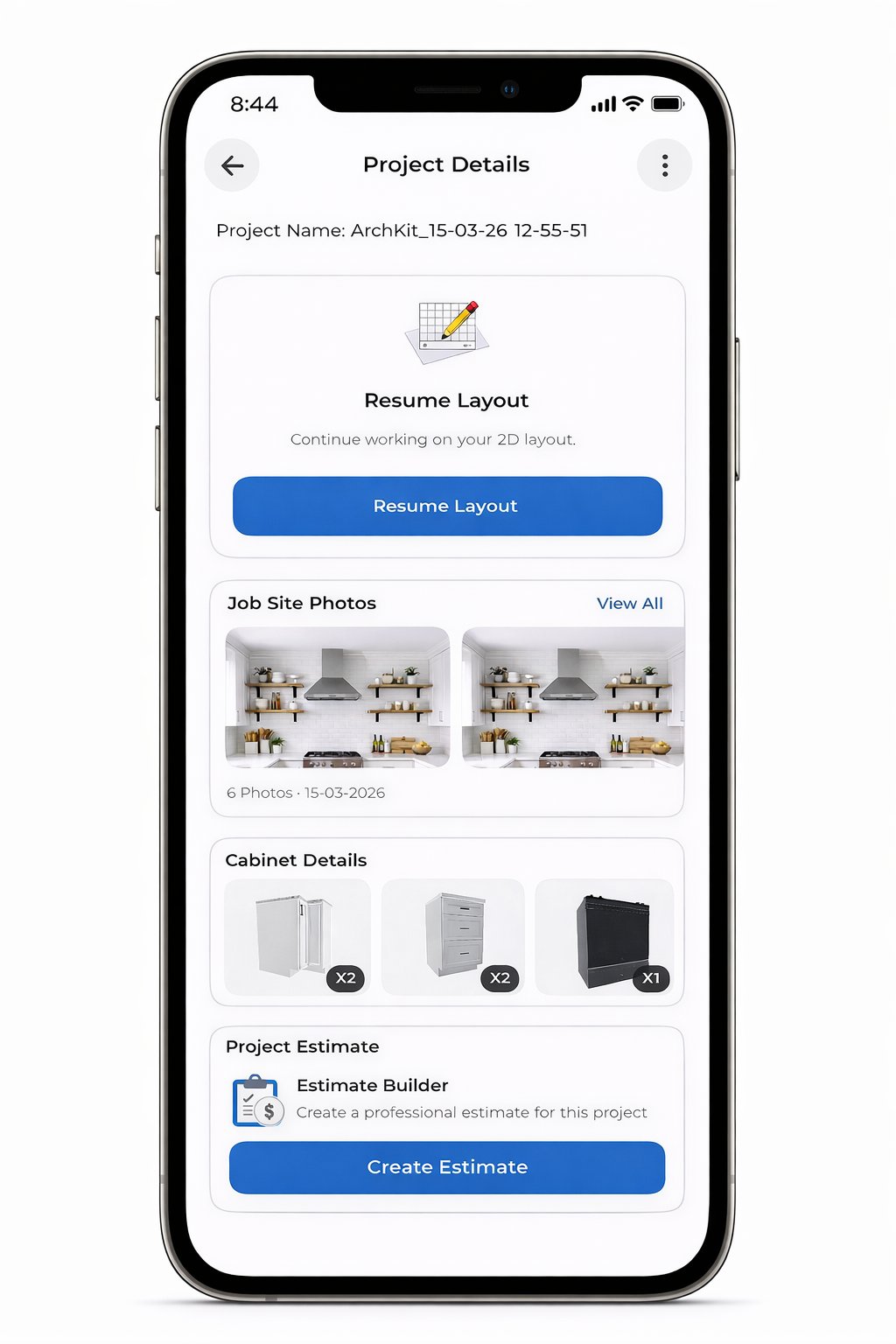
Your tape measure is officially a backup tool. In 2026, the speed of your project approval depends on the tech in your pocket, not the laptop back at your truck. Manual measurement errors lead to expensive cabinet re-orders and massive administrative fatigue. You've likely felt the frustration of a lead going cold while they wait days for a 3D rendering. Integrating an AR kitchen layout tool into your field workflow changes the game by moving the entire design process to the job site.
Stop losing momentum to slow office-dependent workflows and paper blueprints. We'll show you how to master a professional workflow that delivers results in real-time. This guide covers how to scan rooms with LiDAR, generate accurate 3D layouts in under 10 minutes, and provide immediate estimates. Using ArchKit Design to visualize designs directly in a client's home allows you to win more contracts by removing the guesswork. Modernize your trade. Impress your clients. Reclaim your time.
Key Takeaways
- Master the on-site workflow to transition from a physical room to a digital 3D envelope in under five minutes.
- Replace manual tape measurements with an AR kitchen layout tool to eliminate cabinet re-order errors and slash measurement time.
- Use ArchKit’s integrated cabinet catalogs to create "fill-to-fit" layouts that follow standard 3-inch increments directly in front of the client.
- Generate immediate project estimates and 3D walkthroughs to secure contract approvals before leaving the job site.
- Identify the hardware requirements to turn your mobile device into a precision-grade design and bidding workstation.
What is a Professional AR Kitchen Layout Tool?
A professional AR kitchen layout tool is a precision field instrument, not a visual toy. It combines high-speed LiDAR scanning with Augmented Reality (AR) to map physical job sites in seconds. Gone are the days of manual tape measures and messy sketches on napkins. You can now establish a 3D room envelope while you stand in the client’s kitchen. This tech effectively replaces stationary CAD software and bulky laptops. It allows you to project 3D cabinets and appliances over the existing space in real-time. You see the layout. The client sees the vision. The project moves forward without the usual administrative delays.
Efficiency is the primary goal. By merging the measurement phase with the design phase, you eliminate the "dead time" between a site visit and a proposal. Professional tools are built to handle the high stakes of a kitchen remodel. They account for the physical constraints of the room; this ensures that every cabinet you place digitally will actually fit during installation. You aren't just showing a picture. You are building a digital twin of the job site.
Consumer vs. Contractor-Grade AR Tools
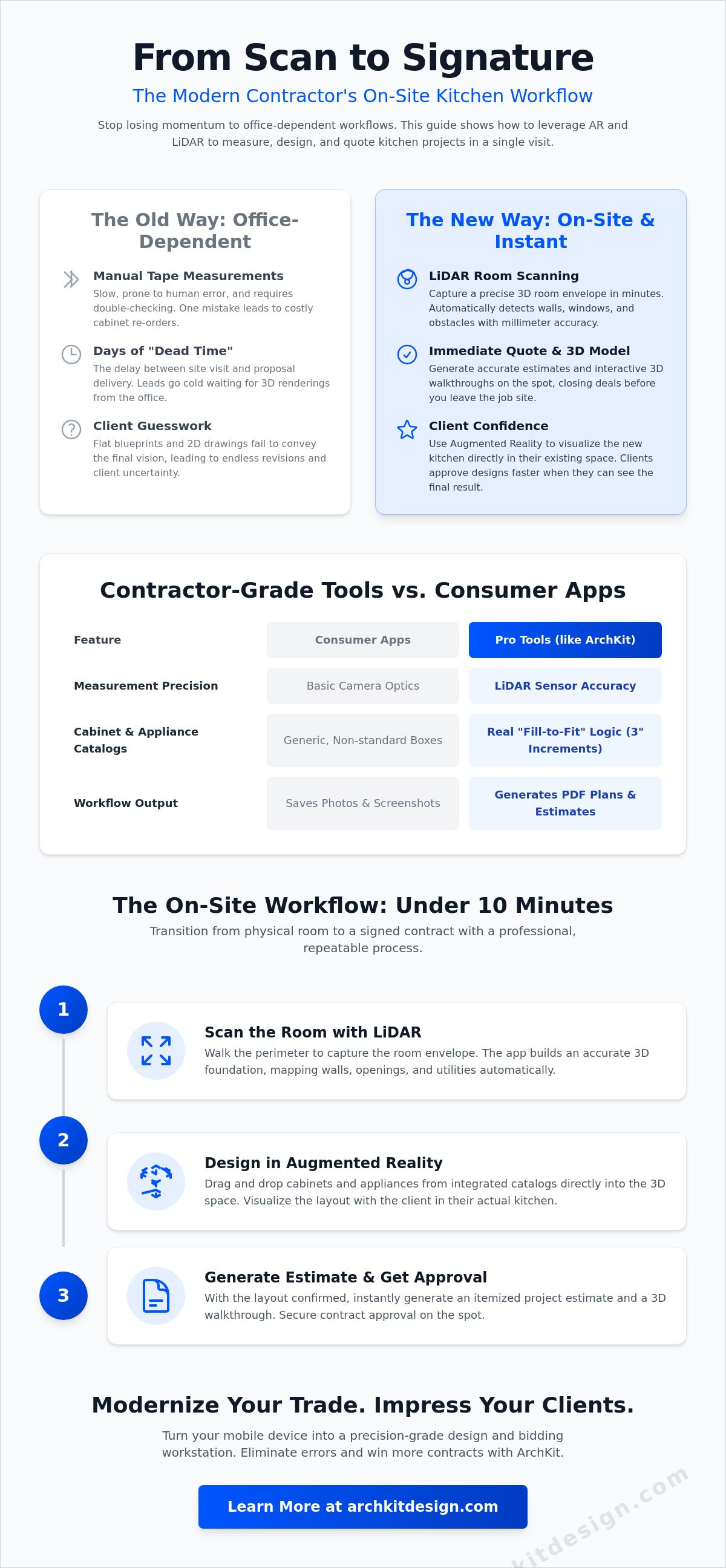
Don't confuse professional software with free furniture-placement apps. Consumer tools are built for general aesthetics, but contractor-grade tools are built for bids. Free apps often fail the accuracy test because they don't account for wall plumb or precise plumbing locations. Professionals need millimeter-precision floor plans to avoid cabinet re-orders. ArchKit Design bridges this gap by integrating design with business logic. It pairs the visual layout with your estimating and project management systems. You aren't just designing; you're building a data-driven proposal that protects your margins. Key differences include:
- Precision: Pro tools use LiDAR sensors; consumer apps use basic camera optics.
- Catalog Logic: Contractor tools use real cabinet increments (3-inch rules), not generic boxes.
- Workflow: Pro tools export PDF plans and estimates; consumer apps just save photos.
The Role of LiDAR in 2026 Kitchen Design
LiDAR stands for "Light Detection and Ranging." It’s a laser scanning system that maps a room by firing light pulses and measuring the return time. This process creates a dense "point cloud." It identifies the exact position of walls, windows, and floor-to-ceiling heights. In 2026, using an iPad Pro LiDAR scanner app is the industry standard for remodelers. It captures the room's geometry faster than any laser meter. It maps the plumbing points and electrical outlets automatically. This level of detail ensures your 3D layout is grounded in physical reality, not just a rough estimate. It's the difference between a project that fits and a project that requires a mid-install redesign.
Mastering the On-Site Workflow: From LiDAR Scan to 3D Layout
Success on-site starts before you open the app. Clear the countertops. Open the blinds. The sensors in your device require adequate lighting to map surfaces accurately. Once the room is prepped, launch your AR kitchen layout tool. This is where the manual labor of measuring ends and the digital workflow begins. You aren't just taking notes; you're building a live model that reacts to the physical environment. This process eliminates the "measurement lag" that typically stalls project kickoffs.
Step 1: Capturing the Room Envelope
Start at the primary entrance. Walk the perimeter slowly. Aim the camera at the intersection of walls and floors. Identify anchor points like door frames and corners to lock the geometry into place. Don't worry about existing cabinetry; modern LiDAR sensors can often interpret the wall plane behind obstacles to maintain accuracy. The Room Envelope is the digital foundation for all cabinet placement. By establishing this 3D boundary first, you ensure that every virtual component you add later stays perfectly aligned with the real-world architecture. Scan the ceiling and floor to lock in the vertical height, which is critical for planning full-height pantry units or crown molding clearances.
Step 2: Populating the Layout with Virtual Cabinets
Transition to the design phase immediately. Open the integrated catalog within ArchKit Design. Select standard U.S. cabinet sizes to ensure your design remains grounded in reality. Drag and drop base units, wall cabinets, and major appliances into the 3D space. If you encounter soffits or plumbing stacks, adjust the cabinet heights and depths instantly. Use the 3D kitchen visualizer for professionals to check clearances between islands and perimeter runs. This step ensures that your proposed layout meets functional standards and avoids costly field modifications.
After the layout is set, switch to AR mode for the final review. Hand the device to the client. Let them walk through their new kitchen at a 1:1 scale. This immersive experience unites design and construction by providing a shared vision of the finished product. It reduces "change order anxiety" and builds immediate trust. Once they approve the visual, export the 2D floor plans and 3D renderings directly to your contract. You've just moved from a blank room to a signed bid in one visit. To streamline your next project, get early access to the ArchKit Design workflow and start bidding faster.
AR Visualization vs. Manual Measurement: Solving the Accuracy Objection
"Can I trust these digital measurements?" It’s the first question every veteran contractor asks. The answer is found in the hardware. In 2026, iPhone and iPad LiDAR sensors are accurate to within 1 to 2 percent at room scale. This isn't a toy; it's a precision instrument. Using an AR kitchen layout tool eliminates the margin for human error that plagues manual measuring. You aren't just reading a tape; you're capturing millions of data points per second. This digital capture removes the "transcription error" that happens when moving from paper notes to office CAD software. What you scan is what you design.
Compare the timelines. A thorough manual measurement of a complex kitchen takes 30 to 60 minutes. A LiDAR scan takes 3 to 5 minutes. You gain nearly an hour of billable time on every site visit. More importantly, you can double-check your work in AR mode before you leave the house. Overlay your 3D model onto the physical walls. If a cabinet overlaps a window casing or blocks an outlet, you see it instantly. No more "measure twice, cut once" anxiety. You measure once and verify in real-time.
Reducing Costly Measurement Rework
A 1/2-inch error in a custom cabinet order is a financial disaster. It leads to re-orders, delayed installs, and evaporated margins. Automated floor plans eliminate the "forgotten measurement" that forces a second site visit. You capture every corner, soffit, and plumbing point in a single pass. For a deeper look at the data, check this LiDAR vs. manual tape measure speed and accuracy comparison. ArchKit ensures your digital foundation is solid before you commit to materials. You save money by getting it right the first time.
Winning Client Trust Through Visual Transparency
Clients don't speak "blueprint." Most homeowners struggle to translate a 2D line drawing into a 3D reality. This gap leads to indecision and project delays. AR bridges this communication void by providing a "Live Walkthrough." You can show the client exactly how a 36-inch island affects their traffic flow. This immediate visual feedback is supported by Cornell University research on AR kitchen systems, which highlights how AR improves user understanding of spatial layouts. Use this guide on how to help clients visualize a kitchen remodel to master your presentation. When a client can see the finished product in their own home, they provide immediate verbal approval. You win the contract because you remove the fear of the unknown.
Maximizing Bid Accuracy with Integrated Cabinet Catalogs
A visual model is only as good as the data behind it. If your design uses generic boxes, you're setting yourself up for a painful redesign. A professional AR kitchen layout tool must speak the language of manufacturers. It needs to utilize industry-standard dimensions so that what the client sees in AR is exactly what you can order from your supplier. This transition from a 3D visual to an itemized cabinet list is where you protect your margins and eliminate material waste. Stop guessing at dimensions and start building with data-driven accuracy.
ArchKit streamlines this by providing a "fill-to-fit" layout system. Instead of manually calculating every inch, the software suggests cabinet combinations that maximize the available wall space. This automated approach ensures that your layout respects the physical constraints of the room while adhering to standard cabinetry rules. You aren't just creating a picture; you're generating a precise bill of materials before you even leave the job site. This level of detail reduces the risk of ordering the wrong units and keeps your project on schedule.
Designing with U.S. Standard Sizes
Professional tools must include 9-inch to 48-inch base and wall cabinet presets. Most U.S. manufacturers build in 3-inch increments. If your layout tool allows for non-standard sizes without warning, you're designing an "impossible" kitchen. ArchKit forces the design to stick to these real-world increments. It accurately represents corner cabinets and fillers in the 3D model. This prevents field surprises where a drawer can't open because it hits a dishwasher handle. By accounting for these clearances in the AR kitchen layout tool, you ensure the design is sourceable and functional from day one.
Generating Instant On-Site Estimates
The "time-to-bid" is a project killer. If you wait three days to send a proposal, the client's excitement cools down. Link your layout items directly to pricing tiers for rapid bid generation. You can present a professional AR cabinet design platform to justify project costs while you're still in the client's home. This transparency builds trust and justifies your pricing. You can adjust the cabinet series or finishes to meet their budget in real-time. Decreasing your bid time from days to minutes while you're parked in the driveway gives you a massive competitive edge. Ready to stop the office-work backlog? Get early access to ArchKit and start closing more contracts on-site.
Implementing ArchKit into Your Contracting Business
Modernizing your workflow doesn't require a total overhaul of your operations. It requires the right field equipment. To leverage a professional AR kitchen layout tool, start with your hardware. You need the LiDAR sensors found in the latest iPhone Pro or iPad Pro models. This investment pays for itself by turning your mobile device into a high-precision design workstation. Stop carrying bulky laptops and rolls of paper to every site. Your phone is now your measuring tape, your CAD software, and your sales pitch. It’s time to adopt the rhythmic workflow that wins contracts: Scan. Design. Close.
Choosing the right plan depends on your project volume. If you’re a solo remodeler handling a few projects a month, the Regular plan offers the full cabinet catalog and PDF exports you need. Larger firms should opt for the Pro plan to manage up to 20 project files and utilize the integrated estimate creator. This flexibility allows you to scale your tech as your business grows. Training your team on this workflow is about speed. The "Scan. Design. Close." method ensures every technician follows the same high-accuracy protocol. This consistency reduces mistakes and keeps your branding professional across every lead. Ready to lead the market? Start by getting early access to ArchKit today.
The ROI of Mobile Kitchen Design
Back-office CAD work is a time sink that drains your profitability. By using an on-site kitchen design tool, you eliminate the hours spent transcribing field notes into desktop software. This shift saves an average of three to five hours per project. It also increases your closing rate. Clients prefer the contractor who provides immediate clarity over the one who promises a drawing "sometime next week." You aren't just selling a kitchen. You're selling an efficient, tech-forward experience that justifies your professional fees. You become the reliable partner who understands the high stakes of accuracy.
Getting Started with ArchKit
Adoption is simple and designed for the busy professional. Download the free kitchen design app to test the LiDAR capabilities in a low-stakes environment. Set up your professional profile. Select your preferred cabinet catalog standards and regional specifications. Once you’re comfortable with the interface, review the ArchKit pricing to select the plan that fits your firm's current project load. You can upgrade or downgrade at any time. No contracts. No friction. Just faster results and more signed bids.
Take Control of Your Job Site Workflow
The gap between measuring and bidding is officially closing. You've seen how LiDAR-powered precision eliminates the risk of a 1/2-inch error ruining a custom cabinet order. You know that walking a client through an on-site 3D visualization builds more trust than any 2D blueprint ever could. By adopting a professional AR kitchen layout tool, you aren't just modernizing your toolkit; you're reclaiming your evenings from back-office CAD work. ArchKit turns your mobile device into your most valuable asset in the field.
Efficiency in 2026 is about delivering immediate, accurate results. Use the standard U.S. Cabinet Catalog to build bids that are sourceable before you even leave the driveway. This is the new standard for the professional remodeler. Replace administrative fatigue with the satisfaction of a signed contract. You now have the technology to turn every site visit into a closed deal without the typical office-work backlog.
Streamline your workflow and get early access to ArchKit today.
The future of your contracting business is in your pocket. Start building with confidence.
Frequently Asked Questions
Is an AR kitchen layout tool accurate enough for cabinet installation?
Yes, LiDAR-based tools provide the precision required for professional layout and bidding. iPhone and iPad Pro sensors are typically accurate to within 1 to 2 percent at room scale. This level of detail identifies plumb issues and wall irregularities before you order materials. Use the digital scan for your primary layout and perform a quick manual check on critical "tight" spots to ensure a perfect fit every time.
Do I need an iPad Pro or iPhone Pro to use the LiDAR features?
You need a "Pro" or "Pro Max" model to access the dedicated LiDAR sensor. These specific devices use laser pulses to map depth with the millimeter-grade accuracy necessary for construction. Standard models rely on camera-based photogrammetry, which lacks the depth-sensing capabilities of a professional AR kitchen layout tool. Investing in Pro hardware turns your phone into a precision field instrument that replaces bulky legacy equipment.
Can I export my AR designs to other CAD software like AutoCAD or 2020?
ArchKit supports professional exports to bridge the gap between the job site and the office. You can generate 2D floor plans and 3D models in standard formats for further refinement in your desktop CAD environment. This workflow allows you to secure on-site approval with AR and then move the data into technical software for final structural blueprints. It ensures consistency from the first scan to the final permit.
How much does professional kitchen design software cost in 2026?
Pricing for modern design tools has shifted to flexible, monthly SaaS models. ArchKit offers a Free Plan for basic scanning and layout tasks. Professional tiers are available at $9.99 per month for the Regular plan or $19.99 per month for the Pro plan, which includes an estimate creator and job site photos. You can upgrade or cancel at any time, eliminating the need for expensive perpetual licenses.
Can the tool handle complex kitchen shapes like L-islands or vaulted ceilings?
The software handles complex geometry by capturing a complete 3D room envelope. You can map angled walls, peninsula units, and varying ceiling heights with ease. The AR kitchen layout tool allows you to drag and drop custom island configurations and check their impact on traffic flow in real-time. This ensures that even the most ambitious architectural features fit within the physical constraints of the existing space.
How does the app handle existing furniture during the room scan?
Modern LiDAR sensors are designed to filter out "visual noise" during the scanning process. The app interprets the wall planes behind existing cabinets or appliances to maintain the room's true dimensions. While clearing countertops improves the speed of the scan, you don't need to empty the kitchen to get an accurate model. The software identifies the structural boundaries of the room despite the presence of everyday furniture.
Can I use the AR tool to show different cabinet colors and textures to clients?
Visualizing finishes is a core feature of the AR experience. You can swap door styles, wood species, and hardware finishes instantly while the client watches. This allows homeowners to compare navy shaker cabinets against white flat-panel units in their actual light conditions. Providing this immediate visual feedback removes the indecision that often delays project starts and helps you finalize the aesthetic details on-site.
Does ArchKit include a library of standard U.S. cabinet sizes?
The integrated catalog follows the standard 3-inch increment rules used by U.S. manufacturers. It includes a full range of base, wall, and tall units from 9 inches to 48 inches. This ensures that every design you create is sourceable and buildable. You won't waste time designing layouts with non-standard dimensions that lead to expensive custom upcharges or installation failures during the project's construction phase.


