
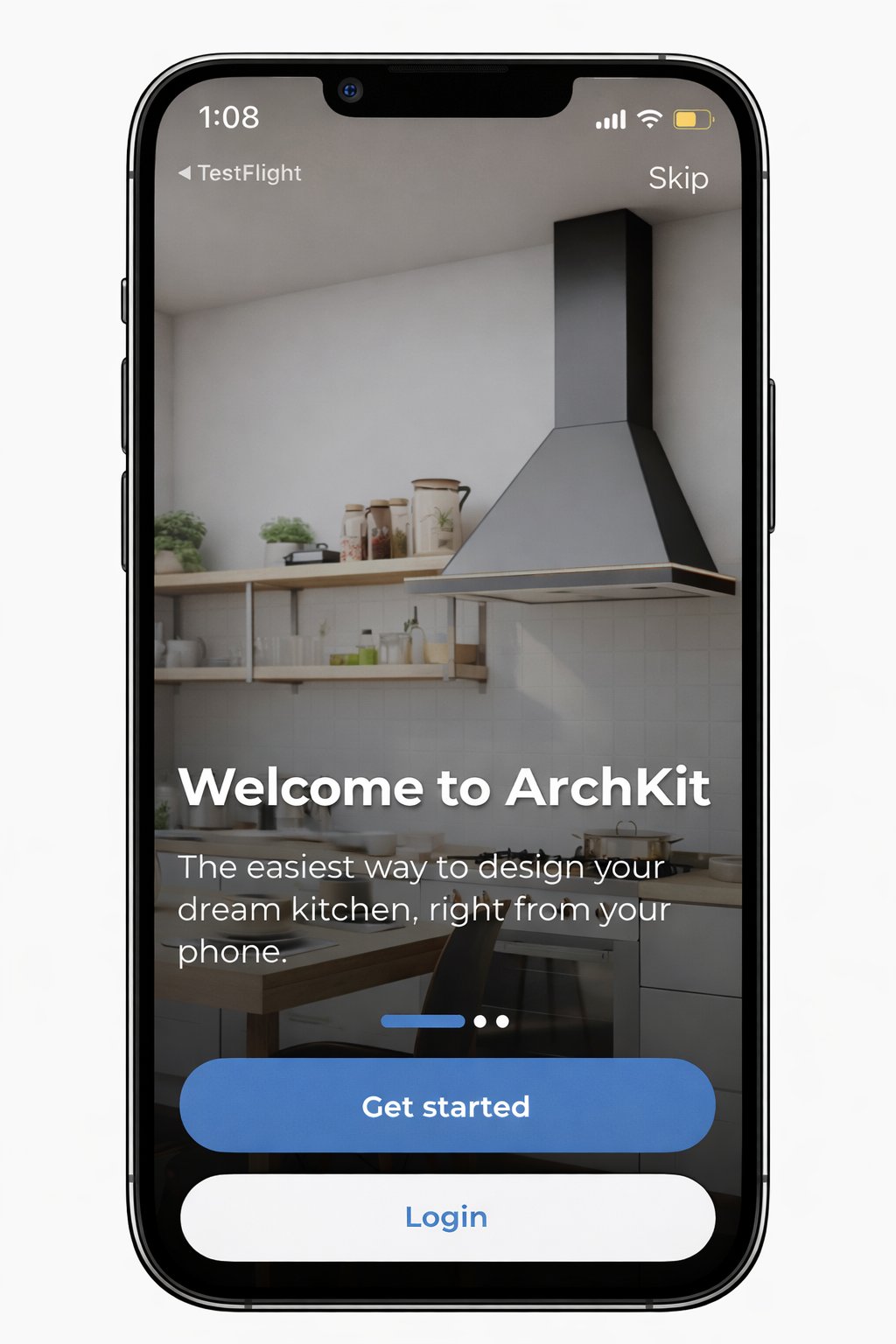
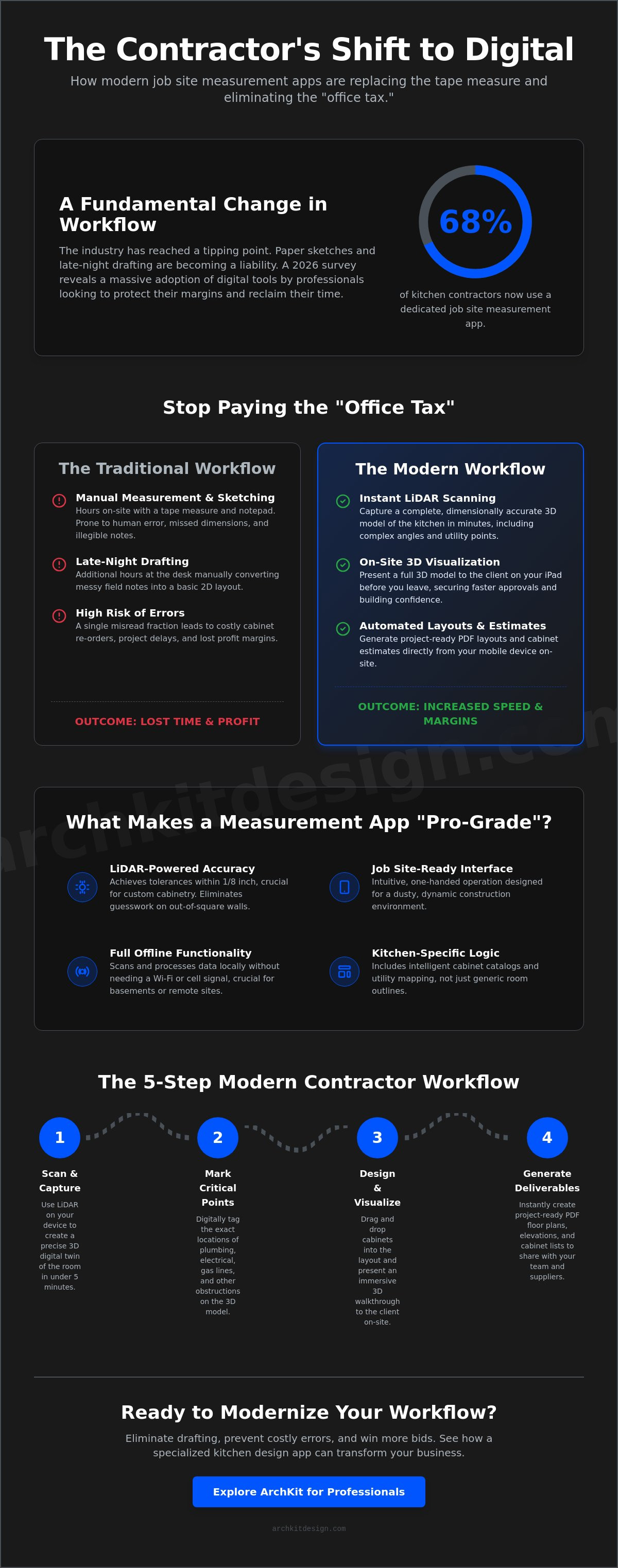
A recent 2026 survey reveals that 68% of kitchen remodeling contractors have ditched the paper sketch for a dedicated job site measurement app. This is a massive jump from just two years ago, and the reason is simple. You know the frustration of the "office tax." It is that late-night session spent turning messy field notes into a 2D layout. One missed dimension or a slight manual error often leads to a costly cabinet re-order that eats your entire profit margin. It's a high-stakes game that traditional tools just can't win anymore.
It's time to stop the administrative fatigue. You can now replace your tape measure with high-precision LiDAR and AR tools that slash measurement errors to near zero. This article explores how modern software generates precise floor plans in minutes. You'll learn how to present a full 3D model to your client before you even walk out their front door. We'll break down the best tools for the job, including industry-specific solutions like ArchKit Design, so you can win more bids and eliminate the drafting backlog. Modernize your workflow. Protect your margins. Reclaim your nights.
Key Takeaways
- Define pro-grade accuracy benchmarks to ensure every cabinet fits the first time without costly re-orders or site revisions.
- Identify the critical differences between generic floor plan scanners and a specialized job site measurement app built specifically for kitchen professionals.
- Implement a streamlined on-site workflow that captures high-precision LiDAR scans and critical utility points like plumbing and gas lines in minutes.
- Leverage mobile tools like ArchKit Design to present immersive 3D visualizations to clients during the initial walkthrough to secure faster project approvals.
- Eliminate the "office tax" of late-night drafting by generating project-ready PDF layouts and cabinet estimates directly from your mobile device.
The Evolution of Job Site Measurement: Beyond the Tape Measure
Manual measurement is no longer just an old-school habit. In the high-stakes world of 2026 kitchen remodeling, it is a professional liability. Relying on a metal tape and a pencil for a custom cabinet project is a recipe for disaster. One misread fraction or a smeared digit on a notepad leads to a six-week lead time delay and a cabinet that simply won't fit the wall. Modern contractors have moved past these risks by adopting a job site measurement app. This technology eliminates the human error inherent in manual data entry and provides a level of precision that analog tools cannot match.
The "Office Tax" is the most significant hidden cost in your business. You spend two hours on-site capturing dimensions, then another three hours at your desk manually drafting a 2D layout. That is five hours of labor before you've even started the actual design. In 2026, mobile technology bridges this gap instantly. Digital tools now transform spatial data into project-ready files the moment you finish your walkthrough. You stop being a data entry clerk and start being a builder again.
The Cost of "Close Enough" in Cabinetry
A 1/8-inch error in a custom cabinet run isn't a minor mistake. It's a total project stall. When you use a digital job site measurement app, you stop guessing about wall plumb or floor level. You capture every obstruction, from crown molding to existing plumbing, in a single pass. This precision does more than prevent re-orders. It builds immediate client trust. When a homeowner sees you using a kitchen design app for iPhone to map their space, they see a professional who values accuracy and modern efficiency.
- Eliminate forgotten dimensions that require a second site visit.
- Capture complex angles and out-of-square walls with millimetric precision.
- Generate professional survey reports to share with subcontractors instantly.
Why 2026 is the Year of the LiDAR-First Workflow
The industry has shifted from basic photogrammetry to LiDAR-first workflows. While older apps used photos to estimate distances, modern hardware utilizes actual laser measurement technology to create a perfect digital twin of the room. This isn't just a 2D sketch; it's an intelligent 3D model that understands depth and volume. For a deep dive into the hardware requirements for these tasks, see our LiDAR kitchen scanner app guide. Scanning a complex kitchen footprint now takes minutes rather than hours. You get the speed of a quick walkthrough with the accuracy of a high-end laser survey. It's fast, it's final, and it's the new standard for the trade.
Comparison Criteria: What Makes a Measurement App "Pro-Grade"?
Kitchen pros don't have time for digital toys. A pro-grade job site measurement app must meet strict criteria to survive a real renovation project. Accuracy is the first hurdle. For custom cabinetry, you need tolerances within 1/8 inch. In 2026, achieving this requires hardware with active LiDAR sensors. While a standard iPhone works for quick sketches, the iPad Pro remains the gold standard for complex kitchen footprints. The larger screen allows for more precise utility marking; meanwhile, the advanced sensor suite ensures your digital twin matches the physical reality.
Ease of use is non-negotiable. You are often balancing on a step ladder or maneuvering through a cramped pantry. If you can't operate the app with one hand on a dusty site, it's a failure. Look for interface designs that prioritize thumb-reach controls and voice-guided prompts. Offline functionality is equally critical. Many high-end kitchen remodels happen in basements or remote areas with zero cell service. Your app must process scans locally without a cloud handshake. If the software stalls because it can't find a 5G signal, it's a liability, not a tool.
Core Features vs. Niche Functionality
Generalist construction apps often boast fifty different calculators. For a kitchen contractor, forty-nine of those are noise. A specialized tool like ArchKit Design focuses on the specific logic of the kitchen. This means the measurement workflow includes intelligent cabinet catalogs and automatic floor plan generation. You don't just get a room outline. You get an interactive layout that understands standard cabinet depths and appliance clearances. Generic floor plan scanners leave you doing the math later. Specialized tools do the math while you scan.
Data Portability and Client Sharing
Speed wins bids. If you can't share your findings instantly, you're losing momentum. A professional tool supports multiple export formats, including PDF for clients and DXF for your CAD software. This portability eliminates the back-and-forth emails that plague the early design phase. You can check our pricing to see how different tiers balance feature depth with project volume. High-performance software should bridge the gap between your mobile device and your desktop drafting tools seamlessly.
Immediate sharing allows you to walk the client through a 3D model before you leave their driveway. This transparency builds confidence and shortens the approval cycle. If you want to see how these professional workflows can transform your next project, you can get early access to the latest design tools built specifically for the field.
Generalist Apps vs. Specialized Kitchen Measurement Tools
Don't fall into the "Tool for Every Trade" trap. Many contractors use a generic job site measurement app designed for framing, roofing, or general floor plans. These tools are excellent for rough-ins, but they lack the surgical precision required for cabinetry. A generic scanner might tell you a wall is ten feet long, but it won't tell you if the plumbing stack is offset or if the HVAC ducting will interfere with your upper cabinets. Generalist apps like ROCK Jobsite focus on linear measurements; meanwhile, kitchen pros need spatial intelligence that understands how a kitchen actually functions.
Specialized tools like ArchKit take a different approach. Instead of offering fifty different trade calculators, they focus on the specific obstacles of a kitchen remodel. You aren't just scanning a box. You're identifying gas lines, water inlets, and electrical outlets in 3D space. This specialized LiDAR scanning ensures your digital twin accounts for every "hidden" variable before you order a single box. When your software understands the difference between a load-bearing wall and a plumbing chase, you eliminate the surprises that usually surface during demolition.
Why Kitchen Pros Need Specialized Layout Logic
A specialized job site measurement app does more than record distances. It uses built-in logic to snap cabinets to scanned walls perfectly. This is why having a US standard cabinet sizes app integrated into your workflow is a game changer. You don't have to manually adjust for standard depths or toe-kick clearances. The software already knows the rules. Designing with real-world dimensions on-site means your initial layout is structurally sound. You stop guessing and start designing with confidence. This reduces revision cycles from weeks to minutes.
Winning the Bid on the Spot
The first visit is your best chance to close. Using AR visualization transforms a dry sales pitch into an immersive experience. When you show a client their new kitchen in 3D before you leave their home, the psychological impact is massive. They stop looking at numbers and start looking at their future home. Use a 3D kitchen visualizer for professionals to place virtual cabinets over their existing space. This immediate validation builds trust. It proves you have the technology and the expertise to handle their project. Don't wait for the office. Close the deal in the kitchen.
Maximizing On-Site Efficiency: The Modern Contractor Workflow
Efficiency in 2026 isn't about working harder; it's about working smarter with a job site measurement app. The transition from measuring a room to finalizing a design used to take days of back-and-forth office work. Now, it happens before you leave the kitchen. By following a structured digital workflow, you can move from a bare room to a signed contract in a single visit. This process removes the friction of manual drafting and keeps the project momentum high.
- Step 1: Rapid LiDAR scanning. Walk the perimeter to create a complete digital twin of the room. Capture every wall, window, and doorway in seconds.
- Step 2: Utility marking. Identify and tag plumbing stacks, gas lines, and electrical outlets. These markers ensure your cabinet layout won't clash with existing infrastructure.
- Step 3: 3D Cabinetry overlay. Drop virtual cabinets into the scan using standard U.S. sizing. Visualizing the layout in AR helps the client feel the new flow of the space.
- Step 4: Instant estimating. Generate a project cost based on the actual layout. You don't need to wait until you're back at the office to talk numbers.
- Step 5: Professional export. Send 2D floor plans and 3D models directly to your production team or cabinet manufacturer.
Scanning Tactics for Crowded Kitchens
Existing cabinetry and appliances can block your line of sight. To maintain 99% accuracy in high-detail areas, scan from multiple angles to fill in "shadows" cast by old islands or refrigerators. Open pantry doors and clear small appliances off the counters to ensure the LiDAR sensor captures the true wall surface. For a deeper look at these techniques, check our guide on LiDAR room mapping. High-precision scanning in a cluttered environment requires a steady hand and a logical path around the room.
Reducing Errors Through Digital Verification
A professional job site measurement app acts as a second set of eyes. Use the software to cross-check manual measurements in critical zones, such as the sink window or the refrigerator alcove. Most modern tools allow you to set automated alerts for non-standard wall angles or uneven floor levels. This immediate feedback allows you to adjust the design on the spot rather than discovering a problem during installation. Digital verification catches discrepancies in real-time, ensuring you leave the site with perfect data and never have to return for a forgotten measurement.
Stop wasting your evenings on manual data entry and start closing more jobs. To see how these mobile workflows can accelerate your business, you can get early access to our latest on-site design tools.
ArchKit: The Professional Choice for Kitchen Measurement and Design
ArchKit stands out as the definitive job site measurement app for the modern kitchen professional. While other tools try to serve every trade from roofing to landscaping, ArchKit focuses exclusively on the unique demands of kitchen remodeling. You aren't just capturing wall lengths. You are managing a complex ecosystem of cabinets, appliances, and utilities. By leveraging the kitchen design app for iPhone, you bring high-end CAD power directly to the job site. Your phone becomes your primary survey tool, your design engine, and your sales platform all at once.
The software provides instant access to a comprehensive catalog of standard U.S. cabinet sizes. This eliminates the need for manual dimensioning during the layout phase. You drop a 36 inch base cabinet into the 3D scan and it snaps into place. The app understands the clearances required for dishwashers and the specific heights needed for wall ovens. This integration simplifies complex estimates. You aren't just visualizing a space; you are building a data-driven project plan that your production team can actually use for the final install.
Built for Speed, Engineered for Accuracy
Precision is the foundation of every successful cabinet install. ArchKit utilizes Apple’s latest LiDAR technology to deliver sub-centimeter accuracy. This isn't a rough estimate. It is professional-grade data that you can rely on for high-end custom orders. The UI is intentionally no-nonsense. We know you are working in loud, dusty, and often cramped environments. Every button is within thumb-reach. Every menu is streamlined for maximum speed. If you want to see the core technology in action, you can start with the free kitchen design app version to test the scanning capabilities on your next walkthrough.
Transforming Your Business with Mobile Workflows
Adopting a mobile-first workflow changes how clients perceive your brand. You stop being the measurer who disappears for a week to draft plans. You become the design consultant who provides answers in real-time. This professional edge helps you scale your business. By reducing the time spent on each site survey, you can visit more leads and close more contracts without increasing your hours. You eliminate the administrative burden and replace it with billable progress. Stop the manual drafting cycle. Start your professional kitchen design journey with ArchKit today and reclaim your evenings.
Modernize Your Workflow and Win More Bids
The traditional tape measure is becoming a bottleneck in a high-demand market. You've seen how a dedicated job site measurement app can eliminate the "office tax" by turning field data into project-ready layouts instantly. By choosing specialized tools over generalist scanners, you ensure that every cabinet fits the first time. You stop being the person with the pencil and start being the expert with the solution.
ArchKit provides the exact toolkit you need for this transition. With LiDAR-powered precision, a built-in standard U.S. Cabinet Catalog, and instant 3D visualization, you can finalize designs right in the client's kitchen. This speed doesn't just save time; it builds massive trust and secures contracts before your competitors even get back to their desks. It's time to reclaim your evenings and scale your business with confidence.
Upgrade your workflow with ArchKit. Get Started Today.
Take the first step toward a more efficient and profitable job site.
Frequently Asked Questions
How accurate is a job site measurement app compared to a laser measure?
Modern LiDAR-based apps achieve sub-centimeter precision, matching the reliability of professional laser measures for standard room dimensions. While a laser measure captures a single point-to-point distance, a job site measurement app captures the entire room volume and complex angles simultaneously. This reduces the risk of missing a single critical dimension that could stall a cabinet installation later.
Do I need an iPad Pro to use a LiDAR measurement app effectively?
You don't strictly need an iPad Pro, but it remains the gold standard for high-detail kitchen surveys. Any iPhone or iPad equipped with a built-in LiDAR sensor will work effectively for scanning. The larger screen on the Pro model simply makes it easier to mark utility points and fine-tune your 3D cabinet layout while standing on a busy site.
Can I export my measurements from ArchKit into other CAD software?
Yes, ArchKit supports industry-standard exports including DXF and PDF files. This allows you to move your on-site scans directly into desktop CAD software for final production drawings. You eliminate the manual drafting phase by starting with a digital twin that is already compatible with your existing professional office tools.
Is it possible to measure a kitchen that is currently full of old cabinets?
It is entirely possible to scan a kitchen before demolition begins. To get the best results, clear the countertops and open pantry doors so the LiDAR sensor can detect the actual wall surfaces. Scan from multiple angles to "see" behind existing islands or bulky appliances, ensuring your new layout accounts for the true room dimensions.
Does the app account for wall plumbness and floor levelness?
Professional LiDAR sensors detect deviations in wall plumbness and floor levelness with high precision. A pro-grade job site measurement app will alert you to out-of-square corners or significant floor slopes. This immediate feedback allows you to plan for shimming or floor leveling requirements before the cabinets ever arrive at the site.
How does ArchKit handle non-standard or custom cabinet sizes?
ArchKit allows you to modify standard U.S. cabinet sizes to fit specific custom requirements. While the app utilizes a standard catalog for rapid layout, you can manually override dimensions for unique fillers or specialized pantry units. This flexibility ensures your layout reflects the actual custom cabinetry you intend to order and install.
Can I share my 3D kitchen layouts directly with clients through the app?
You can share immersive 3D visualizations directly through the app via a secure link or a professional PDF report. This allows clients to view the proposed kitchen on their own devices. Presenting a digital model immediately after the walkthrough builds confidence and helps you secure project approvals faster than traditional 2D sketches.
What happens to my data if I lose internet connection on the job site?
ArchKit processes scans locally on your device, so you don't need an active internet connection to measure a space. Your project data is saved to local storage and will automatically sync to the cloud once you return to a zone with Wi-Fi or cellular service. You can work in basements or remote locations without worrying about losing your progress.


